
Problem ejecting device (USB)

paparazzo79

New member
Member
Local time
10:28 AM
Messages
95
Hi guys.
On just one of my external HDD I keep on geting this error when I want to safely eject/remove the device via taskbar with right mouse click.
None of the running programs are using the device and I only have this issue with this external HDD.
How do I resolve this issue?
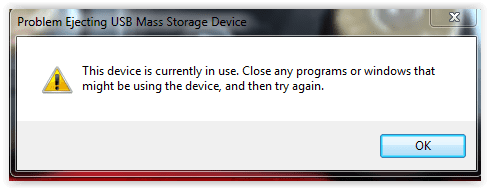
Screen Shot 11-06-21 at 05.32 PM.PNG
 

My Computer

OS
Windows 7 Ultimate 32bit
CPU
amd athlon 64 3600+ X2
Motherboard
Biostar NF520-TE
Graphics Card(s)
Ati Radeon 3650 HD
Monitor(s) Displays
Philips 227EL
If the drive is set to be indexed then windows indexing is keeping the drive open. Also maybe your antivirus scanning the drive.
Firstly there is NO reason to eject an external drive. Windows doesn't use "delayed write" on external drives. Just unplug it.
 

My Computer

Computer type
Laptop
Computer Manufacturer/Model Number
Dell Precision 15 7550 Workstation
OS
Windows 10 22H2 Pro
CPU
Intel(R) Xeon W-10885M
Motherboard
Dell
Memory
2x 32 GB DDR4 ECC memory (128 GB max)
Graphics Card(s)
Intel onboard GPU 1080p - Quadro RTX 5000 Max-Q GPU 4K
Hard Drives
500 GB Corsair T500 main M2 SSD
1 TB Intel storage M2 SSD (6 TB max)
Mouse
Logitech MX-25 Bluetooth
Internet Speed
slow
Antivirus
MS
Browser
Pale Moon 33.3.x x64 AVX2 build
If the drive is set to be indexed then windows indexing is keeping the drive open. Also maybe your antivirus scanning the drive.
Firstly there is NO reason to eject an external drive. Windows doesn't use "delayed write" on external drives. Just unplug it.
R u sure it's safe to physically remove it before ejecting the drive?
I'm not so sure it's good for future safe of the drive.
I know I damaged a lot USB pen drives this way.
 

My Computer

OS
Windows 7 Ultimate 32bit
CPU
amd athlon 64 3600+ X2
Motherboard
Biostar NF520-TE
Graphics Card(s)
Ati Radeon 3650 HD
Monitor(s) Displays
Philips 227EL
paparazzo79:
Restart your computer.
Wait for it to settle down from the restart.
Try again to remove the external HDD.
 

My Computer

Computer type
PC/Desktop
Computer Manufacturer/Model Number
Dell OptiPlex 9020
OS
Windows 7 Professional SP1 64-bit
CPU
Intel Core i7-4790 3.60 GHz
Memory
32 GB DDR3-1600 MHz
Graphics Card(s)
Integrated Intel HD Graphics 4600
Monitor(s) Displays
Viewsonic 32" LCD
Hard Drives
Kingston SATA 3 240 GB SSD
Internet Speed
Spectrum Internet 1000 Mbps
I have never lost any data or corrupted an external drive by simply unplugging it. As long as the drive indicator light isn't flashing it's not writing to the drive. I realize not all externals have a light that flashes such as the 4 4TB Seagate's I have.
 

My Computer

Computer type
Laptop
Computer Manufacturer/Model Number
Dell Precision 15 7550 Workstation
OS
Windows 10 22H2 Pro
CPU
Intel(R) Xeon W-10885M
Motherboard
Dell
Memory
2x 32 GB DDR4 ECC memory (128 GB max)
Graphics Card(s)
Intel onboard GPU 1080p - Quadro RTX 5000 Max-Q GPU 4K
Hard Drives
500 GB Corsair T500 main M2 SSD
1 TB Intel storage M2 SSD (6 TB max)
Mouse
Logitech MX-25 Bluetooth
Internet Speed
slow
Antivirus
MS
Browser
Pale Moon 33.3.x x64 AVX2 build
would be interesting to see Exactly whats on that external device,,, hmmm do you have a "back-up" program ie Macrium that is looking at it
 

My Computer

Computer type
PC/Desktop
Computer Manufacturer/Model Number
medionl/Aspire 6930G/acer x55a
OS
W7 home premium 32bit/W7HP 64bit/w10 tp insider ring
CPU
E5300 dual core
Motherboard
medion MS7366
Memory
3gb
Graphics Card(s)
Nvidia Geforce 7100 Nforce 630i
Monitor(s) Displays
avixc
Internet Speed
n (isp resticted to 72)
Antivirus
mse/pands
Browser
palemoon
Other Info
Belkin Fd7050 n USB using Railink RT2870 drivers, more upto date
Back
Top