
Whenever I try to eject my 160GB Western Digital USB External HD.
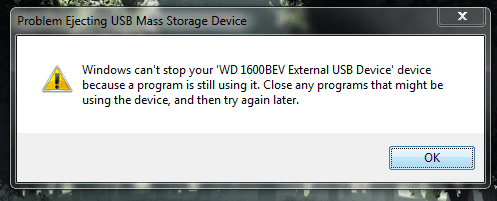
I get the following message :
see screenshot
Even after restarting my computer and trying to eject the USB drive again I still get the message. I'm reluctant to just pull the chord out because I don't want to risk losing any data.
How do I go about ejecting it safely ?
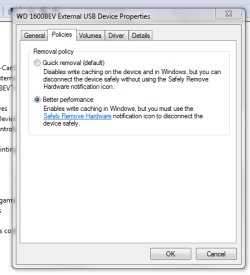
I could probably just change the setting to "optimize for quick removal" however I like performance and want all the performance I can get in order to make my drive as fast as possible.
Finally for the record I use my drive for data storage and backup.
Thanks
Any help as usual would be greatly appreciated !
I get the following message :
see screenshot
Even after restarting my computer and trying to eject the USB drive again I still get the message. I'm reluctant to just pull the chord out because I don't want to risk losing any data.
How do I go about ejecting it safely ?
I could probably just change the setting to "optimize for quick removal" however I like performance and want all the performance I can get in order to make my drive as fast as possible.
Finally for the record I use my drive for data storage and backup.
Thanks
Any help as usual would be greatly appreciated !
Attachments
My Computer
- Computer Manufacturer/Model Number
- HP Envy 17 4054ca
- OS
- Windows 7 baby ! : D
- CPU
- Intel Core i7 720QM @ 1.60GHz
- Motherboard
- Hewlett-Packard 1449 (CPU)
- Memory
- 6.0GB Dual-Channel DDR3 @ 662MHz
- Graphics Card(s)
- ATI Mobility Radeon HD 5650
- Sound Card
- IDT High Definition Audio CODEC
- Monitor(s) Displays
- Generic PnP Monitor @ 1600x900
- Screen Resolution
- 1600X900
- Hard Drives
- 78.15GB INTEL SSDSA2M080G2GC ATA Device (IDE)


