Problem formatting hard drive

psteege

New member
Member
Local time
4:23 PM
Messages
38
I recently installed Windows 7 Ultimate RC build 7100. I used a 40Gb drive I has as a spare. I decided to add another spare drive for backups and for my applications. I had a spare 80Gb
I went to Computer Management and tried to format my 80Gb hard drive.
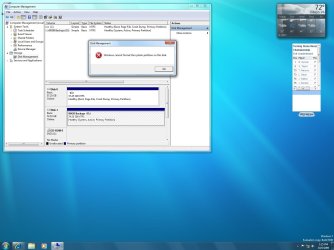
It keeps saying "Winows cannot format the system partition on this disk"


Apparently I had used this 80 GB drive in another machine as a XP boot disk. I removed all the files on it but I can't get the system info off of it.

How can I remove this partition and reformat it ?
 

Attachments
  • DiskFormat.jpg
    DiskFormat.jpg
    124.7 KB · Views: 152

My Computer

Computer Manufacturer/Model Number
DELL GX280
OS
Win 7 Ultimate RC1
CPU
Pentium 4 3.4Ghz
Motherboard
Dell
Memory
2GB
Graphics Card(s)
Onboard
Sound Card
Onboard
Monitor(s) Displays
Dell 2001FP
Hard Drives
80G
300G
500G
hey dude the system disk is the boot disk. The computer can't boot into Windows without it (it's why Windows won't let you format it).

What you'll need to do is move the boot files and boot loader to the C: partition.

You can do so using the bcdboot and bootsect command-line tools on the recovery DVD.

You'll also need to make C: drive "active" using disk management. You might as well start there.
 

My Computer

Computer Manufacturer/Model Number
Too many to list.
OS
XP, Seven, 2008R2
CPU
AMD, Intel, VIA
Motherboard
Various
Memory
Corsair, Kingston, etc.
Graphics Card(s)
ATI, NVIDIA
Monitor(s) Displays
Samsung
Hard Drives
Maxtor, Western Digital
Keyboard
qwerty
Internet Speed
22 Mb/s @ home, 1 Gb/s @ server
Other Info
All of my systems still run fastest on XP 32-bit for the most part. Win7 is fun to play with, but I still prefer XP for raw speed, security, and functionality.
sup3rsprt

Ok, I made the C drive active. I don't have a recovery DVD. I only have the eval RC1 DVD I used for the install. I will look on that DVD for those files.
I just ordered Win7 Home Premium (full legal version). Will those files be on that when it arrives ?
 

My Computer

Computer Manufacturer/Model Number
DELL GX280
OS
Win 7 Ultimate RC1
CPU
Pentium 4 3.4Ghz
Motherboard
Dell
Memory
2GB
Graphics Card(s)
Onboard
Sound Card
Onboard
Monitor(s) Displays
Dell 2001FP
Hard Drives
80G
300G
500G
Update

I found bootsect on the Eval DVD but did not find bcdboot.

Some questions.

How do I used boosect? I opened a command window and ran bootsect /help, but I don't know which command to use.

What order do I perform these command line jobs ? bcdboot first or second ??

Thanks
 

My Computer

Computer Manufacturer/Model Number
DELL GX280
OS
Win 7 Ultimate RC1
CPU
Pentium 4 3.4Ghz
Motherboard
Dell
Memory
2GB
Graphics Card(s)
Onboard
Sound Card
Onboard
Monitor(s) Displays
Dell 2001FP
Hard Drives
80G
300G
500G
yes I think those tools are on the eval DVD. Did you boot from DVD and go into command prompt? (Shift + F10) then type bootsect

maybe it will just be easier if you

1) shutdown
2) disconnect the D: drive
3) power on. go into the BIOS and change boot order to the other drive first,
4) boot from the Eval DVD
5) run startup repair a few times (you'll probably need to reboot 2 or three times and keep going back into the DVD and run startup repair until everything is fixed)

Try it, if it doesn't work you can always put things back the way it was and come back for more help.
 

My Computer

Computer Manufacturer/Model Number
Too many to list.
OS
XP, Seven, 2008R2
CPU
AMD, Intel, VIA
Motherboard
Various
Memory
Corsair, Kingston, etc.
Graphics Card(s)
ATI, NVIDIA
Monitor(s) Displays
Samsung
Hard Drives
Maxtor, Western Digital
Keyboard
qwerty
Internet Speed
22 Mb/s @ home, 1 Gb/s @ server
Other Info
All of my systems still run fastest on XP 32-bit for the most part. Win7 is fun to play with, but I still prefer XP for raw speed, security, and functionality.
Update 2

I found bcdboot.
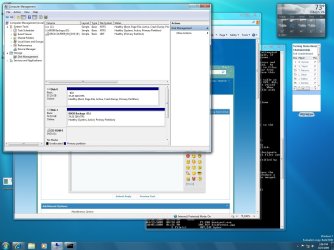
As you can see, now the C drive has the Boot files and I just need to move the System.
I don't know the command line entries to make to cause it to move the files. The /help information is confusing for me. As you can guess, I am a noob at using Windows CLI.
 

Attachments

  • DiskFormat.jpg
    DiskFormat.jpg
    174.4 KB · Views: 324

My Computer

Computer Manufacturer/Model Number
DELL GX280
OS
Win 7 Ultimate RC1
CPU
Pentium 4 3.4Ghz
Motherboard
Dell
Memory
2GB
Graphics Card(s)
Onboard
Sound Card
Onboard
Monitor(s) Displays
Dell 2001FP
Hard Drives
80G
300G
500G
As you can see, now the C drive has the Boot files and I just need to move the System.

well...that's a trick. "boot" in your picture does not mean boot. actually "system" means boot. confusing yes? but it's the truth.

don't worry about the command-line for now, try those steps I gave above
 

My Computer

Computer Manufacturer/Model Number
Too many to list.
OS
XP, Seven, 2008R2
CPU
AMD, Intel, VIA
Motherboard
Various
Memory
Corsair, Kingston, etc.
Graphics Card(s)
ATI, NVIDIA
Monitor(s) Displays
Samsung
Hard Drives
Maxtor, Western Digital
Keyboard
qwerty
Internet Speed
22 Mb/s @ home, 1 Gb/s @ server
Other Info
All of my systems still run fastest on XP 32-bit for the most part. Win7 is fun to play with, but I still prefer XP for raw speed, security, and functionality.
I did all the steps you recommended.
I disconnected the D drive and ran the repair.
The repair did find some problems, rebooted a few times and the repaired them.
The last boot repair did not find any problems.
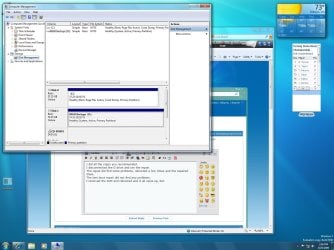
I removed the DVD and rebooted and it all came up, but the Management screen has not changed and I still cannot format the drive.

See attached picture:
 

Attachments

  • DiskStatus.jpg
    DiskStatus.jpg
    182.4 KB · Views: 93

My Computer

Computer Manufacturer/Model Number
DELL GX280
OS
Win 7 Ultimate RC1
CPU
Pentium 4 3.4Ghz
Motherboard
Dell
Memory
2GB
Graphics Card(s)
Onboard
Sound Card
Onboard
Monitor(s) Displays
Dell 2001FP
Hard Drives
80G
300G
500G
Your system is still booting from the D: drive. You need to go into the BIOS and make the drive with the C: partition the first boot device. The computer must be able to boot from that hard drive with the other one completely disconnected.
 

My Computer

Computer Manufacturer/Model Number
Too many to list.
OS
XP, Seven, 2008R2
CPU
AMD, Intel, VIA
Motherboard
Various
Memory
Corsair, Kingston, etc.
Graphics Card(s)
ATI, NVIDIA
Monitor(s) Displays
Samsung
Hard Drives
Maxtor, Western Digital
Keyboard
qwerty
Internet Speed
22 Mb/s @ home, 1 Gb/s @ server
Other Info
All of my systems still run fastest on XP 32-bit for the most part. Win7 is fun to play with, but I still prefer XP for raw speed, security, and functionality.
I had the D drive disconnected when doing the repairs. All the fixes Windows made could only have been done on the C drive.

I checked the BIOS and it is set up to boot from the CD first and then the C drive.
 

My Computer

Computer Manufacturer/Model Number
DELL GX280
OS
Win 7 Ultimate RC1
CPU
Pentium 4 3.4Ghz
Motherboard
Dell
Memory
2GB
Graphics Card(s)
Onboard
Sound Card
Onboard
Monitor(s) Displays
Dell 2001FP
Hard Drives
80G
300G
500G
In that case you should be able to shut down the computer, unplug the D: drive, power back on and boot into Windows. Can you do it? (as a test)
 

My Computer

Computer Manufacturer/Model Number
Too many to list.
OS
XP, Seven, 2008R2
CPU
AMD, Intel, VIA
Motherboard
Various
Memory
Corsair, Kingston, etc.
Graphics Card(s)
ATI, NVIDIA
Monitor(s) Displays
Samsung
Hard Drives
Maxtor, Western Digital
Keyboard
qwerty
Internet Speed
22 Mb/s @ home, 1 Gb/s @ server
Other Info
All of my systems still run fastest on XP 32-bit for the most part. Win7 is fun to play with, but I still prefer XP for raw speed, security, and functionality.
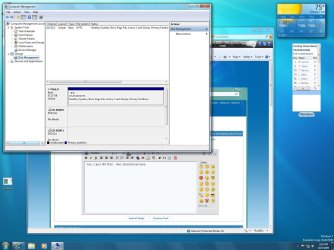
Yes, I just did that. See attached picture.
 

Attachments

  • DiskStatus.jpg
    DiskStatus.jpg
    165.7 KB · Views: 21

My Computer

Computer Manufacturer/Model Number
DELL GX280
OS
Win 7 Ultimate RC1
CPU
Pentium 4 3.4Ghz
Motherboard
Dell
Memory
2GB
Graphics Card(s)
Onboard
Sound Card
Onboard
Monitor(s) Displays
Dell 2001FP
Hard Drives
80G
300G
500G
Got to go to the store now. I will check back later for your answer.

Thanks for all the help you have given me. I really appreciate you taking the time.

Regards
 

My Computer

Computer Manufacturer/Model Number
DELL GX280
OS
Win 7 Ultimate RC1
CPU
Pentium 4 3.4Ghz
Motherboard
Dell
Memory
2GB
Graphics Card(s)
Onboard
Sound Card
Onboard
Monitor(s) Displays
Dell 2001FP
Hard Drives
80G
300G
500G
Alright, good job. We are almost home.

See, now your C: drive says "System", "Boot", and "Active", which is everything we were striving for.

Now shut down and reconnect the other hard drive. Power on, go into the BIOS and make sure the correct disk (the one with the C: drive) is set as the first boot device (or just after the DVD is fine too).

Then the system will boot from the C: drive and you can format your other hard disk.
 

My Computer

Computer Manufacturer/Model Number
Too many to list.
OS
XP, Seven, 2008R2
CPU
AMD, Intel, VIA
Motherboard
Various
Memory
Corsair, Kingston, etc.
Graphics Card(s)
ATI, NVIDIA
Monitor(s) Displays
Samsung
Hard Drives
Maxtor, Western Digital
Keyboard
qwerty
Internet Speed
22 Mb/s @ home, 1 Gb/s @ server
Other Info
All of my systems still run fastest on XP 32-bit for the most part. Win7 is fun to play with, but I still prefer XP for raw speed, security, and functionality.
This is strange.
I went to BIOS and verified the boot sequence is:
1. CDROM
2. C Drive

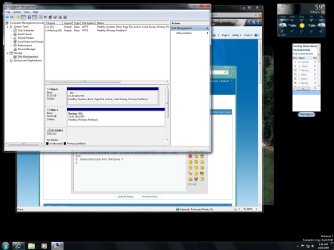
But when I reboot, the "System" goes back onto the D drive as shown on the attached picture.
You saw my last picture, and I did too. C: drive said "System", "Boot", and "Active". Now the "System" is back on the D: drive ??
Why is it jumping drives ?
 

Attachments

  • DiskStatus.jpg
    DiskStatus.jpg
    137.4 KB · Views: 8

My Computer

Computer Manufacturer/Model Number
DELL GX280
OS
Win 7 Ultimate RC1
CPU
Pentium 4 3.4Ghz
Motherboard
Dell
Memory
2GB
Graphics Card(s)
Onboard
Sound Card
Onboard
Monitor(s) Displays
Dell 2001FP
Hard Drives
80G
300G
500G
I went to BIOS and verified the boot sequence is:
1. CDROM
2. C Drive

Can you be a little more specific? I've never seen where you can select a partition letter in the BIOS.

Can you go into the D: drive and rename the hidden boot folder to boot_bak?

If you really are selecting the correct drive then your BIOS is ignoring it. Perhaps it is booting from the drive in the first ATA slot. You can try switching the cables around. Or you can boot from the Windows 7 DVD and delete the boot files off of the "backup" partition using the command-line.
 

My Computer

Computer Manufacturer/Model Number
Too many to list.
OS
XP, Seven, 2008R2
CPU
AMD, Intel, VIA
Motherboard
Various
Memory
Corsair, Kingston, etc.
Graphics Card(s)
ATI, NVIDIA
Monitor(s) Displays
Samsung
Hard Drives
Maxtor, Western Digital
Keyboard
qwerty
Internet Speed
22 Mb/s @ home, 1 Gb/s @ server
Other Info
All of my systems still run fastest on XP 32-bit for the most part. Win7 is fun to play with, but I still prefer XP for raw speed, security, and functionality.
I have a Dell Dimension 4600i PC and the BIOS does say C drive.
The C drive is on the IDE slot and the D drive is a SATA drive, so I can't switch around the cables.

I opened a command windows and did a cd to D: but I did not find any files. My CLI skills are pretty weak.

I don't know what you mean by deleting files off the backup partition.
 

My Computer

Computer Manufacturer/Model Number
DELL GX280
OS
Win 7 Ultimate RC1
CPU
Pentium 4 3.4Ghz
Motherboard
Dell
Memory
2GB
Graphics Card(s)
Onboard
Sound Card
Onboard
Monitor(s) Displays
Dell 2001FP
Hard Drives
80G
300G
500G
Update

I located the files on D: I used "dir /a" and saw all the files.
This is what is locate there:

Volume in drive D is 80GB Backups
Volume Serial Number is B469-A5C7
Directory of D:\
10/05/2009 09:55 AM <DIR> $RECYCLE.BIN
10/03/2009 09:26 PM <DIR> Boot
10/03/2009 09:26 PM 354 boot.ini
04/22/2009 01:28 AM 383,200 bootmgr
10/03/2009 09:26 PM 8,192 BOOTSECT.BAK
08/04/2004 08:00 AM 47,564 NTDETECT.COM
05/28/2009 12:36 PM 250,048 ntldr
10/03/2009 03:00 PM <DIR> RECYCLER
12/13/2008 04:01 PM <DIR> System Volume Information
6 File(s) 689,358 bytes
4 Dir(s) 76,917,702,656 bytes free

I do not know how to rename a folder
 

My Computer

Computer Manufacturer/Model Number
DELL GX280
OS
Win 7 Ultimate RC1
CPU
Pentium 4 3.4Ghz
Motherboard
Dell
Memory
2GB
Graphics Card(s)
Onboard
Sound Card
Onboard
Monitor(s) Displays
Dell 2001FP
Hard Drives
80G
300G
500G
Final Solution

I fixed it so I only boot from C:

1. Booted with my Linux System Rescue CD.
2. Used Linux command "fdisk" to remove all partitions and create a new one.
3. Rebooted back into Windows 7.
4. Used Disk Management to format D: drive

Thanks for all your help, but I am more familiar with Linux so I used it. I did learn a lot about Windows from you and I thank you for taking the time to help me.
 

Attachments

  • DiskStatus.jpg
    DiskStatus.jpg
    151.3 KB · Views: 19

My Computer

Computer Manufacturer/Model Number
DELL GX280
OS
Win 7 Ultimate RC1
CPU
Pentium 4 3.4Ghz
Motherboard
Dell
Memory
2GB
Graphics Card(s)
Onboard
Sound Card
Onboard
Monitor(s) Displays
Dell 2001FP
Hard Drives
80G
300G
500G
Good idea using Linux to fix that. Nice work, I'm glad you got everything sorted out :)
 

My Computer

Computer Manufacturer/Model Number
Too many to list.
OS
XP, Seven, 2008R2
CPU
AMD, Intel, VIA
Motherboard
Various
Memory
Corsair, Kingston, etc.
Graphics Card(s)
ATI, NVIDIA
Monitor(s) Displays
Samsung
Hard Drives
Maxtor, Western Digital
Keyboard
qwerty
Internet Speed
22 Mb/s @ home, 1 Gb/s @ server
Other Info
All of my systems still run fastest on XP 32-bit for the most part. Win7 is fun to play with, but I still prefer XP for raw speed, security, and functionality.
Back
Top