Solved Problem in Boot

rsn7

New member
Local time
9:58 AM
Messages
24
I installed windows 7 ultimate from bootable pen drive in drive E: while a windows home basic was already installed in drive C: of my Sony VAIO VPCEH15En :) Then I formatted drive C: and everything went well except one - When I boot my lap, there are two windows 7 OS options showing up on screen. The first one works but the second one says to install a windows disc and repair. I tried that but it was of no use :( Today I booted my pc from windows installation disc instead of bootable pen drive and in the custom (advanced) screen while installing windows, I formatted both C: and E: and then installed windows :) Again I installed windows in C: :) Now also everything is fine except that I'm seeing the same message again :cry: I even used EaseUS partition manager to merge E: into C: and then rebooted my pc. And still I'm getting the same message while startup :mad::cry: Can anyone please help me to remove the windows 7 boot OS option that is not actually available at all :)
 

My Computer

OS
Windows 7 Ultimate

My Computer

Computer type
Laptop
Computer Manufacturer/Model Number
ACER ASPIRE 5742G
OS
Microsoft Windows 7 Home Premium 64-bits 7601 Multiprocessor Free Service Pack 1
CPU
Intel(R) Core(TM) i3 CPU M 370 @ 2.40GHz
Motherboard
Acer Aspire 5742G
Memory
4,00 GB
Graphics Card(s)
ATI Mobility Radeon HD 5400 Series
Sound Card
(1) AMD High Definition Audio Device (2) Realtek High Defi
Screen Resolution
1366 x 768 x 32 bits (4294967296 colors) @ 60 Hz
Hard Drives
WDC WD5000BEVT-22ZAT0
@Kaktussoft:

Thank you so much for your help:) But can you please explain me your post? I'm not so good with computers :) I dont understand your post :(
 

My Computer

OS
Windows 7 Ultimate
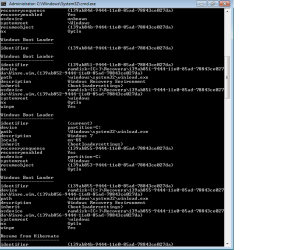
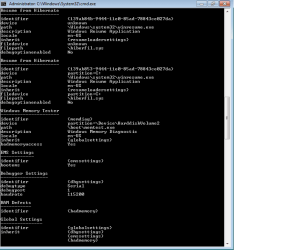
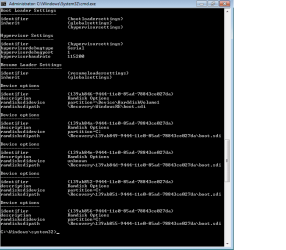
Here is the output of cmd in 4 pictures one by one :)
 

Attachments

  • 1.png
    1.png
    16.2 KB · Views: 12
  • 2.png
    2.png
    15.9 KB · Views: 4
  • 3.png
    3.png
    12.9 KB · Views: 5
  • 4.png
    4.png
    13.9 KB · Views: 4

My Computer

OS
Windows 7 Ultimate
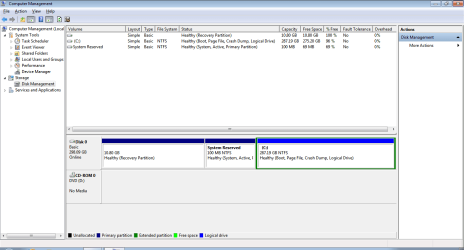
And, this is the screenshot of disk management :)
 

Attachments

  • 5.png
    5.png
    24.6 KB · Views: 10

My Computer

OS
Windows 7 Ultimate
Hope this is what you asked for :) Please help me little soon Kaktussoft :) Thanks in advance :)
 

My Computer

OS
Windows 7 Ultimate
@ x BlueRobot:

Thank you so much for your post :) I'm working on it :) I'll let you know if my problem is solved asap :)
 

My Computer

OS
Windows 7 Ultimate
@ x BlueRobot:

Thank you so much Harry :)
The second tutorial you sent worked like charm :)
Thank you soooooooooooo much :) :) :) :)
 

My Computer

OS
Windows 7 Ultimate
Here is the output of cmd in 4 pictures one by one :)
useless windows recovery:
139ab851-9444-11e0-85ad-78843ce027da
139ab845-9444-11e0-85ad-78843ce027da
139ab849-9444-11e0-85ad-78843ce027da
2nd menu option 139ab84c-9444-11e0-85ad-78843cc027da
useless "resume from hibernate" 139ab84b-9444-11e0-85ad-78843ce027da

useless "ramdisk options"
139ab846-9444-11e0-85ad-78843ce027da
139ab84a-9444-11e0-85ad-78843ce027da
139ab84e-9444-11e0-85ad-78843ce027da
139ab852-9444-11e0-85ad-78843ce027da
So do:
Code:
bcdedit/delete {139ab851-9444-11e0-85ad-78843ce027da}
bcdedit/delete {139ab845-9444-11e0-85ad-78843ce027da}
bcdedit/delete {139ab849-9444-11e0-85ad-78843ce027da}
bcdedit/delete {139ab84c-9444-11e0-85ad-78843cc027da}
bcdedit/delete {139ab84b-9444-11e0-85ad-78843ce027da}
bcdedit/delete {139ab846-9444-11e0-85ad-78843ce027da}
bcdedit/delete {139ab84a-9444-11e0-85ad-78843ce027da}
bcdedit/delete {139ab84e-9444-11e0-85ad-78843ce027da}
bcdedit/delete {139ab852-9444-11e0-85ad-78843ce027da}

All commands are succesfully?
Code:
bcdedit/enum all
and post again
 

My Computer

Computer type
Laptop
Computer Manufacturer/Model Number
ACER ASPIRE 5742G
OS
Microsoft Windows 7 Home Premium 64-bits 7601 Multiprocessor Free Service Pack 1
CPU
Intel(R) Core(TM) i3 CPU M 370 @ 2.40GHz
Motherboard
Acer Aspire 5742G
Memory
4,00 GB
Graphics Card(s)
ATI Mobility Radeon HD 5400 Series
Sound Card
(1) AMD High Definition Audio Device (2) Realtek High Defi
Screen Resolution
1366 x 768 x 32 bits (4294967296 colors) @ 60 Hz
Hard Drives
WDC WD5000BEVT-22ZAT0
@Kaktussoft:

Thank you so much for your help:) But can you please explain me your post? I'm not so good with computers :) I dont understand your post :(
I just want to know what is in your bootmenu and all (hidden) recovery items and hibernate items. It's all in the bcdedit/enum all output.

I just gave you commands to delete the 2nd (at least not the current) bootmenu option. And all unused stuff that's there as a left over from other win7 OS installation and reinstalls.
 

My Computer

Computer type
Laptop
Computer Manufacturer/Model Number
ACER ASPIRE 5742G
OS
Microsoft Windows 7 Home Premium 64-bits 7601 Multiprocessor Free Service Pack 1
CPU
Intel(R) Core(TM) i3 CPU M 370 @ 2.40GHz
Motherboard
Acer Aspire 5742G
Memory
4,00 GB
Graphics Card(s)
ATI Mobility Radeon HD 5400 Series
Sound Card
(1) AMD High Definition Audio Device (2) Realtek High Defi
Screen Resolution
1366 x 768 x 32 bits (4294967296 colors) @ 60 Hz
Hard Drives
WDC WD5000BEVT-22ZAT0

My Computer

Computer type
Laptop
Computer Manufacturer/Model Number
ACER ASPIRE 5742G
OS
Microsoft Windows 7 Home Premium 64-bits 7601 Multiprocessor Free Service Pack 1
CPU
Intel(R) Core(TM) i3 CPU M 370 @ 2.40GHz
Motherboard
Acer Aspire 5742G
Memory
4,00 GB
Graphics Card(s)
ATI Mobility Radeon HD 5400 Series
Sound Card
(1) AMD High Definition Audio Device (2) Realtek High Defi
Screen Resolution
1366 x 768 x 32 bits (4294967296 colors) @ 60 Hz
Hard Drives
WDC WD5000BEVT-22ZAT0
So you deleted the bootmenu entry using tutorial.... nice. But also delete all other unused stuff using bcdedit command to make it cleaner. Post results. Also make win7 partition PRIMARY (don't mark it active yet!) instead of LOGICAL to make it easier to troubleshoot in case "system reserved" gets corrupt.

Using EaseUS Partition Master - How to convert logical partition to primary partition with EaseUS partition manager? - EaseUS Partition Master Manual

Yeah I forgot to add that within the post :o
 

My Computer

Computer type
Laptop
Back
Top