problem in changing the view?

maifs

maifs
Member
VIP
Local time
6:59 AM
Messages
133
Location
Lahore
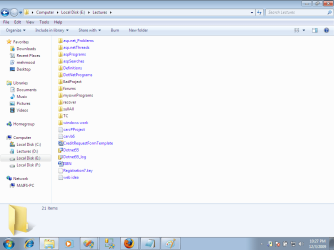
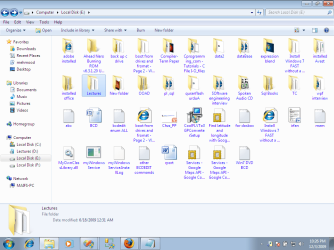
i have to change the view every times when i am seeing the files in one of my drive or folder.
i want that one view would be same for all drives or all folders or sub folders.
as you can see the attachments here...

i want to set the medium icon view to all.
 

Attachments
  • 1.png
    1.png
    62.1 KB · Views: 37
  • 2.png
    2.png
    33.7 KB · Views: 25

My Computer

Computer Manufacturer/Model Number
Gericom/755CI
OS
windows7
CPU
mobile AMD Athlon(tm) XP-M 2600+, 1514 Mhz, 1 Core(s), 1 Log
Motherboard
Gericom 755CI 1.0,BIOS: American Megatrends Inc. 1.04G 07/09
Memory
768 MB
Monitor(s) Displays
15 inches TFT(XGA 1024x786)
Screen Resolution
1024x786
Hard Drives
40GB
Keyboard
compaq
Mouse
IBM
Internet Speed
512KB
i have to change the view every times when i am seeing the files in one of my drive or folder.
i want that one view would be same for all drives or all folders or sub folders.
as you can see the attachments here...

i want to set the medium icon view to all.


Try this:
  1. Close all currently open Explorer windows
  2. Launch Explorer (<WINDOWS_KEY>+<E>)
  3. Open the folder for which you want to customize the view
  4. Set the view as you would want it
  5. Click "Organize" in the top left of the Explorer window, then select "Folder and search options"
  6. Click the "View" tab
  7. Click the "Apply to folders" button
  8. Click "OK"
That should do the trick.
One other question: Is there any particular reason why you've enabled compression of the drive show in the screenshots you included?
 
Last edited:

My Computer

Computer type
PC/Desktop
Computer Manufacturer/Model Number
Virtual Machine
OS
Windows 7 Professional 32-bit SP1
CPU
AMD A4/A6
Motherboard
Intel Corporation 440BX Desktop Reference Platform
Memory
3.00GB EDO
Graphics Card(s)
VMware SVGA 3D
Sound Card
High Definition Audio Device
Monitor(s) Displays
Generic Non-PnP Monitor on VMware SVGA 3D
Screen Resolution
1440x900
Hard Drives
1 x 60GB VMware Virtual SATA Hard Drive ATA Device
Antivirus
Kaspersky Total Security
Some special Folders (Documents,. Pictures, Videos,. Contacts,. default to their own setting,..

Got general folder go to Control Pane > Folder Options. In Windows Explorer choose the way you want the displayed,. then in the View tab, select apply to all folders.
 

My Computer

Computer Manufacturer/Model Number
Cheap $399.00 E-Machine
OS
Windows 7 Pro & Vista Home Premium
CPU
Athlon 64 3800+ (Orleans) 2.40GHz
Motherboard
Winfast
Memory
2GB DDR2 RAM DIMM
Graphics Card(s)
NVIDIA GeForce 8500 GT 512 MB memory HDMI out
Sound Card
creative X-Fi Exteme 7..1 channel
Monitor(s) Displays
Acer V223W 22" widescreen DVI
Screen Resolution
1680x1050
Hard Drives
WDC WD5 500GB
WDC WD25 250GB
PSU
OCZ 550 watt
Case
Gateway
Cooling
2 fans
Keyboard
Dell
Mouse
Sony Vaio
Internet Speed
18MB/s down - .72MB /s up
thanks to all dear.
 

My Computer

Computer Manufacturer/Model Number
Gericom/755CI
OS
windows7
CPU
mobile AMD Athlon(tm) XP-M 2600+, 1514 Mhz, 1 Core(s), 1 Log
Motherboard
Gericom 755CI 1.0,BIOS: American Megatrends Inc. 1.04G 07/09
Memory
768 MB
Monitor(s) Displays
15 inches TFT(XGA 1024x786)
Screen Resolution
1024x786
Hard Drives
40GB
Keyboard
compaq
Mouse
IBM
Internet Speed
512KB
Hi,

How to apply specific view but only for selected folders? For example:

c:/Folder 1/Folder 2/Videos

I'd like to apply "large icons" only for "Videos" folder. Folder 1 and 2 should stay as ex. "list".

Is it possible?

My Win7 do something weird. About a week ago it was showing rendom views for different folders. Ex. Videos folder was shown as large icon, others as a list. It was fine for me. Now it's showing only a "list" and I didn't change anything. Don't know what happened here.
 

My Computer

OS
Windows 7
First export the registry branch HKEY_CURRENT_USER\Software\Microsoft\Windows

Windows has placed a Limit on the number of folder views can be displayed .I think I have a registr y hack,

Windows Registry Editor Version 5.00

[-HKEY_CURRENT_USER\Software\Microsoft\Windows\ShellNoRoam\BagMRU]

[-HKEY_CURRENT_USER\Software\Microsoft\Windows\ShellNoRoam\Bags]

[HKEY_CURRENT_USER\Software\Microsoft\Windows\Shell]
"BagMRU Size"=dword:00001f40

[HKEY_CURRENT_USER\Software\Microsoft\Windows\ShellNoRoam]
"BagMRU Size"=dword:00001f40
[HKEY_CURRENT_USER\Software\Microsoft\Windows\CurrentVersion\Policies\Explorer]
"NoSaveSettings"=dword:00000000

Save the quoted lines in Notpad ans save as 88limit,reg. You have to choose All Files from the drop down menu to and chooseAll Files and make sure you save it in ANSIi firmat,

Then Duouble-click on the file to merge it into the regustry,
 

My Computer

Computer Manufacturer/Model Number
Cheap $399.00 E-Machine
OS
Windows 7 Pro & Vista Home Premium
CPU
Athlon 64 3800+ (Orleans) 2.40GHz
Motherboard
Winfast
Memory
2GB DDR2 RAM DIMM
Graphics Card(s)
NVIDIA GeForce 8500 GT 512 MB memory HDMI out
Sound Card
creative X-Fi Exteme 7..1 channel
Monitor(s) Displays
Acer V223W 22" widescreen DVI
Screen Resolution
1680x1050
Hard Drives
WDC WD5 500GB
WDC WD25 250GB
PSU
OCZ 550 watt
Case
Gateway
Cooling
2 fans
Keyboard
Dell
Mouse
Sony Vaio
Internet Speed
18MB/s down - .72MB /s up
Back
Top