Problem in Downloading!

DaYiM

New member
Member
VIP
Local time
5:32 AM
Messages
130
Hello,

i 'am having odd problem, which is:-
almost every time i download from file Sharing Site
( FileApe, FileSonic, FileServe: which i'am Premuim User )
When the download completely FINISH ( 100% ), it's just
got stucked & it never finishes, & when i try to pause it &
resume it got canceled. i tried all these programs to download:
FireFox, Chrome, Internet Explorer, JDownloade, FreeDownloadManager.
what made me put this thread because now even on "Windows Update"​

program every time it try to download the new Internet Explorer it got stucked!


My Computer

Computer Manufacturer/Model Number
Qosmio X300-13O
OS
Windows 7, 64Bit
CPU
Intel Mobile Core 2 Duo T9600 @ 2.80GHz
Motherboard
TOSHIBA KSRAA (U2E1)
Memory
8.0GB Dual-Channel DDR3 @ 531MHz
Graphics Card(s)
1024MB GeForce 9800M GTX (Toshiba)
Sound Card
Realtek High Definition Audio
Monitor(s) Displays
Generic PnP Monitor on NVIDIA GeForce 9800M GTX
Screen Resolution
Generic PnP Monitor @ 1440x900
Hard Drives
125GB KINGSTON SV100S2128G ATA Device (SATA)
488GB Seagate ST95005620AS ATA Device (SATA)
I'll suggest you download and install Malwarebytes and to run a full scan of your pc. Second,do you have the latest version of the browsers? Also I know when I was using Norton,after downloading a bigger file,I should wait for a 5-6 seconds to scan the file that I'm downloading. It could depend also on your internet connection,if you have slow internet connection. And the last thing try to start Mozilla Firefox in Safe Mode,and try to download that file from there,maybe some ad-don is causing that.
StalkeR.
 

My Computer

Computer type
PC/Desktop
Computer Manufacturer/Model Number
Custom Build
OS
Windows 10 Pro x64
CPU
Intel Core i5 4440 @Stock
Motherboard
Gigabyte Z97 D3H
Memory
4 x 4GB HyperX Fury DDR3
Graphics Card(s)
Gigabyte GTX 1050Ti O4G
Sound Card
Integrated
Monitor(s) Displays
Dell P2417H
Screen Resolution
1920 x 1080
Hard Drives
Samsung EVO 850 120GB / Toshiba DT01ACA050 1TB 7200prm 32MB
PSU
Riotoro Onyx 750W
Case
NZXT H500 Black-Red
Cooling
Stock CPU + NZXT 120mm + 2x120mm red fans
Keyboard
Modecom Volcano Lanparty
Mouse
Asus ROG Gladius / DeepCool E-Pad Plus
Internet Speed
DOCSIS 50/3 Mbit
Browser
Google Chrome
Other Info
Asus K55VJ(i5 3210M, GT635M / 2GB, 8GB DDR3, 500GB HDD)
i did every thing, nothing fixed it.
& by the way i don't have any anti-virus.
PS: just now this happened while i'am
downloading FireFox from it's own site!

but the thing is that i noticed that there
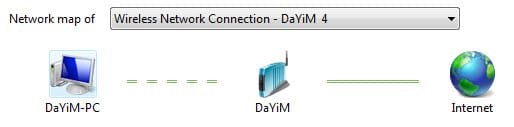
is problem with my connection:-
See the difference between the basic view
& the full map view! how to fix this?
 

Attachments

  • 30-04-2011 11-04-51 Ù….jpg
    30-04-2011 11-04-51 Ù….jpg
    7.6 KB · Views: 5
  • 30-04-2011 11-05-10 Ù….jpg
    30-04-2011 11-05-10 Ù….jpg
    7.2 KB · Views: 5
Last edited:

My Computer

Computer Manufacturer/Model Number
Qosmio X300-13O
OS
Windows 7, 64Bit
CPU
Intel Mobile Core 2 Duo T9600 @ 2.80GHz
Motherboard
TOSHIBA KSRAA (U2E1)
Memory
8.0GB Dual-Channel DDR3 @ 531MHz
Graphics Card(s)
1024MB GeForce 9800M GTX (Toshiba)
Sound Card
Realtek High Definition Audio
Monitor(s) Displays
Generic PnP Monitor on NVIDIA GeForce 9800M GTX
Screen Resolution
Generic PnP Monitor @ 1440x900
Hard Drives
125GB KINGSTON SV100S2128G ATA Device (SATA)
488GB Seagate ST95005620AS ATA Device (SATA)

Back
Top