Problem in HDD partition

TheDevilsKnight

New member
Local time
9:50 PM
Messages
15
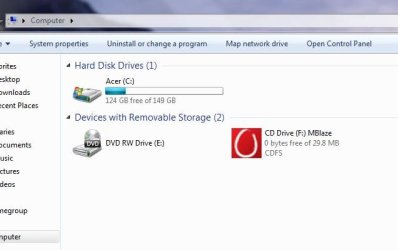
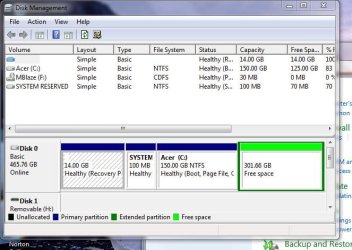
Hello, i have a 500GB HDD in my laptop, i had only C drive so i decided to create one more partition for the documents only, but its kinda not what i wanted, i reserved 150GB for the c drive but somehow its pretty weird and now i cant fix it the C drive shows 149GB in my computer, any way to fix that? i tried all on my part, i even deleted the new partition, im attaching the screenshots below.

Would really appreciate some quick help since im thinking about re installing the windows after the partition for more stability.
 

Attachments
  • Capture.JPG
    Capture.JPG
    58.3 KB · Views: 26
  • 2.JPG
    2.JPG
    29.5 KB · Views: 18

My Computer

Computer Manufacturer/Model Number
Acer Aspire 5742G
OS
Windows 7 x64 home Premium Version 6.1.7601 Service Pack 1 Build 7601
CPU
Intel(R) Core(TM) i5 CPU M 480 @ 2.67GHz
Memory
4GB RAM DDR3
Graphics Card(s)
1GB NVIDIA GeForce GT 540M
Sound Card
Realtek
Monitor(s) Displays
15.6'' HD LED LCD
Screen Resolution
1366x768
Internet Speed
Broadband
Hello, i have a 500GB HDD in my laptop, i had only C drive so i decided to create one more partition for the documents only, but its kinda not what i wanted, i reserved 150GB for the c drive but somehow its pretty weird and now i cant fix it the C drive shows 149GB in my computer, any way to fix that? i tried all on my part, i even deleted the new partition, im attaching the screenshots below.
I don't see the problem. You apparently shrunk the C-partition down to 150GB, and now you have 301GB of "free space" sitting there waiting for you to create a new partition (say, D) in that space.

You're half way there. You just now need to create a new partition in that 301GB free space, and you've achieved your goal.

The second screenshot that shows 150G for C is correct. That's all the partitions you currently have allocated, and 150GB is its size.

Once you create a partition in that other 301GB unallocated space and give it a letter, you'll see it.


P.S. - just one comment. When taking a screenshot from DISKMGMT, it's most helpful to us if you will first maximize the window and then spread the columns horizontally so that all text is visible in the resulting screenshot. There's useful text in there, and in your screenshot it's not shown.
 

My Computer

Computer type
PC/Desktop
Computer Manufacturer/Model Number
Home-built, two systems (1) and (2)
OS
Windows 7 Pro x64 (1), Win7 Pro X64 (2)
CPU
i5-3350p 3.1Ghz/6MB-cache (1); E8400 3.0Ghz/6MB-cache (2)
Motherboard
ASUS P8Z77-V Pro (1); ASUS P5Q3 (2)
Memory
8GB PC3-12800 DDR3 (1); 4GB PC3-10600 DDR3 (2)
Graphics Card(s)
ATI HD7750 (1), (see TV cards); ATI R7 250 (2)
Sound Card
Realtek ALC892 HD Audio (1); Realtek ALC1200 HD Audio (2)
Monitor(s) Displays
Eizo HD2441W LCD, Eizo S2433W (1); Eizo 24" S2433W (2)
Screen Resolution
1920x1200, 1920x1200 (1); 1920x1200 (2)
Hard Drives
(1) 1TB SATA-II (7200RPM), 2x2TB SATA-III (7200RPM), 250GB SATA-III (10000RPM) for OS; 2x2TB external USB 3.0

(2) 320GB SATA-II (7200RPM), 750GB SATA-II (7200RPM), 150GB SATA-II (10000RPM) for OS; 2TB external USB 3.0
PSU
Nesteq ECS-6001 600W (1); Nesteq ECS-5001 500W (2)
Case
Acousti-Case 360 (1) and (2)
Cooling
Noctua NH-U12P SE2 for CPU, 2x120mm case fans (1) and (2)
Keyboard
IBM PS/2 (1) and (2)
Mouse
Logitech MX Revolution wireless (1); Microsoft wired (2)
Internet Speed
100mbps down / 10mbps up
Antivirus
Microsoft Security Essentials; Malwarebyte Anti-Malware Pro
Browser
Firefox
Other Info
Ceton InfiniTV 4-tuner cablecard-enabled TV card as well as Hauppauge HVR-2250 OTA/ATSC 2-tuner TV card in (1), running under Win7 WMC
Maybe I'm missing something as well, but it seems to me you did exactly what you intended. You wanted a 150 GB C drive, and you have it, with 301 GB left for D.
 

My Computer

OS
Windows 7 Ultimate x64 SP1
CPU
Intel Core i7-2600
Motherboard
Gigabyte GA-P67A-UD3P-B3
Memory
12 GB Patriot Extreme DDR3-1333
Graphics Card(s)
Nvidia GTX 470
Monitor(s) Displays
Dell UltraSharp 2209WA
Hard Drives
OCZ Agility3 240 GB, WD5001AALS, WD7501AALS
PSU
OCZ ModStream 700W
Case
CoolerMaster HAF 912 Advanced
Cooling
CoolerMaster Hyper 212 Plus
Hello Ethan.


The 4th partition created using Windows disk management is an Extended partition by default, have a look at Method One #2 in this tutorial linked below for some information on creating Extended partition / Logical drives, you can create as many Logical drives for storage within the Extended partition as there are available drive letters.


My Computer

Computer Manufacturer/Model Number
* BFK Customs *
OS
W 7 64-bit Ultimate
CPU
Intel Q9550 Yorkfield
Motherboard
ASUS P5Q Pro
Memory
8GB Dominator 8500C5D
Graphics Card(s)
ATI : XFX 5870
Sound Card
Realtek HD Audio 7-1
Monitor(s) Displays
1x 47" LCD HDMI & 3x 26" LCD HDMI
Screen Resolution
1920x1080P & 1920x1200
Hard Drives
1x 80GB Intel X25-M G2 SSD : 1x 500GB & 1x 640GB WD Caviar Black(s)
PSU
Corsair 620HX
Case
Cooler Master RC-690
Cooling
Tuniq Tower 120, 2x 140mm and 3x 120mm case fans
Keyboard
Microsoft 500
Mouse
Razer Diamondback 3G
Internet Speed
14 Mb/s
Other Info
1x Koutech 3Gb/s SATA HDD Hot Swap Rack
Back
Top