Problem in partitioning the hard drive

Tamilarasan23

New member
Local time
1:19 AM
Messages
11
Hi experts,
I am using 284 GB hard drive in my laptop.there is two drives now C and G.drive C is 184 GB but only occupied by 54GB but when i tried to shrink the drive only 21 GB is available to shrink.i want new drive with 100 GB,could you please any one help me to partition?

Note:i tried defragmentation but still i am getting the same available shrink size as 21 GB.
What should i do?

Please give the detail explanation.

Thanks in advance.


Cheers
Tamil
 

My Computer

OS
Windows 7 home premium 32bit
Hello Tamilarasan23. Welcome to the forum.

That behavior is a well know problem with Windows. The OS will not allow you to shrink the partition the OS is on to any size you want. The reason is because Windows wants your Page File, and other system files, in an 'unmovable' location on the disk. The OS will not shrink the partition beyond the location of these files.

But they can be moved and the partition can be shrunk without affecting the operation of the OS. Just not with Windows.

Most folks here use Partition Wizard to do this job. It is an easy and relatively safe procedure. Just download and create bootable media (CD or USB), because you can't shink C: from within the OS while it is running.
Free Partition Magic alternative, partition manager freeware, partition magic server, partition magic Windows 7 and free Partition Manager software for Windows 7/8/VISTA/XP/2000 and Windows Server 2003/2008/2000.
 

My Computer

Computer type
PC/Desktop
Computer Manufacturer/Model Number
Home Built - Jan 2013
OS
Windows 7 64 Bit Home Premium SP1
CPU
i7-3820
Motherboard
Asus P9X79-PRO - Bios 4608
Memory
GSkill F3-14900CL9Q - 16GB
Graphics Card(s)
EVGA GeForce GTX660 - Driver 352.86
Sound Card
On board Realtek ALC898
Monitor(s) Displays
Acer S271HL
Screen Resolution
1920 x 1080
Hard Drives
#1- Samsung 840 Pro Series
#2- Western Digital WD1002FAEX Sata3 Black
#3- Western Digital WD1002FAEX Sata3 Black
PSU
Corsair CMPSU-850TX-V2 - 850 watt (by Seasonic)
Case
Corsair Obsidian 550D
Cooling
Standard 3 120mm case fans, Cooler Master Hyper 212 EVO
Keyboard
MS KC-0405
Mouse
Intellimouse 5-button
Internet Speed
56 Mbits/Sec (on a good day)
Antivirus
Avast & Malwarebytes
Browser
Firefox
Other Info
Asus DVD - DRW-24B1ST 24X
dear tevblen,

thanks very much but what is the use of bootable media?what it will do? what is the system requirement to download?after download it should i download the partition wizard and do partition?please guide me

Thanks
 

My Computer

OS
Windows 7 home premium 32bit
The bootable CD of Partition Wizard is self sufficient. It brings it's own mini windows. Just download the .iso and burn it to CD. Then boot with that CD and you will see.

If you don't know how to use it, click on the Help icon.
 

My Computer

Computer Manufacturer/Model Number
HP, Dell, Gateway, Toshiba - 4 laptops and 2 desktops
OS
Vista, Windows7, Mint Mate, Zorin, Windows 8
CPU
from 1.6GHz Duo to i7
Monitor(s) Displays
2x HP w2207
Hard Drives
5x HDD, 7x SSD, 12x Externals
Keyboard
with trackball - no mices
Mouse
Trackball mice
Internet Speed
DSL 6000
Thanks expert but i don't have cd drive to boot only usb port in my laptop:cry:
 

My Computer

OS
Windows 7 home premium 32bit
Then use the USB stick version.
 

My Computer

Computer Manufacturer/Model Number
HP, Dell, Gateway, Toshiba - 4 laptops and 2 desktops
OS
Vista, Windows7, Mint Mate, Zorin, Windows 8
CPU
from 1.6GHz Duo to i7
Monitor(s) Displays
2x HP w2207
Hard Drives
5x HDD, 7x SSD, 12x Externals
Keyboard
with trackball - no mices
Mouse
Trackball mice
Internet Speed
DSL 6000
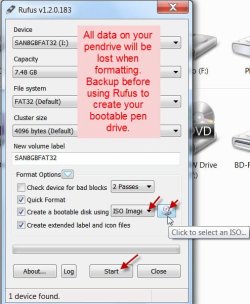
You can create a bootable pendrive with the downloaded ISO.

Use Rufus Rufus - Create bootable USB drives

Plug in your pendrive, run Rufus, select ISO image in the dropdown list, select the ISO and click on start.

Rufus.jpg

Thamizhukkum amudhendru per,
andha thamizh inbathamizh yengal uyirukku ner, uyirukku ner,
Tamil is synonymous with nectar,
Tamil , sweet Tamil, is equivalent to our soul, it is our soul,
 

My Computer

OS
Windows 7 Home Premium 32 bit
Dear experts Thanks very much for your precious help...I will try wit all of yours input.

@jumanji:mikka mikka nandri anna...vazhga valamudan:D:thumbsup:
 

My Computer

OS
Windows 7 home premium 32bit

My Computer

Computer Manufacturer/Model Number
HP, Dell, Gateway, Toshiba - 4 laptops and 2 desktops
OS
Vista, Windows7, Mint Mate, Zorin, Windows 8
CPU
from 1.6GHz Duo to i7
Monitor(s) Displays
2x HP w2207
Hard Drives
5x HDD, 7x SSD, 12x Externals
Keyboard
with trackball - no mices
Mouse
Trackball mice
Internet Speed
DSL 6000
^ Yes, of course it can be created in the aforesaid manner. But it involves installing Partition Wizard on to the PC and then creating the bootable pendrive from it.

Creating the bootable pendrive from the bootable ISO using Rufus is much simpler. Rufus itself is a .exe file needing no install. Further the whole process is fast and the pendrive will still be usable as before to transfer data.( I am not sure of the one created from within the Partition Wizard.)
 

My Computer

OS
Windows 7 Home Premium 32 bit
Try third party softwares like partition magic or partition manager
 

My Computer

OS
Windows 7 Ultimate x64
@mrmah: partition magic alone is enough for solve this?please give more details.
Thanks experts,Is there any other way apart from bootable pendrive?i mean any simple software to remove unmovable files?the problem over here is the thread is for my sister's laptop she is living very far away from me and she does not know these things well and we can't meet soon but she need to partition as soon as possible.
Note:we did paging disable,hibernate file disable,disk cleanup and defragmentation now the memory is little bit increased from 21 gb into 29 gb.
If any user friendly software is available to solve this thread please let me know experts.
Thanks in advance
 

My Computer

OS
Windows 7 home premium 32bit
Hi Tamilarasan23,

You seem to have guided your sister most effectively by a rigourous procedure of dealing effectively with the inadequacies of shrinking the Windows 7 system partition as per the procedure outlined here Working Around Windows Vista’s "Shrink Volume" Inadequacy Problems - How-To Geek

If everything has been done as per the above procedure the only thing that can stand in the way to get maximum possible shrinkage is the MFT as outlined there. You might have perhaps missed defragmenting it with the trial version of the Raxco's Perfect Disk. Download the 30 day trial version here Defrag & Fragmentation Prevention - PerfectDisk 12.5 Pro and defragment.

(I had personally gone through this rigourous procedure - which I consider the best way - long back and had never tried the Partition Wizard but when other experts here say that that is the easiest way, you can count on it. I did not mention this procedure- though it was just a click away in my store:) - because of this. )
 

My Computer

OS
Windows 7 Home Premium 32 bit
Thanks Jumanji we will try as per your instruction and let you know if we encounter the problem again.
yesterday i tried with above How to greek link procedures and i could not follow some osf them because it was for vista,we using windows 7,could you please give link for Windows 7?
 

My Computer

OS
Windows 7 home premium 32bit
Dear Tamilarasan23,

Partition magic is more powerfull than the windows disk manager, download it and give it a try it has alot of features.
you can download it from here: Download Partition Magic 8.0
 

My Computer

OS
Windows 7 Ultimate x64
^ The reign of PowerQuest's PartitionMagic8 (gobbled up later by Symantec/Norton) has ended with Windows XP.

Quote from the website you had referenced:

It does not run on Windows 7 or Windows Vista. However, it can manage partitions on both of these operating systems if it is started from a compatible OS, such as Windows NT, Windows XP or Windows 2000.

It only allows you to create rescue disks using floppy disks, which many computers don’t have anymore.

Well. I did use it till XP. I even made a bootable CD out of the bootable floppies after a lot of research and still have it. ( In the initial days of Windows 7, I did try it and it mucked up all the partitions and then I had to go many an extra mile to undo it.) Pray tell us how to use it in Windows 7. Try yourself and let us know. :geek:
 

My Computer

OS
Windows 7 Home Premium 32 bit
^Any reasons why not MiniTools Partition Wizard as suggested herein early on?
 

My Computer

OS
Windows 7 Home Premium 32 bit
Back
Top