Solved Problem in theme editing with notepad

hamedham

New member
Local time
4:27 AM
Messages
16
Location
urmia
hi friends
im editing themes ( themes that works with universal theme patcher )
but i have a tiny problem!
when i want to determine more than one background :
for example:
[Control Panel\Desktop]
wallpaper=%SystemRoot%\Resources\Themes\***\wallpapers\1.jpg
TileWallpaper=0
WallpaperStyle=10
Pattern=

above commands determines the 1.jpg for theme background
how i can insert 2.jpg 3.jpg (for example ) and etc.
:banghead:
 
Last edited:

My Computer

Computer Manufacturer/Model Number
HAMED
OS
windows 7
CPU
2al core amd
Motherboard
giga
Memory
ddr3
Graphics Card(s)
zotac
Sound Card
onboard
Monitor(s) Displays
lg
Screen Resolution
hd
Hard Drives
maxtor
PSU
intel
Case
digital me
Cooling
intel
Internet Speed
512
Other Info
98
In the main theme folder, where there are the folders like en-US and Shell , make a folder "Wallpaper" and put your other wallpapers there .

Now, if desktop background shuffle is on, it will be changed .... with the speed as you selected there .
 

My Computer

Computer type
PC/Desktop
Computer Manufacturer/Model Number
Self Assembled
OS
Microsoft Windows 10 Pro Insider Preview 64-bit
CPU
Intel(R) Core(TM) i3-4130 CPU @ 3.40GHz
Motherboard
Gigabyte Technology Co., Ltd. B85M-D3H
Memory
Corsair Vengence 4GB x2 (8.00GB Dual-Channel DDR3 @ 798MHz)
Graphics Card(s)
2047MB GeForce GTS 450 (ZOTAC International)
Sound Card
Onboard (Realtek High Definition Audio)
Monitor(s) Displays
LG Flatron E2040T
Screen Resolution
1600x900
Hard Drives
Western Digital 1 TB
Seagate 500 GB
PSU
Corsair VS550
Case
Cooler Master K380
Cooling
Cooler Master Seidon 120V Plus
Keyboard
Logitech MK260r
Mouse
Logitech MK260r
Internet Speed
PMPL Broadband
Antivirus
Windows Defender + MBAM
Browser
Firefox
Other Info
Dell Studio 15" Laptop
In the main theme folder, where there are the folders like en-US and Shell , make a folder "Wallpaper" and put your other wallpapers there .

Now, if desktop background shuffle is on, it will be changed .... with the speed as you selected there .

not working..

:confused::confused:
 

My Computer

Computer Manufacturer/Model Number
HAMED
OS
windows 7
CPU
2al core amd
Motherboard
giga
Memory
ddr3
Graphics Card(s)
zotac
Sound Card
onboard
Monitor(s) Displays
lg
Screen Resolution
hd
Hard Drives
maxtor
PSU
intel
Case
digital me
Cooling
intel
Internet Speed
512
Other Info
98
its very important for me
can anybody help me?????????

:ditto:
 

My Computer

Computer Manufacturer/Model Number
HAMED
OS
windows 7
CPU
2al core amd
Motherboard
giga
Memory
ddr3
Graphics Card(s)
zotac
Sound Card
onboard
Monitor(s) Displays
lg
Screen Resolution
hd
Hard Drives
maxtor
PSU
intel
Case
digital me
Cooling
intel
Internet Speed
512
Other Info
98
:
[Control Panel\Desktop]
wallpaper=%SystemRoot%\Resources\Themes\***\wallpapers\1.jpg
TileWallpaper=0
WallpaperStyle=10
Pattern=

above commands determines the 1.jpg for theme background
how i can insert 2.jpg 3.jpg (for example ) and etc.
:banghead:
You are OK here Then do as Arc said by making a Wallpaper folder in your theme folder.
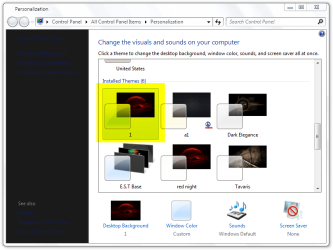
Then (I am using theme 1)
#1
Go to Personalization and apply your theme
1.png
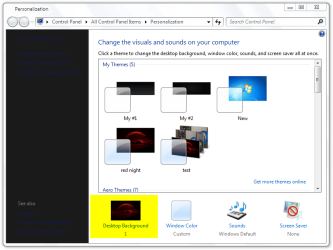
#2
Go to Desktop Background
2.png
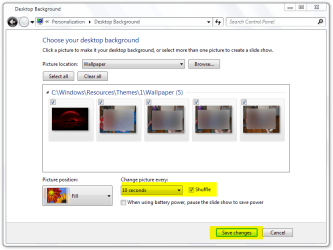
#3
As Arc said set your backgrounds and check Shuffle + time and Save changes
3.png
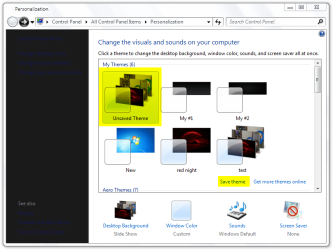
#4
You should have Unsaved Theme choose it and the click on Save theme
4.png
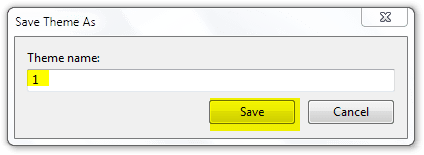
#5
Give it your theme name and Save
5.png
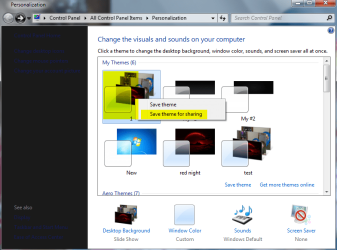
#6
Now your theme is saved but you need to right click on it and choose Save theme for sharing
6.png
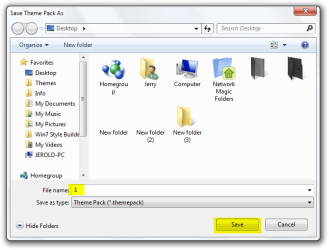
#7
Give it your theme name and Save (I saved it to a new folder on the desktop)
7.png
#8
You will need something like 7-Zip Download to Extract the theme pack
8.png
#9
Inside the theme pack copy the .theme file
9.png
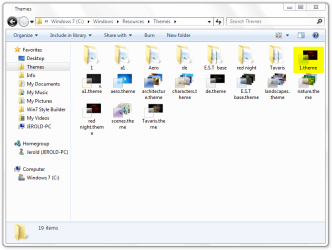
#10
Go to C:\Windows\Resources\Themes and replace the .theme file with the one from the theme pack in step #9
10.png
#11
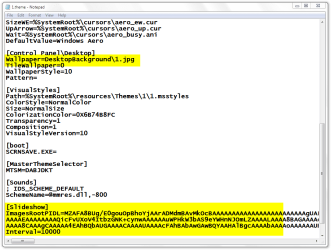
If you right click on the .theme file and open with note pad you can see the changes.
11.png
Now you have a theme folder and a .theme file you can share
Jerry
 

My Computer

Computer type
Laptop
Computer Manufacturer/Model Number
Sager NP9170
OS
Win 7 Pro x64 / Win 10 Pro
CPU
Intel(R) Core(TM) i7-3630QM CPU @ 2.40GHz
Motherboard
CLEVO P170EM
Memory
12 GB
Graphics Card(s)
(1) Intel(R) HD Graphics 4000 (2) NVIDIA GeForce GTX 675M
Sound Card
(1) Realtek High Definition Audio (2) Intel(R) Display Aud
Monitor(s) Displays
17.3
Screen Resolution
1920x1080
Hard Drives
(1) Samsung 860 EVO 500GB(OS) (1) Samsung 860 EVO 500GB(Data)
Keyboard
Backlite
Antivirus
MSE, Malwarebytes Pro
Browser
Firefox
Other Info
DESKTOP: Custom-built.
OS: Win 10 Pro x64.
CASE: Rosewill R5.
CPU: Intel I5 4670K CPU @ 3.40GHz.
CPU COOLER: Cool Master Hyper 212 EVO.
MOTHERBOARD: Asus Z87-A.
MEMORY: Kingston HyperX 2x4 GB.
GPU: Nvidia Geforce 650 TI.
PSU: Corsair TX750.
DRIVES: (1) Samsung 840 120 GB SSD (2) Western Digital blue 500 GB 7200 RPM.
Three Cheers, Jerry :thumbsup:

Bookmarking this page !!
 

My Computer

Computer type
PC/Desktop
Computer Manufacturer/Model Number
Self Assembled
OS
Microsoft Windows 10 Pro Insider Preview 64-bit
CPU
Intel(R) Core(TM) i3-4130 CPU @ 3.40GHz
Motherboard
Gigabyte Technology Co., Ltd. B85M-D3H
Memory
Corsair Vengence 4GB x2 (8.00GB Dual-Channel DDR3 @ 798MHz)
Graphics Card(s)
2047MB GeForce GTS 450 (ZOTAC International)
Sound Card
Onboard (Realtek High Definition Audio)
Monitor(s) Displays
LG Flatron E2040T
Screen Resolution
1600x900
Hard Drives
Western Digital 1 TB
Seagate 500 GB
PSU
Corsair VS550
Case
Cooler Master K380
Cooling
Cooler Master Seidon 120V Plus
Keyboard
Logitech MK260r
Mouse
Logitech MK260r
Internet Speed
PMPL Broadband
Antivirus
Windows Defender + MBAM
Browser
Firefox
Other Info
Dell Studio 15" Laptop

My Computer

Computer type
Laptop
Computer Manufacturer/Model Number
Sager NP9170
OS
Win 7 Pro x64 / Win 10 Pro
CPU
Intel(R) Core(TM) i7-3630QM CPU @ 2.40GHz
Motherboard
CLEVO P170EM
Memory
12 GB
Graphics Card(s)
(1) Intel(R) HD Graphics 4000 (2) NVIDIA GeForce GTX 675M
Sound Card
(1) Realtek High Definition Audio (2) Intel(R) Display Aud
Monitor(s) Displays
17.3
Screen Resolution
1920x1080
Hard Drives
(1) Samsung 860 EVO 500GB(OS) (1) Samsung 860 EVO 500GB(Data)
Keyboard
Backlite
Antivirus
MSE, Malwarebytes Pro
Browser
Firefox
Other Info
DESKTOP: Custom-built.
OS: Win 10 Pro x64.
CASE: Rosewill R5.
CPU: Intel I5 4670K CPU @ 3.40GHz.
CPU COOLER: Cool Master Hyper 212 EVO.
MOTHERBOARD: Asus Z87-A.
MEMORY: Kingston HyperX 2x4 GB.
GPU: Nvidia Geforce 650 TI.
PSU: Corsair TX750.
DRIVES: (1) Samsung 840 120 GB SSD (2) Western Digital blue 500 GB 7200 RPM.
You are OK here Then do as Arc said by making a Wallpaper folder in your theme folder.
Then (I am using theme 1)
#1
Go to Personalization and apply your theme
View attachment 159272
#2
Go to Desktop Background
View attachment 159273
#3
As Arc said set your backgrounds and check Shuffle + time and Save changes
View attachment 159274
#4
You should have Unsaved Theme choose it and the click on Save theme
View attachment 159275
#5
Give it your theme name and Save
View attachment 159276
#6
Now your theme is saved but you need to right click on it and choose Save theme for sharing
View attachment 159277
#7
Give it your theme name and Save (I saved it to a new folder on the desktop)
View attachment 159278
#8
You will need something like 7-Zip Download to Extract the theme pack
View attachment 159279
#9
Inside the theme pack copy the .theme file
View attachment 159280
#10
Go to C:\Windows\Resources\Themes and replace the .theme file with the one from the theme pack in step #9
View attachment 159281
#11
If you right click on the .theme file and open with note pad you can see the changes.
View attachment 159282
Now you have a theme folder and a .theme file you can share
Jerry

Yes
Its the exactly what i wants
thank you "Bongo"
i'm going to test this way....

:dinesh::dinesh::dinesh:
 

My Computer

Computer Manufacturer/Model Number
HAMED
OS
windows 7
CPU
2al core amd
Motherboard
giga
Memory
ddr3
Graphics Card(s)
zotac
Sound Card
onboard
Monitor(s) Displays
lg
Screen Resolution
hd
Hard Drives
maxtor
PSU
intel
Case
digital me
Cooling
intel
Internet Speed
512
Other Info
98
omg!
its great!!!!
really working.other friends can use this useful topic!
really thank u "Bongo"
 

My Computer

Computer Manufacturer/Model Number
HAMED
OS
windows 7
CPU
2al core amd
Motherboard
giga
Memory
ddr3
Graphics Card(s)
zotac
Sound Card
onboard
Monitor(s) Displays
lg
Screen Resolution
hd
Hard Drives
maxtor
PSU
intel
Case
digital me
Cooling
intel
Internet Speed
512
Other Info
98
You're Welcome
Jerry
 

My Computer

Computer type
Laptop
Computer Manufacturer/Model Number
Sager NP9170
OS
Win 7 Pro x64 / Win 10 Pro
CPU
Intel(R) Core(TM) i7-3630QM CPU @ 2.40GHz
Motherboard
CLEVO P170EM
Memory
12 GB
Graphics Card(s)
(1) Intel(R) HD Graphics 4000 (2) NVIDIA GeForce GTX 675M
Sound Card
(1) Realtek High Definition Audio (2) Intel(R) Display Aud
Monitor(s) Displays
17.3
Screen Resolution
1920x1080
Hard Drives
(1) Samsung 860 EVO 500GB(OS) (1) Samsung 860 EVO 500GB(Data)
Keyboard
Backlite
Antivirus
MSE, Malwarebytes Pro
Browser
Firefox
Other Info
DESKTOP: Custom-built.
OS: Win 10 Pro x64.
CASE: Rosewill R5.
CPU: Intel I5 4670K CPU @ 3.40GHz.
CPU COOLER: Cool Master Hyper 212 EVO.
MOTHERBOARD: Asus Z87-A.
MEMORY: Kingston HyperX 2x4 GB.
GPU: Nvidia Geforce 650 TI.
PSU: Corsair TX750.
DRIVES: (1) Samsung 840 120 GB SSD (2) Western Digital blue 500 GB 7200 RPM.
Back
Top