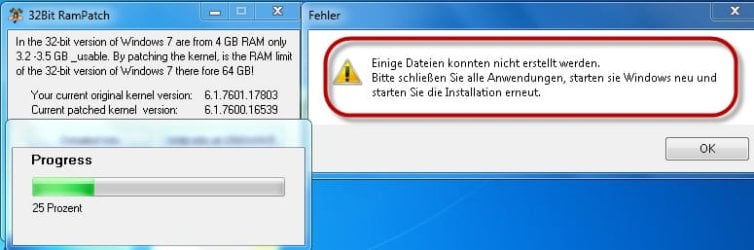
problem installing 32 bit ram patch

It's probably the computer gods preventing you from doing something that will likely cause instability with your computer.

In other words...don't bother installing this. Skip it completely.

If you want to use all of your 4 GB of memory, with the potential for more, run Windows 7 x64.
 

My Computer

OS
Windows 7 Ultimate x64 SP1
CPU
Intel Core i7-2600
Motherboard
Gigabyte GA-P67A-UD3P-B3
Memory
12 GB Patriot Extreme DDR3-1333
Graphics Card(s)
Nvidia GTX 470
Monitor(s) Displays
Dell UltraSharp 2209WA
Hard Drives
OCZ Agility3 240 GB, WD5001AALS, WD7501AALS
PSU
OCZ ModStream 700W
Case
CoolerMaster HAF 912 Advanced
Cooling
CoolerMaster Hyper 212 Plus
First thing could you fill in completely your ((My System Specs)). You can use the User CP at the top of the page and a little program.
Speccy - System Information - Free Download
As Deacon Frost has said that patch is nothing but problems. If you use Windows 7/64 why are you trying to download and install at 32 byte patch?
2 and 2 is not adding up to 4
 

My Computer

Computer type
PC/Desktop
Computer Manufacturer/Model Number
Home made Desktop
OS
Windows 10 Pro. 64/ version 1709 Windows 7 Pro/64
CPU
Intel i7-6800K @ 4.3
Motherboard
ASUS X-99 Deluxe II
Memory
Corsair Platinum 16 gig @2400
Graphics Card(s)
EVGA GTX 1070 OC
Monitor(s) Displays
Asus 27" LED LCD/VE278Q
Screen Resolution
1920-1080 or 1280-720 HDMI
Hard Drives
INTEL SSD 730-240 Gb Sata 3.0/
PSU
EVGA Platium 1200W
Case
Phanteks Luxe Tempered Glass 8 fans/ one radiator
Cooling
XSPC/ Water Cooled CPU
Keyboard
Das 4 Professional
Mouse
Logitech M705/MX Anywhere 2-S
Internet Speed
100 mbits
Antivirus
Microsoft Security Essentials/ Malwarebytes Premium 3.0/ SAS
Browser
I.E. 11 default/Firefox/ ISP Time Warner Cable/Spectrum
Other Info
LG BluRay Burner/
Sound system-KLipsch-THX/
Icy Dock ssd Hot Swap bays.
thank you for answering me
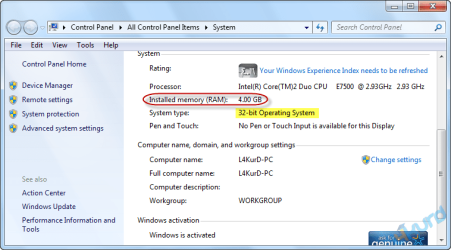
because my friend install 32 bit ram patch use 4 GB memory

de43838bde.png
 

My Computer

OS
windows7
x86 windows 7 max memory size is 4GB, what is a 32-bit memory patch???? Sounds like a hoax to me.
Sometimes usable is lower if motherboard is sharing video memory. Some motherboards allow usage of more ram, I have seen it countless times. Mac Mini's are the worst culprits, just over 2GB usable, waiting on an update for that...

You can not patch x86 windows into 64 bit. Maybe it changes the displayed usable ram, but it doesn't use it period.
 

My Computer

Computer Manufacturer/Model Number
Me.
OS
Windows 7 Pro x64
CPU
i5-760 running at 4.1 stable @ 40C
Motherboard
Asus Maxiumus Gene III
Memory
Corsair 4G Vengeance 2133Mhz
Graphics Card(s)
ATI 5770
Sound Card
Onboard
Monitor(s) Displays
Asus 24" and Sony 19' 4:3
Hard Drives
OCZ Agility 3 60GB 2xWD 750 Blacks in Raid 0
PSU
Corsair AX850
Case
Antec 900 (original)
Cooling
Corsair H70
Keyboard
Logitech G19
Mouse
Rat 7
Internet Speed
Cable ~20Mbps
After Service Pack 1, Windows 7 32 bit started to display the actual amount of memory installed. That doesn't mean you are using it, though.

There's no reason to avoid Windows x64 right now, especially on a system with 4 GB of memory. You don't even have to spend any money to switch. Download the .iso file and you can use your current license key.
 

My Computer

OS
Windows 7 Ultimate x64 SP1
CPU
Intel Core i7-2600
Motherboard
Gigabyte GA-P67A-UD3P-B3
Memory
12 GB Patriot Extreme DDR3-1333
Graphics Card(s)
Nvidia GTX 470
Monitor(s) Displays
Dell UltraSharp 2209WA
Hard Drives
OCZ Agility3 240 GB, WD5001AALS, WD7501AALS
PSU
OCZ ModStream 700W
Case
CoolerMaster HAF 912 Advanced
Cooling
CoolerMaster Hyper 212 Plus
Yeah it's better to get a Windows 7 64 bit to use 4+ RAM (I have it even when mine is 2 GB lol)32 bit OSes will use only <4 GB and no patch would work maybe will fake the memory counter.
 

My Computer

Computer Manufacturer/Model Number
Custom
OS
Windows 7 Ultimate 64-bit SP1
CPU
Intel Celeron G530
Motherboard
Gigabyte GA-H61M-S2-B3
Memory
2 GB DDR3 Kingston 1333 (1066)
Graphics Card(s)
POV Nvidia Geforce GT530
Sound Card
Onboard
Monitor(s) Displays
Samsung SyncMaster S19B150
Screen Resolution
1366x768
Hard Drives
Laptop HDD TOSHIBA MK3265GSX
PSU
Generic 500W
Cooling
Stock
Keyboard
Logitech S 510 Wireless
Mouse
IBM MO28UO
Internet Speed
30 mbps
Derek you have a good point. It will probably just put a fake memory counter figure to make people happy.
 
Last edited:

My Computer

Computer type
PC/Desktop
Computer Manufacturer/Model Number
Home made Desktop
OS
Windows 10 Pro. 64/ version 1709 Windows 7 Pro/64
CPU
Intel i7-6800K @ 4.3
Motherboard
ASUS X-99 Deluxe II
Memory
Corsair Platinum 16 gig @2400
Graphics Card(s)
EVGA GTX 1070 OC
Monitor(s) Displays
Asus 27" LED LCD/VE278Q
Screen Resolution
1920-1080 or 1280-720 HDMI
Hard Drives
INTEL SSD 730-240 Gb Sata 3.0/
PSU
EVGA Platium 1200W
Case
Phanteks Luxe Tempered Glass 8 fans/ one radiator
Cooling
XSPC/ Water Cooled CPU
Keyboard
Das 4 Professional
Mouse
Logitech M705/MX Anywhere 2-S
Internet Speed
100 mbits
Antivirus
Microsoft Security Essentials/ Malwarebytes Premium 3.0/ SAS
Browser
I.E. 11 default/Firefox/ ISP Time Warner Cable/Spectrum
Other Info
LG BluRay Burner/
Sound system-KLipsch-THX/
Icy Dock ssd Hot Swap bays.
Back
Top