
Problem installing Office 2007 Pro Plus

dmindmindmin

New member
Local time
9:59 AM
Messages
2
Hello Guys,

I am a new member so here goes my first post. I am trying to install Office 2007 Professional Plus on a Windows 7 Home Premium 64 bit OS. I just got the PC recently and it came with a trial version of Office 2007 installed on it. When I launch the Setup.exe for Office, I get the following error message:

"Setup could not find any products to install. Please contact your system administrator"

I have tried to run the "Setup.exe" file as an administrator and have also tried to run Setup in Windows XP compatibility mode using the "Troubleshoot compatibility" menu.

I have searched for this particular problem on the web and I have found a few refences alluding to difficulties in uninstalling office but not for installing it.

Any help would be appreciated.

Btw, the setup log file included the following error message:

LIS: finished parsing LIS package "{90120000-0115-0409-0000-0000000FF1CE}"
Required add on group: culture does not have a complete set for descriptor: en-us for product: PROPLUS
Required add on group culture does not have a complete set of addons for product: PROPLUS
A required add on group does not have at least one full match for product: PROPLUS. Removing product from available product choices.
Showing parent-less message Title: 'Setup Error', Message: 'Setup could not find any available products to install. Please contact your system administrator.'
Message returned: 1
Error: All products do not have a complete add on group that is required for installation Type: IncompleteProductAddOns.
Catalyst execution finished: 01/30/2010 16:42:34. Return code: 30026. Exception caught: IncompleteProductAddOns.
PERF: TickCount=15110974 Name=RunSetup Description=End function
 

Attachments
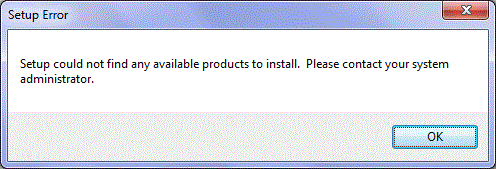
  • Office2007_ProfessionalPlus_Error.gif
    Office2007_ProfessionalPlus_Error.gif
    18.8 KB · Views: 50

My Computer

OS
Windows 7 Home Premium 64 bit
Hi, and Welcome To The Seven Forums :thumbsup:
Not sure why you are having the problem, albeit instead of testing Office 2007, why not jump over to Microsoft.com type in Microsoft Office 2010 beta, and download the Office 2010 beta. Since the one that comes (should) with your new computer is only good for 90 days, or less the 2010 beta is good until October with the Retail version hitting the shelves in July or August.

Again welcome, and good luck. :geek:
 

My Computer

Computer Manufacturer/Model Number
HP Pavilion a4302f
OS
Win 7 Pro x64, VM Win XP, Win7 Pro Sandbox, Kubuntu 11
CPU
AMD Athlon(tm) II X4 640 @ 3.0 Gbz
Memory
12GB 1066MHz DDR3 SDRAM - 2x4GB, 2x2GB
Graphics Card(s)
ATI Radeon HD 4350 HD Graphics/Audio with 512MB
Sound Card
Realtek High Definition Audio
Monitor(s) Displays
1. Dell 23" SP2307, 2. Mitsublishi 40" HDTV, Hannspree 25"
Screen Resolution
1. 2048x1152, 2. 1920-1080, 3. 1920x1200
Hard Drives
Int: 1 120 Gig SSD i
1 - 2.5" 500 USB External HDD
1 -1 Tb USB External HDD
Case
Mid Tower
Cooling
Standard Fans - 5 fans (very quiet)
Keyboard
Microsoft Wireless 2000
Mouse
Microsoft Wireless Mouse 5000
Internet Speed
10 Mbit (realistically 500 Kbit - 1.2 Mbit)
Other Info
Speakers - Bose Desktop (Excellent Sound)
1 external CD|DVD\Blue-ray Recorders/Players (Sony)
Thanks Lee. Would still prefer to run Office 2007 as I understand the Office 2010 beta has some bugs which I cannot work with in the mean-time.
 

My Computer

OS
Windows 7 Home Premium 64 bit
Not sure what bugs there are. Have been using for it the past two months putting together a large project for a IT firm in China. The only thing is we ensure that all files are saved in compatibility mode. Thus far all the work has been done in Excel (graphs and statics), and Word for publications. We are just starting to work up presentations. And, as yet none of my people have found anything that we couldn't work around. I talking several thousand pages of documentation. The one thing we like is the new 64 bit version, it has been nice when working with large projects.

Give it shot it not all that bad.
 

My Computer

Computer Manufacturer/Model Number
HP Pavilion a4302f
OS
Win 7 Pro x64, VM Win XP, Win7 Pro Sandbox, Kubuntu 11
CPU
AMD Athlon(tm) II X4 640 @ 3.0 Gbz
Memory
12GB 1066MHz DDR3 SDRAM - 2x4GB, 2x2GB
Graphics Card(s)
ATI Radeon HD 4350 HD Graphics/Audio with 512MB
Sound Card
Realtek High Definition Audio
Monitor(s) Displays
1. Dell 23" SP2307, 2. Mitsublishi 40" HDTV, Hannspree 25"
Screen Resolution
1. 2048x1152, 2. 1920-1080, 3. 1920x1200
Hard Drives
Int: 1 120 Gig SSD i
1 - 2.5" 500 USB External HDD
1 -1 Tb USB External HDD
Case
Mid Tower
Cooling
Standard Fans - 5 fans (very quiet)
Keyboard
Microsoft Wireless 2000
Mouse
Microsoft Wireless Mouse 5000
Internet Speed
10 Mbit (realistically 500 Kbit - 1.2 Mbit)
Other Info
Speakers - Bose Desktop (Excellent Sound)
1 external CD|DVD\Blue-ray Recorders/Players (Sony)
Have you uninstalled the trial before attempting to install your full version?
 

My Computer

Computer Manufacturer/Model Number
Black_Box (homebuilt)
OS
windows 7 RTM x64
CPU
Phenom II 965 Quad Core 3.4Ghz
Motherboard
Asus M4A79T Deluxe
Memory
Mushkin Blackline 8GB (4x2gb)
Graphics Card(s)
XFX Radeon 5970 Black Edition
Sound Card
onboard
Monitor(s) Displays
Dell 2408WPF-main Dell E248WFP-secondary
Screen Resolution
1920x1200-main 1920x1200-secondary
Hard Drives
OCZ Vertex Limited Edition 100GB (OS)
x1 WD Black Edition 500GB drive (Storage)
PSU
XFX 850w Black Edition (Modular)
Case
Mountian Mods H2go
Cooling
CoolITSystems ECO A.L.C.
Keyboard
Logitech MX 5500 wireless keyboard
Mouse
Razor Copperhead
Internet Speed
16Mb down/2Mb up Wowway Cable Internet
Hello,
I am getting the same problem as mentioned by the originator of the thread. I have a brand new Dell tablet with plenty of space and memory. It came with Windows 7 Pro /64 already installed. The problem I have when trying to install Office 2007 is identical to the one discussed previously. Because my laptop is new, I don't need to uninstall anything as it only came with Win 7 and some other stuff that Dell added, no MS applications. The Office 2K7 installation package I downloaded from Microsoft (we have an account), it is the full version and it is not corrupted (we tested it yesterday). I have to have Office 2007 installed in this laptop, not other version. I have tried installing it as the Admin (even when logged as the local admin) still the same problem. I made a copy of the installation package locally: no changes. I need help.
 

My Computer

OS
Windows 7 Pro 64 bit
Navigate to folder C:\Users\<your account>\AppData\Local\Temp and find files

Microsoft Office Setup.txt ,Microsoft Office Setup_task.txt or other with similar names and attache to post.
 

My Computer

Computer Manufacturer/Model Number
Custom made
OS
Windows 7 Professional x64 PL
CPU
AMD Athlon 4450e
Motherboard
Giga-Byte GA-MA69G-S3H
Memory
GoodRam DDR2 2x2048MB (FSB 800MHz)
Graphics Card(s)
nVidia GeForce 9600GT (G94-300) 1024 MB
Monitor(s) Displays
SAMSUNG SyncMaster HS2P301688
Hard Drives
Seagate ST3750330AS 750GB
PSU
Corsair 550W
Cooling
AeroCool ExtremeEngine 3T
Problems Installing Office 2k7 in Windows 7/64 laptop

Sorry, but those two files do not exist under the user (admin). So I logged on as a different user and try to install Office 7 again with the same results, but in either case I cannot find the files you are asking for. I made sure ALL files were visible, just in case you are wondering. But those files are non-existant.
 

My Computer

OS
Windows 7 Pro 64 bit
Sorry, but those two files do not exist under the user (admin). So I logged on as a different user and try to install Office 7 again with the same results, but in either case I cannot find the files you are asking for. I made sure ALL files were visible, just in case you are wondering. But those files are non-existant.

Maybe they are under other name e.g SetupExe {data}.log or likely

Use any good 3p file manger e.g Total Commander

go to your %temp% folder and find all files with *.txt,*.log extensions containing word "Office",attache them all.
 

My Computer

Computer Manufacturer/Model Number
Custom made
OS
Windows 7 Professional x64 PL
CPU
AMD Athlon 4450e
Motherboard
Giga-Byte GA-MA69G-S3H
Memory
GoodRam DDR2 2x2048MB (FSB 800MHz)
Graphics Card(s)
nVidia GeForce 9600GT (G94-300) 1024 MB
Monitor(s) Displays
SAMSUNG SyncMaster HS2P301688
Hard Drives
Seagate ST3750330AS 750GB
PSU
Corsair 550W
Cooling
AeroCool ExtremeEngine 3T
Back
Top