Problem installing Windows 7 onto External HDD

I prefer dual booting, i did check it out though.

EDIT: No CSM options in BIOS after updating the version to the latest. Stuck :confused:
 

My Computer

Computer type
Laptop
Computer Manufacturer/Model Number
Aspire V3-571G
OS
Windows 8 64-bit (6.2, Build 9200)
CPU
Intel(R) Core(TM) i7-3630QM CPU @ 2.40GHz (8 CPUs), ~2.4GHz
Memory
8GB DDR3
Graphics Card(s)
NVIDIA GeForce GT 640M
Hard Drives
500GB
Antivirus
McAfee
Then what are the Legacy BIOS settings choices? Have you tried different ones to see if UEFI will show up.

Again, it would help to have camera snaps as we may be able to spot special BIOS settings. Have you combed over them all?

Did you try the flash stick method to see if you can get any UEFI bootable media to show up?
 
Then what are the Legacy BIOS settings choices? Have you tried different ones to see if UEFI will show up.

Again, it would help to have camera snaps as we may be able to spot special BIOS settings. Have you combed over them all?

Did you try the flash stick method to see if you can get any UEFI bootable media to show up?

There aint many options, ill get you pictures tomorrow. I think Acer has locked down the option CSM e.g. No advanced menu in BIOS available. I'm finding a blank USB now.
 

My Computer

Computer type
Laptop
Computer Manufacturer/Model Number
Aspire V3-571G
OS
Windows 8 64-bit (6.2, Build 9200)
CPU
Intel(R) Core(TM) i7-3630QM CPU @ 2.40GHz (8 CPUs), ~2.4GHz
Memory
8GB DDR3
Graphics Card(s)
NVIDIA GeForce GT 640M
Hard Drives
500GB
Antivirus
McAfee
I prefer dual booting, i did check it out though.

EDIT: No CSM options in BIOS after updating the version to the latest. Stuck :confused:

The updated UEFI/BIOS firmware, may have CSM DISABLED as Pre-set to boot UEFI or Legacy by default.
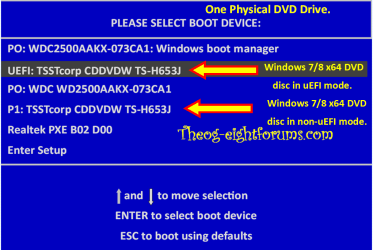
A Genuine Microsoft Windows 7 x64 DVD will boot in UEFI or legacy mode by default, using the One Time Boot Menu, if Secure Boot is DISABLED.

Windows 8 Downgrade-006 SB for posting.PNG
 

My Computer

OS
ME/XP/Vista/Win7
If you're still under warranty I would ask Acer Support. They might have it in their scripts. Otherwise it's a parody.

Also search Google for your model number and UEFI as others will have likely dealt with this.
 
@theog that's what im thinking aswell, I think a genuine DVD will boot up fine.

@gregrocker I've done some research, people trying to request for BIOS unlocks for advanced menu options.

I might have to borrow a genuine Win7 DVD...

Already asking on the Acer forums now : Acer Notebooks & Netbooks - Acer Support Community
 

My Computer

Computer type
Laptop
Computer Manufacturer/Model Number
Aspire V3-571G
OS
Windows 8 64-bit (6.2, Build 9200)
CPU
Intel(R) Core(TM) i7-3630QM CPU @ 2.40GHz (8 CPUs), ~2.4GHz
Memory
8GB DDR3
Graphics Card(s)
NVIDIA GeForce GT 640M
Hard Drives
500GB
Antivirus
McAfee
I believe I've gone over this with you before, but you need to use the lastest official installer for your licensed version from Step 1, burned or written with the tool in Step 2, of Clean Reinstall - Factory OEM Windows 7.

What version of Win7 do you own? You are using 64 bit, correct?
 
I prefer dual booting, i did check it out though.

EDIT: No CSM options in BIOS after updating the version to the latest. Stuck :confused:

The updated UEFI/BIOS firmware, may have CSM DISABLED as Pre-set to boot UEFI or Legacy by default.
A Genuine Microsoft Windows 7 x64 DVD will boot in UEFI or legacy mode by default, using the One Time Boot Menu, if Secure Boot is DISABLED.

View attachment 266178

If you're still under warranty I would ask Acer Support. They might have it in their scripts. Otherwise it's a parody.

Also search Google for your model number and UEFI as others will have likely dealt with this.

I believe I've gone over this with you before, but you need to use the lastest official installer for your licensed version from Step 1, burned or written with the tool in Step 2, of Clean Reinstall - Factory OEM Windows 7.

What version of Win7 do you own? You are using 64 bit, correct?

Im currently on Win8 x64. Yeah, I wanna dual boot win8 with Win7 x64. Shall I follow the above link?
 

My Computer

Computer type
Laptop
Computer Manufacturer/Model Number
Aspire V3-571G
OS
Windows 8 64-bit (6.2, Build 9200)
CPU
Intel(R) Core(TM) i7-3630QM CPU @ 2.40GHz (8 CPUs), ~2.4GHz
Memory
8GB DDR3
Graphics Card(s)
NVIDIA GeForce GT 640M
Hard Drives
500GB
Antivirus
McAfee
@theog that's what im thinking aswell, I think a genuine DVD will boot up fine.

@gregrocker I've done some research, people trying to request for BIOS unlocks for advanced menu options.

I might have to borrow a genuine Win7 DVD...

Already asking on the Acer forums now : Acer Notebooks & Netbooks - Acer Support Community

You will need a genuine Windows 7 DVD or ISO & licence.
 

My Computer

OS
ME/XP/Vista/Win7
Back
Top