Problem moving files to shared folder

israelihero

New member
Local time
1:28 AM
Messages
2
Its real wierd.

Im using one pc with windows 7 and another with XP.
When I copy a file on the pc with win7 to the shared folder, I can see and access the file fine from the XP pc.

However, when I move (Ctrl+X) a file to the shared folder on the pc with win7, the file does not apear when I go to the shared folder from the XP pc.

Anyone knows what Im doing wrong?

BY THE WAY, is there a way to share the entire C drive or we are strict to the public folders? Its wierd that I gave full access permissions to the C drive, yet an error occurs while trying to access from XP. Only the public folders can be accessed.
 

My Computer

OS
win 7
Its real wierd.

Im using one pc with windows 7 and another with XP.
When I copy a file on the pc with win7 to the shared folder, I can see and access the file fine from the XP pc.

However, when I move (Ctrl+X) a file to the shared folder on the pc with win7, the file does not apear when I go to the shared folder from the XP pc.

Anyone knows what Im doing wrong?

BY THE WAY, is there a way to share the entire C drive or we are strict to the public folders? Its wierd that I gave full access permissions to the C drive, yet an error occurs while trying to access from XP. Only the public folders can be accessed.

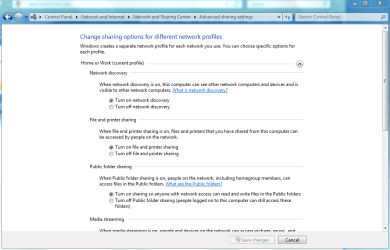
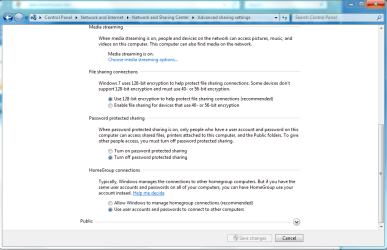
You still need to allow premission to access the shared files on the Win7 machine. Just set up permissions on the Win7 machine by going to "Network and sharing center" and then to the left choose "Change Advance sharing settings". The select the settings in the pictures below.

You should also have access to the entire C drive once you do that.

I've been using my XP machine as my file server and it works perfectly.
 

Attachments

  • sharing center 1.PNG
    sharing center 1.PNG
    32.5 KB · Views: 339
  • sharing center 2.PNG
    sharing center 2.PNG
    35.2 KB · Views: 173
Last edited:

My Computer

Computer type
PC/Desktop
Computer Manufacturer/Model Number
Home built
OS
Windows 7 Ult, Windows 8.1 Pro,
CPU
Q9650-4.275GHz, E8600 4.5GHz, E6750-3.8GHz
Motherboard
Evga 780i FTW
Memory
G.Skill PC2 9600 1200Mhz 5 5 5 15 2T
Graphics Card(s)
GTX480
Sound Card
Asus Xonar D2
Monitor(s) Displays
HannsG
Screen Resolution
1680X1050
Hard Drives
GSkill Phoenix Pro 120GB SSD
PSU
ThermalTake Toughpower 1000Watt modular
Case
ThermalTake XaserV
Cooling
Xigmatek S1283
Keyboard
Logitech G15
Mouse
Logitech G9
Internet Speed
T1
I have already done all of that and I am still having the same issues.
I have gone through so many tutorials, and I have no Idea what I am doing wrong.
 

My Computer

OS
win 7
Back
Top