
Problem Of connection over LAN.

What do you mean by checking the cable??? Only way is to replace the cable, but keeping in mind 60mtr makes it impossible. Also, I dont think a cable can cause the speed issue.
 

My Computer My Computer

Computer Manufacturer/Model Number
MacBook Pro
OS
Lion
CPU
i5
Memory
4GB
Graphics Card(s)
Intel
Screen Resolution
1200x800
Hard Drives
Seagate FreeAgent GO 250GB Ext. HDD
What do you mean by checking the cable??? Only way is to replace the cable, but keeping in mind 60mtr makes it impossible. Also, I dont think a cable can cause the speed issue.

Oh yes cable can make a huge difference. Here is a test you can do get a 9v battery, a light bulb and a 3 meter wire. Make sure the bulb works and connecting it directly to the battery with short wires everything works note how bright the bulb is. Next connect the battery on one end of the 3 meter wire and a light bulb on the other. Look at the bulb see how bright it is. Next get a 15 meter cable and do the same thing. The bulb may not be very bright or off completely. This is a very basic example of how cabling does make a difference. Then there are issues with ends, kinks in the wire, how close it is to electric sources, heat, moisture, etc. etc.
 
Last edited:

My Computer My Computer

Computer type
PC/Desktop
Computer Manufacturer/Model Number
Dell OP7010
OS
Windows 7 Enterprise (x64); Windows Server 2008 R2 (x64)
Memory
16GB
Monitor(s) Displays
4 Dell 24" LCD
Screen Resolution
1280x1024
Keyboard
Dell
Mouse
Dell Optical
Internet Speed
40meg
Dear Sirs,

Thank you very much for your guide lines. I have purchase Ethernet 4 pair cable after your said cable test.Its true that My old cable was create problem. Now, one wire of orange pair make fluctuating of lamp working. I have lay down new cable and connect with same existing router port. Now my PC connect on 100mbps speed. you can check results in attach image.

Dear all experts, Now I have rich on 100mbps speed but not 1gbps :cry:,Kindly guide me how to access this speed.
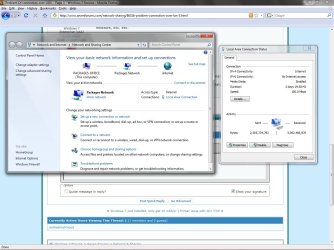
Once again lot of thank because I have lot of learn knowledge form this forum.
 

Attachments

  • LAN PROBLEM.jpg
    LAN PROBLEM.jpg
    130.6 KB · Views: 36

My Computer My Computer

Computer Manufacturer/Model Number
Dell/GX380
OS
Windows Seven 32Bit
CPU
2.93GHz
Memory
2GB
Hard Drives
250Gb
Case
Tower
Does your HUB or Switch or Router support 1GB? If not 100meg may be as fast as you can go. Did you buy a CAT 5e or CAT 6 cable? Those cables are certified for 1GB anything less is not. (Even though they may run at 1GB they are not certified and you may have problems) The larger number the better so if you bought CAT 7 you are fine.
 

My Computer My Computer

Computer type
PC/Desktop
Computer Manufacturer/Model Number
Dell OP7010
OS
Windows 7 Enterprise (x64); Windows Server 2008 R2 (x64)
Memory
16GB
Monitor(s) Displays
4 Dell 24" LCD
Screen Resolution
1280x1024
Keyboard
Dell
Mouse
Dell Optical
Internet Speed
40meg
Dear Sir,

I have purchase CAT6, 4 UTP cable in blue color.Sir Please guide me, how to test or check my router can work or support on 1Gbps??.
We are using Cisco Catalyst 2960 series switch.
 

My Computer My Computer

Computer Manufacturer/Model Number
Dell/GX380
OS
Windows Seven 32Bit
CPU
2.93GHz
Memory
2GB
Hard Drives
250Gb
Case
Tower
Unless your 2960 switch is a G series (most are not) you will only connect at 100meg. G series switches are very expensive and most mid-size or enterprise companies don't buy them.

ex: 2960G-24
 

My Computer My Computer

Computer type
PC/Desktop
Computer Manufacturer/Model Number
Dell OP7010
OS
Windows 7 Enterprise (x64); Windows Server 2008 R2 (x64)
Memory
16GB
Monitor(s) Displays
4 Dell 24" LCD
Screen Resolution
1280x1024
Keyboard
Dell
Mouse
Dell Optical
Internet Speed
40meg
Sir,

Its true, we are using 2960G-24 model switch:D.Now plz tell me how can gain full speed advantages of our above mention switch.
 

My Computer My Computer

Computer Manufacturer/Model Number
Dell/GX380
OS
Windows Seven 32Bit
CPU
2.93GHz
Memory
2GB
Hard Drives
250Gb
Case
Tower
Sir,

Its true, we are using 2960G-24 model switch:D.Now plz tell me how can gain full speed advantages of our above mention switch.

If you plug your computer into the switch and any other device that has a 1Gb card or support you should connect at 1Gb.

What happens when you connect the newly purchased cable from the computer to the switch do you get 1Gb? If you do then you know your switch is working, cable is good, and your NIC on your computer is setup for 1Gb. If you are trying to get your ROUTER to connect at 1Gb you may not be able to. Many routers only support 100meg. What is the model number of the router?
 

My Computer My Computer

Computer type
PC/Desktop
Computer Manufacturer/Model Number
Dell OP7010
OS
Windows 7 Enterprise (x64); Windows Server 2008 R2 (x64)
Memory
16GB
Monitor(s) Displays
4 Dell 24" LCD
Screen Resolution
1280x1024
Keyboard
Dell
Mouse
Dell Optical
Internet Speed
40meg
Sir,
When I connect my new cable plug into my pc then my computer task bar saying that my pc connect with LAN then i check my network controller speed configuration.it was on auto and lan was connected on 100mbps.I search 1Gbps option but there is no any option of 1Gbps.

Sir, In our office 18 computer connected with 2960G-24 this switch.one fiber optic cable comming from 1 km away and connect with this switch.I dont know which router is running back side.
 

My Computer My Computer

Computer Manufacturer/Model Number
Dell/GX380
OS
Windows Seven 32Bit
CPU
2.93GHz
Memory
2GB
Hard Drives
250Gb
Case
Tower

My Computer My Computer

Computer type
PC/Desktop
Computer Manufacturer/Model Number
Dell OP7010
OS
Windows 7 Enterprise (x64); Windows Server 2008 R2 (x64)
Memory
16GB
Monitor(s) Displays
4 Dell 24" LCD
Screen Resolution
1280x1024
Keyboard
Dell
Mouse
Dell Optical
Internet Speed
40meg
Sir,

I download R239885 & NIC_DRVR_WIN_R239885 files from your mention link.After extract to file system giving error as " This installation package is not supported by this processor type"
Now Please ???
I think this packages applicable for windows seven 64bit but I am using 32bit.is it true??
 

My Computer My Computer

Computer Manufacturer/Model Number
Dell/GX380
OS
Windows Seven 32Bit
CPU
2.93GHz
Memory
2GB
Hard Drives
250Gb
Case
Tower
Last edited:

My Computer My Computer

Computer type
PC/Desktop
Computer Manufacturer/Model Number
Dell OP7010
OS
Windows 7 Enterprise (x64); Windows Server 2008 R2 (x64)
Memory
16GB
Monitor(s) Displays
4 Dell 24" LCD
Screen Resolution
1280x1024
Keyboard
Dell
Mouse
Dell Optical
Internet Speed
40meg
System Information
------------------
Operating System: Windows 7 Professional 32-bit (6.1, Build 7600)
System Manufacturer: Dell Inc.
System Model: OptiPlex 380
BIOS: Phoenix ROM BIOS PLUS Version 1.10 A00
Processor: Intel(R) Core(TM)2 Duo CPU E7500 @ 2.93GHz (2 CPUs), ~2.9GHz
Memory: 2048MB RAM
Available OS Memory: 2012MB RAM
Page File: 1041MB used, 2982MB available
------------
Display Devices
---------------
Card name: Intel(R) G41 Express Chipset
Manufacturer: Intel Corporation
Chip type: Intel(R) 4 Series Express Chipset Family
Display Memory: 813 MB
-------------
Net Work Adapter.
-------------
Name: Broadcom NetLink (TM) Gigabit Ethernet


* I have collect this information with the help of dxdiag command.
 

My Computer My Computer

Computer Manufacturer/Model Number
Dell/GX380
OS
Windows Seven 32Bit
CPU
2.93GHz
Memory
2GB
Hard Drives
250Gb
Case
Tower
buddy, you need to fill up the above in your profile, so anybody who wants to help you and click on the My system specs will see what are you using exactly. The above confusion of 32 or 64 bit would havent be arised.

Anyways, here is the link to download the same drivers for 32bit..if you havent downloaded and installed them yet..
Drivers & Downloads
 

My Computer My Computer

Computer Manufacturer/Model Number
MacBook Pro
OS
Lion
CPU
i5
Memory
4GB
Graphics Card(s)
Intel
Screen Resolution
1200x800
Hard Drives
Seagate FreeAgent GO 250GB Ext. HDD
buddy, you need to fill up the above in your profile, so anybody who wants to help you and click on the My system specs will see what are you using exactly. The above confusion of 32 or 64 bit would havent be arised.

Anyways, here is the link to download the same drivers for 32bit..if you havent downloaded and installed them yet..
Drivers & Downloads

Thanks for the support!
 

My Computer My Computer

Computer type
PC/Desktop
Computer Manufacturer/Model Number
Dell OP7010
OS
Windows 7 Enterprise (x64); Windows Server 2008 R2 (x64)
Memory
16GB
Monitor(s) Displays
4 Dell 24" LCD
Screen Resolution
1280x1024
Keyboard
Dell
Mouse
Dell Optical
Internet Speed
40meg
No problem buddy..that is why we are here ;)

And BTW, have been rigorously following up with this thread. Think only we 2 as of now ;) LOL
 

My Computer My Computer

Computer Manufacturer/Model Number
MacBook Pro
OS
Lion
CPU
i5
Memory
4GB
Graphics Card(s)
Intel
Screen Resolution
1200x800
Hard Drives
Seagate FreeAgent GO 250GB Ext. HDD
No problem buddy..that is why we are here ;)

And BTW, have been rigorously following up with this thread. Think only we 2 as of now ;) LOL

Looks like you are correct! :D
 

My Computer My Computer

Computer type
PC/Desktop
Computer Manufacturer/Model Number
Dell OP7010
OS
Windows 7 Enterprise (x64); Windows Server 2008 R2 (x64)
Memory
16GB
Monitor(s) Displays
4 Dell 24" LCD
Screen Resolution
1280x1024
Keyboard
Dell
Mouse
Dell Optical
Internet Speed
40meg
OK Sir, I will do that,
R239862
This driver is already installed on my PC.
Now :cry:
 

My Computer My Computer

Computer Manufacturer/Model Number
Dell/GX380
OS
Windows Seven 32Bit
CPU
2.93GHz
Memory
2GB
Hard Drives
250Gb
Case
Tower
Reminder
 

My Computer My Computer

Computer Manufacturer/Model Number
Dell/GX380
OS
Windows Seven 32Bit
CPU
2.93GHz
Memory
2GB
Hard Drives
250Gb
Case
Tower
any possibility of completely removing the driver, restart and reinstall the driver??
 

My Computer My Computer

Computer Manufacturer/Model Number
MacBook Pro
OS
Lion
CPU
i5
Memory
4GB
Graphics Card(s)
Intel
Screen Resolution
1200x800
Hard Drives
Seagate FreeAgent GO 250GB Ext. HDD
Back
Top