Problem open command Window(administrator)

dreuzel

Never Ever any HP device
Member
Local time
5:58 PM
Messages
32
I'm trying to create some auto setup procedures but can not setup
a CMD administrator command ( non administrator seems to work)


registry tweak
Code:
;  //run  administrator command from explorer 
[HKEY_CLASSES_ROOT\Directory\shell\runas]
@="Open Command Window Here (Administrator)"
[HKEY_CLASSES_ROOT\Directory\shell\runas\command]
@="cmd.exe /s /k pushd \"%V\""

all seems to work perfectly on a local device
but as I'm using a networked device (win7/64 fresh install -stable)
the command prompt never apears (immedialty stops)

both on mapped device net user //server/share x: /persist:yes
and direct //server/share (workgroup//homegroup)

any tips to further debug the problem /maybe a solution ???
 

My Computer

OS
win7
Hi dreuzel,

This reg entry appears to create a right click option called "Open Command Window Here (Administrator)", which in turn opens a CMD prompt with admin elevation. You are saying that mapped drives don't open but local drives do, this is correct so far yeah?

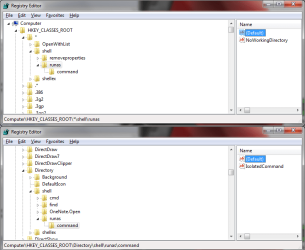
Take a look for any other entries in the registry that might effect the results. The places to check are:
Computer\HKEY_Classes_root\*\shell\runas
Computer\HKEY_Classes_root\Directory\shell\runas

Meanwhile I'll test this too and let you know what I find.
 

Attachments

  • CMD registry entries.png
    CMD registry entries.png
    30.4 KB · Views: 153

My Computer

Computer Manufacturer/Model Number
Custom Hack job
OS
Windows 7 Ultimate 64 bit
CPU
Intel(R) Core(TM)2 Quad CPU Q8200 @ 2.33GHz
Motherboard
GigaByte EP45-UD3
Memory
8 GB Kingston
Graphics Card(s)
Nvidia GeForce 9600GT
Sound Card
Soundblaster Audigy
Monitor(s) Displays
AOC x2 22"
Hard Drives
2 x Samsung 500GB (RAID)
2 x Samsung 2TB
1 x WD Green 2TB
1 x Seagate 1TB
1 x Samsung 500GB
PSU
Thermaltake QFan 750W
Case
CM Scout Gaming
Cooling
Coolermaster V10
Keyboard
Microsoft Wireless Keyboard 1000
Mouse
Microsoft Wireless Optical 2000
Internet Speed
320
Other Info
Winfast PVR2000CP
LG DVD-RAM DVD/RW/DL Super Multi
Linksys WMP300Nx2 Wireless Adapter
Well I did some testing and found that I would receive the error "The system cannot find the drive specified." when I used the "Open Command Window Here (Administrator)" right click option on a networked mapped-drive shorcut.

However there is a workaround - Don't use the mapped drive shortcut, use a UNC shortcut.

e.g.
\\networkedPC\myshare mapped as Z:\myshare
If you right click on the shortcut Z:\myshare it fails with "The system cannot find the drive specified" error opening in your CMD window.
If you rightclick on the shortcut \\networkedPC\myshare a temporary drive letter is allocated and it works.

Hope this helps.
 

My Computer

Computer Manufacturer/Model Number
Custom Hack job
OS
Windows 7 Ultimate 64 bit
CPU
Intel(R) Core(TM)2 Quad CPU Q8200 @ 2.33GHz
Motherboard
GigaByte EP45-UD3
Memory
8 GB Kingston
Graphics Card(s)
Nvidia GeForce 9600GT
Sound Card
Soundblaster Audigy
Monitor(s) Displays
AOC x2 22"
Hard Drives
2 x Samsung 500GB (RAID)
2 x Samsung 2TB
1 x WD Green 2TB
1 x Seagate 1TB
1 x Samsung 500GB
PSU
Thermaltake QFan 750W
Case
CM Scout Gaming
Cooling
Coolermaster V10
Keyboard
Microsoft Wireless Keyboard 1000
Mouse
Microsoft Wireless Optical 2000
Internet Speed
320
Other Info
Winfast PVR2000CP
LG DVD-RAM DVD/RW/DL Super Multi
Linksys WMP300Nx2 Wireless Adapter
exactly my point
Now using Dos commands I often get problems they can not handle the UNC
this is long term project of MS to get that in order .......
spec's so we are in a locked up situation
require UNC to work all over .....

is there a way to add a mapped device ... (adding something before the
mapped command @="cmd.exe /s /k pushd \"%V\""


are there alternatives as %cd%
what is %v in this case is this explained somewhere
 

My Computer

OS
win7
exactly my point
Now using Dos commands I often get problems they can not handle the UNC
this is long term project of MS to get that in order .......
spec's so we are in a locked up situation
require UNC to work all over .....

Sorry I was away on a job last night... back now to help.

I'm not understanding a key piece of the puzzle here.
1. What are you creating auto setup procedures for (is it software, installation, policy roll outs, etc)? I'm just trying to understand why the right click to admin-cmd is needed? If there is a different way to get the same results, understanding the project will help me help you.
2. Is this to go into a batch or vbs script?
3. The workaround is not good because UNC paths fail for another part of your project is this correct?


is there a way to add a mapped device ... (adding something before the
mapped command @="cmd.exe /s /k pushd \"%V\""
In batch-file world yes; but not so with our mapped drives (and I have no idea why)
you can normally link to CMD lines together with the && command; but I tried for a few minutes and failed with our mapped drives.
I also looked at finding the current path with %~dp0
Code:
set 	curpath=%~dp0
pushd 	%curpath%
but I couldn't get it to work from a single command line (i.e. && fails on this command because the variable needs to be found before it can be pushed). I will try again this evening when I have more time. I'll also look at 'calling' a batch file where we have more options and any other ideas that spring to mind (currently it's 11 am for me).

are there alternatives as %cd%
what is %v in this case is this explained somewhere
@="cmd.exe /s /k pushd \"%V\"
The V% is the variable, in your example it is the directory that CMD is called to.

Yep there's plenty of alternatives depending on what you want to do.
For example if I was to.....
Code:
net use X: \\media\PICTURES
X:
I don't need to cd to get to X, just 'X:' on it's own suffices. But I can't do this in one line 'net use X: \\media\PICTURES && X:' because the drive needs to be mapped first before it can be found.

You could use ~dp0 in place of %cd% for some instances.
for an example paste these into a bat or a command window
Code:
echo this is %%cd%%  %cd%
echo this is %%~dp0 %~dp0

Lastly, for your scenario, is a shortcut that opens a CMD windows in a pre-specified mapped target an option?
 

My Computer

Computer Manufacturer/Model Number
Custom Hack job
OS
Windows 7 Ultimate 64 bit
CPU
Intel(R) Core(TM)2 Quad CPU Q8200 @ 2.33GHz
Motherboard
GigaByte EP45-UD3
Memory
8 GB Kingston
Graphics Card(s)
Nvidia GeForce 9600GT
Sound Card
Soundblaster Audigy
Monitor(s) Displays
AOC x2 22"
Hard Drives
2 x Samsung 500GB (RAID)
2 x Samsung 2TB
1 x WD Green 2TB
1 x Seagate 1TB
1 x Samsung 500GB
PSU
Thermaltake QFan 750W
Case
CM Scout Gaming
Cooling
Coolermaster V10
Keyboard
Microsoft Wireless Keyboard 1000
Mouse
Microsoft Wireless Optical 2000
Internet Speed
320
Other Info
Winfast PVR2000CP
LG DVD-RAM DVD/RW/DL Super Multi
Linksys WMP300Nx2 Wireless Adapter
A follow-up.

It doesn't work for me outside of the workaround I provided earlier. Hmm strange stuff.

Let me know the answers to my questions above and we'll think of a route forward.
 

My Computer

Computer Manufacturer/Model Number
Custom Hack job
OS
Windows 7 Ultimate 64 bit
CPU
Intel(R) Core(TM)2 Quad CPU Q8200 @ 2.33GHz
Motherboard
GigaByte EP45-UD3
Memory
8 GB Kingston
Graphics Card(s)
Nvidia GeForce 9600GT
Sound Card
Soundblaster Audigy
Monitor(s) Displays
AOC x2 22"
Hard Drives
2 x Samsung 500GB (RAID)
2 x Samsung 2TB
1 x WD Green 2TB
1 x Seagate 1TB
1 x Samsung 500GB
PSU
Thermaltake QFan 750W
Case
CM Scout Gaming
Cooling
Coolermaster V10
Keyboard
Microsoft Wireless Keyboard 1000
Mouse
Microsoft Wireless Optical 2000
Internet Speed
320
Other Info
Winfast PVR2000CP
LG DVD-RAM DVD/RW/DL Super Multi
Linksys WMP300Nx2 Wireless Adapter
fix

i've been looking for how to do this in win7 for a while. it was SO much more simple in XP. your solution was close and got me started. :)

here is a fix that worked for me:

[HKEY_CLASSES_ROOT\Directory\shell\runas\command]
@="cmd.exe /k \"pushd %L && title Command Prompt\""
 

My Computer

OS
win7 ulti x64
CPU
i7
Memory
6g
Graphics Card(s)
ati
Monitor(s) Displays
3
i've been looking for how to do this in win7 for a while. it was SO much more simple in XP. your solution was close and got me started. :)

here is a fix that worked for me:

[HKEY_CLASSES_ROOT\Directory\shell\runas\command]
@="cmd.exe /k \"pushd %L && title Command Prompt\""

Thanks Mastapat11 for posting that here. I've seen your solution on a number of other threads but I totally couldn't remember "this" thread to find it. It's good of you to leave that here for other readers (and of course triggering this to appear in my active threads once more. Stick around we can do with a fee more script writers ever now and then.
 

My Computer

Computer Manufacturer/Model Number
Custom Hack job
OS
Windows 7 Ultimate 64 bit
CPU
Intel(R) Core(TM)2 Quad CPU Q8200 @ 2.33GHz
Motherboard
GigaByte EP45-UD3
Memory
8 GB Kingston
Graphics Card(s)
Nvidia GeForce 9600GT
Sound Card
Soundblaster Audigy
Monitor(s) Displays
AOC x2 22"
Hard Drives
2 x Samsung 500GB (RAID)
2 x Samsung 2TB
1 x WD Green 2TB
1 x Seagate 1TB
1 x Samsung 500GB
PSU
Thermaltake QFan 750W
Case
CM Scout Gaming
Cooling
Coolermaster V10
Keyboard
Microsoft Wireless Keyboard 1000
Mouse
Microsoft Wireless Optical 2000
Internet Speed
320
Other Info
Winfast PVR2000CP
LG DVD-RAM DVD/RW/DL Super Multi
Linksys WMP300Nx2 Wireless Adapter
Back
Top