Solved Problem reformatting using usb

Jingyiyo

New member
Local time
12:07 PM
Messages
6
My dvd drive on my desktop is faulty so I will have to boot using my thumbdrive. I used Koala to create a bootable windows 7 usb from my windows 7 disk. It all went well but after the restart, it went back to the page where I will choose my language. I have tried removing the thumbdrive right after the computer restarts. The setup continues and it says that it is 'completing installation'. However, after the last restart the screen went blank but I could still move and see my mouse. Please help I have been trying to solve this problem the whole day!
 

My Computer

OS
Windows 7 Ultimate x64
The only method which is both easy and always works correctly is writing to stick using Universal USB Installer with Win7 in dropdown menu.

Then set BIOS Boot order to HD first. Boot the stick instead using the one-time Boot Menu key given on first boot screen. This precludes the need to remove it or restrain its reboots.

If this fails to solve the issue, then wipe the HD using Diskpart Clean Command from Command Line accessing DISKPART At PC Startup. Create partitions as desired during install or just click next to let installer do it for you.

Unplug all other HDs and peripherals to try install again.

Next reset the BIOS to defaults, set SATA controller to AHCI to try install.

If the stall persists at the same place, try entering Device Mgr to uninstall any devices in error (likely Display) to see if isntall will complete and you can update driver from desktop. Device Manager - Access During Windows 7 Installation

Other tips to adapt to get a perfect Clean Reinstall Windows 7 Factory OEM
 
Thank's for the help. But none of the methods worked. I'm going to get a external Dvd drive in these few days. Would you recommend Asustek SDRW-08D2S-U/ HP DVD550s External 8x Slimline USB DVD Writer or Samsung SE-S084C/B 8X tray external slim DVD-writer?
 

My Computer

OS
Windows 7 Ultimate x64
There can only be two reasons why you are not able to install Windows 7 from your pendrive.

1. Your Windows 7 ISO is corrupt.( Download the official Windows 7 SP1 ISO (your version for which you have a valid license) from Official Windows 7 SP1 ISO from Digital River « My Digital Life and use it)

2. Your pendrive is defective. (Try another pendrive)

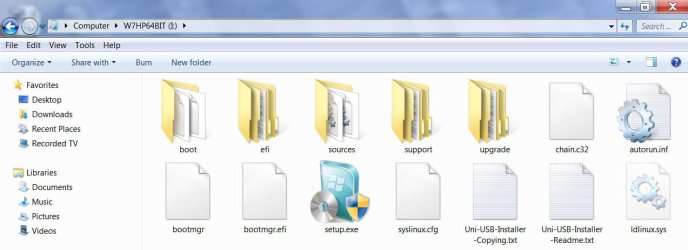
I still have the Windows 7 install Lexar Pen drive I created with Universal USB Installer + downloaded Home Premium 64 bit ISO which I used to install on my netbook.

W7HP64Lexar.jpg

No problem with Universal USB Installer.

As for the external drive, I would recommend ASUS USB 2.0 Slim External 6x Blu-Ray Writer SBW-06C1S-U/DBLU/G/ACI/AS :) ( I do not know about DVD writers.)
 

My Computer

OS
Windows 7 Home Premium 32 bit
There can only be two reasons why you are not able to install Windows 7 from your pendrive.

1. Your Windows 7 ISO is corrupt.( Download the official Windows 7 SP1 ISO (your version for which you have a valid license) from Official Windows 7 SP1 ISO from Digital River « My Digital Life and use it)

2. Your pendrive is defective. (Try another pendrive)

I still have the Windows 7 install Lexar Pen drive I created with Universal USB Installer + downloaded Home Premium 64 bit ISO which I used to install on my netbook.

View attachment 201150

No problem with Universal USB Installer.

As for the external drive, I would recommend ASUS USB 2.0 Slim External 6x Blu-Ray Writer SBW-06C1S-U/DBLU/G/ACI/AS :) ( I do not know about DVD writers.)

I've tried booting using the downloaded Win7 ISO from digital life but it didn't work too. I've tried using 2 other pendrives but it didn't work either.
 

My Computer

OS
Windows 7 Ultimate x64

My Computer

Computer type
PC/Desktop
Computer Manufacturer/Model Number
Home Built Desktop By DataTech
OS
Windows 7 Ultimate X64 SP1
CPU
Intel i5-2550K, Differing ~4.4-4.8GHz No built in GPU
Motherboard
ASUS P8Z68-V PRO/GEN3
Memory
16GB G.Skill Sniper 1866MHz @ 2133MHz 2x8GB
Graphics Card(s)
ASUS GTX650TIB-DC2OC-2GD5, (650TI Boost)
Sound Card
Onboard Realtek 5-1
Monitor(s) Displays
Samsung P2570HD
Screen Resolution
1920x1080
Hard Drives
Samsung 840 Pro 256GB SSD for OS, 500GB Seagate Constellation (Enterprise drive) for Data
PSU
Corsair HX650W
Case
Inwin Dragon Rider
Cooling
Hyper 212 EVO w/two Noctua fans, push-pull, @1300 RPM
Keyboard
E-Z Eyes, bright yellow keys with large characters
Mouse
steelseries SENSEI Laser Pro Gaming
Internet Speed
48-51Mbs Mbs down, 11 Mbs up Xfinity Cable
Antivirus
Norton Internet Security 2013
Browser
IE 10, Opera, Pale Moon if needed
Other Info
4 case fans, LG BluRay-RE, ASUS DVD-RW, Mr. Fusion power supply, 1.21 gigawatts.
I have this problem of the computer rebooting over and over again. So as you have mentioned, I changed the boot priority to my HD on the first reboot. It went well and showed the blue page where it says 'completing installation'. However, after the second reboot, it went into a blank screen but I could still see my mouse and it reboots for the third time. After the third time, it went into the black screen again and everything stopped there. I've checked and my pendrive is not faulty. The Win7 ISO is not either. Please help I have been trying to fix this for 2 days.
 

My Computer

OS
Windows 7 Ultimate x64
Then I would infer that your Windows install is being wriitten into bad sectors that may be causing these problems. With that in mind, I would suggest that you run the diagnostic/repair tool of your HDD manufacturer and check your Hard disk.(Again you may have to run it from bootable pendrive)

( I do not discount the possibility that I may be wrong and there may be others who know better with their wisdom and experience.)
 

My Computer

OS
Windows 7 Home Premium 32 bit
Thank you everyone for making an effort to help me. I've solved the problem by replacing my Dvd drive. The people on this forum is really helpful. I would certainly try my best to help the others in any way I can! Thank you!
 

My Computer

OS
Windows 7 Ultimate x64
Thanks for reporting back and I'm glad you got it.:D
 

My Computer

Computer type
PC/Desktop
Computer Manufacturer/Model Number
Home Built Desktop By DataTech
OS
Windows 7 Ultimate X64 SP1
CPU
Intel i5-2550K, Differing ~4.4-4.8GHz No built in GPU
Motherboard
ASUS P8Z68-V PRO/GEN3
Memory
16GB G.Skill Sniper 1866MHz @ 2133MHz 2x8GB
Graphics Card(s)
ASUS GTX650TIB-DC2OC-2GD5, (650TI Boost)
Sound Card
Onboard Realtek 5-1
Monitor(s) Displays
Samsung P2570HD
Screen Resolution
1920x1080
Hard Drives
Samsung 840 Pro 256GB SSD for OS, 500GB Seagate Constellation (Enterprise drive) for Data
PSU
Corsair HX650W
Case
Inwin Dragon Rider
Cooling
Hyper 212 EVO w/two Noctua fans, push-pull, @1300 RPM
Keyboard
E-Z Eyes, bright yellow keys with large characters
Mouse
steelseries SENSEI Laser Pro Gaming
Internet Speed
48-51Mbs Mbs down, 11 Mbs up Xfinity Cable
Antivirus
Norton Internet Security 2013
Browser
IE 10, Opera, Pale Moon if needed
Other Info
4 case fans, LG BluRay-RE, ASUS DVD-RW, Mr. Fusion power supply, 1.21 gigawatts.
Back
Top