problem saving excel spread sheet in 2010 to 97-2003 format

Muskiehunterjoe

New member
Local time
5:17 PM
Messages
5
I have an new style Excel xlsx spreadsheet that I received from a customer through Email and I can open and re-save as an xlsx spreadsheet using excel 2010. I have saved it to my desktop. When I try to save it in the 97-2003 xls format. Excel then crashes right away and a window pops up. Microsoft Excel has stopped working. The first window reads that it is checking for a solution to the problem. Then it pops up with a second window within 2 seconds and it reads - A problem caused the program to stop working correctly. Windows will close the program and notify you if a solution is available.

The user that received this spread sheet is using 2003 and can not open it at all. It comes up with the window - trying to convert - and then says it can not convert the file.

I am using windows 7 64 bit with office 2010 Pro and all updates have been installed.

Thanks
Joel
 

My Computer My Computer

At a glance

7 -64 bit2.0 quad6 Gb
Computer Manufacturer/Model Number
dell Vostro
OS
7 -64 bit
CPU
2.0 quad
Memory
6 Gb
Hard Drives
450 Gb
Hi Muskiehunterjoe, welcome to Seven Forum. :D

You could try running the Compatability Checker or temporarily change the default save option:
Dealing with Excel 2010 File Formats - For Dummies

Running the Compatibility Checker

You also can run the Compatibility Checker in Excel 2010 to find any potential compatibility issues if you plan to save the file in the Excel 97-2003 file format. To use this feature, follow these steps:

  1. In Excel 2010, open the workbook you want to check.
  2. Click the File tab, click the Check for Issues button on the Info tab (on the left), and click Check Compatibility.
    The Microsoft Excel – Compatibility Checker dialog box appears. Any features that might cause issues are listed in the Summary box.
  3. Click OK to close the dialog box.
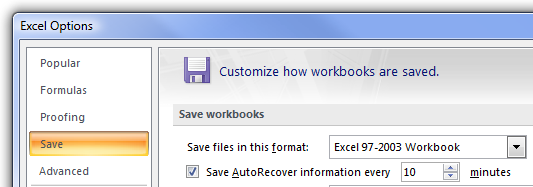
If you’re working in an office where all the workbooks you produce with Excel 2010 must be saved in the old Excel 97-2003 file format for compatibility, you can change the program’s default Save setting so that the program always saves all new workbooks in the older file format. To do this, open the Save tab of the Excel Options dialog box (File→Options→Save) and then select Excel 97-2003 Workbook in the Save Files in This Format drop-down list box.
 

My Computer My Computer

At a glance

Windows 7 Home Premium 64bitIntel(R) Core(TM) i3-2120 CPU @ 3.30GHz3.00 GB(1) Intel(R) HD Graphics (2) VNC Mirror Driver
Computer type
PC/Desktop
Computer Manufacturer/Model Number
Packard Bell
OS
Windows 7 Home Premium 64bit
CPU
Intel(R) Core(TM) i3-2120 CPU @ 3.30GHz
Motherboard
Packard Bell IPISB-AG
Memory
3.00 GB
Graphics Card(s)
(1) Intel(R) HD Graphics (2) VNC Mirror Driver
Sound Card
Realtek High Definition Audio
Monitor(s) Displays
AIO LCD
Screen Resolution
1920 x 1080
Hard Drives
WDC WD10EADX-22TDHB0 ATA Device
Fixed hard disk media
4 partitions
931.51 GB
Keyboard
Wireless
Mouse
Wireless
Antivirus
Microsoft Security Essentials
Browser
IE; Firefox
Other Info
Also:
Samsung N220 Plus Netbook - Windows 7 Home
HP laptop
iPad 5
I opened it up with 2010 and ran the compatibility checker and it found nothing. I set the compatibility checker to run when saving and I tried to save it in the 97-2003 format again and excel crashed again right away. It came up with the same error message.


Thanks Irene for the reply.


Thanks
Joel
 

My Computer My Computer

At a glance

7 -64 bit2.0 quad6 Gb
Computer Manufacturer/Model Number
dell Vostro
OS
7 -64 bit
CPU
2.0 quad
Memory
6 Gb
Hard Drives
450 Gb
Joel, did you try changing the default 'Save' option, like this (as a temporary measure)? [I realise that this guide is for 2007, but should also apply to 2010]
Make Excel 2007 Always Save in Excel 2003 Format - How-To Geek
.
.

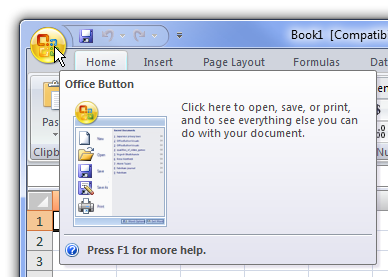
Start by clicking that big round Office Button in the upper left hand corner.
image60.png

.
.

In the resulting menu, click the Excel Options button.
image62.png


Now click the Save tab, and then change the “Safe files in this format” dropdown to “Excel 97-2003 Workbook”.

image63.png
 

My Computer My Computer

At a glance

Windows 7 Home Premium 64bitIntel(R) Core(TM) i3-2120 CPU @ 3.30GHz3.00 GB(1) Intel(R) HD Graphics (2) VNC Mirror Driver
Computer type
PC/Desktop
Computer Manufacturer/Model Number
Packard Bell
OS
Windows 7 Home Premium 64bit
CPU
Intel(R) Core(TM) i3-2120 CPU @ 3.30GHz
Motherboard
Packard Bell IPISB-AG
Memory
3.00 GB
Graphics Card(s)
(1) Intel(R) HD Graphics (2) VNC Mirror Driver
Sound Card
Realtek High Definition Audio
Monitor(s) Displays
AIO LCD
Screen Resolution
1920 x 1080
Hard Drives
WDC WD10EADX-22TDHB0 ATA Device
Fixed hard disk media
4 partitions
931.51 GB
Keyboard
Wireless
Mouse
Wireless
Antivirus
Microsoft Security Essentials
Browser
IE; Firefox
Other Info
Also:
Samsung N220 Plus Netbook - Windows 7 Home
HP laptop
iPad 5
Tried the changing of default file format and when I click save it still saves it as the XLSX format. I do believe this is for new files only that it will automatically save as the old format. If it is already an XLSX format it will continue to save it as that. You still have to change it to XLS to save it in the old format. Anyway I tried it and it still crashes.


Thanks
Joel
 

My Computer My Computer

At a glance

7 -64 bit2.0 quad6 Gb
Computer Manufacturer/Model Number
dell Vostro
OS
7 -64 bit
CPU
2.0 quad
Memory
6 Gb
Hard Drives
450 Gb
Just found out that the user with 2003 has 2 people that send him Excel files both of them are XLSX files. He can open the files from one but not the other?

What can it be that one user is doing that messes up 2003 so it will not open the XLSX files?

Thanks
Joel
 

My Computer My Computer

At a glance

7 -64 bit2.0 quad6 Gb
Computer Manufacturer/Model Number
dell Vostro
OS
7 -64 bit
CPU
2.0 quad
Memory
6 Gb
Hard Drives
450 Gb

My Computer My Computer

At a glance

Windows 7 Home Premium 64bitIntel(R) Core(TM) i3-2120 CPU @ 3.30GHz3.00 GB(1) Intel(R) HD Graphics (2) VNC Mirror Driver
Computer type
PC/Desktop
Computer Manufacturer/Model Number
Packard Bell
OS
Windows 7 Home Premium 64bit
CPU
Intel(R) Core(TM) i3-2120 CPU @ 3.30GHz
Motherboard
Packard Bell IPISB-AG
Memory
3.00 GB
Graphics Card(s)
(1) Intel(R) HD Graphics (2) VNC Mirror Driver
Sound Card
Realtek High Definition Audio
Monitor(s) Displays
AIO LCD
Screen Resolution
1920 x 1080
Hard Drives
WDC WD10EADX-22TDHB0 ATA Device
Fixed hard disk media
4 partitions
931.51 GB
Keyboard
Wireless
Mouse
Wireless
Antivirus
Microsoft Security Essentials
Browser
IE; Firefox
Other Info
Also:
Samsung N220 Plus Netbook - Windows 7 Home
HP laptop
iPad 5
Tried the repair on the file and it found nothing. I tried the original file that came in and it does the same thing. Excel crashes right when I click save when trying to save it in the old format.

I am going to try and get in contact with the person who sent it and see what they have and how they did what they did.

Thanks
Joel
 

My Computer My Computer

At a glance

7 -64 bit2.0 quad6 Gb
Computer Manufacturer/Model Number
dell Vostro
OS
7 -64 bit
CPU
2.0 quad
Memory
6 Gb
Hard Drives
450 Gb
Back
Top