Solved problem sending command

gfheiche

New member
Member
Local time
7:06 PM
Messages
34
When I click on a desk shortcut to open a program, I get first the statement:" There was a problem sending the command to the program." Then the program opens anyhow.
The computer runs windows 7 and firefox 3.51.
How can I get rid of the unnecessary statement:" There was a problem sending the command to the program?"

TIA gfheiche
 

My Computer

OS
windows 7 home premium 64bits
problem

When I click on a desk shortcut to open a program, I get first the statement:" There was a problem sending the command to the program." Then the program opens anyhow.
The computer runs windows 7 and firefox 3.51.
How can I get rid of the unnecessary statement:" There was a problem sending the command to the program?"

TIA gfheiche

HEY gfh

First welcome to sevenforums.

WE could use all your computer specs, OS specs, clean install or upgrade, etc.

TIA

Ken
 

My Computer

Computer Manufacturer/Model Number
HP Pavillion dv-7 1005 Tx
OS
Win 8 Release candidate 8400
CPU
[email protected]
Memory
4 gigs
Graphics Card(s)
Nvidia 9600M
Sound Card
HD built-in
Monitor(s) Displays
17" Wxga
Screen Resolution
1440x900
Cooling
none
Internet Speed
45Mb down 5Mb up
Hello gfh, and welcome to Seven Forums.

As a test for now, you might see if creating a new shortcut directly from the Firefox exe file may work better instead.

Hope this helps,
Shawn
 
Last edited:

My Computer

Computer type
PC/Desktop
Computer Manufacturer/Model Number
Self built custom
OS
64-bit Windows 11 Pro for Workstations
CPU
Intel i7-8700K OC'd to 5 GHz
Motherboard
ASUS ROG Maximus XI Formula Z390
Memory
64 GB (4x16GB) G.SKILL TridentZ RGB DDR4 3600 MHz
Graphics Card(s)
ASUS ROG-STRIX-GTX1080TI-O11G-GAMING
Sound Card
Integrated
Monitor(s) Displays
2 x Samsung Odyssey G7 27"
Screen Resolution
2560x1440
Hard Drives
1TB Samsung 990 PRO M.2,
4TB Samsung 990 PRO PRO M.2,
TerraMaster F8 SSD Plus NAS
PSU
Seasonic Prime Titanium 850W
Case
Thermaltake Core P3
Cooling
Corsair Hydro H115i
Keyboard
Logitech wireless K800
Mouse
Logitech MX Master 4
Internet Speed
2 Gb/s Download and 100 Mb/s Upload
Antivirus
Malwarebyte Anti-Malware Premium
Browser
Google Chrome
Other Info
Logitech Z625 speaker system,
Logitech BRIO 4K Pro webcam,
HP Color LaserJet Pro MFP M477fdn,
APC SMART-UPS RT 1000 XL - SURT1000XLI,
Galaxy S23 Plus phone
Right now, I drag the URL from the Navigation Toolbar onto the desktop.
How do I do this from Firefox.exe file?
Thanks gfheiche
 

My Computer

OS
windows 7 home premium 64bits
Hey Ken,

It is a desktop with an AMD Athlon 64 X2 Dual Core Processor, 1GB RAM, 32 bit.
I upgraded from Vista home premium to Windows 7 Ultimate, using the latest free Release Candidate.
Firefox 3.51

Thanks gfheiche
 

My Computer

OS
windows 7 home premium 64bits
Right now, I drag the URL from the Navigation Toolbar onto the desktop.
How do I do this from Firefox.exe file?
Thanks gfheiche

GFH,

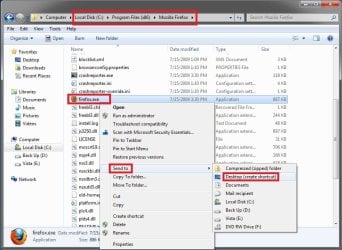
You would just go to the C:\Program Files\Mozilla Firefox folder and right click on the firefox.exe file and clickon Send to and Desktop (Create shortcut) to create the new shortcut to open Firefox with. :)

Firefox.jpg
 

My Computer

Computer type
PC/Desktop
Computer Manufacturer/Model Number
Self built custom
OS
64-bit Windows 11 Pro for Workstations
CPU
Intel i7-8700K OC'd to 5 GHz
Motherboard
ASUS ROG Maximus XI Formula Z390
Memory
64 GB (4x16GB) G.SKILL TridentZ RGB DDR4 3600 MHz
Graphics Card(s)
ASUS ROG-STRIX-GTX1080TI-O11G-GAMING
Sound Card
Integrated
Monitor(s) Displays
2 x Samsung Odyssey G7 27"
Screen Resolution
2560x1440
Hard Drives
1TB Samsung 990 PRO M.2,
4TB Samsung 990 PRO PRO M.2,
TerraMaster F8 SSD Plus NAS
PSU
Seasonic Prime Titanium 850W
Case
Thermaltake Core P3
Cooling
Corsair Hydro H115i
Keyboard
Logitech wireless K800
Mouse
Logitech MX Master 4
Internet Speed
2 Gb/s Download and 100 Mb/s Upload
Antivirus
Malwarebyte Anti-Malware Premium
Browser
Google Chrome
Other Info
Logitech Z625 speaker system,
Logitech BRIO 4K Pro webcam,
HP Color LaserJet Pro MFP M477fdn,
APC SMART-UPS RT 1000 XL - SURT1000XLI,
Galaxy S23 Plus phone
Hello Shawn,
It worked. Great. Thank you very much
GFH
 

My Computer

OS
windows 7 home premium 64bits
You're most welcome. :)
 

My Computer

Computer type
PC/Desktop
Computer Manufacturer/Model Number
Self built custom
OS
64-bit Windows 11 Pro for Workstations
CPU
Intel i7-8700K OC'd to 5 GHz
Motherboard
ASUS ROG Maximus XI Formula Z390
Memory
64 GB (4x16GB) G.SKILL TridentZ RGB DDR4 3600 MHz
Graphics Card(s)
ASUS ROG-STRIX-GTX1080TI-O11G-GAMING
Sound Card
Integrated
Monitor(s) Displays
2 x Samsung Odyssey G7 27"
Screen Resolution
2560x1440
Hard Drives
1TB Samsung 990 PRO M.2,
4TB Samsung 990 PRO PRO M.2,
TerraMaster F8 SSD Plus NAS
PSU
Seasonic Prime Titanium 850W
Case
Thermaltake Core P3
Cooling
Corsair Hydro H115i
Keyboard
Logitech wireless K800
Mouse
Logitech MX Master 4
Internet Speed
2 Gb/s Download and 100 Mb/s Upload
Antivirus
Malwarebyte Anti-Malware Premium
Browser
Google Chrome
Other Info
Logitech Z625 speaker system,
Logitech BRIO 4K Pro webcam,
HP Color LaserJet Pro MFP M477fdn,
APC SMART-UPS RT 1000 XL - SURT1000XLI,
Galaxy S23 Plus phone
Happy you.
It doesn't work for me.
I'm still having this issue.:(
Any other ideas?

Thx
 

My Computer

OS
Windows 7
Solved :D
Changed default browser to IE and after that FF back.
All is fine now.
I've thought maybe it helps another one.

all the best!
 

My Computer

OS
Windows 7
Thanks for posting your solution..
 

My Computer

Computer type
PC/Desktop
Computer Manufacturer/Model Number
LENOVO K450 @3.0GHZ
OS
64-bit Windows 8.1 Pro
CPU
Core(TM) i5 CPU 4330 Haswell @ 3.20GHz
Motherboard
LENOVO
Memory
12.00 GB
Graphics Card(s)
Intel(R) HD Graphics
Sound Card
Intel HD integtrated
Monitor(s) Displays
HP 25' ISP Monitor
Screen Resolution
1900/1020
Hard Drives
(1) ST1000DM003-1CH162 (2) Generic STORAGE DEVICE USB Device (3) Generic STORAGE DEVICE USB Device
Internet Speed
100mb down/10mb up
Uh oh still doesn't work for me...

Hello! This is my first post - thank you for this forum! I'm having the same problem "There was a problem sending the command to the program." message comes up when I click on a desktop link. In my case, I'm testing on a weather gadget. The "solution" is on the right track - if I change IE (8) to the default browser, it works. BUT when I change back to FFox (3.5.5) I get the message again. Any suggestions?? Thanks!
 

My Computer

Computer Manufacturer/Model Number
iBuyPower Gamer Extreme 938i
OS
Windows 7 Home Premium 64-bit
CPU
Intel Core i7 860
Motherboard
Gigabyte GA-P55MUD2 LGA 1156 Intel P55 Micro ATX
Memory
8Gb 1333
Graphics Card(s)
NVIDIA GeForce GTS250 1Gb 256-bit
Sound Card
Integrated
Monitor(s) Displays
ASUS VH236H
Hard Drives
500 Gb SATA II
640 Gb SATA II
1 Tb eSATA II
PSU
630W (supposed to be 700W but I think this is OK!)
Case
iBuyPower (black with large window - less goofy than some)
Cooling
air
Keyboard
MS Natural Ergo Keyboard 4000
Mouse
XG Lazer (600-2500 dpi)
Internet Speed
Gigabit card; broadband "extra-high speed" ISP varies
fixed??!

Hello again! I have *no* idea why, but it's working now... I did update video drivers etc - but nothing that makes sense to me. Sigh. Thanks, anyway!
 

My Computer

Computer Manufacturer/Model Number
iBuyPower Gamer Extreme 938i
OS
Windows 7 Home Premium 64-bit
CPU
Intel Core i7 860
Motherboard
Gigabyte GA-P55MUD2 LGA 1156 Intel P55 Micro ATX
Memory
8Gb 1333
Graphics Card(s)
NVIDIA GeForce GTS250 1Gb 256-bit
Sound Card
Integrated
Monitor(s) Displays
ASUS VH236H
Hard Drives
500 Gb SATA II
640 Gb SATA II
1 Tb eSATA II
PSU
630W (supposed to be 700W but I think this is OK!)
Case
iBuyPower (black with large window - less goofy than some)
Cooling
air
Keyboard
MS Natural Ergo Keyboard 4000
Mouse
XG Lazer (600-2500 dpi)
Internet Speed
Gigabit card; broadband "extra-high speed" ISP varies
My Issue

I am trying to use bitcomet and Firfox downloads my torrents to my desktop and when I try to run the torrent I get the same error, I do not know how to fix this... :cry:
Plz help!
 

My Computer

Computer Manufacturer/Model Number
custom
OS
Windows 7 Profession Media Center Edition
CPU
Intel i7 860 @ 2.8GHz
Memory
4GB DDR3
Graphics Card(s)
GeForce 9500GT
Sound Card
N/A
Monitor(s) Displays
Acer 20" LCD
I have the same issue when opening a file on my network

When I try to open an MS Office file somewhere on my network, I get the same error: "There was a problem sending the command to the program."
However, the program opens...but I still get the annoying error. What does it mean and how do I get rid of it?
 

My Computer

OS
Windows 7
Problem with all programs

Hi guys, I am having the same issue mentioned above, but it is not just with firefox, it is with all programs, including microsoft office and many more. Does anyone know what is the cause of it?
 

My Computer

Computer Manufacturer/Model Number
Asus M50VM-B1
OS
Windows 7 Ultimate x64
CPU
Intel Core2 Duo Inside
Memory
4GB DDR2
Graphics Card(s)
nVidia 9600M GS
Solved :D
Changed default browser to IE and after that FF back.
All is fine now.
I've thought maybe it helps another one.

all the best!


Thanks man, other solution didn't work but this one did, would have been pulling my hair out for ages if i hadn't seen this solution.

Cheers,
W
 

My Computer

Computer Manufacturer/Model Number
Asus n53sv
OS
Windows 7 64bit
CPU
i72630qm - 2.0Ghz
Memory
8Mb RAM
Graphics Card(s)
Nvidia geforce 540m
Sound Card
Intel
My problem was resolved when I disabled the FoxyProxy add-on that I had installed. Someone mentioned this in another forum and it worked for me.
 

My Computer

OS
Windows 7 Professional 32bit
I am getting the same error msg

win7, IE Expl 8 - all of a sudden I am getting the same error msg, but none of my shortcuts work, nor do any of the links within my email messages. But I can open my browser and the links there seem to work. I just installed AVG Free 2011, could this have anything to do with it? Also, I installed a ZIP program earlier, didn't like it, uninstalled it, found that it had changed my home page and installed a weird tool bar. Uninstalled the tool bar from the control panel, reset the home page, but the shortcuts still get that error msg.
 

My Computer

Computer Manufacturer/Model Number
compaq/CQ511OF
OS
win 7
CPU
AMD Athlon 7550
Motherboard
Pegatron NARRA5 (Socket AM2)
Memory
3.0G Samsung dual channel DDR2
Graphics Card(s)
Generic PnP on NVIDIA GeForce 6150SE nForce 430
Sound Card
Realtek High definition audio
Monitor(s) Displays
?
Hard Drives
320GB Hitachi HDT 721032SLA SCSI Disk device
PSU
?
Case
?
Cooling
?
Back
Top