Solved problem: set a theme (W Home Premium 64bits)

yae

New member
[SOLVED] problem: set a theme (W Home Premium 64bits)

Laptop: Asus X5DIJ
OS: Windows 7 Home Premium 64 bits
--------------------------------------------
HI:

I have one problem setting my theme.

1- I select my wallpaper and screensaver
2- I save my theme

Ok

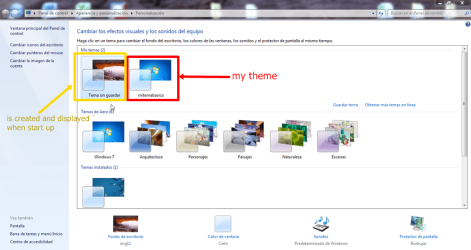
But when I restart the laptop, then when I enter in my desktop, is displayed default theme (file: img11 theme: landscape). My theme is not displayed.

I have tried some possibles solutions that I have found in net: edit register, scann for errors, create a new admin account, ....But the problem continues .:shock:

Any idea?
 
Last edited:

My Computer

Computer Manufacturer/Model Number
Asus
OS
windows 7 home premium 64 bits

My Computer

Computer type
Laptop
Computer Manufacturer/Model Number
Sager NP9170
OS
Win 7 Pro x64 / Win 10 Pro
CPU
Intel(R) Core(TM) i7-3630QM CPU @ 2.40GHz
Motherboard
CLEVO P170EM
Memory
12 GB
Graphics Card(s)
(1) Intel(R) HD Graphics 4000 (2) NVIDIA GeForce GTX 675M
Sound Card
(1) Realtek High Definition Audio (2) Intel(R) Display Aud
Monitor(s) Displays
17.3
Screen Resolution
1920x1080
Hard Drives
(1) Samsung 860 EVO 500GB(OS) (1) Samsung 860 EVO 500GB(Data)
Keyboard
Backlite
Antivirus
MSE, Malwarebytes Pro
Browser
Firefox
Other Info
DESKTOP: Custom-built.
OS: Win 10 Pro x64.
CASE: Rosewill R5.
CPU: Intel I5 4670K CPU @ 3.40GHz.
CPU COOLER: Cool Master Hyper 212 EVO.
MOTHERBOARD: Asus Z87-A.
MEMORY: Kingston HyperX 2x4 GB.
GPU: Nvidia Geforce 650 TI.
PSU: Corsair TX750.
DRIVES: (1) Samsung 840 120 GB SSD (2) Western Digital blue 500 GB 7200 RPM.
Hi:

Yes I follow these steps.

But when start up, default theme is auto created and set as default.

Attach capture.

(My theme saved is named "mitemabasico")


Regards
 

Attachments

  • ScreenShot003.png
    ScreenShot003.png
    310.1 KB · Views: 27

My Computer

Computer Manufacturer/Model Number
Asus
OS
windows 7 home premium 64 bits
My Computer

Computer type
Laptop
Computer Manufacturer/Model Number
Sager NP9170
OS
Win 7 Pro x64 / Win 10 Pro
CPU
Intel(R) Core(TM) i7-3630QM CPU @ 2.40GHz
Motherboard
CLEVO P170EM
Memory
12 GB
Graphics Card(s)
(1) Intel(R) HD Graphics 4000 (2) NVIDIA GeForce GTX 675M
Sound Card
(1) Realtek High Definition Audio (2) Intel(R) Display Aud
Monitor(s) Displays
17.3
Screen Resolution
1920x1080
Hard Drives
(1) Samsung 860 EVO 500GB(OS) (1) Samsung 860 EVO 500GB(Data)
Keyboard
Backlite
Antivirus
MSE, Malwarebytes Pro
Browser
Firefox
Other Info
DESKTOP: Custom-built.
OS: Win 10 Pro x64.
CASE: Rosewill R5.
CPU: Intel I5 4670K CPU @ 3.40GHz.
CPU COOLER: Cool Master Hyper 212 EVO.
MOTHERBOARD: Asus Z87-A.
MEMORY: Kingston HyperX 2x4 GB.
GPU: Nvidia Geforce 650 TI.
PSU: Corsair TX750.
DRIVES: (1) Samsung 840 120 GB SSD (2) Western Digital blue 500 GB 7200 RPM.

My Computer

Computer type
Laptop
Computer Manufacturer/Model Number
Sager NP9170
OS
Win 7 Pro x64 / Win 10 Pro
CPU
Intel(R) Core(TM) i7-3630QM CPU @ 2.40GHz
Motherboard
CLEVO P170EM
Memory
12 GB
Graphics Card(s)
(1) Intel(R) HD Graphics 4000 (2) NVIDIA GeForce GTX 675M
Sound Card
(1) Realtek High Definition Audio (2) Intel(R) Display Aud
Monitor(s) Displays
17.3
Screen Resolution
1920x1080
Hard Drives
(1) Samsung 860 EVO 500GB(OS) (1) Samsung 860 EVO 500GB(Data)
Keyboard
Backlite
Antivirus
MSE, Malwarebytes Pro
Browser
Firefox
Other Info
DESKTOP: Custom-built.
OS: Win 10 Pro x64.
CASE: Rosewill R5.
CPU: Intel I5 4670K CPU @ 3.40GHz.
CPU COOLER: Cool Master Hyper 212 EVO.
MOTHERBOARD: Asus Z87-A.
MEMORY: Kingston HyperX 2x4 GB.
GPU: Nvidia Geforce 650 TI.
PSU: Corsair TX750.
DRIVES: (1) Samsung 840 120 GB SSD (2) Western Digital blue 500 GB 7200 RPM.
HI:

I have followed these steps and scanned with antimalware too, but the problem persist :cry:
 

My Computer

Computer Manufacturer/Model Number
Asus
OS
windows 7 home premium 64 bits
My Computer

Computer type
Laptop
Computer Manufacturer/Model Number
Sager NP9170
OS
Win 7 Pro x64 / Win 10 Pro
CPU
Intel(R) Core(TM) i7-3630QM CPU @ 2.40GHz
Motherboard
CLEVO P170EM
Memory
12 GB
Graphics Card(s)
(1) Intel(R) HD Graphics 4000 (2) NVIDIA GeForce GTX 675M
Sound Card
(1) Realtek High Definition Audio (2) Intel(R) Display Aud
Monitor(s) Displays
17.3
Screen Resolution
1920x1080
Hard Drives
(1) Samsung 860 EVO 500GB(OS) (1) Samsung 860 EVO 500GB(Data)
Keyboard
Backlite
Antivirus
MSE, Malwarebytes Pro
Browser
Firefox
Other Info
DESKTOP: Custom-built.
OS: Win 10 Pro x64.
CASE: Rosewill R5.
CPU: Intel I5 4670K CPU @ 3.40GHz.
CPU COOLER: Cool Master Hyper 212 EVO.
MOTHERBOARD: Asus Z87-A.
MEMORY: Kingston HyperX 2x4 GB.
GPU: Nvidia Geforce 650 TI.
PSU: Corsair TX750.
DRIVES: (1) Samsung 840 120 GB SSD (2) Western Digital blue 500 GB 7200 RPM.
Before to open this thread, I have tried this and no results. Same problem.
 

My Computer

Computer Manufacturer/Model Number
Asus
OS
windows 7 home premium 64 bits
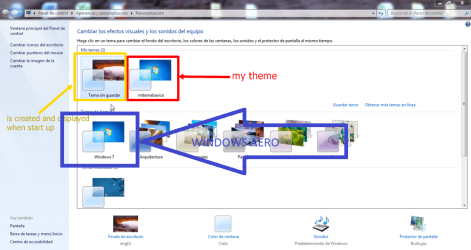
Apply windows 7 aero first, and then apply your themepack . Now restart . Is it works now as it should work ?
 

My Computer

Computer type
PC/Desktop
Computer Manufacturer/Model Number
Self Assembled
OS
Microsoft Windows 10 Pro Insider Preview 64-bit
CPU
Intel(R) Core(TM) i3-4130 CPU @ 3.40GHz
Motherboard
Gigabyte Technology Co., Ltd. B85M-D3H
Memory
Corsair Vengence 4GB x2 (8.00GB Dual-Channel DDR3 @ 798MHz)
Graphics Card(s)
2047MB GeForce GTS 450 (ZOTAC International)
Sound Card
Onboard (Realtek High Definition Audio)
Monitor(s) Displays
LG Flatron E2040T
Screen Resolution
1600x900
Hard Drives
Western Digital 1 TB
Seagate 500 GB
PSU
Corsair VS550
Case
Cooler Master K380
Cooling
Cooler Master Seidon 120V Plus
Keyboard
Logitech MK260r
Mouse
Logitech MK260r
Internet Speed
PMPL Broadband
Antivirus
Windows Defender + MBAM
Browser
Firefox
Other Info
Dell Studio 15" Laptop
But aero is applied already
 

My Computer

Computer Manufacturer/Model Number
Asus
OS
windows 7 home premium 64 bits
If Windows 7 aero (the default theme) is applied , still it appears with another wallpaper ? SFC scannow cannot solve it ?
ScreenShot003.png

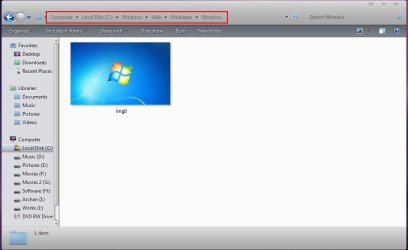
Go to C:\Windows\Web\Wallpaper\Windows ..... and make it sure that it is the only wallpaper there
Capture.JPG

Sometimes a few third party theme installers put some extra wallpapers in this folder ..... such a thing might be taking effect .
 

My Computer

Computer type
PC/Desktop
Computer Manufacturer/Model Number
Self Assembled
OS
Microsoft Windows 10 Pro Insider Preview 64-bit
CPU
Intel(R) Core(TM) i3-4130 CPU @ 3.40GHz
Motherboard
Gigabyte Technology Co., Ltd. B85M-D3H
Memory
Corsair Vengence 4GB x2 (8.00GB Dual-Channel DDR3 @ 798MHz)
Graphics Card(s)
2047MB GeForce GTS 450 (ZOTAC International)
Sound Card
Onboard (Realtek High Definition Audio)
Monitor(s) Displays
LG Flatron E2040T
Screen Resolution
1600x900
Hard Drives
Western Digital 1 TB
Seagate 500 GB
PSU
Corsair VS550
Case
Cooler Master K380
Cooling
Cooler Master Seidon 120V Plus
Keyboard
Logitech MK260r
Mouse
Logitech MK260r
Internet Speed
PMPL Broadband
Antivirus
Windows Defender + MBAM
Browser
Firefox
Other Info
Dell Studio 15" Laptop
If Windows 7 aero (the default theme) is applied , still it appears with another wallpaper ?
Yes
SFC scannow cannot solve it ?

No.
Go to C:\Windows\Web\Wallpaper\Windows ..... and make it sure that it is the only wallpaper there

Sometimes a few third party theme installers put some extra wallpapers in this folder ..... such a thing might be taking effect .

wallpapers are correctly in his folders. The problem is when startup, is created this theme (see my screen capture) and is linked to this wallpaper (landscape - img11).


Laptop is new and comes preinstalled. But now I dont remember if this ocurre since 1st day or after having installed some themes downloaded from Microsoft website. :huh:
 

My Computer

Computer Manufacturer/Model Number
Asus
OS
windows 7 home premium 64 bits
Hello Yae, and welcome to Seven Forums.

Double check your Startup folder in the Start Menu, and in all registry locations in METHOD FOUR in the tutorial below to see if by chance that the .theme or .themepack file that your downloaded is listed to be ran at startup by mistake somehow.

http://www.sevenforums.com/tutorials/1401-startup-programs-change.html

Hope this may help for now,
Shawn
 

My Computer

Computer type
PC/Desktop
Computer Manufacturer/Model Number
Self built custom
OS
64-bit Windows 11 Pro for Workstations
CPU
Intel i7-8700K OC'd to 5 GHz
Motherboard
ASUS ROG Maximus XI Formula Z390
Memory
64 GB (4x16GB) G.SKILL TridentZ RGB DDR4 3600 MHz
Graphics Card(s)
ASUS ROG-STRIX-GTX1080TI-O11G-GAMING
Sound Card
Integrated
Monitor(s) Displays
2 x Samsung Odyssey G7 27"
Screen Resolution
2560x1440
Hard Drives
1TB Samsung 990 PRO M.2,
4TB Samsung 990 PRO PRO M.2,
TerraMaster F8 SSD Plus NAS
PSU
Seasonic Prime Titanium 850W
Case
Thermaltake Core P3
Cooling
Corsair Hydro H115i
Keyboard
Logitech wireless K800
Mouse
Logitech MX Master 4
Internet Speed
2 Gb/s Download and 100 Mb/s Upload
Antivirus
Malwarebyte Anti-Malware Premium
Browser
Google Chrome
Other Info
Logitech Z625 speaker system,
Logitech BRIO 4K Pro webcam,
HP Color LaserJet Pro MFP M477fdn,
APC SMART-UPS RT 1000 XL - SURT1000XLI,
Galaxy S23 Plus phone
HI:

I have some entries in startup but I dont know if someone provokes the issue in the themes and which I can delete

LOG Startup:

Si HKCU:Run Gadwin PrintScreen "C:\Program Files (x86)\Gadwin Systems\PrintScreen\PrintScreen.exe" /nosplash
Si HKLM:Run Boingo Wi-Fi "C:\Program Files (x86)\Boingo\Boingo Wi-Fi\Boingo.lnk"
Si HKLM:Run HDAudDeck C:\Program Files (x86)\VIA\VIAudioi\VDeck\VDeck.exe -r
Si HKLM:Run HControlUser C:\Program Files (x86)\ASUS\ATK Hotkey\HControlUser.exe
Si HKLM:Run ATKOSD2 C:\Program Files (x86)\ASUS\ATKOSD2\ATKOSD2.exe
Si HKLM:Run ATKMEDIA C:\Program Files (x86)\ASUS\ATK Media\DMedia.exe
Si HKLM:Run Adobe ARM "C:\Program Files (x86)\Common Files\Adobe\ARM\1.0\AdobeARM.exe"
Si HKLM:Run SunJavaUpdateSched "C:\Program Files (x86)\Common Files\Java\Java Update\jusched.exe"
Si HKLM:Run Adobe Reader Speed Launcher "C:\Program Files (x86)\Adobe\Reader 9.0\Reader\Reader_sl.exe"
Si HKLM:Run ETDWare C:\Program Files\Elantech\ETDCtrl.exe
Si HKLM:Run AmIcoSinglun64 C:\Program Files (x86)\AmIcoSingLun\AmIcoSinglun64.exe
Si HKLM:Run egui "C:\Program Files\ESET\ESET Smart Security\egui.exe" /hide /waitservice
Si HKLM:Run IgfxTray C:\Windows\system32\igfxtray.exe
Si HKLM:Run HotKeysCmds C:\Windows\system32\hkcmd.exe
Si HKLM:Run Persistence C:\Windows\system32\igfxpers.exe
Si Startup Common SRS Premium Sound.lnk C:\Windows\Installer\{E5CF6B9C-3ABE-43C9-9413-AD5FFC98F049}\NewShortcut5_21C7B668029A47458B27645FE6E4A715.exe
I have a restore system DVD to reinstall OS. But if reinstall OS other time, many app and utilities are installed for default. I can not to do a clean installation. Because I do not have the CD of installation of Windows 7, only the CDs to reinstall OS that it cmes with the laptop
 
Last edited:

My Computer

Computer Manufacturer/Model Number
Asus
OS
windows 7 home premium 64 bits
Nothing really stands out to me as being the cause in those. :(
 

My Computer

Computer type
PC/Desktop
Computer Manufacturer/Model Number
Self built custom
OS
64-bit Windows 11 Pro for Workstations
CPU
Intel i7-8700K OC'd to 5 GHz
Motherboard
ASUS ROG Maximus XI Formula Z390
Memory
64 GB (4x16GB) G.SKILL TridentZ RGB DDR4 3600 MHz
Graphics Card(s)
ASUS ROG-STRIX-GTX1080TI-O11G-GAMING
Sound Card
Integrated
Monitor(s) Displays
2 x Samsung Odyssey G7 27"
Screen Resolution
2560x1440
Hard Drives
1TB Samsung 990 PRO M.2,
4TB Samsung 990 PRO PRO M.2,
TerraMaster F8 SSD Plus NAS
PSU
Seasonic Prime Titanium 850W
Case
Thermaltake Core P3
Cooling
Corsair Hydro H115i
Keyboard
Logitech wireless K800
Mouse
Logitech MX Master 4
Internet Speed
2 Gb/s Download and 100 Mb/s Upload
Antivirus
Malwarebyte Anti-Malware Premium
Browser
Google Chrome
Other Info
Logitech Z625 speaker system,
Logitech BRIO 4K Pro webcam,
HP Color LaserJet Pro MFP M477fdn,
APC SMART-UPS RT 1000 XL - SURT1000XLI,
Galaxy S23 Plus phone
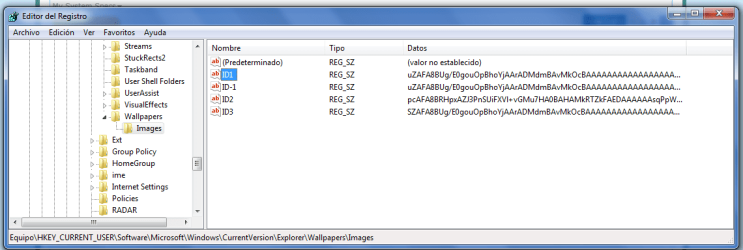
I knew I saw this problem once, but I forgot completely how I solved it. :( You could try one thing though - open regedit, go to HKEY_CURRENT_USER\Software\Microsoft\Windows\CurrentVersion\Explorer\Wallpaper(s?), and delete the key that contains image streams (not the one with MRU subkey).

Btw, where is the picture you chose as wallpaper located?
 

My Computer

Computer Manufacturer/Model Number
Asus N73SV
OS
Windows 7 x64 Ultimate SP1
CPU
Core i7-2630QM
Motherboard
Intel HM 65
Memory
6 GB DDR3
Graphics Card(s)
Nvidia GT 540M / Intel HD 3000 - Optimus switching
Sound Card
HD Audio (Intel Azalia/Realtek) ALC269
Monitor(s) Displays
LED flat panel
Screen Resolution
1920 x 1080
Hard Drives
2x Seagate Momentus 640 GB - 1,28 TB in total
Internet Speed
4 MB/256 kbps
Other Info
External HDs

WD Elements 1,5 TB
WD MyBook 500 GB
ld try one thing though - open regedit, go to HKEY_CURRENT_USER\Software\Microsoft\Windows\CurrentVersion\Explorer\Wallpaper(s?), and delete the key that contains image streams (not the one with MRU subkey).?

HI

Attach capture. What I need to delete?

Btw, where is the picture you chose as wallpaper located?

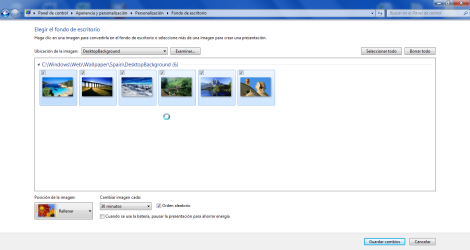
Now I have selected Spain Theme, and pictures are located in C:\Windows\Web\Wallpaper\Spain\DesktopBackground

Attach capture.
 

Attachments

  • img1.png
    img1.png
    84.6 KB · Views: 9
  • ScreenShot012.png
    ScreenShot012.png
    233.2 KB · Views: 6

My Computer

Computer Manufacturer/Model Number
Asus
OS
windows 7 home premium 64 bits
Hi

Now I have seen that I disable power management, themes runs fine :eek:

Any idea to solve this?
 

My Computer

Computer Manufacturer/Model Number
Asus
OS
windows 7 home premium 64 bits

My Computer

Computer type
PC/Desktop
Computer Manufacturer/Model Number
Self built custom
OS
64-bit Windows 11 Pro for Workstations
CPU
Intel i7-8700K OC'd to 5 GHz
Motherboard
ASUS ROG Maximus XI Formula Z390
Memory
64 GB (4x16GB) G.SKILL TridentZ RGB DDR4 3600 MHz
Graphics Card(s)
ASUS ROG-STRIX-GTX1080TI-O11G-GAMING
Sound Card
Integrated
Monitor(s) Displays
2 x Samsung Odyssey G7 27"
Screen Resolution
2560x1440
Hard Drives
1TB Samsung 990 PRO M.2,
4TB Samsung 990 PRO PRO M.2,
TerraMaster F8 SSD Plus NAS
PSU
Seasonic Prime Titanium 850W
Case
Thermaltake Core P3
Cooling
Corsair Hydro H115i
Keyboard
Logitech wireless K800
Mouse
Logitech MX Master 4
Internet Speed
2 Gb/s Download and 100 Mb/s Upload
Antivirus
Malwarebyte Anti-Malware Premium
Browser
Google Chrome
Other Info
Logitech Z625 speaker system,
Logitech BRIO 4K Pro webcam,
HP Color LaserJet Pro MFP M477fdn,
APC SMART-UPS RT 1000 XL - SURT1000XLI,
Galaxy S23 Plus phone
Finally I have solved this problem! :party: and now my themes runs fine. :-)

solution:
I have unistalled Power4 Gear (a power management utility). This app comes preinstalled in my asus laptop.
 

My Computer

Computer Manufacturer/Model Number
Asus
OS
windows 7 home premium 64 bits
Back
Top