
Problem to modify authorization of "Program Files (x86)

Elowen

New member
Local time
10:06 PM
Messages
7
Location
Paris, France
Hello everybody ! :D

As I said before, it is difficult to speak correctly in English. I'm sorry.

I'll try to explain a problem related by one of members of my forum.
I can't test on my PC because I use a 32 bits version of Windows 7 who not contains the folder that he want's to modify.

OS : Windows 7 64 bits (x86)

He wants to modify the rights of the folder "Program Files (x86)" but he have no access to do (see the screenhots)
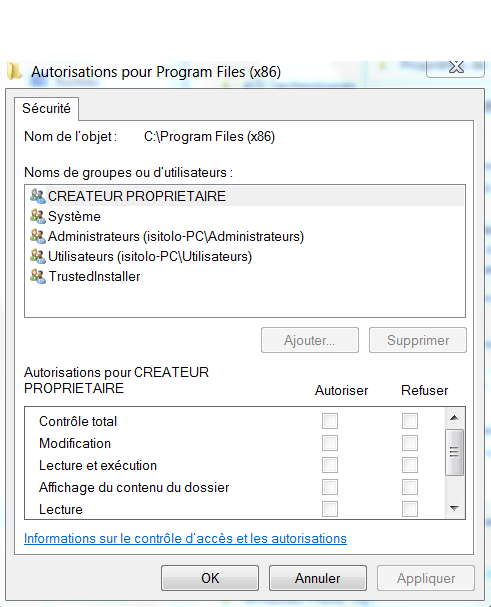
captur12.png


He seems to be administrator. I wait for his confirmation.
I'm suprise that the menu doesn't contain the "advance" button...

I can't find any solution in french forums...

Thank you for your help.
 

My Computer My Computer

At a glance

Windows 7 & Windows Vista
OS
Windows 7 & Windows Vista
I think he needs to "Take Ownership" of that folder. Check out this tutorial
 

My Computer My Computer

At a glance

Windows 7 Ultimate x64 (Retail)i7-Q 7206 GBnVidia GeForce GT 230M (1GB)
Computer Manufacturer/Model Number
HP DV8t quad
OS
Windows 7 Ultimate x64 (Retail)
CPU
i7-Q 720
Motherboard
Motherboard Chipset Intel Ibex Peak-M PM55, Intel Lynnfield
Memory
6 GB
Graphics Card(s)
nVidia GeForce GT 230M (1GB)
Sound Card
IDT High Definition Audio CODEC
Monitor(s) Displays
18.4 inch HP Infinity FHD (Samsung 184HT03-001)
Screen Resolution
1920 x 1080
Hard Drives
Hitachi 500GB 7200 rpm (x2)
Seagate FreeAgent 1.5 TB External USB (x2)
Thermaltake BlacX eSATA/USB 2.0 3.5/2.5 HD dock
Cooling
Zalman NC-2000 notebook cooling pad
Keyboard
laptop
Mouse
Logitech VX Revolution
Other Info
Backup Unit: Lenovo T61p
Thank you very much for your reply and for the tutorial ;)

It's actually what he wants to do.

Last question :

Is this normal that everything is grayed when he wants to modify "manually" even if he is administrator ? This folder is protect ?
 

My Computer My Computer

At a glance

Windows 7 & Windows Vista
OS
Windows 7 & Windows Vista
Not necessarily normal, but not unusual. There seem to be a lot of different things that can cause ownership and permission issues like this to arise. For example, I think just turning UAC off and on can sometimes mess up some permissions. But whatever the cause, I think it's very useful to have a quick and easy menu option available to automate the process of Taking Ownership. Comes in very handy more often than one would think.
 

My Computer My Computer

At a glance

Windows 7 Ultimate x64 (Retail)i7-Q 7206 GBnVidia GeForce GT 230M (1GB)
Computer Manufacturer/Model Number
HP DV8t quad
OS
Windows 7 Ultimate x64 (Retail)
CPU
i7-Q 720
Motherboard
Motherboard Chipset Intel Ibex Peak-M PM55, Intel Lynnfield
Memory
6 GB
Graphics Card(s)
nVidia GeForce GT 230M (1GB)
Sound Card
IDT High Definition Audio CODEC
Monitor(s) Displays
18.4 inch HP Infinity FHD (Samsung 184HT03-001)
Screen Resolution
1920 x 1080
Hard Drives
Hitachi 500GB 7200 rpm (x2)
Seagate FreeAgent 1.5 TB External USB (x2)
Thermaltake BlacX eSATA/USB 2.0 3.5/2.5 HD dock
Cooling
Zalman NC-2000 notebook cooling pad
Keyboard
laptop
Mouse
Logitech VX Revolution
Other Info
Backup Unit: Lenovo T61p
Ok.
Thank You again ;)
 

My Computer My Computer

At a glance

Windows 7 & Windows Vista
OS
Windows 7 & Windows Vista
Back
Top