Problem using 4gb in 64 bits

Ajulian

Agent monkey
Power User
Local time
10:53 PM
Messages
86
Location
Brasil
Hello guys !

I have 4gb ddr2 in my computer, but the system shows something weird

It says that i have 4gb, but only 3gb usable...
I'm using a GA-945GCM-S2C motheboard that supports the 4gb

anyone knows a solution for this?

thanks !
 

My Computer

OS
Windows 7 Ultimate 64 BITS
CPU
Quad core Q6600 2,4GHZ
Motherboard
Asus P5N-D
Memory
8 GB DDR2
Graphics Card(s)
Geforce GT 8600 ddr3
Monitor(s) Displays
1 -22 LCD Samsung, 1-19 LCD Samsung
Screen Resolution
1920x1080, 1440x900
Hard Drives
1 - Barracuda 750 GB
Internet Speed
4mb/s
Other Info
1 home theater 7.1 - 180 RMS
Hello, could you please make a screenshot of your system properties showing that?


thanks
 

My Computer

OS
Windows Vista Ultimate x64 - W7 Beta Build 7000
CPU
Intel Core 2 Duo E6700
Motherboard
GigaByte P-35DS3
Memory
4Gb Kingston Hyper-X
Graphics Card(s)
Nvidia GeForce 8800GT
Sound Card
X-Fi Gamer
Monitor(s) Displays
HP f2105
Screen Resolution
1680x1050
Hard Drives
2x500 Gb Seagate
Internet Speed
6 Mbps
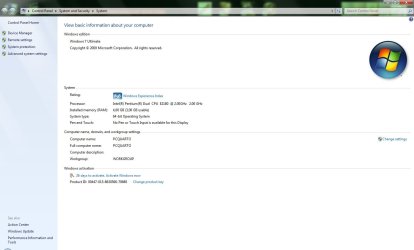
Sure my friend

here the screenshot from my system properties

sysproper.jpg
 

My Computer

OS
Windows 7 Ultimate 64 BITS
CPU
Quad core Q6600 2,4GHZ
Motherboard
Asus P5N-D
Memory
8 GB DDR2
Graphics Card(s)
Geforce GT 8600 ddr3
Monitor(s) Displays
1 -22 LCD Samsung, 1-19 LCD Samsung
Screen Resolution
1920x1080, 1440x900
Hard Drives
1 - Barracuda 750 GB
Internet Speed
4mb/s
Other Info
1 home theater 7.1 - 180 RMS
Thanks for the info. I already reported this bug to Microsoft, but I didn't take any screenshot of my system properties dialog box when I saw that. I've been unable to reproduce it again. If you don't mind, I'm sending your screenshot to them.

Before solving the problem, could you check in the Task Manager your available RAM and post another screenshot here, please?

To solve your issue, just set PAE as ForceEnable in the BCDEdit. It may sound weird, but it was the only thing worked for me. In accordance to MS, the Physical Address Extension only works for 32 bits version of Windows, but... worked for me in W7 x64 RC. Something might be wrong there.

If you don't know how, open a cmd prompt (admin rights), type bcdedit.exe /SET PAE ForceEnable and reboot.

You should see then in both places, system properties and in the Task Manager your 4 gigabytes available.

Regards.
 
Last edited:

My Computer

OS
Windows Vista Ultimate x64 - W7 Beta Build 7000
CPU
Intel Core 2 Duo E6700
Motherboard
GigaByte P-35DS3
Memory
4Gb Kingston Hyper-X
Graphics Card(s)
Nvidia GeForce 8800GT
Sound Card
X-Fi Gamer
Monitor(s) Displays
HP f2105
Screen Resolution
1680x1050
Hard Drives
2x500 Gb Seagate
Internet Speed
6 Mbps
Hi Reckon,
Good morning and thanks for the help.

So, this is a bug?
the main reason for me to get 64 bits version was that i have those 4gb that i cant use in 32 bits.

Im working now, but when i get home i'll try to do that.
After you post i was reading about that command that you told me to use...he will force my PC to "see" the 4gb right ? but...really works in 64 bits? i was reading that this is for 32 bits version, as you say in your comment too...if it works, is another bug? hehe a god bug, i guess

Anyway
I hope it works !^^
i will let you know in this topic

And sure, you can send this screenshot
thanks for the help

(and sorry for my english :geek:)
 

My Computer

OS
Windows 7 Ultimate 64 BITS
CPU
Quad core Q6600 2,4GHZ
Motherboard
Asus P5N-D
Memory
8 GB DDR2
Graphics Card(s)
Geforce GT 8600 ddr3
Monitor(s) Displays
1 -22 LCD Samsung, 1-19 LCD Samsung
Screen Resolution
1920x1080, 1440x900
Hard Drives
1 - Barracuda 750 GB
Internet Speed
4mb/s
Other Info
1 home theater 7.1 - 180 RMS
Hey guys, im having the exact same problem, just that mine displays 2.97gb usable.
I tried what Reckon said, and it hasn't changed at all, it still displays 2.97gb , any other solutions?

Enzo.
 

My Computer

Computer Manufacturer/Model Number
Custom Build
OS
W7 RTM Ultimate x64
CPU
Intel Q8400 @ 2.66GHZ
Motherboard
Gigabyte GA-EG45M-UD2H
Memory
4GB DDR2-800
Graphics Card(s)
Gainward GTS 450 GLH 1GB Edition
Sound Card
Integrated 8 Channel
Monitor(s) Displays
AOC 23.6 Inch Widescreen LCD
Screen Resolution
1920x1080
Hard Drives
Seagate 500GB Internal
Western Digital 1TB Internal

Hitachi 1TB External
PSU
Apevia Java Power 500W
Case
Cooler Master HAF 922 Black
Cooling
Stock Intel CPU Fan
Keyboard
HP SK-2960 Multimedia Keyboard
Mouse
Logitech M350 Wireless Gaming Mouse
Internet Speed
1.5MB
When I begin to search a solution for this problem, I heard once that update the BIOS may help, but I never tried
May be a solution...i dont know...
I’ll try this too if Reckon says doesn’t work for me
 

My Computer

OS
Windows 7 Ultimate 64 BITS
CPU
Quad core Q6600 2,4GHZ
Motherboard
Asus P5N-D
Memory
8 GB DDR2
Graphics Card(s)
Geforce GT 8600 ddr3
Monitor(s) Displays
1 -22 LCD Samsung, 1-19 LCD Samsung
Screen Resolution
1920x1080, 1440x900
Hard Drives
1 - Barracuda 750 GB
Internet Speed
4mb/s
Other Info
1 home theater 7.1 - 180 RMS
Try to look at any remapping memory options in the BIOS.

Regards
 

My Computer

OS
Windows Vista Ultimate x64 - W7 Beta Build 7000
CPU
Intel Core 2 Duo E6700
Motherboard
GigaByte P-35DS3
Memory
4Gb Kingston Hyper-X
Graphics Card(s)
Nvidia GeForce 8800GT
Sound Card
X-Fi Gamer
Monitor(s) Displays
HP f2105
Screen Resolution
1680x1050
Hard Drives
2x500 Gb Seagate
Internet Speed
6 Mbps
Hey guys, im having the exact same problem, just that mine displays 2.97gb usable.
I tried what Reckon said, and it hasn't changed at all, it still displays 2.97gb , any other solutions?

Enzo.

Enzo, could you please post a screenshot of your system properties window? Also, could you check available memory in the task bar?

Thanks
 
Last edited:

My Computer

OS
Windows Vista Ultimate x64 - W7 Beta Build 7000
CPU
Intel Core 2 Duo E6700
Motherboard
GigaByte P-35DS3
Memory
4Gb Kingston Hyper-X
Graphics Card(s)
Nvidia GeForce 8800GT
Sound Card
X-Fi Gamer
Monitor(s) Displays
HP f2105
Screen Resolution
1680x1050
Hard Drives
2x500 Gb Seagate
Internet Speed
6 Mbps
yeahp here :

systemprops.png
 

My Computer

Computer Manufacturer/Model Number
Custom Build
OS
W7 RTM Ultimate x64
CPU
Intel Q8400 @ 2.66GHZ
Motherboard
Gigabyte GA-EG45M-UD2H
Memory
4GB DDR2-800
Graphics Card(s)
Gainward GTS 450 GLH 1GB Edition
Sound Card
Integrated 8 Channel
Monitor(s) Displays
AOC 23.6 Inch Widescreen LCD
Screen Resolution
1920x1080
Hard Drives
Seagate 500GB Internal
Western Digital 1TB Internal

Hitachi 1TB External
PSU
Apevia Java Power 500W
Case
Cooler Master HAF 922 Black
Cooling
Stock Intel CPU Fan
Keyboard
HP SK-2960 Multimedia Keyboard
Mouse
Logitech M350 Wireless Gaming Mouse
Internet Speed
1.5MB
That's video card shared memory folks.
 

My Computer

Computer type
Laptop
Computer Manufacturer/Model Number
Apple
OS
El Capitan / Windows 10
CPU
i7-4980HQ
Memory
16GB
Graphics Card(s)
Iris 5200
Dangit, i only got 512mb Graphics? Why is it taking up 1.03gb?

Enzo.
 

My Computer

Computer Manufacturer/Model Number
Custom Build
OS
W7 RTM Ultimate x64
CPU
Intel Q8400 @ 2.66GHZ
Motherboard
Gigabyte GA-EG45M-UD2H
Memory
4GB DDR2-800
Graphics Card(s)
Gainward GTS 450 GLH 1GB Edition
Sound Card
Integrated 8 Channel
Monitor(s) Displays
AOC 23.6 Inch Widescreen LCD
Screen Resolution
1920x1080
Hard Drives
Seagate 500GB Internal
Western Digital 1TB Internal

Hitachi 1TB External
PSU
Apevia Java Power 500W
Case
Cooler Master HAF 922 Black
Cooling
Stock Intel CPU Fan
Keyboard
HP SK-2960 Multimedia Keyboard
Mouse
Logitech M350 Wireless Gaming Mouse
Internet Speed
1.5MB
Dangit, i only got 512mb Graphics? Why is it taking up 1.03gb?

Enzo.


Same here
i have 512 in my video card too
 

My Computer

OS
Windows 7 Ultimate 64 BITS
CPU
Quad core Q6600 2,4GHZ
Motherboard
Asus P5N-D
Memory
8 GB DDR2
Graphics Card(s)
Geforce GT 8600 ddr3
Monitor(s) Displays
1 -22 LCD Samsung, 1-19 LCD Samsung
Screen Resolution
1920x1080, 1440x900
Hard Drives
1 - Barracuda 750 GB
Internet Speed
4mb/s
Other Info
1 home theater 7.1 - 180 RMS

My Computer

OS
Windows Vista Ultimate x64 - W7 Beta Build 7000
CPU
Intel Core 2 Duo E6700
Motherboard
GigaByte P-35DS3
Memory
4Gb Kingston Hyper-X
Graphics Card(s)
Nvidia GeForce 8800GT
Sound Card
X-Fi Gamer
Monitor(s) Displays
HP f2105
Screen Resolution
1680x1050
Hard Drives
2x500 Gb Seagate
Internet Speed
6 Mbps
That's video card shared memory folks.

This is true if you own a GPU incorporated in the motherboard and you are sharing memory. If you do own a GPU, that's not what Windows should be reporting.
 

My Computer

OS
Windows Vista Ultimate x64 - W7 Beta Build 7000
CPU
Intel Core 2 Duo E6700
Motherboard
GigaByte P-35DS3
Memory
4Gb Kingston Hyper-X
Graphics Card(s)
Nvidia GeForce 8800GT
Sound Card
X-Fi Gamer
Monitor(s) Displays
HP f2105
Screen Resolution
1680x1050
Hard Drives
2x500 Gb Seagate
Internet Speed
6 Mbps
This is true if you own a GPU incorporated in the motherboard and you are sharing memory. If you do own a GPU, that's not what Windows should be reporting.

Read the KB. It specifically states that video memory must be mapped into addressable memory. AGP used to call it an aperture.
 

My Computer

Computer type
Laptop
Computer Manufacturer/Model Number
Apple
OS
El Capitan / Windows 10
CPU
i7-4980HQ
Memory
16GB
Graphics Card(s)
Iris 5200
That's for 32 bits version of Windows?

From the KB:

APPLIES TO
  • Windows Vista Business
  • Windows Vista Enterprise
  • Windows Vista Home Basic
  • Windows Vista Home Premium
  • Windows Vista Starter
  • Windows Vista Ultimate
  • Windows Vista Enterprise 64-bit Edition
  • Windows Vista Home Basic 64-bit Edition
  • Windows Vista Home Premium 64-bit Edition
  • Windows Vista Ultimate 64-bit Edition
  • Windows Vista Business 64-bit Edition
 

My Computer

Computer type
Laptop
Computer Manufacturer/Model Number
Apple
OS
El Capitan / Windows 10
CPU
i7-4980HQ
Memory
16GB
Graphics Card(s)
Iris 5200
So, i can't disable this sharing memory and have all my 4gb running separate from my video card?
 

My Computer

OS
Windows 7 Ultimate 64 BITS
CPU
Quad core Q6600 2,4GHZ
Motherboard
Asus P5N-D
Memory
8 GB DDR2
Graphics Card(s)
Geforce GT 8600 ddr3
Monitor(s) Displays
1 -22 LCD Samsung, 1-19 LCD Samsung
Screen Resolution
1920x1080, 1440x900
Hard Drives
1 - Barracuda 750 GB
Internet Speed
4mb/s
Other Info
1 home theater 7.1 - 180 RMS
So, i can't disable this sharing memory and have all my 4gb running separate from my video card?

Let me start by saying that the Microsoft support document referenced above is a great resource and explains this issue well. I will assume that you've read that article and still have questions, so let me rephrase this for you here.

1. Memory addresses below 4GB are a finite resource and there is competition for those addresses. Some of them are reserved for the system firmware/BIOS, then some for devices (see number 2), and the leftover addresses are used by Windows.

2. PCI configuration space is memory-mapped (meaning that it's accessed in the same manner and using the same addressing scheme as physical memory) and typically consumes address space below 4GB for 32-bit OS compatibility reasons. Addresses used for PCI configuration space cannot be used by the OS to access physical memory. To use a simple analogy: Windows cannot park any cars (data) in those parking spots (addresses) because someone else (a device) is already parked there.

3. Each device in your computer consumes a small part of the PCI configuration space below 4GB. This is true regardless of whether you have an on-board video card or an add-in card.

4. If your system BIOS does not support memory remapping then there is no way for Windows to utilize the physical memory whose addresses are overlapped by PCI configuration space without corrupting PCI device state in the process.

So, in summary: If you install 4GB of memory in your computer that is running a 64-bit version of Windows and you do not know how or do not have a mechanism to enable memory remapping (this would be an option in the system BIOS, if it were available), the firmware will consume a few MB of memory and PCI configuration space will overlap a much larger block of memory (typically between 512MB and 1GB) and you will be left with approximately 3 to 3.5GB of RAM. This is not a bug in Windows. In fact, Windows is doing exactly the right thing because it's not corrupting your device state.

*Note: If you don't have an option to enable memory remapping and you think that your system should support it, you might try loading a newer system BIOS or contacting your system manufacturer or motherboard vendor to request a system BIOS update with memory remapping support.

 

My Computer

OS
Windows 7 Ultimate x64
CPU
A fast one.
Memory
Lots.
Monitor(s) Displays
3
Back
Top