Trident1
New member
- Local time
- 9:35 AM
- Messages
- 117
I'm using Macrium (free) ver 5.3
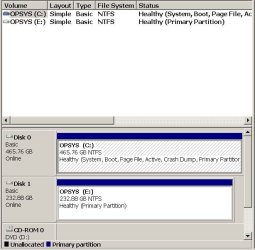
I've used image backup to an external hard drive and then use Macrium restore to correct faults on the original C: drive. That works fine. But, when I insert another larger HD into the external (VanTec) system, select Clone this disk - it copies. Both the original OS and the Cloned drive have the same files on each. Yet, when I replace the oringinal OS hard drive with the cloned drive - a message pops ups asking to put in a "boot" CD. I don't know where to go from here.
I've used image backup to an external hard drive and then use Macrium restore to correct faults on the original C: drive. That works fine. But, when I insert another larger HD into the external (VanTec) system, select Clone this disk - it copies. Both the original OS and the Cloned drive have the same files on each. Yet, when I replace the oringinal OS hard drive with the cloned drive - a message pops ups asking to put in a "boot" CD. I don't know where to go from here.
My Computer
- Computer type
- PC/Desktop
- Computer Manufacturer/Model Number
- Custom
- OS
- Windows 7 Professional, 32bit
- CPU
- intel Core i5, i5 3570 3.4GHZ, 6MB Quad Core
- Motherboard
- Asus P8B75-V, LGA 1155
- Memory
- 4GB, (2x2GB) 240 Pin DDR3, 1333Mhz
- Graphics Card(s)
- on board
- Sound Card
- Audigy
- Monitor(s) Displays
- Samsung 21"
- Hard Drives
- WD 500GB 7200 RPM, 16NB Cache SATA
- PSU
- Corsair 600W
- Case
- Cooler Master Storm Scout
- Keyboard
- MS
- Mouse
- MS Optical
- Antivirus
- MS Security Essentials
- Browser
- IE 10, and Firefox ver. 24