Solved Problem using search in windows explorer

ukenigma

New member
Local time
7:49 PM
Messages
4
Hi.
I have read a few posts already regarding this but none appear to be specific to the problem I have, or the solutions tried do not work.

When new, my HDD was partioned (C:&D:) 225gb ea (don't know why, thats how it was new!!)

up until recently, the search function worked fine.

now, the search function still works on C: but not on D:. as C: is mainly programmes and sysfiles i never search it, but D: is where all my stuff is stored.

Mighty frustrating! i haven't intentionally messed about with any of the search settings but i did have a windows update for messenger and live etc recently. might be coincedence, but it kinda ties in with the time scale.

help me obi-wan-kenobi's, your my only hope!
 

My Computer

OS
win 7 home premium 64bit
Welcome to the forums!

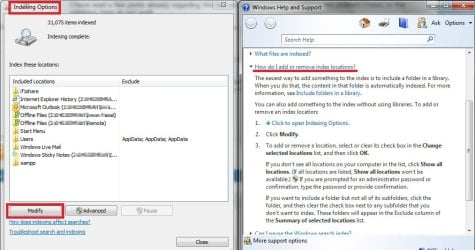
You may have already tried this, I dunno, but have a go at the following: type "search" in the Start Menu search field, then select "Change how Windows searches". It should pull up the Indexing Options window, like so:

win7--search_index.jpg

According to the directions in the Help windows on the right, all you need to do is click on the Modify button there and you should be able to add more locations for Search to use.
 

My Computer

Computer Manufacturer/Model Number
Self-built rig
OS
Win7 Pro x64
CPU
Koa i5-2550K
Memory
8 GB
Graphics Card(s)
Sapphire ATI 6870 1GB GDDR5
Sound Card
RealTek HD Audio / ATI HDMI Audio
Monitor(s) Displays
Samsung HDTV Monitor T23A350
Screen Resolution
1920 x 1080
Hard Drives
- SSD (C:)
- HDD (D:)
- BD-ROM (E:)
Keyboard
Logitech G110
Internet Speed
Unifi home (5mbps)
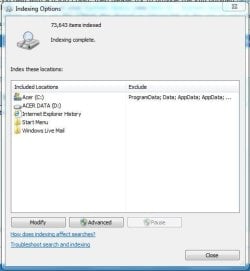
i have tried that and my D: drive is included. i have tried rebuilding the index, but to no avail.
its a feature i used a lot and its soooo frustrating for it not to work.
please see attached screenshot

any further suggestions from anyone will be appreciated
 

Attachments

  • Capture.JPG
    Capture.JPG
    33.4 KB · Views: 0

My Computer

OS
win 7 home premium 64bit
indexing has now completely rebuilt and this still isnt searching.
so frustrating!!
 

My Computer

OS
win 7 home premium 64bit

My Computer

Computer type
PC/Desktop
Computer Manufacturer/Model Number
Self assembled
OS
Windows 10 Home 64Bit
CPU
Intel Core i5 10400 @ 2.90GHz
Motherboard
Intel Corporation DG41WV (PROCESSOR)
Memory
8.00GB Single-Channel Unknown @ 1329MHz (16-20-20-38)
Sound Card
Realtek High Definition Audio
Monitor(s) Displays
DELL E170S
Screen Resolution
1280x1024 pixels
Hard Drives
931GB TOSHIBA DT01ACA100 (SATA)
238GB TEAM TM8PS7256G (SATA SSD)
Case
Nothing Fancy
Cooling
Fans
Keyboard
A4 Tech Co LTD
Mouse
A4 Tech Co Ltd/Logitech
Internet Speed
25 Mbps

My Computer

Computer type
PC/Desktop
Computer Manufacturer/Model Number
home built
OS
Multi-Boot W7_Pro_x64 W8.1_Pro_x64 W10_Pro_x64 +Linux_VMs +Chromium_VM
CPU
AMD Athlon II x4 620
Motherboard
Gigabyte GA-MA785G-UD3H
Memory
6GB GSkill DDR2 800
Graphics Card(s)
AMD 4670 GPU + AMD 4200 IGP
Sound Card
on board Realtek ALC889A
Monitor(s) Displays
RCA 40" LCD TV, Insignia 32" LCD TV, HP 15" LCD monitor
Screen Resolution
1680 x 1050
Hard Drives
OCZ Vertex 3 120GB,
Samsung F3 1TB (3),
Several others - WD, Seagate, Hitachi, ...
PSU
Corsair 500 W
Case
Rosewill mid tower
Cooling
CM 90mm rifle
Keyboard
Gyration wireless, Logitech wireless, Dell USB wired
Mouse
Gyration wireless, Logitech wireless, V7 USB wired
Internet Speed
Spectrum - 100Mbps D / 10Mbps U
Antivirus
Avast, MBAM3, EMET, WinPatrol
Browser
Pale Moon, Firefox, IE
Other Info
2 multi-boot PC's
Mainly HTPC/Office/Gen purpose (no gaming).
Trendnet USB KVM.
LG DVD burner/Blue Ray Player.
Tray system for removable SATA backup drives.

Not currently OCd, under-volted.
I use Hybrid sleep, rarely re-boot or shutdown.

Hauppauge HD-PVR, Avermedia PCIe TV Tuner, Hauppauge PCI TV Tuner.
thanks for all the info. was down to folder permissions. believe it or not, it was windows OWN help file that resolved it!!
somehow, SYSTEM had been removed from security tab in folder properties. added it back in and allowed permissions and all searcehes work now! weird and i dont know how it got turned off. if anyone is having same problem then let me know and i will talk you through it!
 

My Computer

OS
win 7 home premium 64bit
nice to know you fixed it :)
 

My Computer

Computer type
PC/Desktop
Computer Manufacturer/Model Number
Self assembled
OS
Windows 10 Home 64Bit
CPU
Intel Core i5 10400 @ 2.90GHz
Motherboard
Intel Corporation DG41WV (PROCESSOR)
Memory
8.00GB Single-Channel Unknown @ 1329MHz (16-20-20-38)
Sound Card
Realtek High Definition Audio
Monitor(s) Displays
DELL E170S
Screen Resolution
1280x1024 pixels
Hard Drives
931GB TOSHIBA DT01ACA100 (SATA)
238GB TEAM TM8PS7256G (SATA SSD)
Case
Nothing Fancy
Cooling
Fans
Keyboard
A4 Tech Co LTD
Mouse
A4 Tech Co Ltd/Logitech
Internet Speed
25 Mbps
Back
Top