
After searching for a few hours, I decided to post a new thread.
I am trying to extract some specific files from a system image rather than doing a full restore. The WindowsImageBackup is on an external 500gb hard drive.
I have followed all directions on how to do this:
Computer management -> Disk management -> attach VHD
The VHD attaches fine, and it is the correct file. But when it attaches I get the message: "you need to format the disk in drive F: before you can use it. Do you want to format it?"
I clicked cancel, and then tried to right click -> explore. I then got the message: "F:\ is not accessible. The file or directory is corrupted and unreadable."
Out of all the tutorials I have read, the file should open just fine and let me explore it. Why is it asking me to format the disk? And is it safe to do so?
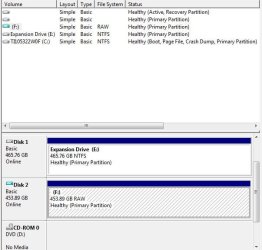
I attached a screenshot from Computer Management when the VHD is attached.
I don't want to lose everything on the system image! Can I/should I format the disk?
Thanks in advance for your help! Let me know if you need more information.
Ben
I am trying to extract some specific files from a system image rather than doing a full restore. The WindowsImageBackup is on an external 500gb hard drive.
I have followed all directions on how to do this:
Computer management -> Disk management -> attach VHD
The VHD attaches fine, and it is the correct file. But when it attaches I get the message: "you need to format the disk in drive F: before you can use it. Do you want to format it?"
I clicked cancel, and then tried to right click -> explore. I then got the message: "F:\ is not accessible. The file or directory is corrupted and unreadable."
Out of all the tutorials I have read, the file should open just fine and let me explore it. Why is it asking me to format the disk? And is it safe to do so?
I attached a screenshot from Computer Management when the VHD is attached.
I don't want to lose everything on the system image! Can I/should I format the disk?
Thanks in advance for your help! Let me know if you need more information.
Ben
Attachments
My Computer
At a glance
Windows 7 Home Premium x64
- OS
- Windows 7 Home Premium x64


