Problem - Win7 64bit Context [Send to]

You didn't follow the directions. I specified to rename the folder shortcut Sond To SendTo

that is how it will appear in the SendTo Menu.

I've done this on the last 4 or 5 Windows OS and it works every time.
 

My Computer

Computer Manufacturer/Model Number
HP Media Center
OS
Windows 7 32 bit
CPU
AMD 5200+ dual core
Memory
2 GB
Graphics Card(s)
NVidia GeForce 6150SE 128 MB
Monitor(s) Displays
CRT
Screen Resolution
1280x1024
Hard Drives
500 GB Sata internal :

SIIG USB 3.0 docking stations w/WD Caviar Black 6 Gb/s drives
Keyboard
PS/2
Mouse
PS/2 Wheel Mouse
Other Info
SIIG USB 3.0 PCIexpress card.
You didn't follow the directions. I specified to rename the folder shortcut Sond To SendTo

that is how it will appear in the SendTo Menu.

I've done this on the last 4 or 5 Windows OS and it works every time.

Got it.

BUT it still did NOT work.

Essentially no shortcut works from my SendTo folder :cry:
 

My Computer

Computer type
PC/Desktop
Computer Manufacturer/Model Number
Custom build
OS
Windows 7 64bit
CPU
Intel(R) Core(TM) i5-4690 CPU @ 3.50GHz
Motherboard
Gigabyte Technology Co., Ltd. Z97X-UD5H
Memory
8gb
Graphics Card(s)
GeForce GTX 770, 2gb memory
Hard Drives
Seagate ST4000DX001-1CE16 4tb Hybread (SSD + SATA)

Western Digital WDC WD1600BB-32DWA0 USB Device 160gb (external)
Antivirus
ESET NOD32 Antivirus
Browser
Firefox & IE
Ok, I am getting a better idea what you are saying. I don't think I've run into this one before. When you do shell:sendto it does open the correct folder? How old is your user account? I'm wondering if this is one of those cases where the user account is corrupt.

Unfortunately in Windows,if that is the case, it is usually faster to create a new account than to fix the old one. As an experiment it may be a good idea to create a new user account and put some stuff in the SendTo. See if it is normal or has the defaults same as this one?
 

My Computer

Computer Manufacturer/Model Number
HP Media Center
OS
Windows 7 32 bit
CPU
AMD 5200+ dual core
Memory
2 GB
Graphics Card(s)
NVidia GeForce 6150SE 128 MB
Monitor(s) Displays
CRT
Screen Resolution
1280x1024
Hard Drives
500 GB Sata internal :

SIIG USB 3.0 docking stations w/WD Caviar Black 6 Gb/s drives
Keyboard
PS/2
Mouse
PS/2 Wheel Mouse
Other Info
SIIG USB 3.0 PCIexpress card.
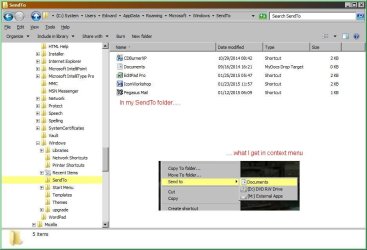
My current SendTo in screenshot:

Win7Pro_SendTo_Folder.jpg

Windows has to be sourcing your context menu Send to list from somewhere. That somewhere, of yours, may be set to an incorrect location.

To prove or falsify my claim, Tecknomage, could you delete the Documents file that resides in your C:\Users\Edward\AppData\Roaming\Microsoft\Windows\SendTo folder. After doing so, does your Send to list, in your context menu, reflect the change? I.e. Does "Documents" show up as an item in your Send to afterwards?

If not then, evidently, Windows isn't looking in your C:\Users\Edward\AppData\Roaming\Microsoft\Windows\SendTo folder to create your Send to list, and may be an indication of a loose registry value.
 

My Computer

Computer type
PC/Desktop
OS
Windows 10, Windows 8.1 Pro, Windows 7 Professional, OS X El Capitan
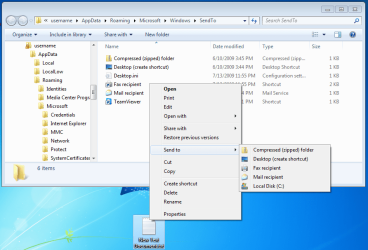
Notice that "TeamViewer" is missing from the Send to context menu:

sendto1.PNG


I then deleted "Documents" from this folder
C:\Users\username\AppData\Roaming\Microsoft\Windows\SendTo

sendto2.PNG

The Send to context menu did change - as expected - i.e. "Documents" is no longer shown in the Send to context menu. That probably means that the context menu is being built from the folder that I think that it is coming from and yet "TeamViewer" is still missing from the Send to context menu (because of NTFS permissions).

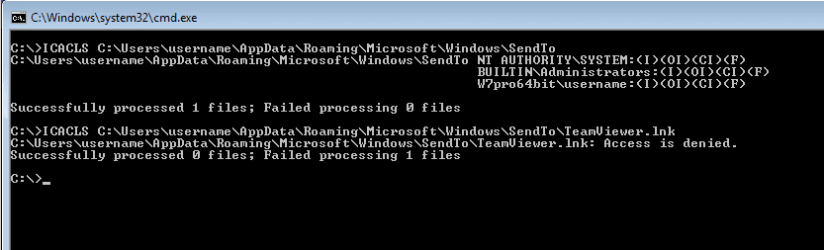
Maybe Tecknomage should check to see that the Send to folder is set to inherit and propagate the correct NTFS permissions.

sendto3.PNG
 

My Computer

Computer type
Laptop
Computer Manufacturer/Model Number
Employer provided Dell Latitude
OS
W7 Pro SP1 64bit
CPU
i7
Memory
8GB
Graphics Card(s)
Intel HD Graphics
Hard Drives
crappy SSD
Antivirus
Employer mandated Symantec Endpoint Protection
Browser
Pale Moon 64bit, IE11 64bit & Chrome 64bit
Ok, I am getting a better idea what you are saying. I don't think I've run into this one before. When you do shell:sendto it does open the correct folder? How old is your user account? I'm wondering if this is one of those cases where the user account is corrupt.

Unfortunately in Windows,if that is the case, it is usually faster to create a new account than to fix the old one. As an experiment it may be a good idea to create a new user account and put some stuff in the SendTo. See if it is normal or has the defaults same as this one?

This is a single-user (Administrator) Win7 Pro 64bit system, custom built, less than 2yrs ago.

Using [Search] "shell:sendto" DOES open the folder.

As for creating a test Account, did that and got the same results. SendTo will not display shortcuts in Context Menu.
 

My Computer

Computer type
PC/Desktop
Computer Manufacturer/Model Number
Custom build
OS
Windows 7 64bit
CPU
Intel(R) Core(TM) i5-4690 CPU @ 3.50GHz
Motherboard
Gigabyte Technology Co., Ltd. Z97X-UD5H
Memory
8gb
Graphics Card(s)
GeForce GTX 770, 2gb memory
Hard Drives
Seagate ST4000DX001-1CE16 4tb Hybread (SSD + SATA)

Western Digital WDC WD1600BB-32DWA0 USB Device 160gb (external)
Antivirus
ESET NOD32 Antivirus
Browser
Firefox & IE
Maybe Tecknomage should check to see that the Send to folder is set to inherit and propagate the correct NTFS permissions.
Ah, of course, let's not forget about NTFS permissions. It's possibly incorrectly set permissions that is the problem the OP experiences rather than a busted registry key.

Tecknomage, you should run and post the output from Icacls here for one of the files that exist in your SendTo folder, but do not appear in your Send to context menu.
 
Last edited:

My Computer

Computer type
PC/Desktop
OS
Windows 10, Windows 8.1 Pro, Windows 7 Professional, OS X El Capitan
Maybe Tecknomage should check to see that the Send to folder is set to inherit and propagate the correct NTFS permissions.
Ah, of course, let's not forget about NTFS permissions. It's possibly incorrectly set permissions that is the problem the OP experiences rather than a busted registry key.

Tecknomage, you should run and post the output from Icacls here for one of the files that exist in your SendTo folder, but do not appear in your Send to context menu.

You are not specific enough.

"NTFS permission" I assume you mean something in Policies. Which?

"Icacls" not a term I am familiar with. Please explain.
 

My Computer

Computer type
PC/Desktop
Computer Manufacturer/Model Number
Custom build
OS
Windows 7 64bit
CPU
Intel(R) Core(TM) i5-4690 CPU @ 3.50GHz
Motherboard
Gigabyte Technology Co., Ltd. Z97X-UD5H
Memory
8gb
Graphics Card(s)
GeForce GTX 770, 2gb memory
Hard Drives
Seagate ST4000DX001-1CE16 4tb Hybread (SSD + SATA)

Western Digital WDC WD1600BB-32DWA0 USB Device 160gb (external)
Antivirus
ESET NOD32 Antivirus
Browser
Firefox & IE
"Icacls" not a term I am familiar with. Please explain.
Apologies. Icacls is a Command Prompt command that deals with viewing and setting NTFS permissions (never mind what those are).

For one of the items in your SendTo folder, Tecknomage, that does not appear in your context menu Send to, would you be able to open up a command prompt and enter in a command similar to
Code:
icacls "C:\Users\Edward\AppData\Roaming\Microsoft\Windows\SendTo\EditPad Pro.lnk"
and take a screenshot or copy paste the command's output here so that we can determine if the permission settings on that file is correctly set.
 

My Computer

Computer type
PC/Desktop
OS
Windows 10, Windows 8.1 Pro, Windows 7 Professional, OS X El Capitan
"Icacls" not a term I am familiar with. Please explain.
Apologies. Icacls is a Command Prompt command that deals with viewing and setting NTFS permissions (never mind what those are).

For one of the items in your SendTo folder, Tecknomage, that does not appear in your context menu Send to, would you be able to open up a command prompt and enter in a command similar to
Code:
icacls "C:\Users\Edward\AppData\Roaming\Microsoft\Windows\SendTo\EditPad Pro.lnk"
and take a screenshot or copy paste the command's output here so that we can determine if the permission settings on that file is correctly set.

Here's what I got:

Microsoft Windows [Version 6.1.7601]
Copyright (c) 2009 Microsoft Corporation. All rights reserved.

C:\Users\Edward>icacls "C:\Users\Edward\AppData\Roaming\Microsoft\Windows\SendTo
\EditPad Pro.lnk"
C:\Users\Edward\AppData\Roaming\Microsoft\Windows\SendTo\EditPad Pro.lnk NT AUTH
ORITY\SYSTEM(I)(F)
BUILTIN
\Administrators(I)(F)
Edward-
PC\Edward(I)(F)

Successfully processed 1 files; Failed processing 0 files

C:\Users\Edward>

C:\Users\Edward>

C:\Users\Edward>
 

My Computer

Computer type
PC/Desktop
Computer Manufacturer/Model Number
Custom build
OS
Windows 7 64bit
CPU
Intel(R) Core(TM) i5-4690 CPU @ 3.50GHz
Motherboard
Gigabyte Technology Co., Ltd. Z97X-UD5H
Memory
8gb
Graphics Card(s)
GeForce GTX 770, 2gb memory
Hard Drives
Seagate ST4000DX001-1CE16 4tb Hybread (SSD + SATA)

Western Digital WDC WD1600BB-32DWA0 USB Device 160gb (external)
Antivirus
ESET NOD32 Antivirus
Browser
Firefox & IE
NTFS permissions look fine - bummer.

How about file attributes?

A shortcut with the Hidden attribute should not show in the Send to context menu.

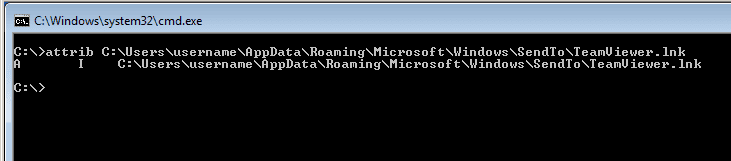
This is what a normal (not hidden) shortcut looks like:
sendto4.PNG

Can you please post that info for the EditPad Pro.lnk?
Code:
attrib "C:\Users\Edward\AppData\Roaming\Microsoft\Windows\SendTo\EditPad Pro.lnk"
 

My Computer

Computer type
Laptop
Computer Manufacturer/Model Number
Employer provided Dell Latitude
OS
W7 Pro SP1 64bit
CPU
i7
Memory
8GB
Graphics Card(s)
Intel HD Graphics
Hard Drives
crappy SSD
Antivirus
Employer mandated Symantec Endpoint Protection
Browser
Pale Moon 64bit, IE11 64bit & Chrome 64bit
How about file attributes?

A shortcut with the Hidden attribute should not show in the Send to context menu.
A stab in the dark suggestion; the Shortcuts seen in the image don't look as if they have the Hidden attribute, UsernameIssues.


Tecknomage, could you follow my post #24 and report back your findings?
 

My Computer

Computer type
PC/Desktop
OS
Windows 10, Windows 8.1 Pro, Windows 7 Professional, OS X El Capitan
How about file attributes?

A shortcut with the Hidden attribute should not show in the Send to context menu.
A stab in the dark suggestion; the Shortcuts seen in the image don't look as if they have the Hidden attribute, UsernameIssues.


Tecknomage, could you follow my post #24 and report back your findings?
I agree. They do not look dim/hidden to me either. I checked that before posting. However, I'm old and the contrast on this laptop screen is not all that great. I figured it best to ask what attrib showed instead of going by what I think I see. I also wondered if the icon dimming scheme might be messed up - since something is weird about that folder.


About your test in post #24.
Here is something for you to try...
...navigate via Windows Explorer to your Send to folder
...rename that Documents shortcut
(Maybe Documents7777)
...keep the Windows Explorer window in view
...stare at that renamed Documents shortcut......
......while you right click on most any other file or folder.

You can also bring Windows Explorer back into focus (if need be) and press Ctrl-Z.

Your test is much simpler/quicker.
My version of that test is fun :-)


Tecknomage's original post mentioned using SHELL:SENDTO to open the applicable folder. This was mentioned again in post #23 and #26. I'm not sure if that test is about the same as your test in post #24. Your test (and its results) are sure simpler to wrap my feeble mind around - since I'm not clear if Explorer consults SHELL:SENDTO before building these context menus. Process Monitor showed that a ton of stuff happens to create these context menus, but I never found SHELL:SENDTO in the mix. Of course, Process Monitor confirms exactly which folder is used to build the context menu (and its sub-menus).


tecknomage,
Do you still have the test account that you mentioned in post #26? If so, can you please post a screenshot from that account just like the excellent screenshot that you attached to post #17?

Also, I know that post #6 is from last year and lots of stuff could have changed since then, but could you also provide us with a screenshot of the Send to folder from the Default profile folder? As I understand things, that Default profile is copied to each new user profile... but I could be wrong.

 

My Computer

Computer type
Laptop
Computer Manufacturer/Model Number
Employer provided Dell Latitude
OS
W7 Pro SP1 64bit
CPU
i7
Memory
8GB
Graphics Card(s)
Intel HD Graphics
Hard Drives
crappy SSD
Antivirus
Employer mandated Symantec Endpoint Protection
Browser
Pale Moon 64bit, IE11 64bit & Chrome 64bit
SHELL:SENDTO command opens the same folder that has the problem. And yes, creating another Account did NOT solve the problem, that new Account's SendTo folder also did not display any shortcut I put into it.
 

My Computer

Computer type
PC/Desktop
Computer Manufacturer/Model Number
Custom build
OS
Windows 7 64bit
CPU
Intel(R) Core(TM) i5-4690 CPU @ 3.50GHz
Motherboard
Gigabyte Technology Co., Ltd. Z97X-UD5H
Memory
8gb
Graphics Card(s)
GeForce GTX 770, 2gb memory
Hard Drives
Seagate ST4000DX001-1CE16 4tb Hybread (SSD + SATA)

Western Digital WDC WD1600BB-32DWA0 USB Device 160gb (external)
Antivirus
ESET NOD32 Antivirus
Browser
Firefox & IE
SHELL:SENDTO command opens the same folder that has the problem. And yes, creating another Account did NOT solve the problem, that new Account's SendTo folder also did not display any shortcut I put into it.
I already knew that a new account did not solve the problem.

You only seem to be responding to the last post in your thread each time that you visit. I'll leave you in the capable hands of Pyprohly.
 

My Computer

Computer type
Laptop
Computer Manufacturer/Model Number
Employer provided Dell Latitude
OS
W7 Pro SP1 64bit
CPU
i7
Memory
8GB
Graphics Card(s)
Intel HD Graphics
Hard Drives
crappy SSD
Antivirus
Employer mandated Symantec Endpoint Protection
Browser
Pale Moon 64bit, IE11 64bit & Chrome 64bit
Back
Top