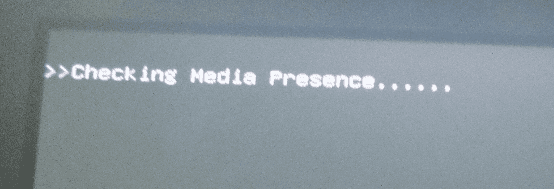
I have a little problem with I think the BIOS on my Asus G650JM ROG.
I installed a new drive into my machine to try another system and had to make a few changes in the BIOS such as Secure boot and CSM but now when I turn on the machine with either system installed I get this black screen with a message that says "Checking for media presence" and this takes about a minute before the OS fires up and then runs with no problems.
Now I am not that good with the EUFI BIOS and even less so with the laptop type which looks more like the old legacy type and I am wondering if anyone knows just what I have changed or not set to get it to boot straight into the system without having this message show up each time.
I have got the boot order set to hard rive but somehow it now sometimes reverts back to iVp6 or IVp4 or something similar and I have no idea what those mean - I have Googled them but still cannot understand why this is happening.
Any help really appreciate.
Attachments
Screenshot at 2017-11-15 08-11-31.png
151.6 KB
· Views: 22
My Computer
Computer type
PC/Desktop
Computer Manufacturer/Model Number
Own build (new) Desk1 / Asus ROG Win 7 / Desk2 1st build
OS
Desk1 7 Home Prem / Desk2 10 Pro / Main lap Asus ROG 10 Pro 2 laptop Toshiba 7 Pro Asus P2520 7 & 10
One other Desktop (tester) and spare Toshba laptop both with SSD's
Running Kaspersky 2016 ISS on all machines config'd identically
Logitec audio stereo systems on each machine (x3)
Canon MG5250MFC
Router/modem TP-Link running WPA2SK
Thanks mate I was actually trying a Linux build on this machine and I just don't know why the boot order kept changing around. To be honest the EUFI in laptops is more like the old legacy type and whereas I can move around in it on the desktops the laptop has a lot less options to set what one wants. I have done what you have sent and it is working fine now and thanks for the link too because of what I said about the type or format of the BIOS I tend not to read those because of finding the EUFI stuff quite bewildering. I know I shouldn't by now but usually I have no issues with this machine I ahevn't had to worry about the BIOS.
My Computer
Computer type
PC/Desktop
Computer Manufacturer/Model Number
Own build (new) Desk1 / Asus ROG Win 7 / Desk2 1st build
OS
Desk1 7 Home Prem / Desk2 10 Pro / Main lap Asus ROG 10 Pro 2 laptop Toshiba 7 Pro Asus P2520 7 & 10
One other Desktop (tester) and spare Toshba laptop both with SSD's
Running Kaspersky 2016 ISS on all machines config'd identically
Logitec audio stereo systems on each machine (x3)
Canon MG5250MFC
Router/modem TP-Link running WPA2SK
One other Desktop (tester) and spare Toshba laptop both with SSD's
Running Kaspersky 2016 ISS on all machines config'd identically
Logitec audio stereo systems on each machine (x3)
Canon MG5250MFC
Router/modem TP-Link running WPA2SK