
Problem with Bootable "Windows Defender Offline" utility error code 0x
Computer Specs:
Hp DV6-1355dx
Windows 7 64Bit Ultimate
Intel Core 2 Duo 2.20Ghz processor
4Gb Ram
Hey guys thanks a lot for strolling through, I truly appreciate it and hope with everyones assistance this issue will get resolved. So here's my issue; have I've found that everytime I have allowed windows update to install anything that has had to do with security, following the updates I have always run into the BSOD resulting in restoring my computer to an earlier date. Well this time, things are a bit different.
Whenever my computer has seemed to start to choke up, and really begins to lag, from things as simple as maximizing a minimized window, and it taking about 20 seconds for it to do so, the BSOD is coming. Heres an example of one:
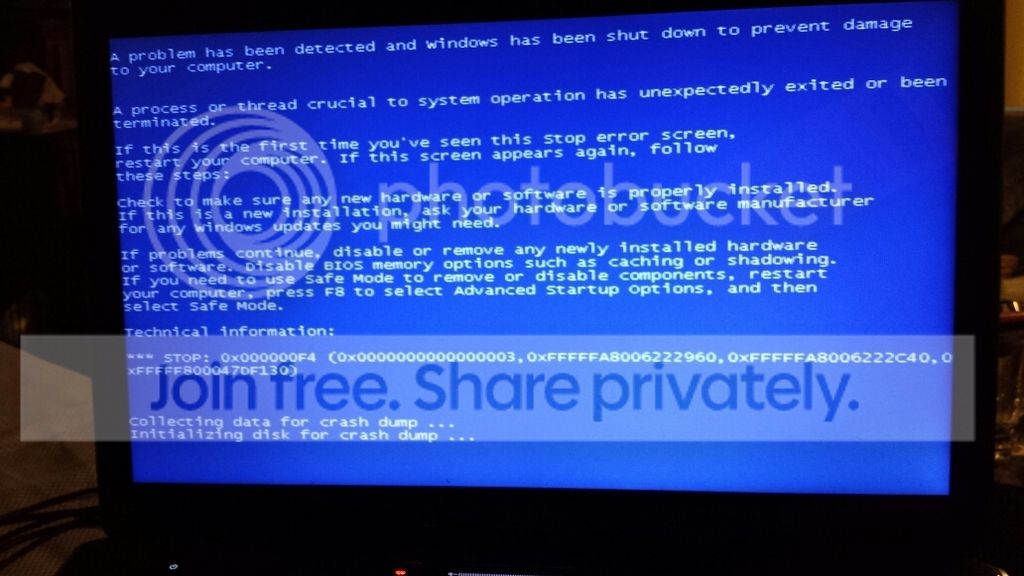
Ill be honest with you guys, I dont know how to interpret what the cause of it is, nor do I know where people find it,(event viewer logs?) but surprisingly I've worked on computers all my life really.
So heres the issue:
Computer completely froze up on me this time, cursor wouldn't react nothing, BSOD, then I found myself in A continuous looping failure of Windows Start up Repair, unable to actually load windows. I tried repairing the device by booting off my windows 7 disk and this is the error I keep getting:
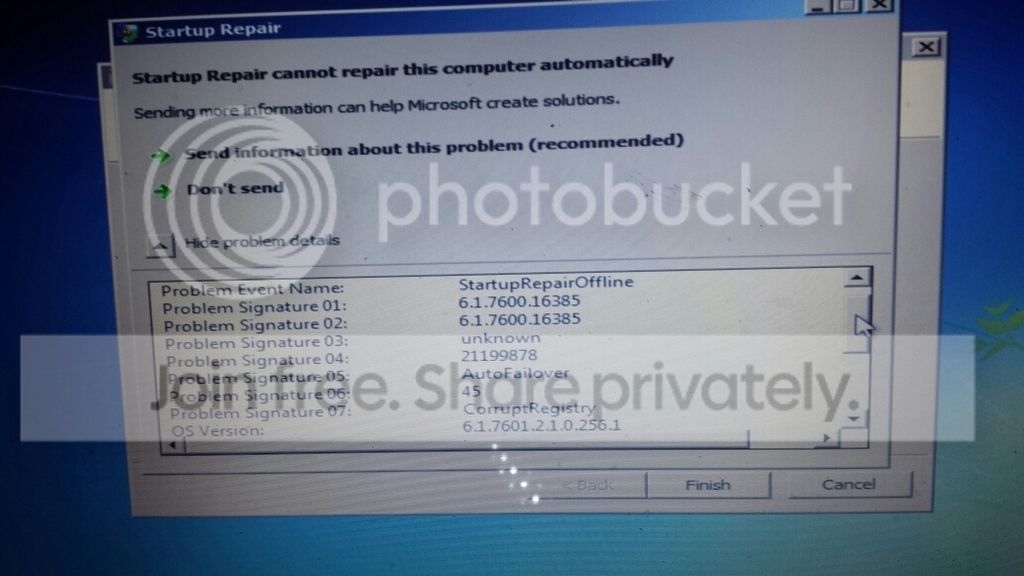
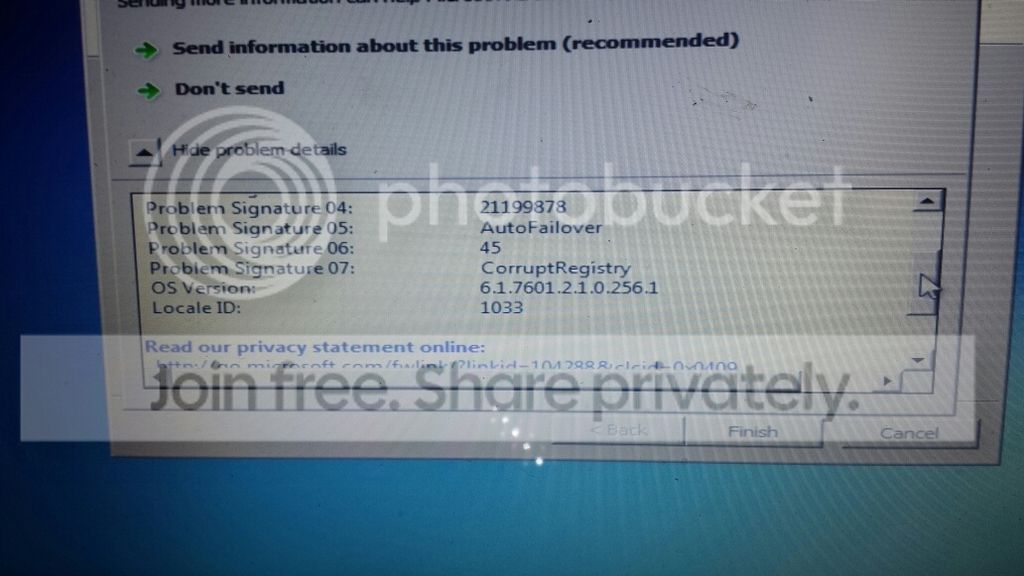 by the way let me add that theres no restore point (of course right....) so that wasn't an option...
Now if im not mistaken that will be translated further in my logs file? Ive honestly really never known how to go about checking but always have seen people pasting a huge report of there BSOD's on here for people to examine, and I dont know how to find that info I dont mind being honest here.
Anyhow I looked it up and found here on the forum the "Windows Defender offline" utility, which I made on another laptop, running windows 7 64bit as well, putting it onto a USB flash drive, which it updated and all, this time booting off of the flash drive, and this is what I had in front of me just to confirm:

Thinking things were going to go well!! then this error screen pops up:

error 0x80070002
Which then........restarts the computer...
I looked it up and honestly was overwhelmed with so many things that I couldn't do, such as
sfc \scannow, which didnt work because the only time I am able to open up command prompt is when I were to place the windows 7 cd in and go into repair, which in command prompt tells me it cannot perform the scan because there is a Windows repair in progress........Restart..........the computer and try again.......
I dont know what to do guys, but honestly my life is on this hard drive and I cannot, I cant lose all of my stuff....
GOOD NEWS IS! I think, I removed the hard drive and plugged it into my Drive Mate, and im able to access all the files, I put as much of what I could onto an external HD in case things turn for the worst. But im hoping by having access to all the folders as if I were able to load windows, maybe with your guys assistance, I could rid the issue thats causing this all? Please? Again thanks for reading through this and sticking through it with me. I am confident that whatever questions you may have, I can answer, even if I have to look up how to get them, so please if there is anything further that I have left out, or anyone may need to assist me, fire away, please. It would mean the world to me honestly, for mine is on this hard drive. Thanks so much.
Computer Specs:
Hp DV6-1355dx
Windows 7 64Bit Ultimate
Intel Core 2 Duo 2.20Ghz processor
4Gb Ram
Hey guys thanks a lot for strolling through, I truly appreciate it and hope with everyones assistance this issue will get resolved. So here's my issue; have I've found that everytime I have allowed windows update to install anything that has had to do with security, following the updates I have always run into the BSOD resulting in restoring my computer to an earlier date. Well this time, things are a bit different.
Whenever my computer has seemed to start to choke up, and really begins to lag, from things as simple as maximizing a minimized window, and it taking about 20 seconds for it to do so, the BSOD is coming. Heres an example of one:
Ill be honest with you guys, I dont know how to interpret what the cause of it is, nor do I know where people find it,(event viewer logs?) but surprisingly I've worked on computers all my life really.
So heres the issue:
Computer completely froze up on me this time, cursor wouldn't react nothing, BSOD, then I found myself in A continuous looping failure of Windows Start up Repair, unable to actually load windows. I tried repairing the device by booting off my windows 7 disk and this is the error I keep getting:
Now if im not mistaken that will be translated further in my logs file? Ive honestly really never known how to go about checking but always have seen people pasting a huge report of there BSOD's on here for people to examine, and I dont know how to find that info I dont mind being honest here.
Anyhow I looked it up and found here on the forum the "Windows Defender offline" utility, which I made on another laptop, running windows 7 64bit as well, putting it onto a USB flash drive, which it updated and all, this time booting off of the flash drive, and this is what I had in front of me just to confirm:
Thinking things were going to go well!! then this error screen pops up:
error 0x80070002
Which then........restarts the computer...
I looked it up and honestly was overwhelmed with so many things that I couldn't do, such as
sfc \scannow, which didnt work because the only time I am able to open up command prompt is when I were to place the windows 7 cd in and go into repair, which in command prompt tells me it cannot perform the scan because there is a Windows repair in progress........Restart..........the computer and try again.......
I dont know what to do guys, but honestly my life is on this hard drive and I cannot, I cant lose all of my stuff....
GOOD NEWS IS! I think, I removed the hard drive and plugged it into my Drive Mate, and im able to access all the files, I put as much of what I could onto an external HD in case things turn for the worst. But im hoping by having access to all the folders as if I were able to load windows, maybe with your guys assistance, I could rid the issue thats causing this all? Please? Again thanks for reading through this and sticking through it with me. I am confident that whatever questions you may have, I can answer, even if I have to look up how to get them, so please if there is anything further that I have left out, or anyone may need to assist me, fire away, please. It would mean the world to me honestly, for mine is on this hard drive.
Thanks so much.
Last edited:
My Computer
At a glance
windows 7 Untimate 64bit
- OS
- windows 7 Untimate 64bit


