Solved Problem with Windows 7 boot, error 0xc000000f

andesite

New member
Local time
1:45 AM
Messages
3
I'm running Windows 7 on my desktop PC, dualbooting with Fedora 24.
Recently, I've had a few blackouts, and my PC was running when one of said blackouts occurred. Now, starting back up, Windows gave me the choice between running recovery mode and starting normally, because of power surges, and I chose recovery mode. I can't remember the specifics of what happened, but suffice it to say it failed, and I rebooted into Windows.
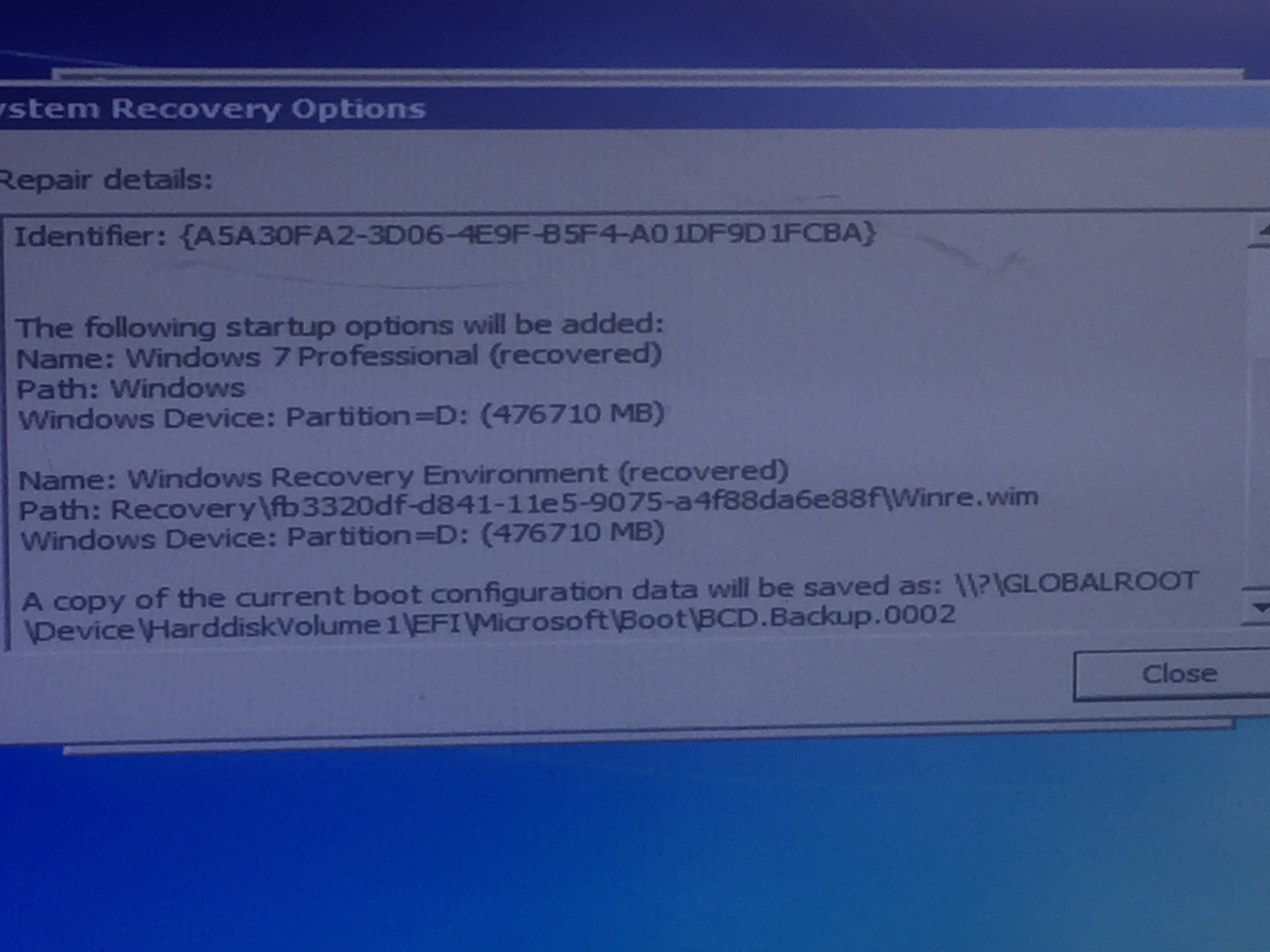
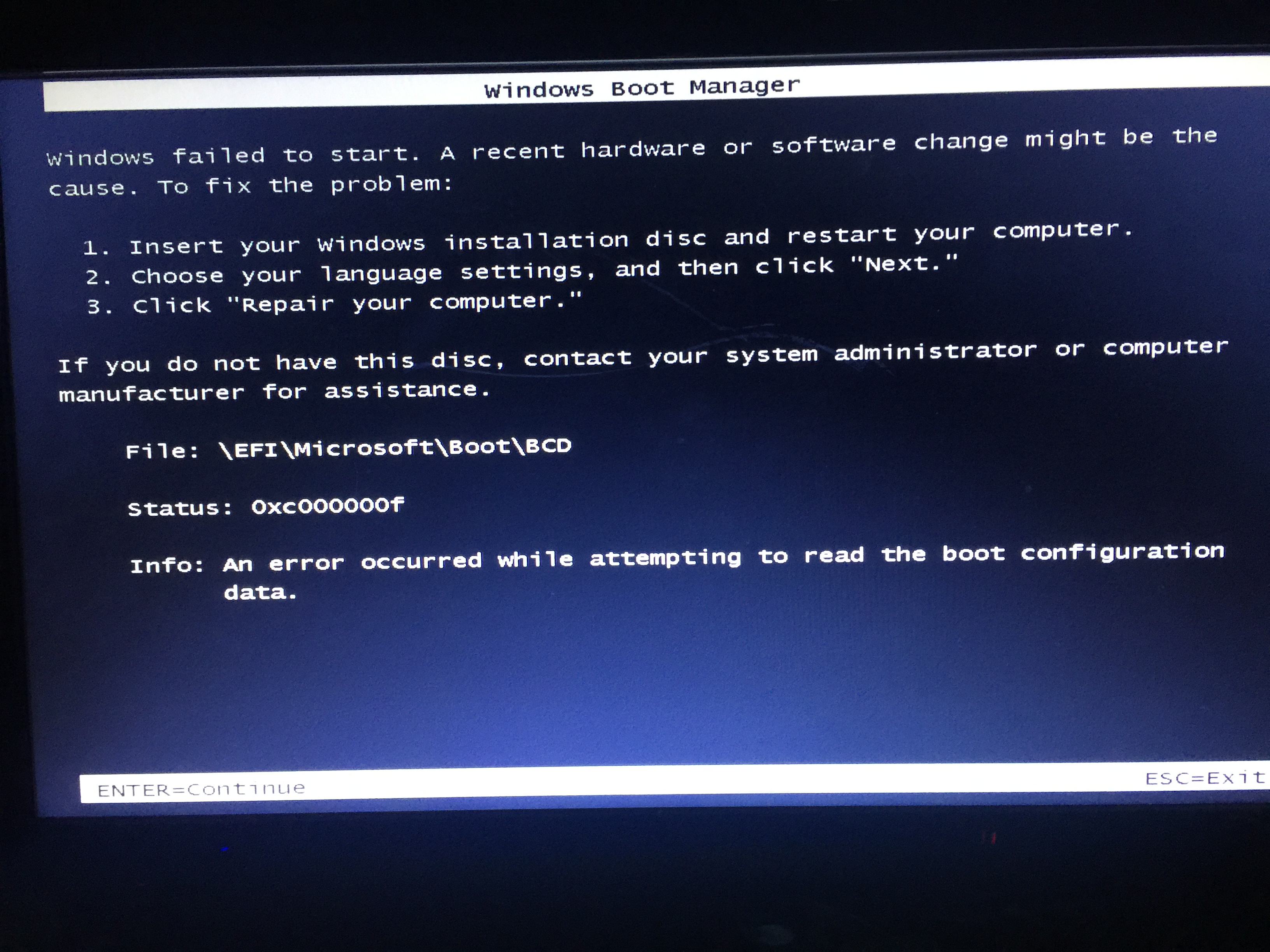
Now I'm faced with a screen giving me an error, namely, 0xc000000f, an error occurred while attempting to read the boot configuration data, and it suggests I boot using my Windows installation disk. I fished it out, and booted to it, started system recovery options. System recovery options searched for an operating system, and said it detected a problem with my computer's startup options, and these were the details:
3ThcWcr.jpg

WF97lzM.jpg

I selected repair and restart, and immediately I get a "Failed to save startup options." box. After closing it, I'm on the system recovery options menu with an option to restore my computer with a system image and the option to use recovery tools, with a text field below that is supposed to list operating systems, but which is empty. Since I'm an idiot and don't use Windows that much, I have no system image to restore to.
I will point out that through Fedora(which works fine), I can access my Windows partitions, and all my files are fine, it just seems to be a problem with the boot files.
I've been searching the net for solutions for the good part of the day, finally decided to come here. I'd greatly appreciate any help.
 

My Computer

Computer type
PC/Desktop
Computer Manufacturer/Model Number
Asus Skeletion Build
OS
Windows 7 Professional x64
Hard Drives
Two hard drives, C has 400~ GBs, F has 900~ GBs.
Other Info
Dual-booting with Fedora 24
Hello and welcome andesite mate can you get into safe mode?? - power on while tapping F8 if you can try running these
SFC /SCANNOW Command - System File Checker
Disk Check < if necessary include the /f and /r in the command line as per Option2 > in safe mode if need be

SFC usually best run for three scans


This may also be of some help. Persoanlly I ma not a fan of dual boots - had too many issues withthem in the past and just gave them away. If I wnat to run another system I usually swap otu dedicated drives.

In nay case mate do make images when things are right again see this
Imaging with free Macrium I do then regularly and you can even set them up to do on a weekly basis and what I do is always keeps the first one and delete the ovveerflow keeping say the last four.

But lets get this thing sorted first.
 

My Computer

Computer type
PC/Desktop
Computer Manufacturer/Model Number
Own build (new) Desk1 / Asus ROG Win 7 / Desk2 1st build
OS
Desk1 7 Home Prem / Desk2 10 Pro / Main lap Asus ROG 10 Pro 2 laptop Toshiba 7 Pro Asus P2520 7 & 10
CPU
Desk1 i5 3750K / Laptop i7 GTX 860M / Desk2 i5 2500
Motherboard
Desk1 Asus P877-V / Desk2 Gigabyte H67 UD3H / Laptop ?
Memory
Desk1 8GB (1866) / Desk2 16GB (1333) / Laptop 8Gb DDR3
Graphics Card(s)
Desk 1& 2NVidia GTX 650 & Laptops on board Intel
Sound Card
Desk 1 & 2 -XONAR DG Realtek High Def audio Laptop
Monitor(s) Displays
Desk 1 Benq HD 2450 / Desk2 Philips 24" / Laptop 17.5"
Screen Resolution
1920x1080 D1 & D2 & Laptop 1
Hard Drives
Desk1 Samsung 120GB 830 SSD
Asus ROG 256GB 850 Pro SSD
Desk2 Samsung 840 256 SSD
Toshiba 120GB EVO
PSU
Desk 1 Corsair HX 1050/ Laptop ? / Desk 2 Corsair HX 650
Case
Desk 1 Cooler HAF XM ? Toshiba laptop / Desk2 Coolermaster
Cooling
Fans on all Desk1 -2 Desk2 - all Coolermasters 5 Laptop ?
Keyboard
Desk 1 MS Sidewinder X6 Desk 2 MS Sidewinder X 4
Mouse
Desk 1&2 - Gigabyte MS 900 gamer - laptop - Logitec wireless
Internet Speed
ADSL2+
Other Info
One other Desktop (tester) and spare Toshba laptop both with SSD's
Running Kaspersky 2016 ISS on all machines config'd identically
Logitec audio stereo systems on each machine (x3)
Canon MG5250MFC
Router/modem TP-Link running WPA2SK
Thanks, the issue is that I'm getting this error as soon as I choose Windows from the boot menu. I tried pressing f8, but to no avail. This is a picture of the screen I get immediately after choosing to boot windows:
4n8iw5c.jpg

After pressing enter or esc, it just continues down the boot order.
Cheers.
 

My Computer

Computer type
PC/Desktop
Computer Manufacturer/Model Number
Asus Skeletion Build
OS
Windows 7 Professional x64
Hard Drives
Two hard drives, C has 400~ GBs, F has 900~ GBs.
Other Info
Dual-booting with Fedora 24
So, did you try booting from the Windows DVD and choosing "Repair your computer."? What happened?
Can you boot into Safe Mode, as ICIT2LOL suggests? What happens then?

I don't like the fact that the error messages give Windows install location as Partition D:

Not convinced that the blackouts caused your problems, unless the blackouts were preceded by a massive voltage surge, of course - I often switch my machine off at the wall if I can't wait for it to Shutdown. It just offers boot options at next startup, usually with "Start Windows Normally" as the highlighted default. But even that couldn't move your Windows installation to drive D:
I've never seen Windows installed on drive D: Only ever C:

Just flailing. Have you more than one hard drive? Is your Windows drive connected to SATA 0? (My motherboard gets snitty if my primary hard drive (I have several drives, one with Linux Mint on) isn't connected to SATA 0.

Personally, I'd try to discover why D: and why Partition. As far as I'm aware, it should just be C:
Using msconfig.exe, my Boot tab reveals, "Windows 7(C:\Windows) : Current OS;Default OS" No mention of any Partition. (Not offered as any solution - you can't boot into Windows, so you can't use msconfig.exe - I understand. Just information.)

Perhaps the following may provide avenues...

Windows 7 wont boot - thinks my OS files are on D: drive - Microsoft Community

https://support.microsoft.com/en-gb/kb/2004518

How to Manually Repair Windows 7 Boot Loader Problems
 

My Computer

Computer type
PC/Desktop
Computer Manufacturer/Model Number
Self Build
OS
Windows 7 Professional 64 bit (and Linux Mint)
CPU
AMD FX 8320 8-core
Motherboard
MSI 990FXA-GD65
Memory
16 Gig DDR3
Graphics Card(s)
Sapphire Radeon Dual-X R9 280X 3GB
Sound Card
Onboard sound
Monitor(s) Displays
ProLiteE2483HS
Screen Resolution
1920 x 1080 (60Hz)
Hard Drives
SanDisk 250GB SSD SATAIII
Seagate 500GB as Program Install drive, inc redirected System Folders
USB 500GB (Seagate) Backup, everything
Toshiba 80GB 2.5 inch w/ Linux Mint
PSU
Integrator 700 Watt
Case
Xcase
Cooling
Thermalright Truespirit-90M. Tower. Superb
Keyboard
Old Dell (very)
Mouse
Trust wireless. Rusted contact w/added aluminium foil clump
Internet Speed
Not bad
Antivirus
Kaspersky 2016
Browser
Opera
Other Info
Age 65, me, not the machine.
Don't like modern jazz, sport, marzipan, noisy pillows, being cold, most TV programmes, Windows 10, unfair division of wealth, toothache, gristle, bears and sharks, and anything that doesn't work.
Cheers to both of you, you set me down the right path. The issue I was having was exactly this:
Issue with a Windows 7 Boot issue - involving the BCD perhaps - Super User
Basically, due to my dualbooting shenanigans, when Windows gave me the choice between starting normally and running Windows recovery, and I chose Windows recovery, due to the presence of two EFI partitions on the computer, it got confused(hence thinking Windows was in D:, thanks for spotting that one). All I had to do was change the id of the linux EFI system temporarily so that Windows recovery could do its thing.
Thanks for all your help!
 

My Computer

Computer type
PC/Desktop
Computer Manufacturer/Model Number
Asus Skeletion Build
OS
Windows 7 Professional x64
Hard Drives
Two hard drives, C has 400~ GBs, F has 900~ GBs.
Other Info
Dual-booting with Fedora 24
Back
Top