Solved Problem With BootMenu

WindowsGeek

MAster B0ss
Local time
6:02 PM
Messages
17
Location
Bucharest , Romania
Hi, can you help me plssss:cry:

I hame a problem with my Windows 7 and Xp problem :

When i GO in to he boot menu i get an error on Xp.
In EasyBCD , the boot loader of Xp isnt in B:\ where de XP is installed it in a folder called C:\NST and there are s files with no extension

->
easyldr1
->
easyldr2 (and also i don't know what are those files)

also the Xp bootmenu command gets me to the easyldr2 which gaves me the error in the bootmenu :mad::mad::mad:
 
Last edited:

My Computer

Computer type
PC/Desktop
Computer Manufacturer/Model Number
custom build
OS
Windows 7 Ultimate SP1 x64
CPU
AMD A4-3300 APU
Motherboard
MSI A55M-P33
Memory
2 x 2GB Kingston KVR1333D3S8N9K2/4G
Graphics Card(s)
Ati Radeon HD 6410D
Sound Card
Realtek HD Audio
Monitor(s) Displays
Samsung SyncMaster 740n
Screen Resolution
1280x1024
Hard Drives
Samsung ST250DM001 DH253GJ ATA 250 GB - Files

Western Digital WDC WD800JD-55MUA1 80.0 GB - Windows
PSU
450 W Dell
Case
RPC small form factor case
Cooling
Stock AMD fan
Keyboard
Logitech Cordless MX Duo Y-RJ20
Mouse
Logitech Mx700
Internet Speed
9MB/s Peak D/L 1MB/s Peak U/L
Antivirus
Microsoft Security Essentials
Browser
Chrome
Other Info
WiFi usb adapter TRENDnet TEW-648-UBM b/g/n standards

Bluetooth USB adapter

A4TECH USB Speakers

Omnikey SmartCard Reader w/ RFID
Re:Problem With Boot Menu

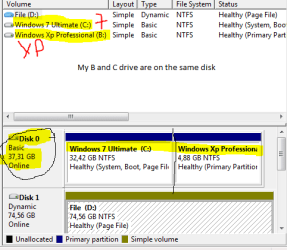
These are my Partitions
C: is windows 7 Ultimate
B:is Windows XP Professional

Capture.PNG

Also i waanted to say that C and B came from a single HDD :D:D:geek:
 

My Computer

Computer type
PC/Desktop
Computer Manufacturer/Model Number
custom build
OS
Windows 7 Ultimate SP1 x64
CPU
AMD A4-3300 APU
Motherboard
MSI A55M-P33
Memory
2 x 2GB Kingston KVR1333D3S8N9K2/4G
Graphics Card(s)
Ati Radeon HD 6410D
Sound Card
Realtek HD Audio
Monitor(s) Displays
Samsung SyncMaster 740n
Screen Resolution
1280x1024
Hard Drives
Samsung ST250DM001 DH253GJ ATA 250 GB - Files

Western Digital WDC WD800JD-55MUA1 80.0 GB - Windows
PSU
450 W Dell
Case
RPC small form factor case
Cooling
Stock AMD fan
Keyboard
Logitech Cordless MX Duo Y-RJ20
Mouse
Logitech Mx700
Internet Speed
9MB/s Peak D/L 1MB/s Peak U/L
Antivirus
Microsoft Security Essentials
Browser
Chrome
Other Info
WiFi usb adapter TRENDnet TEW-648-UBM b/g/n standards

Bluetooth USB adapter

A4TECH USB Speakers

Omnikey SmartCard Reader w/ RFID

My Computer

OS
ME/XP/Vista/Win7
I would start a fresh, & backup your data.

1) Delete all partitions.
2) Install Win xp to Disk0, one partition of 37.31gb.
3) Install Windows 7 to Disk1, one partition of 74.56gb, as a Basic drive not Dynamic.

Have a read of those tutorials:
http://www.sevenforums.com/tutorials/91339-ssd-hdd-optimize-windows-reinstallation.html
http://www.sevenforums.com/tutorials/8057-dual-boot-installation-windows-7-xp.html?ltr=D
System Restore Points - Stop XP Dual Boot Delete - Vista Forums

Are you insane!!!!! Disk1 contains all my games and data
 

My Computer

Computer type
PC/Desktop
Computer Manufacturer/Model Number
custom build
OS
Windows 7 Ultimate SP1 x64
CPU
AMD A4-3300 APU
Motherboard
MSI A55M-P33
Memory
2 x 2GB Kingston KVR1333D3S8N9K2/4G
Graphics Card(s)
Ati Radeon HD 6410D
Sound Card
Realtek HD Audio
Monitor(s) Displays
Samsung SyncMaster 740n
Screen Resolution
1280x1024
Hard Drives
Samsung ST250DM001 DH253GJ ATA 250 GB - Files

Western Digital WDC WD800JD-55MUA1 80.0 GB - Windows
PSU
450 W Dell
Case
RPC small form factor case
Cooling
Stock AMD fan
Keyboard
Logitech Cordless MX Duo Y-RJ20
Mouse
Logitech Mx700
Internet Speed
9MB/s Peak D/L 1MB/s Peak U/L
Antivirus
Microsoft Security Essentials
Browser
Chrome
Other Info
WiFi usb adapter TRENDnet TEW-648-UBM b/g/n standards

Bluetooth USB adapter

A4TECH USB Speakers

Omnikey SmartCard Reader w/ RFID
No Theog is not insane, but your configurations are incompetent, as is your screenshot which cut off the Used Disk Space column in listings so we could not possibly know how full your incompetently-formatted Dynamic Disk is.

Try installing EasyBCD 2.1 to Win7, on Edit OS Menu tab Delete the XP listing, then on Add OS tab add XP to see if it will autocomplete drive letter correctly. If not, see if it will take the incompetently-lettered B manually.

Be nice or don't come back.
 
No Theog is not insane, but your configurations are incompetent, as is your screenshot which cut off the Used Disk Space column in listings so we could not possibly know how full your incompetently-formatted Dynamic Disk is.

Try installing EasyBCD 2.1 to Win7, on Edit OS Menu tab Delete the XP listing, then on Add OS tab add XP to see if it will autocomplete drive letter correctly. If not, see if it will take the incompetently-lettered B manually.

Be nice or don't come back.

Thanx i solved it!!!!!!!!!!!!!!!!!!!!!!!!!!!!!!!!!!!!!!!!!!!!!!:party::party::party::D:D
 

My Computer

Computer type
PC/Desktop
Computer Manufacturer/Model Number
custom build
OS
Windows 7 Ultimate SP1 x64
CPU
AMD A4-3300 APU
Motherboard
MSI A55M-P33
Memory
2 x 2GB Kingston KVR1333D3S8N9K2/4G
Graphics Card(s)
Ati Radeon HD 6410D
Sound Card
Realtek HD Audio
Monitor(s) Displays
Samsung SyncMaster 740n
Screen Resolution
1280x1024
Hard Drives
Samsung ST250DM001 DH253GJ ATA 250 GB - Files

Western Digital WDC WD800JD-55MUA1 80.0 GB - Windows
PSU
450 W Dell
Case
RPC small form factor case
Cooling
Stock AMD fan
Keyboard
Logitech Cordless MX Duo Y-RJ20
Mouse
Logitech Mx700
Internet Speed
9MB/s Peak D/L 1MB/s Peak U/L
Antivirus
Microsoft Security Essentials
Browser
Chrome
Other Info
WiFi usb adapter TRENDnet TEW-648-UBM b/g/n standards

Bluetooth USB adapter

A4TECH USB Speakers

Omnikey SmartCard Reader w/ RFID
Back
Top