Problem with buttons inside windows.

cinos11

New member
Local time
1:07 AM
Messages
14
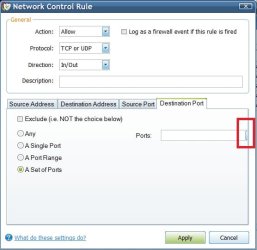
With some of the buttons/drop down menus i've seen on my computer get cut off.
I do not know what is causing this. I attatched a photo of an example of one of the many problems that occur like this. Does anyone know how to fix it?
 

Attachments

  • 1.jpg
    1.jpg
    31.3 KB · Views: 16

My Computer

Computer Manufacturer/Model Number
HP
OS
Windows 7 Professional
Memory
3 DDR2 2GB Each
Graphics Card(s)
NVIDIA GeForce 9100
Monitor(s) Displays
Monitors: 1)Starlogic VGA 2)Samsung DVI-I
Hard Drives
1 internal Hard drive inside computer. File System NTFS total 600GB
External Hard drive: 500GB
Cooling
Fan
I think it might have something to do with your theme that you have installed.
In the personalization settings, switch back to a Windows default theme. Does the problem still exist?

 

My Computer

Computer type
PC/Desktop
Computer Manufacturer/Model Number
The Dominator?
OS
Windows Seven Ultimate
CPU
AMD Piledriver FX 8320 @ 3.5GHz
Motherboard
ASUS M5A97 EVO R2.0
Memory
Crucial Ballistix 8GB 1600 MHz DDR3
Graphics Card(s)
ASUS GeForce GTX 970 Strix Edition @ 1.114 GHz
Sound Card
Integrated
Monitor(s) Displays
LG 23EA63V 23" IPS 1080p Monitor
Screen Resolution
1920x1080
Hard Drives
Samsung SSD 840 EVO 120 GB
1x WD GreenPower 500GB 7200RPM
1 External HDD 1TB
PSU
Corsair CX500
Case
Zalman Z9 Plus
Cooling
CPU - Corsair Hydro H80i, Case - 3x Aerocool Shark Edition
Keyboard
Xenta Backlit Keyboard (Not very good!)
Mouse
Logitech G400
Internet Speed
Download: 7 mb/s Upload: 0.76 mb/s
Antivirus
Microsoft Security Essentials
Browser
Google Chrome
Other Info
Overclockers UK Desk Pad 89 x 45 cm
1200x730x600mm Desk
Using Virtual Audio Cable to split stereo sound into Audio Technica ATH-M50 headphones and Logitech X-530 speakers.
I think it might have something to do with your theme that you have installed.
In the personalization settings, switch back to a Windows default theme. Does the problem still exist?

No, this did not help at all.
It's still the same.
 

My Computer

Computer Manufacturer/Model Number
HP
OS
Windows 7 Professional
Memory
3 DDR2 2GB Each
Graphics Card(s)
NVIDIA GeForce 9100
Monitor(s) Displays
Monitors: 1)Starlogic VGA 2)Samsung DVI-I
Hard Drives
1 internal Hard drive inside computer. File System NTFS total 600GB
External Hard drive: 500GB
Cooling
Fan
Right click on desktop
personalize
display
Then change te view size.

Wish you luck
 

My Computer

Computer type
PC/Desktop
Computer Manufacturer/Model Number
Dell XPS 420
OS
Windows 10, Home Clean Install
CPU
Intel Core2 processsor Q8200(2.33Ghz 1333FSB) Quad Core Tech
Motherboard
Dell
Memory
6 gb
Graphics Card(s)
ATI Radeon 256MB HD3650
Sound Card
Intergrated 7.1 Channel Audio
Monitor(s) Displays
Dell SP2009W 20"
Hard Drives
640 GB Serial ATA Hard drive
Cooling
Fan
Keyboard
Dell USB Keyboard
Mouse
Dell Premium Optical USB
Internet Speed
DSL 2.85
Thank you for your help it worked, i gave you rep.
 

My Computer

Computer Manufacturer/Model Number
HP
OS
Windows 7 Professional
Memory
3 DDR2 2GB Each
Graphics Card(s)
NVIDIA GeForce 9100
Monitor(s) Displays
Monitors: 1)Starlogic VGA 2)Samsung DVI-I
Hard Drives
1 internal Hard drive inside computer. File System NTFS total 600GB
External Hard drive: 500GB
Cooling
Fan
I am always happy to help, Particularly glad in this case, I had my doubt. In any event, ty for the rep and enjoy Windows 7.
 

My Computer

Computer type
PC/Desktop
Computer Manufacturer/Model Number
Dell XPS 420
OS
Windows 10, Home Clean Install
CPU
Intel Core2 processsor Q8200(2.33Ghz 1333FSB) Quad Core Tech
Motherboard
Dell
Memory
6 gb
Graphics Card(s)
ATI Radeon 256MB HD3650
Sound Card
Intergrated 7.1 Channel Audio
Monitor(s) Displays
Dell SP2009W 20"
Hard Drives
640 GB Serial ATA Hard drive
Cooling
Fan
Keyboard
Dell USB Keyboard
Mouse
Dell Premium Optical USB
Internet Speed
DSL 2.85
Back
Top