
Problem with codec (ffdshow doesn't work)

cactusek

New member
Local time
11:15 AM
Messages
10
I have windows 7 RC since few days and I have very big problem with films and codecs. In all films and all players system doesn't use ffdshow for video decoding. I installed ffdshow and other codecs pack and always is the same problem. I tried Windows 7 Codec Pack too.
Is any way to force windows to use ffdshow to decode video ?
Only Windows Media Player Classic uses ffdshow becuase I made this trick: Media Center Decoder Utility (MCDU) Finally Comes to Windows 7 | Hacking Windows 7 Media Center but I want playing films in all player using ffdshow codec.
 

My Computer

OS
windows 7 RC
Yes. Open ffdshow from the startmenu and goto directshow control. Crank the 'merit' up to the top. Also click Edit on the 'don't use ffdshow for' and ensure the WMP isn't listed. Then goto 'codecs', and on the dropdown list next to the video type you want to play through ffdshow, switch it to libavcodec. Also, goto 'trays, dialog and paths' and ensure that you have it configured to show tray icons.

If all that fails I'd suggest k-lite as it corrects the decode chain when it installs. If you select WMP as your prefered player on the install dialog, it will make sure everything points to it.
 

My Computer

OS
Windows 7077
Yes. Open ffdshow from the startmenu and goto directshow control. Crank the 'merit' up to the top.

yes, I had --> very high


Also click Edit on the 'don't use ffdshow for' and ensure the WMP isn't listed. Then goto 'codecs', and on the dropdown list next to the video type you want to play through ffdshow, switch it to libavcodec. Also, goto 'trays, dialog and paths' and ensure that you have it configured to show tray icons.

yes, I had all.

If all that fails I'd suggest k-lite as it corrects the decode chain when it installs. If you select WMP as your prefered player on the install dialog, it will make sure everything points to it.

I installed it too but no results :( Something in system blocks ffdshow. Allways players use Enhanced video renderer to decode video :/
 

My Computer

OS
windows 7 RC
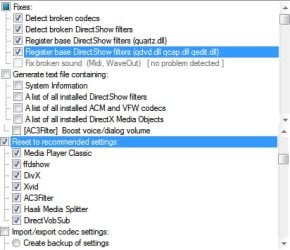
If you have k-lite on there, best thing to do it run the codec tweak tool and tick the options showqn below. Also, make sure ffdshow and ffdshow vfw interface is enabled under codec management

eta; also, are you running x64? If you're running 64bit wmp, you'll need 64bit codecs too.
 

Attachments

  • Untitled-2.jpg
    Untitled-2.jpg
    48.2 KB · Views: 1,020

My Computer

OS
Windows 7077
I tried your hint but it didn't help me. During running Codec tweak tool I got two errors

71858972.jpg.html

97884878.jpg.html


and this log:
http://www.tomek.netiz.pl/klcp_codec_log.txt
Any idea?
Thx fot help and answers!


eta; also, are you running x64? If you're running 64bit wmp, you'll need 64bit codecs too.
no, I have x86 system.
 
Last edited:

My Computer

OS
windows 7 RC
Hmm, odd. All I can suggest is that you uninstall everything and start from scratch. The log.txt doesn't even include .avi under the source filters which is strange.

Honestly, if this happened to me I'd just reinstall windows, but then I don't have that much patience.
 

My Computer

OS
Windows 7077
Is it safe to have x64 codecs installed over x86 ? I think not - what do you reckon ?
 

My Computer

OS
XP x64
+1, I use the same codec community pack and VLCmediaPlayer. The built in classic player with the community pack is great as well. The community pack also will allow you to edit ff options immediatly after install.
 

My Computer

Computer Manufacturer/Model Number
Self Custom Built
OS
Windows 7 x64 Ultimate
CPU
Q6600 Quad Core @ 2.40GHz
Motherboard
EVGA 132YWE178A1 LGA 775 NVIDIA nForce 780i SLI FTW
Memory
OCZ Reaper HPC 8GB DDR3 1333MHz
Graphics Card(s)
SLI 8800GTX / 8800GTS
Sound Card
Built In HD Audio
Monitor(s) Displays
4x SAMSUNG 245BW Black 24" Widescreen
Screen Resolution
1920x1200
Hard Drives
1TB Lacie Network Drive
2x 500GB 7500RPM Raptors
PSU
700Watt
Case
Custom Case
Cooling
Water Cooled
Keyboard
Logitech G15
Mouse
Logitech G9
Internet Speed
15MBdown/2MBup
My Solution

Hi......

Sorry for my English!

I had same problem with x86

Once worked like the steps (1-5) below, BUT at another
time not worked.... You can try Win7DSFilterTweaker

1 - Get and open the software GSPOT 2.70
2 - Go to menu SYSTEM / LIST CODECS AND OTHER FILTERS
3 - Choose "DSH - YV12 - FFDSHOW RAW VIDEO FILTER" in the list
4 - Right button of mouse and SET FILTER MERIT
5 - Put the merit in the top (0xf00000) and OK button.

Test if the codec it's Ok......
 
Last edited:

My Computer

OS
Windows XP
Back
Top