Problem with Desktop Gadgets

midnightwolf76

New member
Local time
7:13 PM
Messages
14
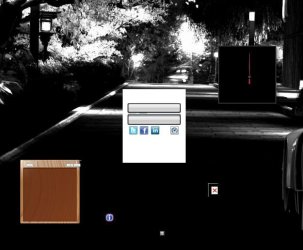
I had a flaky install of McAfee go wrong and when I uninstalled and restarted all my desktop gadgets stopped working. UAC is turned on, it's always on, by default and I like it that way.

Anyway I'm going to use the snipping tool to grab an image for you.

As you can see from the image below I'm unable to see any images for my gadgets, it's really annoying. I've been praising Windows 7 for not having to reformat/reinstall like previous versions and I hope I still don't have to.

messedgadgets.png
 

My Computer

Computer Manufacturer/Model Number
Self Built
OS
Windows 7 Ultimate x64 Signature Edition
CPU
AMD Athlon X2 Kuma
Motherboard
MSI K9N2 SLI Platinum
Memory
Corsair Dominator PC8500C5D 4GB
Graphics Card(s)
MSI N9800GT-OC 512MB
Sound Card
Realtek ALC888
Monitor(s) Displays
Samsung 2253BW 22" DVI/D-SUB
Hard Drives
Western Digital 320GB SATA
Western Digital 80GB SATA
Western Digital 80GB PATA
PSU
Ultra X3 600W
Case
Chieftec Dragon
Cooling
Air
Have you tried a system restore??
 

My Computer

Computer type
PC/Desktop
Computer Manufacturer/Model Number
LENOVO K450 @3.0GHZ
OS
64-bit Windows 8.1 Pro
CPU
Core(TM) i5 CPU 4330 Haswell @ 3.20GHz
Motherboard
LENOVO
Memory
12.00 GB
Graphics Card(s)
Intel(R) HD Graphics
Sound Card
Intel HD integtrated
Monitor(s) Displays
HP 25' ISP Monitor
Screen Resolution
1900/1020
Hard Drives
(1) ST1000DM003-1CH162 (2) Generic STORAGE DEVICE USB Device (3) Generic STORAGE DEVICE USB Device
Internet Speed
100mb down/10mb up
System Restore is always disabled on my machines, if I had System Restore, I probably wouldn't be here.
 

My Computer

Computer Manufacturer/Model Number
Self Built
OS
Windows 7 Ultimate x64 Signature Edition
CPU
AMD Athlon X2 Kuma
Motherboard
MSI K9N2 SLI Platinum
Memory
Corsair Dominator PC8500C5D 4GB
Graphics Card(s)
MSI N9800GT-OC 512MB
Sound Card
Realtek ALC888
Monitor(s) Displays
Samsung 2253BW 22" DVI/D-SUB
Hard Drives
Western Digital 320GB SATA
Western Digital 80GB SATA
Western Digital 80GB PATA
PSU
Ultra X3 600W
Case
Chieftec Dragon
Cooling
Air
Try cleaning your registry using ccleaner or similar, reboot, and report back.
 

My Computer

OS
Windows 7 Ultimate x86
I've done that, I'm currently uninstalling the desktop gadget platform as seen from another thread. Then I will reinstall it, and if that doesn't work, I'm going to run SFC /SCANNOW. So I will let you know how that goes. I was tired last night and didn't think of uninstall/reinstall.
 
Last edited:

My Computer

Computer Manufacturer/Model Number
Self Built
OS
Windows 7 Ultimate x64 Signature Edition
CPU
AMD Athlon X2 Kuma
Motherboard
MSI K9N2 SLI Platinum
Memory
Corsair Dominator PC8500C5D 4GB
Graphics Card(s)
MSI N9800GT-OC 512MB
Sound Card
Realtek ALC888
Monitor(s) Displays
Samsung 2253BW 22" DVI/D-SUB
Hard Drives
Western Digital 320GB SATA
Western Digital 80GB SATA
Western Digital 80GB PATA
PSU
Ultra X3 600W
Case
Chieftec Dragon
Cooling
Air
Okay, I have:
Uninstalled and reinstalled Desktop Gadgets - Not Resolved
Ran SFC /SCANNOW - No Errors - Not Resolved
Created a Test User Account - Not Resolved

I saw a correlation between Gadgets and PNG files so I went and opened one of my graphics and sure enough I'm unable to view PNG files. I am wondering if I have lost the extension in the registry somehow. I can view PNG in thumbnails in folders, but as soon as I open them with any image viewing tool they go blank.

*I can view PNG files via Web Browsers (Just Tested)
*I still cannot view PNG files within Windows
 

My Computer

Computer Manufacturer/Model Number
Self Built
OS
Windows 7 Ultimate x64 Signature Edition
CPU
AMD Athlon X2 Kuma
Motherboard
MSI K9N2 SLI Platinum
Memory
Corsair Dominator PC8500C5D 4GB
Graphics Card(s)
MSI N9800GT-OC 512MB
Sound Card
Realtek ALC888
Monitor(s) Displays
Samsung 2253BW 22" DVI/D-SUB
Hard Drives
Western Digital 320GB SATA
Western Digital 80GB SATA
Western Digital 80GB PATA
PSU
Ultra X3 600W
Case
Chieftec Dragon
Cooling
Air

My Computer

Computer type
PC/Desktop
Computer Manufacturer/Model Number
Self built custom
OS
64-bit Windows 11 Pro for Workstations
CPU
Intel i7-8700K OC'd to 5 GHz
Motherboard
ASUS ROG Maximus XI Formula Z390
Memory
64 GB (4x16GB) G.SKILL TridentZ RGB DDR4 3600 MHz
Graphics Card(s)
ASUS ROG-STRIX-GTX1080TI-O11G-GAMING
Sound Card
Integrated
Monitor(s) Displays
2 x Samsung Odyssey G7 27"
Screen Resolution
2560x1440
Hard Drives
1TB Samsung 990 PRO M.2,
4TB Samsung 990 PRO PRO M.2,
TerraMaster F8 SSD Plus NAS
PSU
Seasonic Prime Titanium 850W
Case
Thermaltake Core P3
Cooling
Corsair Hydro H115i
Keyboard
Logitech wireless K800
Mouse
Logitech MX Master 4
Internet Speed
2 Gb/s Download and 100 Mb/s Upload
Antivirus
Malwarebyte Anti-Malware Premium
Browser
Google Chrome
Other Info
Logitech Z625 speaker system,
Logitech BRIO 4K Pro webcam,
HP Color LaserJet Pro MFP M477fdn,
APC SMART-UPS RT 1000 XL - SURT1000XLI,
Galaxy S23 Plus phone
I tried fixing the PNG and XML file extensions and that didn't work.

So I went to one of the gadgets and double-clicked the .js file and it gave an error:

"Can't find script engine to open script (jscript)"

Fixed!

Open Command Prompt as an Administrator

Code:
regsvr32 %systemroot%\system32\jscript.dll

Log Off / Log On

Gadgets are now functioning properly.
 

My Computer

Computer Manufacturer/Model Number
Self Built
OS
Windows 7 Ultimate x64 Signature Edition
CPU
AMD Athlon X2 Kuma
Motherboard
MSI K9N2 SLI Platinum
Memory
Corsair Dominator PC8500C5D 4GB
Graphics Card(s)
MSI N9800GT-OC 512MB
Sound Card
Realtek ALC888
Monitor(s) Displays
Samsung 2253BW 22" DVI/D-SUB
Hard Drives
Western Digital 320GB SATA
Western Digital 80GB SATA
Western Digital 80GB PATA
PSU
Ultra X3 600W
Case
Chieftec Dragon
Cooling
Air
That's great news Midnightwolf. Thank you for posting back with your results and solution. :)
 

My Computer

Computer type
PC/Desktop
Computer Manufacturer/Model Number
Self built custom
OS
64-bit Windows 11 Pro for Workstations
CPU
Intel i7-8700K OC'd to 5 GHz
Motherboard
ASUS ROG Maximus XI Formula Z390
Memory
64 GB (4x16GB) G.SKILL TridentZ RGB DDR4 3600 MHz
Graphics Card(s)
ASUS ROG-STRIX-GTX1080TI-O11G-GAMING
Sound Card
Integrated
Monitor(s) Displays
2 x Samsung Odyssey G7 27"
Screen Resolution
2560x1440
Hard Drives
1TB Samsung 990 PRO M.2,
4TB Samsung 990 PRO PRO M.2,
TerraMaster F8 SSD Plus NAS
PSU
Seasonic Prime Titanium 850W
Case
Thermaltake Core P3
Cooling
Corsair Hydro H115i
Keyboard
Logitech wireless K800
Mouse
Logitech MX Master 4
Internet Speed
2 Gb/s Download and 100 Mb/s Upload
Antivirus
Malwarebyte Anti-Malware Premium
Browser
Google Chrome
Other Info
Logitech Z625 speaker system,
Logitech BRIO 4K Pro webcam,
HP Color LaserJet Pro MFP M477fdn,
APC SMART-UPS RT 1000 XL - SURT1000XLI,
Galaxy S23 Plus phone
I know it's been a long time since the last post here but this is the only thread I found that talks about the exact problem I'm having but the solution here did not work for me. I have tried everything midnightwolf76 has tried including the cmd "regsvr32 %systemroot%\system32\jscript.dll" and logging off and on but the problem persists. Just like him I can't see the Windows Sidebar .png files but I can other .png files of my own. I also have system restore disabled and I really wanted to get this fixed without reinstalling windows. Is there anything else that can be done?
 

Attachments

  • Capture.JPG
    Capture.JPG
    43.3 KB · Views: 13
I know it's been a long time since the last post here but this is the only thread I found that talks about the exact problem I'm having but the solution here did not work for me. I have tried everything midnightwolf76 has tried including the cmd "regsvr32 %systemroot%\system32\jscript.dll" and logging off and on but the problem persists. Just like him I can't see the Windows Sidebar .png files but I can other .png files of my own. I also have system restore disabled and I really wanted to get this fixed without reinstalling windows. Is there anything else that can be done?


Hello Kiujol, and welcome to Seven Forums.

Here's the latest possible solution that may be able to fix this for you.

http://www.sevenforums.com/tutorials/140358-gadgets-not-displaying-correctly-windows-7-fix.html

Hope this helps,
Shawn
 
Last edited:

My Computer

Computer type
PC/Desktop
Computer Manufacturer/Model Number
Self built custom
OS
64-bit Windows 11 Pro for Workstations
CPU
Intel i7-8700K OC'd to 5 GHz
Motherboard
ASUS ROG Maximus XI Formula Z390
Memory
64 GB (4x16GB) G.SKILL TridentZ RGB DDR4 3600 MHz
Graphics Card(s)
ASUS ROG-STRIX-GTX1080TI-O11G-GAMING
Sound Card
Integrated
Monitor(s) Displays
2 x Samsung Odyssey G7 27"
Screen Resolution
2560x1440
Hard Drives
1TB Samsung 990 PRO M.2,
4TB Samsung 990 PRO PRO M.2,
TerraMaster F8 SSD Plus NAS
PSU
Seasonic Prime Titanium 850W
Case
Thermaltake Core P3
Cooling
Corsair Hydro H115i
Keyboard
Logitech wireless K800
Mouse
Logitech MX Master 4
Internet Speed
2 Gb/s Download and 100 Mb/s Upload
Antivirus
Malwarebyte Anti-Malware Premium
Browser
Google Chrome
Other Info
Logitech Z625 speaker system,
Logitech BRIO 4K Pro webcam,
HP Color LaserJet Pro MFP M477fdn,
APC SMART-UPS RT 1000 XL - SURT1000XLI,
Galaxy S23 Plus phone
You're most welcome Kiujol. I'm happy to hear that you got it fixed now. :)
 

My Computer

Computer type
PC/Desktop
Computer Manufacturer/Model Number
Self built custom
OS
64-bit Windows 11 Pro for Workstations
CPU
Intel i7-8700K OC'd to 5 GHz
Motherboard
ASUS ROG Maximus XI Formula Z390
Memory
64 GB (4x16GB) G.SKILL TridentZ RGB DDR4 3600 MHz
Graphics Card(s)
ASUS ROG-STRIX-GTX1080TI-O11G-GAMING
Sound Card
Integrated
Monitor(s) Displays
2 x Samsung Odyssey G7 27"
Screen Resolution
2560x1440
Hard Drives
1TB Samsung 990 PRO M.2,
4TB Samsung 990 PRO PRO M.2,
TerraMaster F8 SSD Plus NAS
PSU
Seasonic Prime Titanium 850W
Case
Thermaltake Core P3
Cooling
Corsair Hydro H115i
Keyboard
Logitech wireless K800
Mouse
Logitech MX Master 4
Internet Speed
2 Gb/s Download and 100 Mb/s Upload
Antivirus
Malwarebyte Anti-Malware Premium
Browser
Google Chrome
Other Info
Logitech Z625 speaker system,
Logitech BRIO 4K Pro webcam,
HP Color LaserJet Pro MFP M477fdn,
APC SMART-UPS RT 1000 XL - SURT1000XLI,
Galaxy S23 Plus phone
Hello Rafael, and welcome to Seven Forums.

Since you have the same problem, did you already try the same solution? :)
 

My Computer

Computer type
PC/Desktop
Computer Manufacturer/Model Number
Self built custom
OS
64-bit Windows 11 Pro for Workstations
CPU
Intel i7-8700K OC'd to 5 GHz
Motherboard
ASUS ROG Maximus XI Formula Z390
Memory
64 GB (4x16GB) G.SKILL TridentZ RGB DDR4 3600 MHz
Graphics Card(s)
ASUS ROG-STRIX-GTX1080TI-O11G-GAMING
Sound Card
Integrated
Monitor(s) Displays
2 x Samsung Odyssey G7 27"
Screen Resolution
2560x1440
Hard Drives
1TB Samsung 990 PRO M.2,
4TB Samsung 990 PRO PRO M.2,
TerraMaster F8 SSD Plus NAS
PSU
Seasonic Prime Titanium 850W
Case
Thermaltake Core P3
Cooling
Corsair Hydro H115i
Keyboard
Logitech wireless K800
Mouse
Logitech MX Master 4
Internet Speed
2 Gb/s Download and 100 Mb/s Upload
Antivirus
Malwarebyte Anti-Malware Premium
Browser
Google Chrome
Other Info
Logitech Z625 speaker system,
Logitech BRIO 4K Pro webcam,
HP Color LaserJet Pro MFP M477fdn,
APC SMART-UPS RT 1000 XL - SURT1000XLI,
Galaxy S23 Plus phone
yes i try the "Gadgets not Displaying Correctly in Windows 7 - Fix" i try option one because my drive is on C .I follow it step by step then it work but when i restart my laptop the gadget on my desktop didn't work again..
 

My Computer

OS
window 7 ultimate
Are you using a 3rd party firewall program, or just Windows Firewall? If 3rd party, you will need to add an exception to allow the gadget access through the firewall.

What gadget is this for? I'll be happy to do some testing with it to see how it works on my system. :)
 

My Computer

Computer type
PC/Desktop
Computer Manufacturer/Model Number
Self built custom
OS
64-bit Windows 11 Pro for Workstations
CPU
Intel i7-8700K OC'd to 5 GHz
Motherboard
ASUS ROG Maximus XI Formula Z390
Memory
64 GB (4x16GB) G.SKILL TridentZ RGB DDR4 3600 MHz
Graphics Card(s)
ASUS ROG-STRIX-GTX1080TI-O11G-GAMING
Sound Card
Integrated
Monitor(s) Displays
2 x Samsung Odyssey G7 27"
Screen Resolution
2560x1440
Hard Drives
1TB Samsung 990 PRO M.2,
4TB Samsung 990 PRO PRO M.2,
TerraMaster F8 SSD Plus NAS
PSU
Seasonic Prime Titanium 850W
Case
Thermaltake Core P3
Cooling
Corsair Hydro H115i
Keyboard
Logitech wireless K800
Mouse
Logitech MX Master 4
Internet Speed
2 Gb/s Download and 100 Mb/s Upload
Antivirus
Malwarebyte Anti-Malware Premium
Browser
Google Chrome
Other Info
Logitech Z625 speaker system,
Logitech BRIO 4K Pro webcam,
HP Color LaserJet Pro MFP M477fdn,
APC SMART-UPS RT 1000 XL - SURT1000XLI,
Galaxy S23 Plus phone
Back
Top