
Problem with Directx when trying to open games..

xaniarias

New member
Local time
11:20 AM
Messages
6
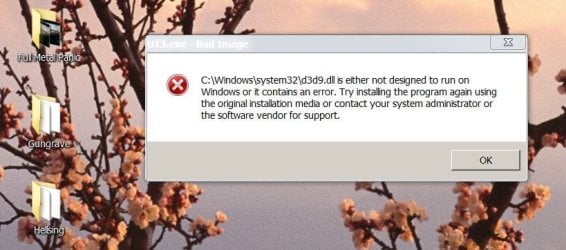
When ever I open any game I get a message telling me that d3d9.dll is not designed to run on windows or contains an error..

I have already reinstalled directx, as well as downloaded a d3d9.dll file and tried that one out.. Still get the same error message..

Any help?? I have attached a picture of the error message as well..

--Matt
 

Attachments
  • Capture.JPG
    Capture.JPG
    58.3 KB · Views: 172

My Computer

OS
Windows 7 64bit
CPU
q6600
Motherboard
EVGA 780i SLI
Memory
4 gigs at 1066
Graphics Card(s)
2 8800gt's in SLI
Sound Card
X-fi Titanium
directx

When ever I open any game I get a message telling me that d3d9.dll is not designed to run on windows or contains an error..

I have already reinstalled directx, as well as downloaded a d3d9.dll file and tried that one out.. Still get the same error message..

Any help?? I have attached a picture of the error message as well..

--Matt

Hi and welcome to SF

the error code says the file is either not designed for win or damaged. where are you getting the direct x install from

BTW there is a thread abt this here.
Windows errors related to d3d9.dll?


d3d9.dll is a process belonging to the DirectX program . d3d9.dll is DirectX DLL for DirectX9. It adds DirectX functionality for Windows Multimedia tasks and games.
Check that d3d9.dll is stable on your computer.


Hope this helps

Ken
 

My Computer

Computer Manufacturer/Model Number
HP Pavillion dv-7 1005 Tx
OS
Win 8 Release candidate 8400
CPU
[email protected]
Memory
4 gigs
Graphics Card(s)
Nvidia 9600M
Sound Card
HD built-in
Monitor(s) Displays
17" Wxga
Screen Resolution
1440x900
Cooling
none
Internet Speed
45Mb down 5Mb up
I am using the directx installer straight from microsoft.. Called dxwebsetup.exe

gonna try a registry cleaner and will post back with the results..

thanks everyone

--Matt
 

My Computer

OS
Windows 7 64bit
CPU
q6600
Motherboard
EVGA 780i SLI
Memory
4 gigs at 1066
Graphics Card(s)
2 8800gt's in SLI
Sound Card
X-fi Titanium
cleaned the registry up, still getting the same message...

Also I searched for other topics with d3d9.dll errors and didn't find much, can you give me a link to the topic?

--Matt
 

My Computer

OS
Windows 7 64bit
CPU
q6600
Motherboard
EVGA 780i SLI
Memory
4 gigs at 1066
Graphics Card(s)
2 8800gt's in SLI
Sound Card
X-fi Titanium
just tried a system restore.. Still get the same error..

BTW I am using RC 7100 64bit

please if anyone knows how to remedy this problem let me know!

--matt
 

My Computer

OS
Windows 7 64bit
CPU
q6600
Motherboard
EVGA 780i SLI
Memory
4 gigs at 1066
Graphics Card(s)
2 8800gt's in SLI
Sound Card
X-fi Titanium
I also have problems with DirectX, I downloaded the Battlefield 2 demo to see how well the game runs on my comp. But when I start it it says that I have to install DirectX 9.0c. :sarc: Wierd since I have DirectX 10 installed.
 

My Computer

OS
Windows 7
CPU
AMD Athlon Xp 2600+
Memory
1.5 gb
Graphics Card(s)
Nvidia 5600 XT
I also have problems with DirectX, I downloaded the Battlefield 2 demo to see how well the game runs on my comp. But when I start it it says that I have to install DirectX 9.0c. :sarc: Wierd since I have DirectX 10 installed.

Older games still look for the DX9 files in the DX10 library. You can fix this by downloading the DirectX 9c installer for their website to update the library file for DirectX.

As for the main topic have you tried the DirectX SDK kit install?
 

My Computer

Computer Manufacturer/Model Number
Custom Build
OS
Windows 7 Ultimate x64 SP1
CPU
AMD Phenom II 1090 3.2 six core
Motherboard
MSI 890FXA-GD65
Memory
16 gig DDR3
Graphics Card(s)
MSI R6950 2gig
Sound Card
on board
Monitor(s) Displays
Acer 23inch led
Screen Resolution
1900x1080 widescreen
Hard Drives
Seagate 1tb SATA6
2x 1tb HITACHI Deskstar
PSU
CORSAIR Enthusiast Series TX750 V2 750W
Case
CoolMaster HAF 922
Cooling
Box AMD Heatsink/Fan
Internet Speed
Cable 12Mbps/3Mbps
Thanks!
 

My Computer

OS
Windows 7
CPU
AMD Athlon Xp 2600+
Memory
1.5 gb
Graphics Card(s)
Nvidia 5600 XT
No haven't tried that.. I will now and see if it works
 

My Computer

OS
Windows 7 64bit
CPU
q6600
Motherboard
EVGA 780i SLI
Memory
4 gigs at 1066
Graphics Card(s)
2 8800gt's in SLI
Sound Card
X-fi Titanium
I installed RC 7 x64 (7232) for the first time yesterday and had problems getting any of my games to play! Then I downloaded this Direct X package from Microsoft and everything worked perfectly. Maybe you could try it.
 

My Computer

Computer Manufacturer/Model Number
Custom build
OS
Windows 7 RC Build 7232 x64
CPU
Intel Core 2 Duo E6420 2.13Gh o/c'd to 3.42Gh
Motherboard
Asus P5K SE
Memory
Corsair Dominator DDR2 1066Mh 4Gb (2x2Gb)
Graphics Card(s)
ATI Radeon HD 4890 1Gb
Sound Card
On board
Monitor(s) Displays
Samsung Syncmaster 22"
Screen Resolution
1680x1050
Hard Drives
Seagate Barracuda 240Gb
WD Caviar Black 1Tb
PSU
Thermaltake Toughpower 850W
Case
Coolermaster HAF932
Cooling
Coolermaster V8
Keyboard
Generic
Mouse
Generic
Internet Speed
ADSL 2Mb/s
OK, this may or may not be your solution but here it goes...

I am usually weiry when games ask me to install DirectX since I usually keep the latest versions but, I have come to learn that some games don't start or play well when you don't install the directX that comes with the game installation.

So, in short, go ahead and reinstall the game(s) and when and if it asks you to install DX, just say YES... I do not believe it can harm your PC by doing so but it may let you play the game ;)
 

My Computer

Computer type
PC/Desktop
Computer Manufacturer/Model Number
Custom Built... Intel/Nvidia/ASRock
OS
Windows 7 x64 (Ultimate)
CPU
Intel i5-4670K
Motherboard
ASRock Z87 Extreme 6
Memory
8GBs Ripjaws 2133Mhz
Graphics Card(s)
Asus GTX660 (2GBs)
Sound Card
Onboard Realtek HD
Monitor(s) Displays
Acer AL2216W
Screen Resolution
1680 x 1050
Hard Drives
Samsung 840 SSD 120GBs
Samsung 750GB 32MB cache
1.5 TB
PSU
PC Cooling 750w Silencer
Case
Thermaltake Spedo Advance
Cooling
Std Cooler
Keyboard
Logitech G15
Mouse
Logitech G9
Internet Speed
Comcast 20Mbit
Antivirus
Avast
Browser
Firefox
I've tried reinstalling and installing any directx stuff off game discs..

Well I am going back to Vista for my gaming machine.. Still using the RC Win 7 on my other system tho
 

My Computer

OS
Windows 7 64bit
CPU
q6600
Motherboard
EVGA 780i SLI
Memory
4 gigs at 1066
Graphics Card(s)
2 8800gt's in SLI
Sound Card
X-fi Titanium
Back
Top