Problem with dual boot Win 7 + XP (XP first)

docholliday

New member
Member
Local time
8:04 AM
Messages
30
Location
Burlington ,WI
Complaint: When starting computer, boot manager does not show Win 7

Symptoms: Previously, my system was running XP 32 bit and Vista 32 without any problems. After installing Vista, I found it quite easy to use EASYBCD to properly configure the boot manager to have XP as the default system, and Vista as the optional system further down the line. The two OSs are set on separate partitions of the same disk. Note however that the disk is actually a RAID 1 array.

A few days ago I installed Windows 7 Professional 64 bit, as a clean install after wiping out the Vista partition. Installation proceeded without difficulty, but when I tried to make the necessary changes to the boot file via EASYBCD, the XP partition was not listed. So I mounted the partition and labeled it as X:, and went back to EASYBCD to add XP to the X: partition.

But after restarting, the boot manager menu listed:

(1)Older version of Windows
(2)Vista boot loader

When I choose (1), a new table comes up that lists only XP. If chosen, XP starts without difficulty.

When I choose (2), I get an error screen. I will post the exact error message momentarily.

I thought maybe the boot needed to be repaired, so I booted off the Win 7 DVD and instructed it to fix my computer. But after running a scan, a window popped up telling me that there was no problem to fix. I then restarted the system, leaving the DVD in the drive, but when prompted, I allowed the system to continue loading instead of striking a key to boot from the Win 7 DVD.

Instead of the boot menu above, the new menu was:
(1) Windows 7
(2) Windows XP

This is exactly what I told EASYBCD to do! But I can only get to this menu if I have the Win 7 DVD in the drive when I start up the computer! Note that I am NOT booting off the disk; the disk is simply sitting in the drive! When the bios checks the drive for a disk and sees one is present, it asks me if I want to boot from it (press any key) or not (do nothing). Whenever I do nothing, I get the right boot menu!

I have spent many, many hours and scoured the forums, but I have yet to see this problem described.

I will post a screen image of my disk management shortly. I will also post a copy of the EASYBCD screen image.

Thanks.
 

My Computer My Computer

At a glance

Windows 7AMD Athalon 64 x2 6000+4GBNVIDIA 8600GTS
OS
Windows 7
CPU
AMD Athalon 64 x2 6000+
Motherboard
ASUS M2N-SLI Deluxe
Memory
4GB
Graphics Card(s)
NVIDIA 8600GTS
Monitor(s) Displays
Samsung Syncmaster 22"
Hard Drives
Seagate 320GB
Western Digital 640GB x 2 in RAID 1
Case
Antec Sonata III
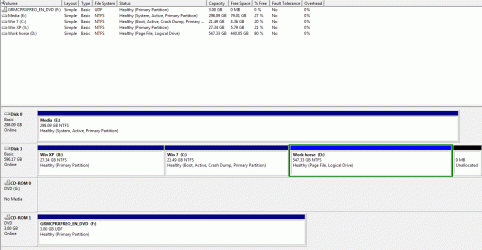
Enclosed is a screen shot of my disc management.

Note that Windows 7 has designated a data drive as disk 0. I find this to be a little strange and even annoying. I have read posts that this is a hardware issue, but previously, the drive with the OS has ALWAYS been Disk 0.
 

Attachments

  • ScreenHunter_02 Jan. 06 12.47.gif
    ScreenHunter_02 Jan. 06 12.47.gif
    30.3 KB · Views: 67

My Computer My Computer

At a glance

Windows 7AMD Athalon 64 x2 6000+4GBNVIDIA 8600GTS
OS
Windows 7
CPU
AMD Athalon 64 x2 6000+
Motherboard
ASUS M2N-SLI Deluxe
Memory
4GB
Graphics Card(s)
NVIDIA 8600GTS
Monitor(s) Displays
Samsung Syncmaster 22"
Hard Drives
Seagate 320GB
Western Digital 640GB x 2 in RAID 1
Case
Antec Sonata III
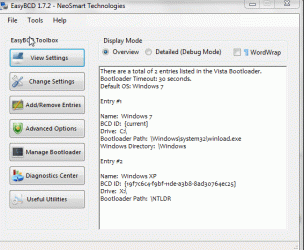
Screen shot of EASYBCD.

Please let me know what other data and settings I can post to help solve this problem.
 

Attachments

  • ScreenHunter_03 Jan. 06 12.54.gif
    ScreenHunter_03 Jan. 06 12.54.gif
    29.3 KB · Views: 41

My Computer My Computer

At a glance

Windows 7AMD Athalon 64 x2 6000+4GBNVIDIA 8600GTS
OS
Windows 7
CPU
AMD Athalon 64 x2 6000+
Motherboard
ASUS M2N-SLI Deluxe
Memory
4GB
Graphics Card(s)
NVIDIA 8600GTS
Monitor(s) Displays
Samsung Syncmaster 22"
Hard Drives
Seagate 320GB
Western Digital 640GB x 2 in RAID 1
Case
Antec Sonata III
The problem is your System MBR has been derailed to the Media drive. This is a frequent problem with data drives in DISK0.

I see SIW2 is reading this so I will defer to him to give you the fix.

I would unplug Media, repair install XP, then add Win7 with Easy.

When replugging Media drive, it may be necessary to set it Inactive using Diskpart CMD.
 
Try seeing if Disk 0 is first HD in bios boot order.

You have one HD set up as a Raid array?
 
Last edited:

My Computers My Computers

  • At a glance

    7 X64i5 84002x8gb 3200mhz
    Computer type
    PC/Desktop
    OS
    7 X64
    CPU
    i5 8400
    Motherboard
    gigabyte b365m ds3h
    Memory
    2x8gb 3200mhz
    Hard Drives
    various
    PSU
    pure power 11 400w cm
    Case
    Coolermaster
    Cooling
    cryorig m9i
  • At a glance

    7x64g54008gb ddr4 2400
    Computer type
    PC/Desktop
    OS
    7x64
    CPU
    g5400
    Motherboard
    ga b365m ds3h
    Memory
    8gb ddr4 2400
    PSU
    xfx pro 450w
@gregrocker: Thanks for the idea. If this is what I need to do, I'll do it. Is there maybe a less labor intensive fix? Is there anyway to move the MBR from Media back to where it should be (the Win7 partition, right?).

@SIW2: Good thought.
And yes, Disk 1 is a RAID array.

I had a look, but the drive with my OS is first in line.

But here is another interesting symptom:

I changed the boot order from CD ROM > HDD to HDD > CD ROM.
The boot menu changed to:
(1) Microsoft Windows XP
(2) Microsoft recovery console

So, any mention of a Vista loader or Win 7 was gone. But once I switched the priority back to CD ROM > HDD, and if the Win 7 DVD was loaded (even though I did not tell the bios to boot from it), I get the menu I am looking for:

(1)Windows 7
(2)Windows XP

But I suppose all of this is moot considering that to fix this, according to gregrocker, I need to put the MBR back where it should be. Again is there possibly a better procedure?
 

My Computer My Computer

At a glance

Windows 7AMD Athalon 64 x2 6000+4GBNVIDIA 8600GTS
OS
Windows 7
CPU
AMD Athalon 64 x2 6000+
Motherboard
ASUS M2N-SLI Deluxe
Memory
4GB
Graphics Card(s)
NVIDIA 8600GTS
Monitor(s) Displays
Samsung Syncmaster 22"
Hard Drives
Seagate 320GB
Western Digital 640GB x 2 in RAID 1
Case
Antec Sonata III
Curious.

It appears you have two different bcd stores.

Go to folder options and show Hidden files.

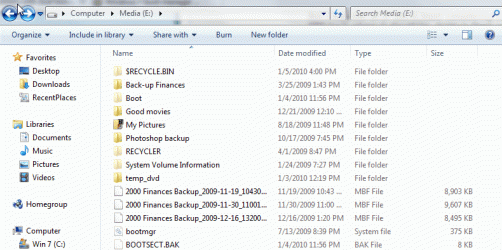
Post a screenie of the contents of the Media drive and the 7 partition - see if you can locate a pale yellow Boot folder on the root of the drive
 

My Computers My Computers

  • At a glance

    7 X64i5 84002x8gb 3200mhz
    Computer type
    PC/Desktop
    OS
    7 X64
    CPU
    i5 8400
    Motherboard
    gigabyte b365m ds3h
    Memory
    2x8gb 3200mhz
    Hard Drives
    various
    PSU
    pure power 11 400w cm
    Case
    Coolermaster
    Cooling
    cryorig m9i
  • At a glance

    7x64g54008gb ddr4 2400
    Computer type
    PC/Desktop
    OS
    7x64
    CPU
    g5400
    Motherboard
    ga b365m ds3h
    Memory
    8gb ddr4 2400
    PSU
    xfx pro 450w
And the plot thickens...
 

Attachments

  • ScreenHunter_02 Jan. 06 14.06.gif
    ScreenHunter_02 Jan. 06 14.06.gif
    35.6 KB · Views: 30
  • ScreenHunter_03 Jan. 06 14.07.gif
    ScreenHunter_03 Jan. 06 14.07.gif
    40.8 KB · Views: 26

My Computer My Computer

At a glance

Windows 7AMD Athalon 64 x2 6000+4GBNVIDIA 8600GTS
OS
Windows 7
CPU
AMD Athalon 64 x2 6000+
Motherboard
ASUS M2N-SLI Deluxe
Memory
4GB
Graphics Card(s)
NVIDIA 8600GTS
Monitor(s) Displays
Samsung Syncmaster 22"
Hard Drives
Seagate 320GB
Western Digital 640GB x 2 in RAID 1
Case
Antec Sonata III
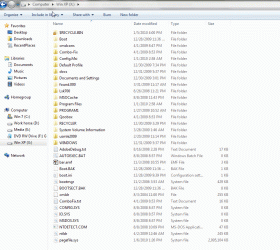
Here is a screenie of drive X (with XP):
 

Attachments

  • ScreenHunter_04 Jan. 06 14.11.gif
    ScreenHunter_04 Jan. 06 14.11.gif
    54.6 KB · Views: 23

My Computer My Computer

At a glance

Windows 7AMD Athalon 64 x2 6000+4GBNVIDIA 8600GTS
OS
Windows 7
CPU
AMD Athalon 64 x2 6000+
Motherboard
ASUS M2N-SLI Deluxe
Memory
4GB
Graphics Card(s)
NVIDIA 8600GTS
Monitor(s) Displays
Samsung Syncmaster 22"
Hard Drives
Seagate 320GB
Western Digital 640GB x 2 in RAID 1
Case
Antec Sonata III
Ok - I think the best way forward is to use C as the system partition. You can leave Disk 1 as first in Bios boot order.

You can use commands, but easiest to d/l EasyBCD 2.0 Beta Builds - The NeoSmart Forums

Click Diagnostics center , Dot Change boot drive, click Rescue my system - select C in drop down, OK.

It takes a few seconds.

Then click Add/Remove entries - remove the entry for Xp .

Add a new entry for XP and let easy autoconfigure.
 

My Computers My Computers

  • At a glance

    7 X64i5 84002x8gb 3200mhz
    Computer type
    PC/Desktop
    OS
    7 X64
    CPU
    i5 8400
    Motherboard
    gigabyte b365m ds3h
    Memory
    2x8gb 3200mhz
    Hard Drives
    various
    PSU
    pure power 11 400w cm
    Case
    Coolermaster
    Cooling
    cryorig m9i
  • At a glance

    7x64g54008gb ddr4 2400
    Computer type
    PC/Desktop
    OS
    7x64
    CPU
    g5400
    Motherboard
    ga b365m ds3h
    Memory
    8gb ddr4 2400
    PSU
    xfx pro 450w
From what I see, the media drive 0 is the primary drive. It has the System partition, which means it has the boot files on it.

I would take the DVD out so it won't confuse the situation. If you want to keep your media drive, it might be best to disconnect it.

Could you check the root directories of the XP, Win 7 and media drive for the hidden system files bootmgr and ntldr? Make note of where you find them. I am guessing they are in the Media drive, but also maybe one or the other will be on the XP or Win 7 drive.
 

My Computer My Computer

At a glance

Windows 7 x64i7-2600K8 GGTX 480
Computer Manufacturer/Model Number
Homebuilt
OS
Windows 7 x64
CPU
i7-2600K
Motherboard
Asus P8Z77-v Pro
Memory
8 G
Graphics Card(s)
GTX 480
Sound Card
Onboard
Monitor(s) Displays
LG W2753V
Screen Resolution
1920x1080
Hard Drives
Crucial M4 128 G SSD
If he makes the XP partition active and puts that drive first in the drive priority (not not boot order), or disconnect the Media drive, he should be back where he started.

The system would then boot to the XP partition as system and use the already installed boot files.
 

My Computer My Computer

At a glance

Windows 7 x64i7-2600K8 GGTX 480
Computer Manufacturer/Model Number
Homebuilt
OS
Windows 7 x64
CPU
i7-2600K
Motherboard
Asus P8Z77-v Pro
Memory
8 G
Graphics Card(s)
GTX 480
Sound Card
Onboard
Monitor(s) Displays
LG W2753V
Screen Resolution
1920x1080
Hard Drives
Crucial M4 128 G SSD
I followed the recs made by SIW2: it worked beautifully. I now see the boot manager menu as it should (without having the Win 7 DVD in the drive).

However, drive E: (media), is still recognized by the system as Disk 0. And there is still boot info on this drive. But is this info being used? After all, I told EASYBCD to use C:.

I'm not too worried about this now, but is this going to be an issue in the future? Let's say if I pull the E: drive? Actually, I think I should get this right now, for I would hate to have bigger problems in the future.

What do you think?

By the way, thank you to everyone. I really do appreciate the assistance.
 

My Computer My Computer

At a glance

Windows 7AMD Athalon 64 x2 6000+4GBNVIDIA 8600GTS
OS
Windows 7
CPU
AMD Athalon 64 x2 6000+
Motherboard
ASUS M2N-SLI Deluxe
Memory
4GB
Graphics Card(s)
NVIDIA 8600GTS
Monitor(s) Displays
Samsung Syncmaster 22"
Hard Drives
Seagate 320GB
Western Digital 640GB x 2 in RAID 1
Case
Antec Sonata III
You should be fine. Check in Disk Management.

If the 7 partition is listed as System - you don't need the boot files on Media drive, and removing the Media drive is ok.

It doesn't matter that it is called Disk 0.
 

My Computers My Computers

  • At a glance

    7 X64i5 84002x8gb 3200mhz
    Computer type
    PC/Desktop
    OS
    7 X64
    CPU
    i5 8400
    Motherboard
    gigabyte b365m ds3h
    Memory
    2x8gb 3200mhz
    Hard Drives
    various
    PSU
    pure power 11 400w cm
    Case
    Coolermaster
    Cooling
    cryorig m9i
  • At a glance

    7x64g54008gb ddr4 2400
    Computer type
    PC/Desktop
    OS
    7x64
    CPU
    g5400
    Motherboard
    ga b365m ds3h
    Memory
    8gb ddr4 2400
    PSU
    xfx pro 450w
Thanks again. I appreciate your help. If you are near Milwaukee, I'd buy you a beer. Otherwise, let me know if this site collects donations. I'd be glad to contribute.
 

My Computer My Computer

At a glance

Windows 7AMD Athalon 64 x2 6000+4GBNVIDIA 8600GTS
OS
Windows 7
CPU
AMD Athalon 64 x2 6000+
Motherboard
ASUS M2N-SLI Deluxe
Memory
4GB
Graphics Card(s)
NVIDIA 8600GTS
Monitor(s) Displays
Samsung Syncmaster 22"
Hard Drives
Seagate 320GB
Western Digital 640GB x 2 in RAID 1
Case
Antec Sonata III
I'm the other side of the world, happy to help.

Have a great year.:D
 

My Computers My Computers

  • At a glance

    7 X64i5 84002x8gb 3200mhz
    Computer type
    PC/Desktop
    OS
    7 X64
    CPU
    i5 8400
    Motherboard
    gigabyte b365m ds3h
    Memory
    2x8gb 3200mhz
    Hard Drives
    various
    PSU
    pure power 11 400w cm
    Case
    Coolermaster
    Cooling
    cryorig m9i
  • At a glance

    7x64g54008gb ddr4 2400
    Computer type
    PC/Desktop
    OS
    7x64
    CPU
    g5400
    Motherboard
    ga b365m ds3h
    Memory
    8gb ddr4 2400
    PSU
    xfx pro 450w
Back
Top