Problem with dual boot xp and seven ! help !!

Punked Boyz

New member
Member
Local time
6:11 AM
Messages
84
guyz...earlier i had installed win 7 and xp in dual boot mode,but yesterday something went wrong n windows cant boot,so i hv 2 re install xp,now i didnt see any option of dual boot.

plz tell me how to get back 7 in dual boot option ?
 

My Computer My Computer

Computer Manufacturer/Model Number
Assembled pc
OS
MS Windows 7 Ultimate 32-bit SP1
CPU
Intel Core i3 530 @ 2.93GHz
Motherboard
Intel Corporation DH55PJ (XU1)
Memory
2.0GB Single-Channel DDR3 @ 665MHz (9-9-9-24)
Graphics Card(s)
MSI Radeon HD 5770
Sound Card
Realtek High Definition Audio
Screen Resolution
1600*900
Hard Drives
313GB Western Digital WDC WD3200AAJS-00L7A0 ATA Device (SATA)
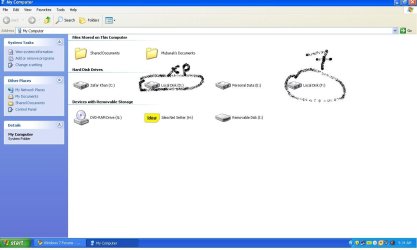
If you re-installed XP, you probably reformatted your computer, which erased all your partitions. Go to "My Computer" and see if it shows more than one partition.

If not, you need to partition your hard drive and install 7 on the new partition.
 

My Computer My Computer

OS
Windows 7 Home Basic, 64 bit
CPU
dual core, Athlon 2; 3.4 gigahertz
Memory
4 gigabytes
Graphics Card(s)
ATI Radeon HD 5400 Series
Sound Card
AMD High Definitin Audio Device
Monitor(s) Displays
Generic PnP Monitor
Hard Drives
ST350041 3AS SCSI Disk Device
Keyboard
Standard PS/2 Keyboard
Other Info
Assembled in a Mexican computer store
i dint formatted all partitions,other partitions are also there
 

Attachments

  • drives.JPG
    drives.JPG
    62.9 KB · Views: 45

My Computer My Computer

Computer Manufacturer/Model Number
Assembled pc
OS
MS Windows 7 Ultimate 32-bit SP1
CPU
Intel Core i3 530 @ 2.93GHz
Motherboard
Intel Corporation DH55PJ (XU1)
Memory
2.0GB Single-Channel DDR3 @ 665MHz (9-9-9-24)
Graphics Card(s)
MSI Radeon HD 5770
Sound Card
Realtek High Definition Audio
Screen Resolution
1600*900
Hard Drives
313GB Western Digital WDC WD3200AAJS-00L7A0 ATA Device (SATA)
This is normal for XP to be the only one to load if you install XP after 7 is installed. If you still have your Windows 7 disk, load from the DVD, and do a Startup Repair. That will fix it so a boot manager screen will be shown, allowing you to choose between XP and 7.
 

My Computer My Computer

Computer type
Laptop
Computer Manufacturer/Model Number
HP ProBook 4540s
OS
Windows 7 Ultimate SP1 x64 and Windows XP Professional SP3 x32 (Dual Boot)
CPU
Intel Core i3-3110M @ 2.4 GHz
Memory
16 GB DDR3 (2x8GB PC3-12800 Crucial Ram)
Graphics Card(s)
Intel HD 4000
Screen Resolution
1366x768
Hard Drives
HGST 1TB 5400 RPM 2.5-inch Internal Hard Drive

Western Digital My Book Essentials 4 TB External Hard Drive

Western Digital My Passport Ultra 2 TB Portable Hard Drive
Antivirus
Microsoft Security Essentials 4.5.216.0
Browser
Mozilla Firefox 32.0
i hv done startup repair using win 7 disk,but still its booting to xp...
 

My Computer My Computer

Computer Manufacturer/Model Number
Assembled pc
OS
MS Windows 7 Ultimate 32-bit SP1
CPU
Intel Core i3 530 @ 2.93GHz
Motherboard
Intel Corporation DH55PJ (XU1)
Memory
2.0GB Single-Channel DDR3 @ 665MHz (9-9-9-24)
Graphics Card(s)
MSI Radeon HD 5770
Sound Card
Realtek High Definition Audio
Screen Resolution
1600*900
Hard Drives
313GB Western Digital WDC WD3200AAJS-00L7A0 ATA Device (SATA)
ye insert you win 7 cd and do a start up repair you have to so it dont load automaicly into xp its what i did on my other pc that has duo boot
 

My Computer My Computer

Computer type
PC/Desktop
Computer Manufacturer/Model Number
custom build
OS
Windows 10 64bit
CPU
AMD Phenom II X4 925 (Deneb)(2.8GHz) OC 3.4GHz
Motherboard
M5A78L-MLX Plus
Memory
Corsair Vengeance DDR3 4GBX2 (8192MB)
Graphics Card(s)
XFX HD 6870 1GB (OC)- 940MHz core, mem 1150MHz
Monitor(s) Displays
Vizio 26' 1920x1080 / Acer 1336x768
Screen Resolution
1920x1080 60Hz /1336x768
Hard Drives
Kingston Digital 60GB SSDNow V300/500gb HDD Western Digital 7200rpm (/WD 160GB HDD 7200rpm
PSU
CORSAIR CX600 600w
Case
AZZA Orion 202 EVO
Cooling
cooler master hyper TX3 cpu cooler
Keyboard
Razer DeathStalker
Mouse
Logitech Optical Gaming Mouse G400
Antivirus
Defualt on win 10
Browser
Firefox
Other Info
cpu is overclocked in bios
You'll have to mark the Windows 7 partition as active before attempting the startup repair. This can be done from the Windows 7 setup DVD using the command prompt and diskpart. (Note that once this is done you won't be able to reboot into XP, so only do this immediately before performing startup repair.)

Once your ability to boot into Windows 7 is restored, the next step is to add XP back as a new boot entry to the Windows 7 boot manager, for which EasyBCD is the simplest way to do it.
 

My Computer My Computer

Computer type
PC/Desktop
Computer Manufacturer/Model Number
Custom-built
OS
Windows 7 Professional SP1 32-bit
CPU
Intel Core 2 Duo E6600 2.4GHz
Motherboard
Asus PL5D2
Memory
4GB DDR2-667 (4x1GB in dual-channel config)
Graphics Card(s)
nVidia GeForce 9800 GT
Sound Card
Creative X-Fi XtremeMusic
Monitor(s) Displays
Acer P236H
Screen Resolution
1920x1200 (DVI)
Hard Drives
OCZ SSD Vertex Plus 60GB SATA (Firmware 3.55), 64MB cache
Hitachi HD321KJ SATA, 320GB, 7200rpm, 16MB cache
PSU
Antec TruePower 2.0
Case
Cooler Master Centurion
Cooling
Too many fans
Keyboard
Standard
Mouse
Microsoft wireless optical mouse
Internet Speed
AT&T U-verse (18mbit/sec)
Antivirus
Microsoft Security Essentials
Browser
Firefox
Other Info
Other devices:
Compaq CQ-60 laptop
Google Nexus 7 (2012) tablet
Nvidia SHIELD tablet (US/LTE)
Hardkernel ODROID-XU single-board computer (Samsung Exynos 5420)
You have XP marked as being on F, Win7 on D, so what is on C? Are you sure you didn't install a second XP?

If you correctly reinstalled XP over itself, then you'll need to start Win7 as stated earlier after marking the 7 partition Active: Partition - Mark as Active (Method Two),
then run Startup Repair - Run 3 Separate Times

Once Win7 starts, install EasyBCD to add XP, accept boot files, let it autocomplete, Save, Reboot to Dual Boot menu. EasyBCD 2.0.2 - NeoSmart Technologies

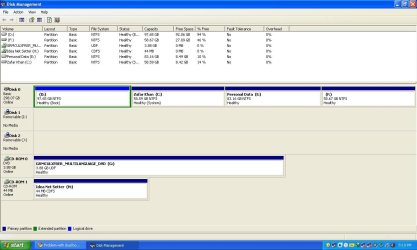
Let us see the Disk Mgmt screenshot to be certain there are no anomalies.
 
disk mgmt.JPG
 

My Computer My Computer

Computer Manufacturer/Model Number
Assembled pc
OS
MS Windows 7 Ultimate 32-bit SP1
CPU
Intel Core i3 530 @ 2.93GHz
Motherboard
Intel Corporation DH55PJ (XU1)
Memory
2.0GB Single-Channel DDR3 @ 665MHz (9-9-9-24)
Graphics Card(s)
MSI Radeon HD 5770
Sound Card
Realtek High Definition Audio
Screen Resolution
1600*900
Hard Drives
313GB Western Digital WDC WD3200AAJS-00L7A0 ATA Device (SATA)
so this is the screenshot,now tell me what 2 do exactly :)


n yeah thanx every1 for ur reply ,much appriciated :)
 

My Computer My Computer

Computer Manufacturer/Model Number
Assembled pc
OS
MS Windows 7 Ultimate 32-bit SP1
CPU
Intel Core i3 530 @ 2.93GHz
Motherboard
Intel Corporation DH55PJ (XU1)
Memory
2.0GB Single-Channel DDR3 @ 665MHz (9-9-9-24)
Graphics Card(s)
MSI Radeon HD 5770
Sound Card
Realtek High Definition Audio
Screen Resolution
1600*900
Hard Drives
313GB Western Digital WDC WD3200AAJS-00L7A0 ATA Device (SATA)
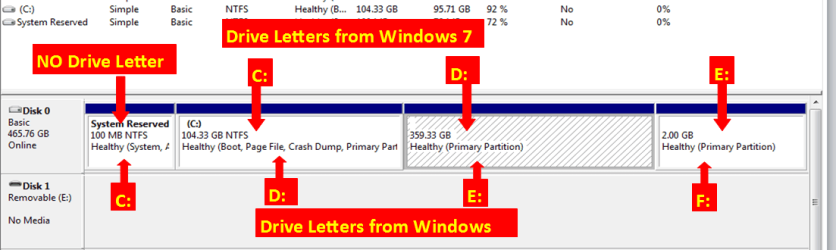
You are booted into D now, so what is on C which appears to hold the System boot files for both XP and 7?

You show in the previous Computer screenshot that Win7 is on F. How do you know this? Doesn't Win7 show itself as C when you boot into it? It should if it was correctly installed from booted DVD.

If Win7 is on C then mark it Active in Disk Mgmt, boot into Win7 DVD Repair console to run Startup Repair 3 Separate Times until Win7 starts up, then install EasyBCD to add XP to Dual Boot menu.

If you are unsure what OS is on C then post back a screenshot of contents on C when you click on it in Computer.
 
i dont think dat D contains any boot file,n win 7 is installed in F coz all windows files are in F,let me try the step 3 which u hv told...

will post de results sson :)
 

My Computer My Computer

Computer Manufacturer/Model Number
Assembled pc
OS
MS Windows 7 Ultimate 32-bit SP1
CPU
Intel Core i3 530 @ 2.93GHz
Motherboard
Intel Corporation DH55PJ (XU1)
Memory
2.0GB Single-Channel DDR3 @ 665MHz (9-9-9-24)
Graphics Card(s)
MSI Radeon HD 5770
Sound Card
Realtek High Definition Audio
Screen Resolution
1600*900
Hard Drives
313GB Western Digital WDC WD3200AAJS-00L7A0 ATA Device (SATA)
Then you have a mess. I would see if there is any Windows folder on C as it is almost never left alone to be a data drive after install of two OS's.

Are you not aware you need to boot Win7 DVD when installing so that it obtains the C drive letter for itself whenever booted into it? It appears you ran it from XP which itself was on D for some reason which is very unusual since it would have taken C when installed first.

I would suggest you get it right by reinstalling Win7 to C after moving data off of it, then add XP from Win7 using EasyBCD. If you keep it the way it is you have your System boot files on a data drive C, with the OS's on other partitions.
 
Back
Top