Problem with DVD drive after installation

Devices

Matt, are you able to get a screen shot for us?
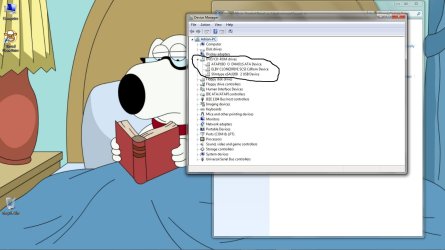
Attached are screen shots of my devices with my drives circled in black.
I want to see what yours look like.
 

Attachments

  • dvice_mgr.jpg
    dvice_mgr.jpg
    104 KB · Views: 18
  • drives.jpg
    drives.jpg
    100.2 KB · Views: 9
  • drives1.jpg
    drives1.jpg
    106.7 KB · Views: 10

My Computer

Computer Manufacturer/Model Number
Custom Build
OS
Windows 7 7600 1 X64
CPU
AMD PHENOM II X 550 PROCESSOR 3.1 ghz
Motherboard
ASUS M4A78-TE
Memory
Corsair 4 gig ddr 3
Graphics Card(s)
ati radeon 3300
Sound Card
ati hd
Monitor(s) Displays
syncmaster 2033sw
Screen Resolution
1600X900 60 hz refresh
Hard Drives
twin_seagates SATA's 1 TB & 500 Gig, hitachi_slimline 160 gig
PSU
antec_550 watt
Case
cooler master GLite
Cooling
stock_heat sink
Internet Speed
20mbs up/ 1.5mbs down
Other Info
favorite child "stewie"
favorite dog "brian"
Right managed to find a booklet concerning my motherboard its an ASUS M3A32-MVP Deluxe Series.

http://img23.imageshack.us/img23/8292/screenmgh.jpg

Thats a link to the screenie you asked for I hope I got that right, oh and I just want to say I really do appreciate all your help.
 

My Computer

Computer Manufacturer/Model Number
Alienware
OS
Win7 Home Premium 64 Bit
CPU
AMD Phenom Quad Core 9650
Memory
4 gig's of DDR2
Graphics Card(s)
Sapphire Radeon 4870 1gig
Monitor(s) Displays
Sony SDM-P234
Screen Resolution
1920x1200
Keyboard
Logitech G15
Mouse
Microsoft DX8 Sidewinder
Internet Speed
Upto 12MB (I get around 6-8)
Identified DVD connection

Hello Matt, we have identified your DVD/CD, good job getting the device manager screen shot.
Ok, we have identified your MOBO and your dvd optical storage device.
As we thought the drive is a SATA device so the settings need to be changed in the bios. Also it is possible that your MOBO's chipset drivers are out of date and you need to load the new chipset driver.
First thing first: We are going to update the Mother board, are you ready!:cool: First look at the screen shot I uploaded, what you are seeing is the ASSUS support site, ASSUS is the maker of your MOBO. The screen shot at the bootom of the picture is the chipset file specifically for your MOBO, I want you to follow : ASUSTeK Computer Inc.-Support-
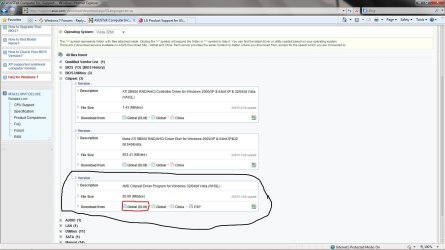
Down load the update, its the last update on the bottom.
 

Attachments

  • ASSUS_CHIP.jpg
    ASSUS_CHIP.jpg
    126.8 KB · Views: 21

My Computer

Computer Manufacturer/Model Number
Custom Build
OS
Windows 7 7600 1 X64
CPU
AMD PHENOM II X 550 PROCESSOR 3.1 ghz
Motherboard
ASUS M4A78-TE
Memory
Corsair 4 gig ddr 3
Graphics Card(s)
ati radeon 3300
Sound Card
ati hd
Monitor(s) Displays
syncmaster 2033sw
Screen Resolution
1600X900 60 hz refresh
Hard Drives
twin_seagates SATA's 1 TB & 500 Gig, hitachi_slimline 160 gig
PSU
antec_550 watt
Case
cooler master GLite
Cooling
stock_heat sink
Internet Speed
20mbs up/ 1.5mbs down
Other Info
favorite child "stewie"
favorite dog "brian"
Chipset update

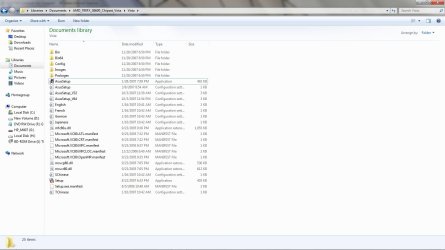
Matt after you download the chipset update you need to extract it to a folder or location where you know where the set up file is. After that you will need to run the set up file. The set up file will run automatically. After it has installed the new updates and drivers, reboot the system and tell us what happened.
 

Attachments

  • zip.jpg
    zip.jpg
    94.7 KB · Views: 17
Last edited:

My Computer

Computer Manufacturer/Model Number
Custom Build
OS
Windows 7 7600 1 X64
CPU
AMD PHENOM II X 550 PROCESSOR 3.1 ghz
Motherboard
ASUS M4A78-TE
Memory
Corsair 4 gig ddr 3
Graphics Card(s)
ati radeon 3300
Sound Card
ati hd
Monitor(s) Displays
syncmaster 2033sw
Screen Resolution
1600X900 60 hz refresh
Hard Drives
twin_seagates SATA's 1 TB & 500 Gig, hitachi_slimline 160 gig
PSU
antec_550 watt
Case
cooler master GLite
Cooling
stock_heat sink
Internet Speed
20mbs up/ 1.5mbs down
Other Info
favorite child "stewie"
favorite dog "brian"
SALUTE

Salute! Take a rep Matt. Good job!
 

Attachments

  • 633502079247460928-squirrel-marines.jpg
    633502079247460928-squirrel-marines.jpg
    57.1 KB · Views: 11

My Computer

Computer Manufacturer/Model Number
Custom Build
OS
Windows 7 7600 1 X64
CPU
AMD PHENOM II X 550 PROCESSOR 3.1 ghz
Motherboard
ASUS M4A78-TE
Memory
Corsair 4 gig ddr 3
Graphics Card(s)
ati radeon 3300
Sound Card
ati hd
Monitor(s) Displays
syncmaster 2033sw
Screen Resolution
1600X900 60 hz refresh
Hard Drives
twin_seagates SATA's 1 TB & 500 Gig, hitachi_slimline 160 gig
PSU
antec_550 watt
Case
cooler master GLite
Cooling
stock_heat sink
Internet Speed
20mbs up/ 1.5mbs down
Other Info
favorite child "stewie"
favorite dog "brian"
Been out all day today so not had a chance to try this until now, I downloaded the file and updated the chipset but the same problem persists with the DVD drive.
 

My Computer

Computer Manufacturer/Model Number
Alienware
OS
Win7 Home Premium 64 Bit
CPU
AMD Phenom Quad Core 9650
Memory
4 gig's of DDR2
Graphics Card(s)
Sapphire Radeon 4870 1gig
Monitor(s) Displays
Sony SDM-P234
Screen Resolution
1920x1200
Keyboard
Logitech G15
Mouse
Microsoft DX8 Sidewinder
Internet Speed
Upto 12MB (I get around 6-8)
Been out all day today so not had a chance to try this until now, I downloaded the file and updated the chipset but the same problem persists with the DVD drive.
Do you have a 4 gig flash stick?
 

My Computer

Computer Manufacturer/Model Number
Custom Build
OS
Windows 7 7600 1 X64
CPU
AMD PHENOM II X 550 PROCESSOR 3.1 ghz
Motherboard
ASUS M4A78-TE
Memory
Corsair 4 gig ddr 3
Graphics Card(s)
ati radeon 3300
Sound Card
ati hd
Monitor(s) Displays
syncmaster 2033sw
Screen Resolution
1600X900 60 hz refresh
Hard Drives
twin_seagates SATA's 1 TB & 500 Gig, hitachi_slimline 160 gig
PSU
antec_550 watt
Case
cooler master GLite
Cooling
stock_heat sink
Internet Speed
20mbs up/ 1.5mbs down
Other Info
favorite child "stewie"
favorite dog "brian"
I notice the early comment to update DVD drive firmware was skipped over. Reason?

Here is the link to latest firmware, click Drivers and Software tab on product support page: LG Product Support for GSA-H55N

File attached below:

Follow the ReadMe in the zip file.
Greg, Matt performed the firmaware update, he describes doing that on the first page.
 

My Computer

Computer Manufacturer/Model Number
Custom Build
OS
Windows 7 7600 1 X64
CPU
AMD PHENOM II X 550 PROCESSOR 3.1 ghz
Motherboard
ASUS M4A78-TE
Memory
Corsair 4 gig ddr 3
Graphics Card(s)
ati radeon 3300
Sound Card
ati hd
Monitor(s) Displays
syncmaster 2033sw
Screen Resolution
1600X900 60 hz refresh
Hard Drives
twin_seagates SATA's 1 TB & 500 Gig, hitachi_slimline 160 gig
PSU
antec_550 watt
Case
cooler master GLite
Cooling
stock_heat sink
Internet Speed
20mbs up/ 1.5mbs down
Other Info
favorite child "stewie"
favorite dog "brian"
I notice the early comment to update DVD drive firmware was skipped over. Reason?

Here is the link to latest firmware, click Drivers and Software tab on product support page: LG Product Support for GSA-H55N

File attached below:

Follow the ReadMe in the zip file.
Greg, Matt performed the firmaware update, he describes doing that on the first page.
I did not skip over it perhaps I was not clear previously, after I had deleted the driver and let windows find the drive after a fresh boot to no avail at that point I then tried installing the drive from the LG website still no change with the problem.
 

My Computer

Computer Manufacturer/Model Number
Alienware
OS
Win7 Home Premium 64 Bit
CPU
AMD Phenom Quad Core 9650
Memory
4 gig's of DDR2
Graphics Card(s)
Sapphire Radeon 4870 1gig
Monitor(s) Displays
Sony SDM-P234
Screen Resolution
1920x1200
Keyboard
Logitech G15
Mouse
Microsoft DX8 Sidewinder
Internet Speed
Upto 12MB (I get around 6-8)
Let me save everyone troubles with this.

The lens in the drive is either dirty or defective. Open it up, put a little rubbing alcohol on a q-tip and clean it gently. Use a dry q-tip to dry it.

If that fails, toss the drive in the garbage and purchase a new one.

I didn't read every last word in here, but a firmware update has a slight chance of fixing too. Try that also before tossing.
 

My Computer

Computer Manufacturer/Model Number
self built
OS
7600.20510 x86
CPU
P4 550 3.4 GHz HT running at 3.5 GHz
Motherboard
MSI PM8M3-V (MS-7211 v1.x) Micro-ATX mainboard
Memory
OCZ 2 GB(2x1GB) DDR400mHz running @ 414 mHz
Graphics Card(s)
HIS Radeon HD 3850 IceQ 3 Turbo HDMI Dual DL-DVI AGP
Sound Card
MOTU Traveler firewire studio interface 192 kHz 24 bit
Monitor(s) Displays
22" widescreen Acer X223W LCD, 17" Compaq P75 CRT
Screen Resolution
1680x1050 and 1280x1024
Hard Drives
SATA I x2 WD, 400 GB and 120 GB, SATA 2 WD Caviar Black 1 TB
PSU
350W generic
Case
Cybertronpc, it glows blue
Cooling
stock cpu fan, Ice-Q 3 gpu and system, many case fans
Keyboard
Logitch Classical Keyboard 200
Mouse
Logitech Mediaplay cordless
Internet Speed
1792/448 kbits/sec
Other Info
SATA II PCI fake RAID adapter, 1 GB Readyboost, original ATI Remote Wonder (even works with WMC perfectly), Logitech Rumblepad 2 game controller x2
Let me save everyone troubles with this.

The lens in the drive is either dirty or defective. Open it up, put a little rubbing alcohol on a q-tip and clean it gently. Use a dry q-tip to dry it.

If that fails, toss the drive in the garbage and purchase a new one.

I didn't read every last word in here, but a firmware update has a slight chance of fixing too. Try that also before tossing.
If the drive is faulty I have no problem replacing it a new DVD drive is not exactly expensive, however it seems strange that this problem reared its head immediately after I installed my fresh Win7 install.

The one other thing about installing a new DVD drive is I have never done that before, memory yes, gfx cards too but never a DVD drive but I suppose it cannot be that difficult.
 

My Computer

Computer Manufacturer/Model Number
Alienware
OS
Win7 Home Premium 64 Bit
CPU
AMD Phenom Quad Core 9650
Memory
4 gig's of DDR2
Graphics Card(s)
Sapphire Radeon 4870 1gig
Monitor(s) Displays
Sony SDM-P234
Screen Resolution
1920x1200
Keyboard
Logitech G15
Mouse
Microsoft DX8 Sidewinder
Internet Speed
Upto 12MB (I get around 6-8)
I'd really have to say it's coincidence. I've fixed many drives with your no DVD reading problem like this. And tossed many unfixable ones too.

It's very simple to attach a new drive. Take the broken one to the store and they will help you find a replacement of the same type. Install it back in the case with screws, attach two cables and done. There may be a jumper needing to be set. You can ask them about that at the store. They will see your original drive.

If you want, keep the original broken one. If the new one you buy fails in your system (extremely unlikely), return it to the store as you don't need it and I've given you bad advice.

I really don't think this is bad advice. :D
 

My Computer

Computer Manufacturer/Model Number
self built
OS
7600.20510 x86
CPU
P4 550 3.4 GHz HT running at 3.5 GHz
Motherboard
MSI PM8M3-V (MS-7211 v1.x) Micro-ATX mainboard
Memory
OCZ 2 GB(2x1GB) DDR400mHz running @ 414 mHz
Graphics Card(s)
HIS Radeon HD 3850 IceQ 3 Turbo HDMI Dual DL-DVI AGP
Sound Card
MOTU Traveler firewire studio interface 192 kHz 24 bit
Monitor(s) Displays
22" widescreen Acer X223W LCD, 17" Compaq P75 CRT
Screen Resolution
1680x1050 and 1280x1024
Hard Drives
SATA I x2 WD, 400 GB and 120 GB, SATA 2 WD Caviar Black 1 TB
PSU
350W generic
Case
Cybertronpc, it glows blue
Cooling
stock cpu fan, Ice-Q 3 gpu and system, many case fans
Keyboard
Logitch Classical Keyboard 200
Mouse
Logitech Mediaplay cordless
Internet Speed
1792/448 kbits/sec
Other Info
SATA II PCI fake RAID adapter, 1 GB Readyboost, original ATI Remote Wonder (even works with WMC perfectly), Logitech Rumblepad 2 game controller x2
I notice the early comment to update DVD drive firmware was skipped over. Reason?

Here is the link to latest firmware, click Drivers and Software tab on product support page: LG Product Support for GSA-H55N

File attached below:

Follow the ReadMe in the zip file.
Greg, Matt performed the firmaware update, he describes doing that on the first page.
I did not skip over it perhaps I was not clear previously, after I had deleted the driver and let windows find the drive after a fresh boot to no avail at that point I then tried installing the drive from the LG website still no change with the problem.

Sorry thought you said driver and not firmware.

If it let you install Win7 then it may have crapped out. torrentg's suggestion to try cleaning the lens is a good last shot, then find a quality brand replacement at store $50-90 vs. buy.com or newegg $25-40.

Optical drives are becoming less important as flash stick prices come down. I have my 7 install files on primary formatted flash stick in a folder with all other apps/tools - when I wanna install I just move the files into the root and boot from it.
 
Back
Top