Problem with Encrypt and Decrypt

dtaluthge

New member
Local time
7:55 PM
Messages
43
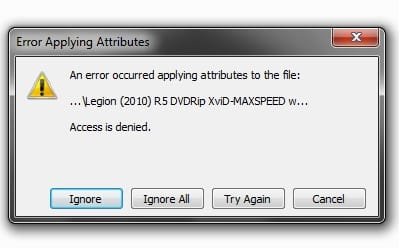
I have 2 partitions c and d. i encrypted some files in d:. yesterday i formatted ma lap and i installed a fresh copy of win7. today i tried to copy that files into a cd it displays an error. then i tried to decrypt that files it also getting an error. even i cant open that files. plzzzzzz some one help me:(:(:(


Untitled.jpg
 

My Computer

Computer Manufacturer/Model Number
Acer Extenca 5630
OS
Windows 7 ultimate (32bit) v 7600
CPU
Acer
Memory
2GB
Hard Drives
320GB
Internet Speed
3.5Mbps
Did you have a password before you formatted? Try using that same password and decrypt again. Restart before decrypting if you have to.

Edit: password on your user account, if it wasn't clear.
 

My Computer

Computer Manufacturer/Model Number
Asus G73SW-XN2
OS
Windows 2000 5.0 Build 2195
CPU
Intel Core i7-2630QM@2GHz(2.9GHz Turbo Boost) [Sandy Bridge]
Motherboard
Asus G73SW (Intel HM65 Chipset)
Memory
Kingston DDR3 1333 16GB (4GBx4)
Graphics Card(s)
nVidia GTX 460m 1.5GB
Sound Card
EAX Advanced HD 5.0, THX TruStudio
Monitor(s) Displays
17.3 in. primary & 23 in. secondary
Screen Resolution
1920x1080
Hard Drives
Seagate Momentus XT (SATA II) 500 GB @ 7200 RPM
Hitachi (SATA II) 500GB @ 7200 RPM

Non Raid because ASUS was crappy to choose an HM65 Chipset
Keyboard
Built-in 102-Key Backlit Keyboard
Other Info
It's a Laptop.
And if Arkhi's suggestion does not help, then you'll have to go to a data recovery specialist to decrypt the files. What you should have done was write those files to disk before reloading your Windows.

I built a new POS Server computer for a client several weeks ago, and their original data was encrypted with EFS. The files could be seen but not accessed on the new computer after transplanting the old hard disk, which had to be put back into the original box so that I could decrypt them first. Only after decrypting the files on the machine that originally performed the encryption was I able to access them on the new machine.
 

My Computer

Computer type
PC/Desktop
Computer Manufacturer/Model Number
Virtual Machine
OS
Windows 7 Professional 32-bit SP1
CPU
AMD A4/A6
Motherboard
Intel Corporation 440BX Desktop Reference Platform
Memory
3.00GB EDO
Graphics Card(s)
VMware SVGA 3D
Sound Card
High Definition Audio Device
Monitor(s) Displays
Generic Non-PnP Monitor on VMware SVGA 3D
Screen Resolution
1440x900
Hard Drives
1 x 60GB VMware Virtual SATA Hard Drive ATA Device
Antivirus
Kaspersky Total Security
it doesnt prompt to enter password
 

My Computer

Computer Manufacturer/Model Number
Acer Extenca 5630
OS
Windows 7 ultimate (32bit) v 7600
CPU
Acer
Memory
2GB
Hard Drives
320GB
Internet Speed
3.5Mbps
wt can i do nw??????????? even i cant delete that files
 

My Computer

Computer Manufacturer/Model Number
Acer Extenca 5630
OS
Windows 7 ultimate (32bit) v 7600
CPU
Acer
Memory
2GB
Hard Drives
320GB
Internet Speed
3.5Mbps
Well it depends on how you encrypted them. Was it a third party tool? Or did you use the built in windows Encrypted File Sytem to do it?

If the EFS, as Dzomlija indicated, that's kind of the point of the encrypted file system. The files can ONLY be decrypted on the machine with the same user account that created them. Not just the user name and password, the /actual/ account and it's associated credentials. So if the drive is removed it cannot be decrypted anywhere else, even if they got your user name and password and created a new account.

If you had exported your credentials or made an encryption recovery disk or assigned a differnet user (that still exists) as a data recovery agent then there might be a chance but if not, and you reformatted your drive that old user account is now gone forever and so is the data :(
 

My Computer

Computer Manufacturer/Model Number
Scratch built
OS
Windows 7 x64 Ultimate
CPU
i7 960
Motherboard
Asus P6X58D
Memory
12 Gig Corsair Dominator
Graphics Card(s)
Nvidia 480
Sound Card
Maudio Delta 44 + breakout box
Monitor(s) Displays
Dell UltraSharp U2410 24in and Samsung 21 dual monitors
Screen Resolution
1920x1200 and 1280x1024
Hard Drives
Primary: Intel X-25M G2 160G SSD
Secondary: Segate baracuda 1.0 TB
HDs in AHCI mode.
PSU
Corasair TX850
Case
Cooler Master HAF
Cooling
Corsair H50
Keyboard
Logitech G15 + N52 game pad
Mouse
Logitech MX518
Internet Speed
15kbs down 4.5kbps up
Other Info
WEI 7.6
CPU & RAM 7.6
Graphics 7.9
Hard disk 7.7
You may be able to delete the files by taking ownership of them using the new account. Seach "Take Ownership" in this forum, there are several threads that show how to do that. Basically all those files currently "belong" to the old user account, you need to take them over, then you can manipulate them.
 

My Computer

Computer Manufacturer/Model Number
Scratch built
OS
Windows 7 x64 Ultimate
CPU
i7 960
Motherboard
Asus P6X58D
Memory
12 Gig Corsair Dominator
Graphics Card(s)
Nvidia 480
Sound Card
Maudio Delta 44 + breakout box
Monitor(s) Displays
Dell UltraSharp U2410 24in and Samsung 21 dual monitors
Screen Resolution
1920x1200 and 1280x1024
Hard Drives
Primary: Intel X-25M G2 160G SSD
Secondary: Segate baracuda 1.0 TB
HDs in AHCI mode.
PSU
Corasair TX850
Case
Cooler Master HAF
Cooling
Corsair H50
Keyboard
Logitech G15 + N52 game pad
Mouse
Logitech MX518
Internet Speed
15kbs down 4.5kbps up
Other Info
WEI 7.6
CPU & RAM 7.6
Graphics 7.9
Hard disk 7.7
it doesnt prompt to enter password

I think what Arkhi meant was that you must change your current user account password, log off, then log in again, and then try to decrypt the files.

I'm not too sure whether or not that will work though, as the EFS uses a unique internal SID for encryption together with your password. This SID is first created when a user account is created, and remains constant even though you may change your username or password. In fact, Windows warns you that changing an account password may lead to inability to access encrypted data.

Deleting the user account and recreating it with exactly the same name and password won't work, because a new, differemt, SID will be generated that will be incompatible with the already encrypted files.

As I said, what you should have done is either decrypt those files before reloading Windows, or write them to disk. Unfortunately, there is no easy way to get back to those files without an extreme amount of effort.

You have three choices. Go to a data recovery specialist, download them again if you can, or cut your losses and remember to keep backups next time.

I know it sounds nasty, and I'm trying to say this as nicely as possible, but in most cases I've seen, those files are gone for good.:cry:
 

My Computer

Computer type
PC/Desktop
Computer Manufacturer/Model Number
Virtual Machine
OS
Windows 7 Professional 32-bit SP1
CPU
AMD A4/A6
Motherboard
Intel Corporation 440BX Desktop Reference Platform
Memory
3.00GB EDO
Graphics Card(s)
VMware SVGA 3D
Sound Card
High Definition Audio Device
Monitor(s) Displays
Generic Non-PnP Monitor on VMware SVGA 3D
Screen Resolution
1440x900
Hard Drives
1 x 60GB VMware Virtual SATA Hard Drive ATA Device
Antivirus
Kaspersky Total Security
thanks for all. i didnt got any answer i deleted those files:cry::cry::cry::cry::cry::cry::cry::cry::cry::cry::cry::cry::cry::cry::cry::cry::cry::cry::cry::cry::cry::cry::cry::cry:
 

My Computer

Computer Manufacturer/Model Number
Acer Extenca 5630
OS
Windows 7 ultimate (32bit) v 7600
CPU
Acer
Memory
2GB
Hard Drives
320GB
Internet Speed
3.5Mbps
Sorry we couldn't help, but encrypting your files IS a dangerous prospect for the uninitiated.

Just remember next time to keep proper backups. And if your files do contain sensitive information (why else would you need encryption?), and you have written them to CD for backup, you can always keep them locked in a personal safe away from prying eyes. Better yet, get yourself a safety deposit box at your local bank and keep them in there...
 

My Computer

Computer type
PC/Desktop
Computer Manufacturer/Model Number
Virtual Machine
OS
Windows 7 Professional 32-bit SP1
CPU
AMD A4/A6
Motherboard
Intel Corporation 440BX Desktop Reference Platform
Memory
3.00GB EDO
Graphics Card(s)
VMware SVGA 3D
Sound Card
High Definition Audio Device
Monitor(s) Displays
Generic Non-PnP Monitor on VMware SVGA 3D
Screen Resolution
1440x900
Hard Drives
1 x 60GB VMware Virtual SATA Hard Drive ATA Device
Antivirus
Kaspersky Total Security
if i remember correctly EFS is based on certificates if i am not mistaken
you could actually go around EFS in windows xp but not anymore in vista and above...
next time backup your personal EFS cert and you should be able to decrypt these files
 

My Computer

Computer Manufacturer/Model Number
Tx2500z Tablet Pc/Homemade Server
OS
Windows 7 Ult x64(x2), HomePrem x32(x4), Server 08 (+VM), 08 R2 (VM) , SuSe 11.2 (VM), XP 32 (VM)
CPU
Turion X2 ultra (oh well came with laptop)/P4 @3.2 (yes P4)
Motherboard
IDK HP Motherboard / Intel DG965SS
Memory
OCZ Dual Channel 4GB kit/ 1gb Dual Channel
Graphics Card(s)
HD 3200 graphics /GMA x3100 (yay for intergrated!!)
Sound Card
Realtek HD Audio(mic working, well sort of)/Siig IC-70012
Monitor(s) Displays
built-in Hp 12" laptop screen/ Acer 19"
Screen Resolution
1280x800 /1440x900
Cooling
All Air Cooled
Mouse
Logi MX Rev. /MS Wheel Optical 1.1A /Logitech Optical Mouse
Internet Speed
College baby but its still routed through vpn to 1536k...
Other Info
love my wacom pen and pressure sensitivity...
wished it worked in 7, SUSE for that matter though
Back
Top