
Problem with Ext.HDD

wds7

New member
Member
VIP
Local time
11:43 PM
Messages
329
Hi All.
When i have my ext.Hdd plugged in and after restarts it keeps recycling ...untill i unplug it then it can boot to wds ..
Any idea what's wrong with my laptop ...?
Is there any update that i miss...?
(I system is fully updated)
Thanks
 

My Computer

Computer type
Laptop
Computer Manufacturer/Model Number
Sony Vaio VPC-SE23FXS
OS
WDS 7 Home Pre.x64
CPU
Intel Core i5 2450M @ 2.50GHz
Memory
8GB Kingston[2x4] Dual-Channel DDR3 @ 1333MHz
Graphics Card(s)
AMD Radeon(TM) HD 6470M + Intel(R) HD Graph 3000
Hard Drives
TOSHIBA MK6459GSXP 600GB x 5400RPM (SATA)
Does the external hard drive work okay if you plug it in while the system is already booted? If so, post a screen shot of Disk Management with the external hard drive is connected. Make the Disk Management window full screen so everything shows please.

How to Upload and Post a Screenshot and File in Seven Forums
 

My Computer

Computer type
PC/Desktop
Computer Manufacturer/Model Number
Lenovo IdeaCenter 450
OS
Windows 10 Pro X64
CPU
Intel Quad Core i7-4770 @ 3.4Ghz
Memory
16.0GB PC3-12800 DDR3 SDRAM 1600 MHz
Graphics Card(s)
Intel Integrated HD Graphics
Sound Card
Realtek HD Audio
Monitor(s) Displays
HP 22" LCD
Screen Resolution
1680 x 1050
Hard Drives
250GB Samsung EVO SATA-3 SSD
2TB Seagate ST2000DM001 SATA-2
1.5TB Seagate ST3150041AS SATA
Keyboard
Dell USB
Mouse
Lenovo USB
Internet Speed
Cable via Road Runner 3MB Upload, 30MB Download
Antivirus
Windows Defender, MBAM Pro, MBAE
Browser
Seamonkey
Other Info
UEFI/GPT
PLDS DVD-RW DH16AERSH
Does the external hard drive work okay if you plug it in while the system is already booted? If so, post a screen shot of Disk Management with the external hard drive is connected. Make the Disk Management window full screen so everything shows please.

How to Upload and Post a Screenshot and File in Seven Forums

Yes , it works perfectly good when i plug it in while pc is on ..
For instance ..when i re-image my lp from ext.hdd "That's where i keep the back up"
after it's done and restart "with the ext-hdd still plugged in" ..then it keeps rebooting ..forever ...until i unplug the hdd out ..
(I don't have my ext.hdd with me right now ....but will show you screen shot as soon as i get home .)
Thanks

Update :

Here is my Disk Management

11-15-2010 3-52-30 PM.jpg
 
Last edited:

My Computer

Computer type
Laptop
Computer Manufacturer/Model Number
Sony Vaio VPC-SE23FXS
OS
WDS 7 Home Pre.x64
CPU
Intel Core i5 2450M @ 2.50GHz
Memory
8GB Kingston[2x4] Dual-Channel DDR3 @ 1333MHz
Graphics Card(s)
AMD Radeon(TM) HD 6470M + Intel(R) HD Graph 3000
Hard Drives
TOSHIBA MK6459GSXP 600GB x 5400RPM (SATA)
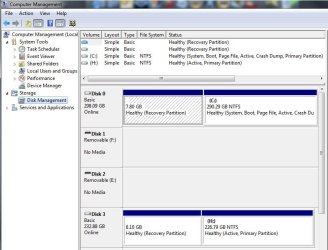
Is Disk 3 the external drive?

You have two active partitions, C: (your Win 7 drive) and H: (on your external drive). Perhaps that is what is causing the problem. Try removing Active from the external drive and see if you can then reboot.

I don't know if you can do this from Disk Management or not, but you can do it from a Elevated Command Prompt. See here, 2nd post: how to make mark partition not active
 

My Computer

Computer type
PC/Desktop
Computer Manufacturer/Model Number
Lenovo IdeaCenter 450
OS
Windows 10 Pro X64
CPU
Intel Quad Core i7-4770 @ 3.4Ghz
Memory
16.0GB PC3-12800 DDR3 SDRAM 1600 MHz
Graphics Card(s)
Intel Integrated HD Graphics
Sound Card
Realtek HD Audio
Monitor(s) Displays
HP 22" LCD
Screen Resolution
1680 x 1050
Hard Drives
250GB Samsung EVO SATA-3 SSD
2TB Seagate ST2000DM001 SATA-2
1.5TB Seagate ST3150041AS SATA
Keyboard
Dell USB
Mouse
Lenovo USB
Internet Speed
Cable via Road Runner 3MB Upload, 30MB Download
Antivirus
Windows Defender, MBAM Pro, MBAE
Browser
Seamonkey
Other Info
UEFI/GPT
PLDS DVD-RW DH16AERSH
Yes disk 3 is the ext.hdd .....and i don't need to boot from it ..
I use it to store data and wdsImagerecovery .
Some how it doesn't work in wds7 ..."It was a good way for wdsXp though ..i keep it incase some one needs"
It's OK ..i just turn off before i unplug it .
Thanks for your help.
 

My Computer

Computer type
Laptop
Computer Manufacturer/Model Number
Sony Vaio VPC-SE23FXS
OS
WDS 7 Home Pre.x64
CPU
Intel Core i5 2450M @ 2.50GHz
Memory
8GB Kingston[2x4] Dual-Channel DDR3 @ 1333MHz
Graphics Card(s)
AMD Radeon(TM) HD 6470M + Intel(R) HD Graph 3000
Hard Drives
TOSHIBA MK6459GSXP 600GB x 5400RPM (SATA)
Back
Top