I just did a clean install of Windows 7
When i boot the system up, i now get this message
"Diskette Drive 0 Seek Failure F1 to continue"
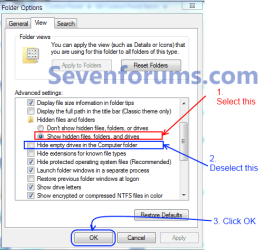
Under my Computer it now lists that i have Two Floppy drives, A and B
I only have one drive, an external USB drive, made by Memorex
The drive A somehow Windows thinks i have, but there is none.
The drive B is reading as my floppy drive (which i want to change to drive A)
Floppy drives are not showing up under the Disk Management, in order to try and change the drive letter paths.
I have a Dell Insprion 530s, Windows 7 Home Premium.
When i boot the system up, i now get this message
"Diskette Drive 0 Seek Failure F1 to continue"
Under my Computer it now lists that i have Two Floppy drives, A and B
I only have one drive, an external USB drive, made by Memorex
The drive A somehow Windows thinks i have, but there is none.
The drive B is reading as my floppy drive (which i want to change to drive A)
Floppy drives are not showing up under the Disk Management, in order to try and change the drive letter paths.
I have a Dell Insprion 530s, Windows 7 Home Premium.
My Computer
- Computer type
- PC/Desktop
- Computer Manufacturer/Model Number
- Dell Insprion 530s
- OS
- Windows 7 Home Premuim 64 Bit
- CPU
- Intel Core 2 Duo E4600 @ 2.4Ghz
- Motherboard
- Foxconn
- Memory
- Crucial 4GB
- Graphics Card(s)
- ATI Raedon 5450 1GB
- Sound Card
- Integrated
- Monitor(s) Displays
- Dell 19 inch
- Screen Resolution
- 4:3
- Hard Drives
- 1TB Western Digital
- PSU
- Bestec 250w
- Keyboard
- Dell
- Mouse
- GE
- Antivirus
- Microsoft Security Essentinals
- Browser
- Internet Explorer 11