Problem with geforce 310M (vostro 3300)

mkhtmu

New member
Local time
3:45 AM
Messages
3
Hi
I have problem with Video crad in windows 7 ultimate 64 bit.
Dell vostro 3300
Os win 7 ultimate 64 bit
CPU core i5 2.4
Ram 4GB
VGA Vostro 3300 NVIDIA(R) Geforce(TM) 310M, 512MB Graphics


I installed all of software and drivers from dell drivers related to my service tag (serial number)
I also installed the driver of my VGA from nividia site

in all of this situations my VGA known as standard VGA graphic adaptor

I do not have an aero effect or ...
Please help me


My Computer My Computer

Computer Manufacturer/Model Number
Dell/Vostro 3300
OS
Windows 7 Ultimate x64
CPU
Intel(R) Core(TM) i5-520M (2.40GHz base, up to 2.93GHz, 2C/4
Memory
4 GB
Graphics Card(s)
Geforce(TM) 310M, 512MB Graphics
Run the WEI.

~Lordbob
 

My Computer My Computer

Computer Manufacturer/Model Number
Hera
OS
Windows 7 Ultimate x64, Mint 9
CPU
Intel i5-2500k
Motherboard
ASUS P8P67 Pro
Memory
2x 4Gb Corsair VENGEANCE DDR3-1600
Graphics Card(s)
NVidia GeForce N260GTX Twin Frozr
Sound Card
Realtek HD OnBoard Audio
Monitor(s) Displays
ASUS 24" Monitor
Screen Resolution
1920x1080
Hard Drives
G.SKILL Phoenix Series 60GB SATA II MLC Internal Solid State Drive (SSD)
SAMSUNG Spinpoint F3R 1TB 7200 RPM 32MB Cache SATA II
PSU
Cooler Master Real Power Pro 750W
Case
Cooler Master Haf 932
Cooling
Fans
Keyboard
Razer Tarantula
Mouse
Razer Lachesis
Internet Speed
not fast enough

My Computer My Computer

Computer Manufacturer/Model Number
Dell/Vostro 3300
OS
Windows 7 Ultimate x64
CPU
Intel(R) Core(TM) i5-520M (2.40GHz base, up to 2.93GHz, 2C/4
Memory
4 GB
Graphics Card(s)
Geforce(TM) 310M, 512MB Graphics
dera Lordbob I run it

Run the WEI.

~Lordbob

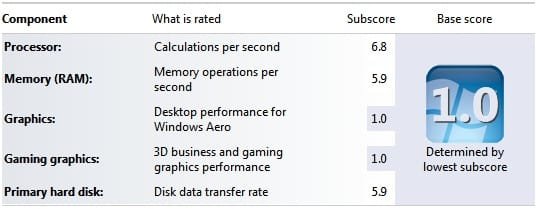
Dear Lordbob I run it. below is an image from rating results. (the subscore of graphics and gaming graphics are 1.
The problem remained
 

Attachments

  • WEI.jpg
    WEI.jpg
    18.2 KB · Views: 89

My Computer My Computer

Computer Manufacturer/Model Number
Dell/Vostro 3300
OS
Windows 7 Ultimate x64
CPU
Intel(R) Core(TM) i5-520M (2.40GHz base, up to 2.93GHz, 2C/4
Memory
4 GB
Graphics Card(s)
Geforce(TM) 310M, 512MB Graphics
Odd. I would agree that it is not recognizing your graphics card. Try downloading the newest drivers and uninstall the old ones. Then restart and install the new ones.

~Lordbob
 

My Computer My Computer

Computer Manufacturer/Model Number
Hera
OS
Windows 7 Ultimate x64, Mint 9
CPU
Intel i5-2500k
Motherboard
ASUS P8P67 Pro
Memory
2x 4Gb Corsair VENGEANCE DDR3-1600
Graphics Card(s)
NVidia GeForce N260GTX Twin Frozr
Sound Card
Realtek HD OnBoard Audio
Monitor(s) Displays
ASUS 24" Monitor
Screen Resolution
1920x1080
Hard Drives
G.SKILL Phoenix Series 60GB SATA II MLC Internal Solid State Drive (SSD)
SAMSUNG Spinpoint F3R 1TB 7200 RPM 32MB Cache SATA II
PSU
Cooler Master Real Power Pro 750W
Case
Cooler Master Haf 932
Cooling
Fans
Keyboard
Razer Tarantula
Mouse
Razer Lachesis
Internet Speed
not fast enough
Hi!
same here, any idea?

Dell vostro 3300
Os win 7 pro 64 bit
CPU core i5 2.4
Ram 4GB
VGA Vostro 3300 NVIDIA(R) Geforce(TM) 310M, 512MB Graphics
Latest driver from Nvidia; Driver version: 8.17.12.6099, driver date: 2010.10.16
 

My Computer My Computer

OS
Windows 7 Pro x64
I had the same problem with 310M on Vaio S. WEI was 1 only, because of the graphics. I simply downloaded the driver for geforce from the Sony site and installed it. Then i realised that the 310M did not work at all before that. There was a driver for it installed but geforce was nor in use. After the the installation my WEI is 5 now, and aero works. A couple of hours latter the computer asked to reset again, just to uninstalle the old driver.
 

My Computer My Computer

OS
windows 7 home premium
Back
Top