
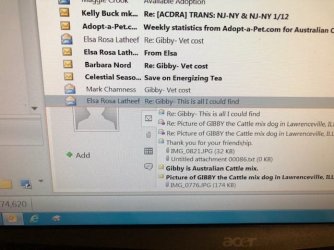
First time posting here. Not sure this is the correct area. Must have clicked on something by mistake on Windows 7 and don't know how to get rid of it. In the lower area of Outlook (e-mails, inbox) an unwanted grey box appears. It says something about "connect outlook to online social networks". There is a figure at the top half of a person and lower down it says +add. On the right side there are 4 little icons to click (email, show attachments, show meetings, show status updates.)
How do I get rid of this unwanted box so that all my e-mails look normal and not pushed to the side of it?
Thanks,
Barbara
How do I get rid of this unwanted box so that all my e-mails look normal and not pushed to the side of it?
Thanks,
Barbara
Attachments
My Computer
At a glance
Windows7
- Computer type
- PC/Desktop
- Computer Manufacturer/Model Number
- Dell
- OS
- Windows7
