Solved Problem With Hard Drive Freezing When Accessing Files

Brucex64

New member
Member
Local time
9:20 PM
Messages
65
Location
Jackson, MS USA
I've got an external hard drive (actually just an internal drive in an enclosure connected via usb) that is giving me a problem lately. When I plug it into the computer it shows up and gives me the autoplay dialog. It shows up in Windows Explorer and allows me to look at the properties. It shows me the directory tree and names of files. I've even been able to click on a small file and drag/move it onto my internal hard drive successfully. But with folders containing 40gb of videos or lots of photos Windows Explorer freezes. Both of my photo viewing applications freeze too if I use them to view the files. I need to loolk at these files to see if I need any of them and I need to save the videos!

I tried booting into safe mode but I can't do that because my mouse won't work (its a usb mouse) - this is probably a different issue though.

I turned off indexing for this drive through the properties dialog. I also uninstalled the usb driver for it, plugged it in and let it reinstall a usb driver. I can't make this drive allow me to view and/or move all of the files! What could be the problem?
 

My Computer

Computer type
PC/Desktop
Computer Manufacturer/Model Number
custom build
OS
Windows 7 Pro SP1
CPU
Intel i7-4770
Motherboard
Gigabyte B85M-D3H
Memory
8gb
Graphics Card(s)
NVIDIA GeForce GT640
Hard Drives
Samsung SSD 120gb
Seagate HDD 500gb
Antivirus
Microsoft Security Essentials
Browser
Firefox
My first point of suspicion will be the enclosure you are using.

Try connecting your HDD internally and see whether you can access everything normally..

Now a question that should embarrass you: Is it difficult for you to mention the manufacturer, Model Number, Capacity of the internal HDD and the manufacturer and model of the enclosure? When you have a problem with a device you should always furnish complete details of the devices involved - not just my PC, my external drive, my enclosure.
 

My Computer

OS
Windows 7 Home Premium 32 bit

My Computer

Computer type
PC/Desktop
Computer Manufacturer/Model Number
Skylake Special #666
OS
Windows 10 Pro x64
CPU
Intel Core i7 6700K
Motherboard
Asus Sabertooth Z170 Mark 1
Memory
GSkill TridentZ RGB 16GB 3600 16-16-16-36
Graphics Card(s)
EVGA GTX 980 Ti SC x2
Sound Card
Realtek High Definition
Monitor(s) Displays
AOC G2460PG
Screen Resolution
1920 x 1080 144Hz
Hard Drives
Samsung 860 Pro 256GB, Seagate Barracuda 4TB x2
PSU
EVGA 1000 P2, EVGA White Custom Braided Cables
Case
Corsair Vengeance C70 Gunmetal Black
Cooling
Corsair H100i v2, Corsair ML120 x2, Thermal Grizzly Kryonaut
Keyboard
Logitech G910 Orion Spectrum
Mouse
Logitech G700s
Internet Speed
Verizon Fios Quantum Gateway 75/75
Antivirus
Windows Defender, Malwarebytes Free 3.8.3
Browser
Chrome
Other Info
Corsair SP120 x4, LG Blu-ray Drive, Durabrand HT-395 100 Watt Dolby Digital Amp, Corsair H2100 Wireless 7.1 Headset
Sorry, I should have included more info. The hard drive is a Seagate Barracuda 7200.10 with an IDE connection. 160gb capacity, about 75gb free. I bought it in 2008 but it hasn't been used much in the last 3 years.

The enclosure is a Spire Gigapod II SP-121. Not much more I can say about it, it has a power cable and a usb cable. It only have an IDE connector inside for the drive. I checked but I don't have another IDE cable to try. I think I may have thrown them away because all my other drives are SATA. I did try a different usb cable from another drive enclosure (that one is a SATA drive) and its not the usb cable.

I tried to plug this into my small netbook computer and it does the same thing.

Oh, and I've pretty much only used it to store photos/videos when travelling. After a trip in January, I hooked it up to my computer and copied the "keeper" photos onto my internal drive (which has cloud backup). I left the videos on there because I didn't have space for them. I even used Premiere to edit some videos with the raw files on this drive and it worked fine. It worked fine when I last used it a month or two ago. It may have been a bit slower than SATA but it was ok for what it was being used for. I would really like to get those videos out of it though.
 

My Computer

Computer type
PC/Desktop
Computer Manufacturer/Model Number
custom build
OS
Windows 7 Pro SP1
CPU
Intel i7-4770
Motherboard
Gigabyte B85M-D3H
Memory
8gb
Graphics Card(s)
NVIDIA GeForce GT640
Hard Drives
Samsung SSD 120gb
Seagate HDD 500gb
Antivirus
Microsoft Security Essentials
Browser
Firefox
It`s IDE and only 160 GB, get your data off and chuck it.
 

My Computer

Computer type
PC/Desktop
Computer Manufacturer/Model Number
Skylake Special #666
OS
Windows 10 Pro x64
CPU
Intel Core i7 6700K
Motherboard
Asus Sabertooth Z170 Mark 1
Memory
GSkill TridentZ RGB 16GB 3600 16-16-16-36
Graphics Card(s)
EVGA GTX 980 Ti SC x2
Sound Card
Realtek High Definition
Monitor(s) Displays
AOC G2460PG
Screen Resolution
1920 x 1080 144Hz
Hard Drives
Samsung 860 Pro 256GB, Seagate Barracuda 4TB x2
PSU
EVGA 1000 P2, EVGA White Custom Braided Cables
Case
Corsair Vengeance C70 Gunmetal Black
Cooling
Corsair H100i v2, Corsair ML120 x2, Thermal Grizzly Kryonaut
Keyboard
Logitech G910 Orion Spectrum
Mouse
Logitech G700s
Internet Speed
Verizon Fios Quantum Gateway 75/75
Antivirus
Windows Defender, Malwarebytes Free 3.8.3
Browser
Chrome
Other Info
Corsair SP120 x4, LG Blu-ray Drive, Durabrand HT-395 100 Watt Dolby Digital Amp, Corsair H2100 Wireless 7.1 Headset
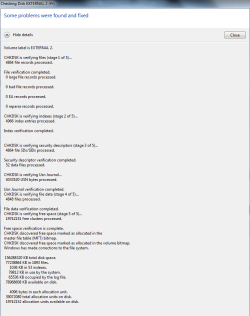
I ran a chkdsk on it. This was the result. So it looks like it should be good, right?

Maybe....maybe this will work! My fingers are crossed! I was able to copy two files (1 photo raw file and one mp4 GoPro clip that is 3.5gb in size. It copied successfully! I will try more...
 

Attachments

  • chkdsk.PNG
    chkdsk.PNG
    74.1 KB · Views: 2

My Computer

Computer type
PC/Desktop
Computer Manufacturer/Model Number
custom build
OS
Windows 7 Pro SP1
CPU
Intel i7-4770
Motherboard
Gigabyte B85M-D3H
Memory
8gb
Graphics Card(s)
NVIDIA GeForce GT640
Hard Drives
Samsung SSD 120gb
Seagate HDD 500gb
Antivirus
Microsoft Security Essentials
Browser
Firefox
Hopefully, after check disk corrected the file system deficiency in the MFT, you should be able to read the drive without any problem of freezing. If that happens, as AddRAM mentioned in his post#5, ASAP copy all data into another SATA drive and jettison your old enclosure and HDD.
 

My Computer

OS
Windows 7 Home Premium 32 bit
Ok, here's an update. It started to work again as it did before. I don't trust it though.

I decided to spend $60 on a WD Passport external usb drive that I can use for the purpose of storing photos/video temporarily. I am moving the files over. A big chunk is some GoPro videos (38gb). My main data drive doesn't have enough space to permanently store them (I only have 45gb free) so they'll have to reside on the Passport for now. I'll have to upgrade that internal drive at some point and I was hoping to go SSD.
 

My Computer

Computer type
PC/Desktop
Computer Manufacturer/Model Number
custom build
OS
Windows 7 Pro SP1
CPU
Intel i7-4770
Motherboard
Gigabyte B85M-D3H
Memory
8gb
Graphics Card(s)
NVIDIA GeForce GT640
Hard Drives
Samsung SSD 120gb
Seagate HDD 500gb
Antivirus
Microsoft Security Essentials
Browser
Firefox
There is no reason to get a sdd for storage purposes, unless you have money to burn. Large ssd`s are very expensive.

Just save up to get a 2 TB WD or Seagate Sata 3 Hard drive.
 

My Computer

Computer type
PC/Desktop
Computer Manufacturer/Model Number
Skylake Special #666
OS
Windows 10 Pro x64
CPU
Intel Core i7 6700K
Motherboard
Asus Sabertooth Z170 Mark 1
Memory
GSkill TridentZ RGB 16GB 3600 16-16-16-36
Graphics Card(s)
EVGA GTX 980 Ti SC x2
Sound Card
Realtek High Definition
Monitor(s) Displays
AOC G2460PG
Screen Resolution
1920 x 1080 144Hz
Hard Drives
Samsung 860 Pro 256GB, Seagate Barracuda 4TB x2
PSU
EVGA 1000 P2, EVGA White Custom Braided Cables
Case
Corsair Vengeance C70 Gunmetal Black
Cooling
Corsair H100i v2, Corsair ML120 x2, Thermal Grizzly Kryonaut
Keyboard
Logitech G910 Orion Spectrum
Mouse
Logitech G700s
Internet Speed
Verizon Fios Quantum Gateway 75/75
Antivirus
Windows Defender, Malwarebytes Free 3.8.3
Browser
Chrome
Other Info
Corsair SP120 x4, LG Blu-ray Drive, Durabrand HT-395 100 Watt Dolby Digital Amp, Corsair H2100 Wireless 7.1 Headset
Do not buy WD external Passport, My Book etc., Those are hardware encrypted and should these drives fail - as these do most often compared to other brands - DIY data recovery is almost impossible.

http://www.sevenforums.com/hardware...-passport-ultra-external-drive-corrupted.html
"( You unknowingly got trapped and locked yourself out, buying a hardware encrypted Western Digital External drive.)"

http://www.sevenforums.com/hardware-devices/398842-disk-2-unkown-not-initialized.html#post3269412

You will be better off buying a good enclosure and a suitable internal HDD to go into it.
 

My Computer

OS
Windows 7 Home Premium 32 bit
That sounds like a scam! They make a drive that comes encrypted and if it fails no one but them can recover data.

I did not install any of their software so is it still locked?
 

My Computer

Computer type
PC/Desktop
Computer Manufacturer/Model Number
custom build
OS
Windows 7 Pro SP1
CPU
Intel i7-4770
Motherboard
Gigabyte B85M-D3H
Memory
8gb
Graphics Card(s)
NVIDIA GeForce GT640
Hard Drives
Samsung SSD 120gb
Seagate HDD 500gb
Antivirus
Microsoft Security Essentials
Browser
Firefox
If it is anything other than WD Elements, the data that goes into the actual physical HDD inside the enclosure is automatically encrypted by the hardware encryption/decryption chip present in the enclosure electronics whether or not you install any WD software like Smartware etc,. There is no way the user can defeat the hardware encryption that takes place.

Even in the case of WD Elements external drive, the Sata to USB bridge electronics inside the enclosure is integrated into the physical HDD. ( it does not have the conventional SATA connector) So you cannot separate the HDD and try to recover the data by connecting it directly into the motherboard - in cases where it is only the interface electronics that has failed and the HDD itself is still good.

I also understand that even other manufacturers may be adapting such integration to make the externals truly portable with size reduction.

Keeping all these in view, it is always better to purchase an enclosure and a conventional internal HDD to go with it.

Scam or not - I am nobody to pass any judgement except giving out the facts as I know as people have experienced and let me know :).
 

My Computer

OS
Windows 7 Home Premium 32 bit
What is the benefit of non-password protected hardware encryption? If someone steals the drive they can still get the data and if someone hacks into a computer with one of these connected they can still get the data. I doubt that anyone is going to go to the effort of prying the case open to steal the bare drive (which would render it useless).
 

My Computer

Computer type
PC/Desktop
Computer Manufacturer/Model Number
custom build
OS
Windows 7 Pro SP1
CPU
Intel i7-4770
Motherboard
Gigabyte B85M-D3H
Memory
8gb
Graphics Card(s)
NVIDIA GeForce GT640
Hard Drives
Samsung SSD 120gb
Seagate HDD 500gb
Antivirus
Microsoft Security Essentials
Browser
Firefox
You are absolutely right. Perhaps you had read this write-up which I had quoted many times in this forum.:) Should you avoid external hard drives that boast built-in encryption? | Bald Nerd

At one point of time as the article mentions WD was using the same decrypt key for all the drives in the same batch. Later realising that it can be decrypted by procuring the same batch WD drive, they changed the decryption key to something like a random number. So each hardware encrypted WD drive has a random key generated by an algorithm which is embedded in the drive electronics.

Then how is that the WD Data Recovery Partners are able to decrypt the drive? My guess is that WD provides them with something like a Master key just like TSA has the master Key to open all TSA locks. ( Fortunately I have two TSA locks that can be opened with the same key. So I need not carry two keys :))

Just at this time of writing, I have read that some Data Recovery Agencies have mastered the art/technique of decrypting any WD encrypted drive for USD300 Fee.( Just in case you need the service at anytime ;))
 

My Computer

OS
Windows 7 Home Premium 32 bit
Well I may have spoke too soon. :( I think its bad again. And the WD Passport is useless with my configuration. I had to go out of town for a couple days. I discovered that the Passport will not be recognized by my Netbook because it is Windows XP and the WD drive is not formatted for XP. I could not format it because I moved some important stuff from my PC onto it. I was able to store new photos on the Netbook and putting them on my PC worked because I copied them from the original memory cards.

When I got home, I plugged in the original external hard drive and the Netbook did not recognize it! I plugged it into my desktop computer and its doing the same thing as in my original post. Can't read or copy anything from it.

At this point I do not think there's anything of value on it.

So I don't know what a good solution is for storing photos when I travel. Buy a new Netbook or mini laptop? But then how do I transfer stuff to my PC's internal drive? Other suggestions?
 

My Computer

Computer type
PC/Desktop
Computer Manufacturer/Model Number
custom build
OS
Windows 7 Pro SP1
CPU
Intel i7-4770
Motherboard
Gigabyte B85M-D3H
Memory
8gb
Graphics Card(s)
NVIDIA GeForce GT640
Hard Drives
Samsung SSD 120gb
Seagate HDD 500gb
Antivirus
Microsoft Security Essentials
Browser
Firefox
What kind of format is on the WD Passport that Win XP doesn't recognize it? All kinds of Windows recognizes Fat 32 or NTFS. And to be compatible to all OS normally external drives are Fat 32 formated. Is your WD a GPT drive?
 

My Computers

System One System Two

  • Computer type
    PC/Desktop
    Computer Manufacturer/Model Number
    custom build
    OS
    Windows 7 HP 64
    CPU
    i5 6600K - 800MHz to 4200MHz
    Motherboard
    GA-Z170-HD3P
    Memory
    4+4G GSkill DDR4 3000
    Graphics Card(s)
    IG - Intel 530
    Monitor(s) Displays
    Samsung 226BW
    Screen Resolution
    1680x1050
    Hard Drives
    (1) -1 SM951 – 128GB M.2 AHCI PCIe SSD drive for Windows 7 and Lubuntu
    (2) -1 WD SATA 3 - 1T for Data
    (3) -1 WD SATA 3 - 1T for backup
    PSU
    Thermaltake 450W TR2 gold
    Keyboard
    Old and good Chicony mechanical keyboard
    Mouse
    Logitech mX performance - 9 buttons (had to disable some)
    Internet Speed
    500Mb/s
    Browser
    Firefox 64
    Other Info
    TinyWall firewall
  • Computer type
    Laptop
    System Manufacturer/Model Number
    Asus Q550LF
    OS
    Windows 7 Pro
    CPU
    i7-4500U 800MHz to 3.0GHz
    Motherboard
    Asus Q550LF
    Memory
    (4+4)G DDR3 1600
    Graphics Card(s)
    IG intel 4400 + NVIDIA GeForce GT 745M
    Sound Card
    Realtek
    Monitor(s) Displays
    LG Display LP156WF4-SPH1
    Screen Resolution
    1920 x 1080
    Hard Drives
    BX500 120G SSD for Windows and programs +
    1T HDD for data
    Internet Speed
    500 Mb/s
    Browser
    Firefox
    Other Info
    TinyWall firewall
I downloaded the WD SES Driver and installed it on the netbook. Now the Passport is recognized by Windows but won't come up. Under Device Management/Storage it shows it listed as GPT Protected but when I look at that on my desktop it does not say GPT, just formatted NTFS.
 

My Computer

Computer type
PC/Desktop
Computer Manufacturer/Model Number
custom build
OS
Windows 7 Pro SP1
CPU
Intel i7-4770
Motherboard
Gigabyte B85M-D3H
Memory
8gb
Graphics Card(s)
NVIDIA GeForce GT640
Hard Drives
Samsung SSD 120gb
Seagate HDD 500gb
Antivirus
Microsoft Security Essentials
Browser
Firefox

My Computers

System One System Two

  • Computer type
    PC/Desktop
    Computer Manufacturer/Model Number
    custom build
    OS
    Windows 7 HP 64
    CPU
    i5 6600K - 800MHz to 4200MHz
    Motherboard
    GA-Z170-HD3P
    Memory
    4+4G GSkill DDR4 3000
    Graphics Card(s)
    IG - Intel 530
    Monitor(s) Displays
    Samsung 226BW
    Screen Resolution
    1680x1050
    Hard Drives
    (1) -1 SM951 – 128GB M.2 AHCI PCIe SSD drive for Windows 7 and Lubuntu
    (2) -1 WD SATA 3 - 1T for Data
    (3) -1 WD SATA 3 - 1T for backup
    PSU
    Thermaltake 450W TR2 gold
    Keyboard
    Old and good Chicony mechanical keyboard
    Mouse
    Logitech mX performance - 9 buttons (had to disable some)
    Internet Speed
    500Mb/s
    Browser
    Firefox 64
    Other Info
    TinyWall firewall
  • Computer type
    Laptop
    System Manufacturer/Model Number
    Asus Q550LF
    OS
    Windows 7 Pro
    CPU
    i7-4500U 800MHz to 3.0GHz
    Motherboard
    Asus Q550LF
    Memory
    (4+4)G DDR3 1600
    Graphics Card(s)
    IG intel 4400 + NVIDIA GeForce GT 745M
    Sound Card
    Realtek
    Monitor(s) Displays
    LG Display LP156WF4-SPH1
    Screen Resolution
    1920 x 1080
    Hard Drives
    BX500 120G SSD for Windows and programs +
    1T HDD for data
    Internet Speed
    500 Mb/s
    Browser
    Firefox
    Other Info
    TinyWall firewall
It is 1tb. So from that article it looks like if I reformat with a MBR it would work? Is there any difference to how this drive will operate (and with its encryption scheme) between GUID and MBR format types?
 

My Computer

Computer type
PC/Desktop
Computer Manufacturer/Model Number
custom build
OS
Windows 7 Pro SP1
CPU
Intel i7-4770
Motherboard
Gigabyte B85M-D3H
Memory
8gb
Graphics Card(s)
NVIDIA GeForce GT640
Hard Drives
Samsung SSD 120gb
Seagate HDD 500gb
Antivirus
Microsoft Security Essentials
Browser
Firefox
GPT has the advantage to support drives bigger than 2T, but only UEFI BIOS will handle it. As your drive is smaller than 2T there is no need for GPT and you wont see any difference.
 

My Computers

System One System Two

  • Computer type
    PC/Desktop
    Computer Manufacturer/Model Number
    custom build
    OS
    Windows 7 HP 64
    CPU
    i5 6600K - 800MHz to 4200MHz
    Motherboard
    GA-Z170-HD3P
    Memory
    4+4G GSkill DDR4 3000
    Graphics Card(s)
    IG - Intel 530
    Monitor(s) Displays
    Samsung 226BW
    Screen Resolution
    1680x1050
    Hard Drives
    (1) -1 SM951 – 128GB M.2 AHCI PCIe SSD drive for Windows 7 and Lubuntu
    (2) -1 WD SATA 3 - 1T for Data
    (3) -1 WD SATA 3 - 1T for backup
    PSU
    Thermaltake 450W TR2 gold
    Keyboard
    Old and good Chicony mechanical keyboard
    Mouse
    Logitech mX performance - 9 buttons (had to disable some)
    Internet Speed
    500Mb/s
    Browser
    Firefox 64
    Other Info
    TinyWall firewall
  • Computer type
    Laptop
    System Manufacturer/Model Number
    Asus Q550LF
    OS
    Windows 7 Pro
    CPU
    i7-4500U 800MHz to 3.0GHz
    Motherboard
    Asus Q550LF
    Memory
    (4+4)G DDR3 1600
    Graphics Card(s)
    IG intel 4400 + NVIDIA GeForce GT 745M
    Sound Card
    Realtek
    Monitor(s) Displays
    LG Display LP156WF4-SPH1
    Screen Resolution
    1920 x 1080
    Hard Drives
    BX500 120G SSD for Windows and programs +
    1T HDD for data
    Internet Speed
    500 Mb/s
    Browser
    Firefox
    Other Info
    TinyWall firewall
Back
Top