Solved Problem with hard drive space

Sean Birt

New member
Local time
11:48 PM
Messages
16
Hi there i am some trouble here, i am trying to sort out my friends pc for her. What has happened is windows 7 no longer see's all the space on the hard drive. she reckons that it just happened, but she cant really remember.
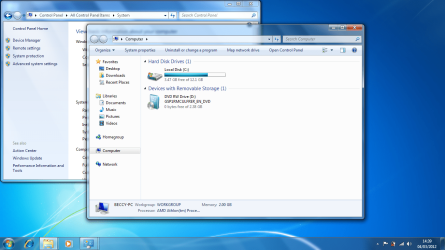
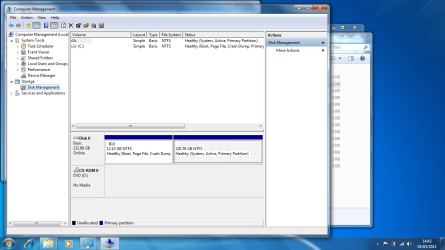
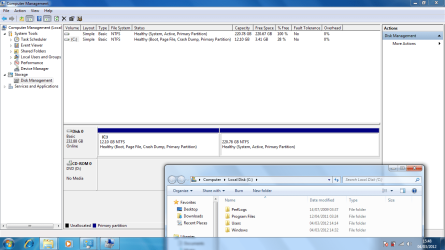
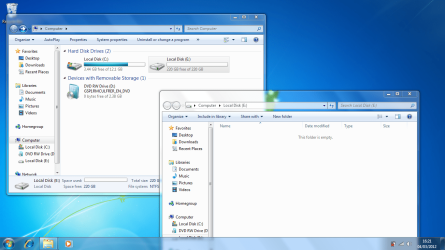
when you click on my computer you get everything come up as normal except windows shows only 12gb of space on a 250gb hard drive (see example 1), but when you go to the computer management section windows shows the space is there. (see example 2).
Any help would be greatly appreciated thank you :confused:
 

Attachments

  • EXAMPLE 1 limited space on a 250gb hard drive.png
    EXAMPLE 1 limited space on a 250gb hard drive.png
    158.4 KB · Views: 73
  • EXAMPLE 2 limited space on a 250gb hard drive.png
    EXAMPLE 2 limited space on a 250gb hard drive.png
    97.9 KB · Views: 73

My Computer

Computer Manufacturer/Model Number
emachines
OS
win7 ultimate x32
CPU
1.6
Memory
2gb ram 250 gb hd
Hard Drives
250 gb toshiba MK2555GSX ata
Welcome to Windows Seven Forums.

I don't quite know how it has happened, but the 12GB partition should not be allocated a drive letter, let alone drive letter C.

This partition is the computer's recovery partition and should not have a drive letter at all.

The 220GB partition holds the Windows OS and doesn't have a drive letter allocated, when in fact it should be allocated drive letter C.

Go into Disk Management and remove drive letter C from the 12GB partition, and then allocate it to the 220GB Windows partition.

This tutorial should help if you need it: http://www.sevenforums.com/tutorials/82994-drive-letter-add-change-remove-windows-7-a.html
 

My Computer

Computer Manufacturer/Model Number
HP Pavilion Elite 495UK
OS
Windows 7 Ultimate SP1 64-Bit
CPU
Intel Core i7 870 @ 2.93GHz
Motherboard
MSI 2A9C (CPU1)
Memory
8Gb Dual-Channel DDR3 @ 664MHz
Graphics Card(s)
nVidia GeForce GTX 460 1024MB dedicated RAM
Sound Card
Realtek HD Audio
Monitor(s) Displays
HP2310i
Screen Resolution
1920 x 1080
Hard Drives
1x1954GB Hitachi HDS22020ALA 330 (RAID), 1x1954GB Hitachi External for backup and storage
PSU
460W
Case
HP Elite
Cooling
Air cooled
Keyboard
Logitech K750 solar-powered keyboard
Mouse
Logitech Wireless M180 mouse
Internet Speed
2Mb
Other Info
Pure Avanti Flow Internet Radio with iPod Dock, 64Gb iPod, HP USB Speakers, Sony MDR-V500 Headphones, Sony Vaio F-Series Laptop
ah right i see what you mean, but everything is on :C if i open it, there are 4 folders:- PerfLogs, Program Files, Users and Windows. i cant open the other one, the open function is greyed out, in the disc management section.
i dont know whats happened either or how she has done it.
 

My Computer

Computer Manufacturer/Model Number
emachines
OS
win7 ultimate x32
CPU
1.6
Memory
2gb ram 250 gb hd
Hard Drives
250 gb toshiba MK2555GSX ata
and Thank you
 

My Computer

Computer Manufacturer/Model Number
emachines
OS
win7 ultimate x32
CPU
1.6
Memory
2gb ram 250 gb hd
Hard Drives
250 gb toshiba MK2555GSX ata
Dear Sean Birt,

A warm welcome to SevenForums!

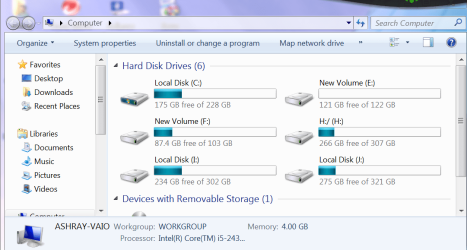
1) Computer shows the used up disk spaces and naturally the free spaces. That's the norm.

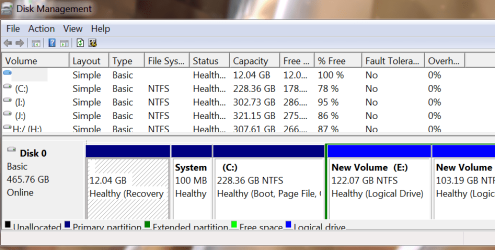
2) Whereas under "Disk Management", the partitions per se do not show the above details. Instead they are listed above as percentages which you have not included in your snap.(View mine below)

3) I have noticed something else. The "system Reserve" of 100 MB is not seen in the disk management pic.View mine for comparison.

regards and best wishes,
sreedhav
 

Attachments

  • Computer_2012-03-04_20-55-34.png
    Computer_2012-03-04_20-55-34.png
    54.7 KB · Views: 15
  • Disk Management_2012-03-03_06-55-52.png
    Disk Management_2012-03-03_06-55-52.png
    27.4 KB · Views: 23

My Computer

Computer Manufacturer/Model Number
Sony Vaio C series VPCCB35FN laptop
OS
MS Windows 7 Home Premium 64-bit SP1
CPU
IntelCore [email protected]; Sandy Bridge 32nm Tech.
Motherboard
Sony Vaio Version:C609NJYJ
Memory
4096Mb RAM; Single ChannelDDR3@665MHz; DRAM Freq:662MHz
Graphics Card(s)
AMD Radeon HD 6630M; GPU:Whistler;BIOS Core&mem Clock:123.36
Sound Card
REALTEK High Definition Audio Device; INTEL Display Card
Monitor(s) Displays
Generic PnP Intel HD;Resolution:1920*1040 Pixels; BPP:32bits
Screen Resolution
Current Resolution:1920*1080 Pixels; Monitor Frequency:60Hz
Hard Drives
Internal HD:TOSHIBA MK5061GSY; Real Size:488 GB;NTFS; 3 Partitions; SATA; HEADS:16

External HDD: WD Elements 1023 PORTABLE; Estimated Size: 1TB; NTFS; 3 Partitions
Cooling
Lateral Exhaust with a Cooling Pad Placed Beneath.
Keyboard
Logitech Bluetooth+ Generic Integrated K-B
Mouse
Logitech Bluetooth
Internet Speed
2MBPS
Other Info
1)Trend Micro Titanium Maximum Security Suite Version:3
2)SAS-PRO

3)MBAM--PRO


4)WATERFOX+IE9 +WOT+LINKEXTEND+ DRWEBCUREIT LINK CHECKER

5)SPYWAREBLASTER

6) WINPATROL PLUS

7) SANDBOXIE and
8) A BIT OF COMMON SENSE.

My Computer

Computer Manufacturer/Model Number
HP Pavilion Elite 495UK
OS
Windows 7 Ultimate SP1 64-Bit
CPU
Intel Core i7 870 @ 2.93GHz
Motherboard
MSI 2A9C (CPU1)
Memory
8Gb Dual-Channel DDR3 @ 664MHz
Graphics Card(s)
nVidia GeForce GTX 460 1024MB dedicated RAM
Sound Card
Realtek HD Audio
Monitor(s) Displays
HP2310i
Screen Resolution
1920 x 1080
Hard Drives
1x1954GB Hitachi HDS22020ALA 330 (RAID), 1x1954GB Hitachi External for backup and storage
PSU
460W
Case
HP Elite
Cooling
Air cooled
Keyboard
Logitech K750 solar-powered keyboard
Mouse
Logitech Wireless M180 mouse
Internet Speed
2Mb
Other Info
Pure Avanti Flow Internet Radio with iPod Dock, 64Gb iPod, HP USB Speakers, Sony MDR-V500 Headphones, Sony Vaio F-Series Laptop
i am now trying a start up repair ill keeep you posted
 

My Computer

Computer Manufacturer/Model Number
emachines
OS
win7 ultimate x32
CPU
1.6
Memory
2gb ram 250 gb hd
Hard Drives
250 gb toshiba MK2555GSX ata
OK, but do make sure you run it three times with a reboot between each one.

If it doesn't do the trick you may be faced with restoring the computer to its factory state - assuming of course your friend has a recovery disc (s).
 

My Computer

Computer Manufacturer/Model Number
HP Pavilion Elite 495UK
OS
Windows 7 Ultimate SP1 64-Bit
CPU
Intel Core i7 870 @ 2.93GHz
Motherboard
MSI 2A9C (CPU1)
Memory
8Gb Dual-Channel DDR3 @ 664MHz
Graphics Card(s)
nVidia GeForce GTX 460 1024MB dedicated RAM
Sound Card
Realtek HD Audio
Monitor(s) Displays
HP2310i
Screen Resolution
1920 x 1080
Hard Drives
1x1954GB Hitachi HDS22020ALA 330 (RAID), 1x1954GB Hitachi External for backup and storage
PSU
460W
Case
HP Elite
Cooling
Air cooled
Keyboard
Logitech K750 solar-powered keyboard
Mouse
Logitech Wireless M180 mouse
Internet Speed
2Mb
Other Info
Pure Avanti Flow Internet Radio with iPod Dock, 64Gb iPod, HP USB Speakers, Sony MDR-V500 Headphones, Sony Vaio F-Series Laptop
no she has not got a recovery disc, she bought the laptop from a catologue and thats all she got,the laptop.
i am now trying the 3 times start up repair, lets see what happens. ta
see image for what is actually on :c
 

Attachments

  • EXAMPLE 3.png
    EXAMPLE 3.png
    64.5 KB · Views: 16

My Computer

Computer Manufacturer/Model Number
emachines
OS
win7 ultimate x32
CPU
1.6
Memory
2gb ram 250 gb hd
Hard Drives
250 gb toshiba MK2555GSX ata
The huge 220GB part of the drive does not show up on on My Computer because there was no drive letter assigned to it. I have seen a tutorial on Youtube that removing the drive letter assigned to a drive makes it hide itself from showing on My Computer but not on the Computer Management console.

My solution for this is to assign a drive letter to that 220GB space:

Right click at that 220GB drive space on the Computer Management console then Change Drive Letter and Paths. You must then add the drive letter of your choice such as D: then click OK.

Then go to My Computer and see if it shows up.
 

My Computer

Computer Manufacturer/Model Number
Custom Built
OS
Windows 7 Ultimate 32 Bit, Windows Developer Preview, Linux Mint 9 Gnome 32 Bit
CPU
Intel Pentium Dual CPU E2180@2GHz
Motherboard
Elitegroup 671T-M3
Graphics Card(s)
NVIDIA GeForce 7200 GS
Monitor(s) Displays
AOC TFT1560 15" LCD Monitor
Screen Resolution
1024x768
Keyboard
Logitech USB Keyboard
The pic you show is right because you are looking at the factory image, it is the os as such for getting the comp back the way the factory set it up, NEW
 

My Computer

Computer Manufacturer/Model Number
Dell XPS 730
OS
Windows 7 Home Premium 64 bit
CPU
Intel Core 2 quad Extreme Q9770 @ 3.2 GHz
Memory
4x2 GB Muskin 1600 MHz ram
Graphics Card(s)
NVidia GTX 250
Sound Card
Soundblaster X-Fi Fatality Champion
Monitor(s) Displays
2 Dell 2007WFP Ultrascans
Screen Resolution
3360 x 1050
Hard Drives
WD Black 1TB sata, 2-WD Black 500 sata, 2-Seagate 500 Go external
PSU
1000 Watt
Cooling
air
Keyboard
MS Natrual Keyboard Pro
Mouse
Logitech Wireless Trackball
Internet Speed
DSL Elite
i have done that before, but becuase all the os n stuff is on :C it still says there is no space on :C when trying to install new software. so reinstalled windows hoping that it would sort it out, but when i had finished installing, it was still the same as the images above
 

My Computer

Computer Manufacturer/Model Number
emachines
OS
win7 ultimate x32
CPU
1.6
Memory
2gb ram 250 gb hd
Hard Drives
250 gb toshiba MK2555GSX ata
I insist you do this solution:

Right click at that 220GB drive space on the Computer Management console then Change Drive Letter and Paths. You must then add the drive letter of your choice such as D: then click OK.

Then go to My Computer and see if it shows up.
 

My Computer

Computer Manufacturer/Model Number
Custom Built
OS
Windows 7 Ultimate 32 Bit, Windows Developer Preview, Linux Mint 9 Gnome 32 Bit
CPU
Intel Pentium Dual CPU E2180@2GHz
Motherboard
Elitegroup 671T-M3
Graphics Card(s)
NVIDIA GeForce 7200 GS
Monitor(s) Displays
AOC TFT1560 15" LCD Monitor
Screen Resolution
1024x768
Keyboard
Logitech USB Keyboard
i have done this and yes it does show up.
 

Attachments

  • EXAMPLE 4.png
    EXAMPLE 4.png
    149.6 KB · Views: 14

My Computer

Computer Manufacturer/Model Number
emachines
OS
win7 ultimate x32
CPU
1.6
Memory
2gb ram 250 gb hd
Hard Drives
250 gb toshiba MK2555GSX ata
and i done the 3 start up repairs, nothing changed. poo hehe ta
 

My Computer

Computer Manufacturer/Model Number
emachines
OS
win7 ultimate x32
CPU
1.6
Memory
2gb ram 250 gb hd
Hard Drives
250 gb toshiba MK2555GSX ata
You have a drive E: now. Try right clicking this new drive E: from the Computer Management console, then Shrink volume. Shrink it a little. Afterwards, right click on drive C: then Extend Volume. This will use the space you shrunk from drive E: to be used to extend the capacity of drive C:

Hope this works out for you.
 

My Computer

Computer Manufacturer/Model Number
Custom Built
OS
Windows 7 Ultimate 32 Bit, Windows Developer Preview, Linux Mint 9 Gnome 32 Bit
CPU
Intel Pentium Dual CPU E2180@2GHz
Motherboard
Elitegroup 671T-M3
Graphics Card(s)
NVIDIA GeForce 7200 GS
Monitor(s) Displays
AOC TFT1560 15" LCD Monitor
Screen Resolution
1024x768
Keyboard
Logitech USB Keyboard
ok ta i will try that, just gonna watch the end of the rugby
 

My Computer

Computer Manufacturer/Model Number
emachines
OS
win7 ultimate x32
CPU
1.6
Memory
2gb ram 250 gb hd
Hard Drives
250 gb toshiba MK2555GSX ata
i have shrunk :E drive but extend drive on :c is greyed out.
 

My Computer

Computer Manufacturer/Model Number
emachines
OS
win7 ultimate x32
CPU
1.6
Memory
2gb ram 250 gb hd
Hard Drives
250 gb toshiba MK2555GSX ata
Actually, this drive E: could be pretty useful. I suggest you only use 1/3 or even 1/4 of the overall disk space on drive C: then drive E: is where you should tell your friend to save important files, music, documents and other data so when drive C: gets reformatted, if ever Windows is reinstalled, her files would be sitting safe at drive E:
 

My Computer

Computer Manufacturer/Model Number
Custom Built
OS
Windows 7 Ultimate 32 Bit, Windows Developer Preview, Linux Mint 9 Gnome 32 Bit
CPU
Intel Pentium Dual CPU E2180@2GHz
Motherboard
Elitegroup 671T-M3
Graphics Card(s)
NVIDIA GeForce 7200 GS
Monitor(s) Displays
AOC TFT1560 15" LCD Monitor
Screen Resolution
1024x768
Keyboard
Logitech USB Keyboard
Post a screenshot. What happens with the shrunken space?
 

My Computer

Computer Manufacturer/Model Number
Custom Built
OS
Windows 7 Ultimate 32 Bit, Windows Developer Preview, Linux Mint 9 Gnome 32 Bit
CPU
Intel Pentium Dual CPU E2180@2GHz
Motherboard
Elitegroup 671T-M3
Graphics Card(s)
NVIDIA GeForce 7200 GS
Monitor(s) Displays
AOC TFT1560 15" LCD Monitor
Screen Resolution
1024x768
Keyboard
Logitech USB Keyboard
Back
Top