Problem with Homegroups

zubrick

New member
Local time
5:21 PM
Messages
4
I have a laptop and a desktop. Both are running Windows 7 Home Premium 32-bit. The laptop connects wirelessly to the router and the desktop is connected directly to the router with a cable. The laptop displays the network name that I assigned when I set up the network. However, the desktop displays that it is connected to "Network 2." When I try to create a homegroup, the system says that you must be on the same network. I think that Windows 7 is splitting the wired and wireless connection into two networks. Any ideas of how to fix this?
 

My Computer

Computer Manufacturer/Model Number
Dell Inspiron 1720
OS
Windows 7 Home Premium 32-bit
CPU
Core 2 Duo
Memory
2 GB
It might be easier to set up the Homegroup on the wired machine first, after that you should join the Homegroup from the wireless machine but do it from the wireless connection only.

You may need to abandon the Homegroup you already created by doing this on both machines.
http://www.sevenforums.com/tutorials/43980-homegroup-leave.html?filter

Then create the new Homegroup on the wired PC first like this.
http://www.sevenforums.com/tutorials/43961-homegroup-create.html?filter

Then join from the wireless PC like in the link below, be sure and check your router settings like in the picture.
http://www.sevenforums.com/tutorials/43972-homegroup-add-computer-join.html?filter
 

My Computer

Computer type
PC/Desktop
Computer Manufacturer/Model Number
Home built
OS
Windows 7 Ult, Windows 8.1 Pro,
CPU
Q9650-4.275GHz, E8600 4.5GHz, E6750-3.8GHz
Motherboard
Evga 780i FTW
Memory
G.Skill PC2 9600 1200Mhz 5 5 5 15 2T
Graphics Card(s)
GTX480
Sound Card
Asus Xonar D2
Monitor(s) Displays
HannsG
Screen Resolution
1680X1050
Hard Drives
GSkill Phoenix Pro 120GB SSD
PSU
ThermalTake Toughpower 1000Watt modular
Case
ThermalTake XaserV
Cooling
Xigmatek S1283
Keyboard
Logitech G15
Mouse
Logitech G9
Internet Speed
T1
I have already tried that. The problem is that Windows 7 is separating the computers into two different networks. Is there any way to fix this?
 

My Computer

Computer Manufacturer/Model Number
Dell Inspiron 1720
OS
Windows 7 Home Premium 32-bit
CPU
Core 2 Duo
Memory
2 GB
From your Desktop, are you able to join the network you created on your laptop?
 

My Computer

Computer Manufacturer/Model Number
Lenovo ThinkPad T60
OS
Windows 7 Ultimate 64Bit
CPU
GenuineIntel Intel(R) Core(TM) DuoCore T2400 @ 1.83GHz
Motherboard
Intel(R) 82801G (ICH7 Family)
Memory
2.00 GB
Graphics Card(s)
Mobile Intel(R) 945 Express Chipset
Sound Card
SoundMAX Integrated Digital HD Audio
Monitor(s) Displays
ThinkPad Display
Screen Resolution
1400x1050
Hard Drives
100Gb SATA
Keyboard
Standard Keyboard
Mouse
HID-compliant Mouse
Internet Speed
Cable Broadband - 54Mbps
Other Info
Intel(R) PRO/1000 PL Network Connection
11a/b/g Wireless LAN Mini PCI Express Adapter
I have already tried that. The problem is that Windows 7 is separating the computers into two different networks. Is there any way to fix this?

It sounds to me like you are creating the Homegroup twice, once with each machine. The second machine only needs to join the Homegroup which is accomplished by typing in the Homegroup password when you get the prompt for it during the set up process.

When setting up the Homegroup on the second machine, you need to type in the Homegroup password which you should have already obtained and written down when you set up the Homegroup on the first machine.

Are you getting dual networks when you do that?

It might also help to know your make, model and version number of the router you are using for this so I can check if there is a firmware update.
 

My Computer

Computer type
PC/Desktop
Computer Manufacturer/Model Number
Home built
OS
Windows 7 Ult, Windows 8.1 Pro,
CPU
Q9650-4.275GHz, E8600 4.5GHz, E6750-3.8GHz
Motherboard
Evga 780i FTW
Memory
G.Skill PC2 9600 1200Mhz 5 5 5 15 2T
Graphics Card(s)
GTX480
Sound Card
Asus Xonar D2
Monitor(s) Displays
HannsG
Screen Resolution
1680X1050
Hard Drives
GSkill Phoenix Pro 120GB SSD
PSU
ThermalTake Toughpower 1000Watt modular
Case
ThermalTake XaserV
Cooling
Xigmatek S1283
Keyboard
Logitech G15
Mouse
Logitech G9
Internet Speed
T1
Neither the desktop or the laptop are able to "see" each other on the network. When I try to join the homegroup made on the desktop with the laptop, there are no available homegroups to join, because the two machines are on different networks.

My router is a Lynkis WRT54G2 v.1
 

My Computer

Computer Manufacturer/Model Number
Dell Inspiron 1720
OS
Windows 7 Home Premium 32-bit
CPU
Core 2 Duo
Memory
2 GB
Show us both machines ipconfig pls.
 

My Computer

Computer Manufacturer/Model Number
Lenovo ThinkPad T60
OS
Windows 7 Ultimate 64Bit
CPU
GenuineIntel Intel(R) Core(TM) DuoCore T2400 @ 1.83GHz
Motherboard
Intel(R) 82801G (ICH7 Family)
Memory
2.00 GB
Graphics Card(s)
Mobile Intel(R) 945 Express Chipset
Sound Card
SoundMAX Integrated Digital HD Audio
Monitor(s) Displays
ThinkPad Display
Screen Resolution
1400x1050
Hard Drives
100Gb SATA
Keyboard
Standard Keyboard
Mouse
HID-compliant Mouse
Internet Speed
Cable Broadband - 54Mbps
Other Info
Intel(R) PRO/1000 PL Network Connection
11a/b/g Wireless LAN Mini PCI Express Adapter
Well your router should be working fine and is compatible. There is a firmware update from June if it comes down to that but I can't say if you need it or not.

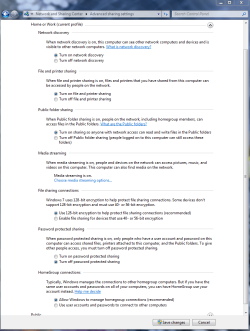
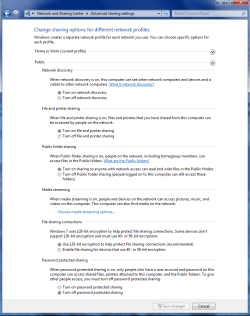
As for the machines not being able to see each other, check these settings in the Advanced Network Settings window and make sure they match the ones in the pictures.
 

Attachments

  • Home or work homegroup enable.PNG
    Home or work homegroup enable.PNG
    45 KB · Views: 200
  • public sharing enabled all.PNG
    public sharing enabled all.PNG
    39.7 KB · Views: 151

My Computer

Computer type
PC/Desktop
Computer Manufacturer/Model Number
Home built
OS
Windows 7 Ult, Windows 8.1 Pro,
CPU
Q9650-4.275GHz, E8600 4.5GHz, E6750-3.8GHz
Motherboard
Evga 780i FTW
Memory
G.Skill PC2 9600 1200Mhz 5 5 5 15 2T
Graphics Card(s)
GTX480
Sound Card
Asus Xonar D2
Monitor(s) Displays
HannsG
Screen Resolution
1680X1050
Hard Drives
GSkill Phoenix Pro 120GB SSD
PSU
ThermalTake Toughpower 1000Watt modular
Case
ThermalTake XaserV
Cooling
Xigmatek S1283
Keyboard
Logitech G15
Mouse
Logitech G9
Internet Speed
T1
Thank you chev65 your solution worked. My settings were not identical on both machines. It works great now. Thanks:)
 

My Computer

Computer Manufacturer/Model Number
Dell Inspiron 1720
OS
Windows 7 Home Premium 32-bit
CPU
Core 2 Duo
Memory
2 GB
Hey zubrick thats great. It's usually those settings that cause the most problems. Glad to see you up and running. :D
 

My Computer

Computer type
PC/Desktop
Computer Manufacturer/Model Number
Home built
OS
Windows 7 Ult, Windows 8.1 Pro,
CPU
Q9650-4.275GHz, E8600 4.5GHz, E6750-3.8GHz
Motherboard
Evga 780i FTW
Memory
G.Skill PC2 9600 1200Mhz 5 5 5 15 2T
Graphics Card(s)
GTX480
Sound Card
Asus Xonar D2
Monitor(s) Displays
HannsG
Screen Resolution
1680X1050
Hard Drives
GSkill Phoenix Pro 120GB SSD
PSU
ThermalTake Toughpower 1000Watt modular
Case
ThermalTake XaserV
Cooling
Xigmatek S1283
Keyboard
Logitech G15
Mouse
Logitech G9
Internet Speed
T1
Back
Top