Problem with installation, HELP :/

Pepc619

New member
Local time
12:13 PM
Messages
55
Hello everyone, today I got new PC, you can check components down in the left corner.
I downloaded Latest 7600 64x build from Wzor and Hashes and stuff are all alright. Problem is that computer always freezes when it gets to ''Expanding Windows Files'' while it installs. First there are three dots all the time, but when it gets to 12%, sometimes 6% or 1% it freezes, I can't move my mouse anymore, there is nothing I can do but restart PC.

HELP!
 

My Computer

Computer Manufacturer/Model Number
Custom build
OS
Windows Xp 32 bit, Windows 7 next week :P
CPU
Intel i7 920 D0 @ 3,5 ghz
Motherboard
Gigabyte GA-EX58-UD4P
Memory
TeamGroup 6 gig ram 1866 mhz CL=9
Graphics Card(s)
Sapphire Radeon 4890
Sound Card
Integrated
Monitor(s) Displays
Samsung SyncMaster 940N 17''
Screen Resolution
1280 x 1024
Hard Drives
Western Digital Black Caviar 640 gig 7200
PSU
LC Power Metatron Arkangel 850W
Case
Cooler Master RC-690
Cooling
CPU Cooler Scythe Mugen 2
Keyboard
Genius
Mouse
Genius
Internet Speed
no idea max download is 160kb, max upload 32kb, kinda slow
Whoops I didn't notice before, please move this thread to installation forum.
I still need help, anyone?
 

My Computer

Computer Manufacturer/Model Number
Custom build
OS
Windows Xp 32 bit, Windows 7 next week :P
CPU
Intel i7 920 D0 @ 3,5 ghz
Motherboard
Gigabyte GA-EX58-UD4P
Memory
TeamGroup 6 gig ram 1866 mhz CL=9
Graphics Card(s)
Sapphire Radeon 4890
Sound Card
Integrated
Monitor(s) Displays
Samsung SyncMaster 940N 17''
Screen Resolution
1280 x 1024
Hard Drives
Western Digital Black Caviar 640 gig 7200
PSU
LC Power Metatron Arkangel 850W
Case
Cooler Master RC-690
Cooling
CPU Cooler Scythe Mugen 2
Keyboard
Genius
Mouse
Genius
Internet Speed
no idea max download is 160kb, max upload 32kb, kinda slow
Hi,

This problem can be cause by a bad burn as the 'Expanding Files' section is when it's also copying files from the DVD. Try at a slower burn speed to see if that solves the issue.

Hope it helps :)


Jeff
 

My Computer

Computer Manufacturer/Model Number
Compaq Desktop
OS
Windows 7 Ultimate x64
CPU
AMD Sempron Dual Core
Memory
3GB
Graphics Card(s)
NVIDIA GeForce 6150SE nForce 430
Screen Resolution
1024x768
Hard Drives
150GB Sata
It didn't help :( I first burned 2 DVDS at 4x because i thought that one brand sucked lol.
Then I burned one at 2x and it didn't help :( Also I can't burn at 1x :S
 

My Computer

Computer Manufacturer/Model Number
Custom build
OS
Windows Xp 32 bit, Windows 7 next week :P
CPU
Intel i7 920 D0 @ 3,5 ghz
Motherboard
Gigabyte GA-EX58-UD4P
Memory
TeamGroup 6 gig ram 1866 mhz CL=9
Graphics Card(s)
Sapphire Radeon 4890
Sound Card
Integrated
Monitor(s) Displays
Samsung SyncMaster 940N 17''
Screen Resolution
1280 x 1024
Hard Drives
Western Digital Black Caviar 640 gig 7200
PSU
LC Power Metatron Arkangel 850W
Case
Cooler Master RC-690
Cooling
CPU Cooler Scythe Mugen 2
Keyboard
Genius
Mouse
Genius
Internet Speed
no idea max download is 160kb, max upload 32kb, kinda slow
Would making bootable USB work?
 

My Computer

Computer Manufacturer/Model Number
Custom build
OS
Windows Xp 32 bit, Windows 7 next week :P
CPU
Intel i7 920 D0 @ 3,5 ghz
Motherboard
Gigabyte GA-EX58-UD4P
Memory
TeamGroup 6 gig ram 1866 mhz CL=9
Graphics Card(s)
Sapphire Radeon 4890
Sound Card
Integrated
Monitor(s) Displays
Samsung SyncMaster 940N 17''
Screen Resolution
1280 x 1024
Hard Drives
Western Digital Black Caviar 640 gig 7200
PSU
LC Power Metatron Arkangel 850W
Case
Cooler Master RC-690
Cooling
CPU Cooler Scythe Mugen 2
Keyboard
Genius
Mouse
Genius
Internet Speed
no idea max download is 160kb, max upload 32kb, kinda slow
Your new machine is good enough, but sometimes the sata (or ide) cords of the hard disk or the dvd-rom will cause some troubles. Check them carefully.

Or, why not try to install the W7 from your XP system?

You can create an ISO image from your 7600 x64 DVD, then mount it on a virtual CD.

With this way, if the total installation is less than 20 minutes, then, you will know how to check your hardware.
 

My Computer

OS
Server 2008 R2 SP1, Win7 x64 Pro SP1
CPU
Intel Core 2 Duo E6700 @3.3GHz
Motherboard
ASUS P5W DH DELUXE
Memory
Transcend DDRII 800 4GB (2 x 2GB )
Graphics Card(s)
GeForce 7950GX2
Sound Card
Realtek ALC882M Integrated on board
Monitor(s) Displays
ACER AL2723 27" LCD
Screen Resolution
1920x1200
Hard Drives
WD 6401 AALS 640G x 1
Seagate 160 GB (Barracuda 7200.7) x 2
PSU
Zippy PSL-6720P(G1)720W
Case
Thermaltake Kandalf VA9000SWA
Cooling
Zalman CNPS9500
Keyboard
Standard
Mouse
Standard
Internet Speed
10M, Cable
Other Info
Above is one of my desktops.
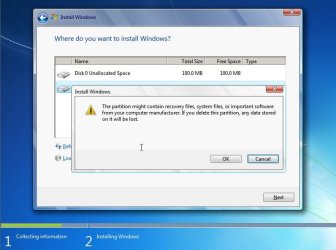
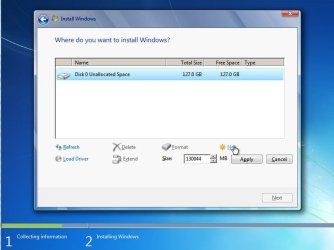
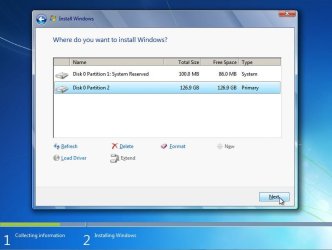
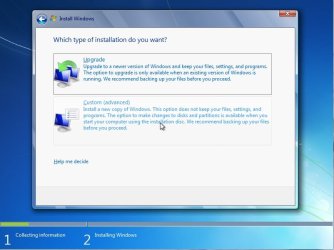
I had this before a few times, very random. What I did was instead of selecting the quick options of installing, I went in to advanced, deleted the system partition and system reserved partition, then selected "new" and created one myself, then chose the new partition to have windows installed. After this is completed successfully.

It was very random when it would happen, but I found myself having to install it this way.

Be sure that files are backed up before deleting partitions, unless you care less about anything on the system.
 

Attachments

  • win7setup-adv.JPG
    win7setup-adv.JPG
    50.4 KB · Views: 22
  • win7setup-del.JPG
    win7setup-del.JPG
    51.6 KB · Views: 32
  • win7setup-new.JPG
    win7setup-new.JPG
    45.9 KB · Views: 22
  • win7setup-next.JPG
    win7setup-next.JPG
    46.5 KB · Views: 22
Last edited:

My Computer

Computer Manufacturer/Model Number
Built Myself
OS
Windows 7 7600.16384 x64
CPU
Intel Core i7 OC'd to 3.20 GHz
Motherboard
Gigabyte
Memory
6GB GSkillz Triple Channel DDR3 OC'd to 1600 MHz
Graphics Card(s)
Nvidia GTX 280
Sound Card
X-Fi Platinum
Monitor(s) Displays
Dual 2001FWP
Screen Resolution
1680x1050 x 2
Hard Drives
System - Dual 150GB Raptors Raid0
Doc Storage - 1TB SATA 32MB cache Samsung
TV Recordings - 1TB SATA 32MB cache Samsung
PSU
Gigawatt Antec
Case
Antec 900
Keyboard
Saitek
Mouse
logitech MX 10000
Internet Speed
30 mb/s
7echno7im, will this work if I don't have operating system installed yet? Because computer is fresh and had none operating system installed before...

Ok let me get this straight. I first go to standard installation and make a few drives and try to install. If it fails I restart my computer and do as you say. I go to advanced, I delete all partitions together with system and backup system. Then I create new drives and Install normal way through advanced?
 

My Computer

Computer Manufacturer/Model Number
Custom build
OS
Windows Xp 32 bit, Windows 7 next week :P
CPU
Intel i7 920 D0 @ 3,5 ghz
Motherboard
Gigabyte GA-EX58-UD4P
Memory
TeamGroup 6 gig ram 1866 mhz CL=9
Graphics Card(s)
Sapphire Radeon 4890
Sound Card
Integrated
Monitor(s) Displays
Samsung SyncMaster 940N 17''
Screen Resolution
1280 x 1024
Hard Drives
Western Digital Black Caviar 640 gig 7200
PSU
LC Power Metatron Arkangel 850W
Case
Cooler Master RC-690
Cooling
CPU Cooler Scythe Mugen 2
Keyboard
Genius
Mouse
Genius
Internet Speed
no idea max download is 160kb, max upload 32kb, kinda slow
Well if your previous installation failed, delete the partition.

The key here when i experienced a similar issue was creating the partitions myself, then choosing them to install, rather than selecting the drive and hitting next and allowing Windows to create the partitions.
 

My Computer

Computer Manufacturer/Model Number
Built Myself
OS
Windows 7 7600.16384 x64
CPU
Intel Core i7 OC'd to 3.20 GHz
Motherboard
Gigabyte
Memory
6GB GSkillz Triple Channel DDR3 OC'd to 1600 MHz
Graphics Card(s)
Nvidia GTX 280
Sound Card
X-Fi Platinum
Monitor(s) Displays
Dual 2001FWP
Screen Resolution
1680x1050 x 2
Hard Drives
System - Dual 150GB Raptors Raid0
Doc Storage - 1TB SATA 32MB cache Samsung
TV Recordings - 1TB SATA 32MB cache Samsung
PSU
Gigawatt Antec
Case
Antec 900
Keyboard
Saitek
Mouse
logitech MX 10000
Internet Speed
30 mb/s
Something else my brother ran into that was similar on a Windows XP install is that his hard drive was defective and there was a problem somewhere on the disk. We narrowed it down and found it was somewhere on the first 10GB. We created a 12 GB partition, then another with he rest of the drive. We selected the 2nd bigger partition to "get over the hump" then everything ran fine, but he could not use the first 10GB.

We only did this because he didn't have another drive and didn't want to buy another.
 

My Computer

Computer Manufacturer/Model Number
Built Myself
OS
Windows 7 7600.16384 x64
CPU
Intel Core i7 OC'd to 3.20 GHz
Motherboard
Gigabyte
Memory
6GB GSkillz Triple Channel DDR3 OC'd to 1600 MHz
Graphics Card(s)
Nvidia GTX 280
Sound Card
X-Fi Platinum
Monitor(s) Displays
Dual 2001FWP
Screen Resolution
1680x1050 x 2
Hard Drives
System - Dual 150GB Raptors Raid0
Doc Storage - 1TB SATA 32MB cache Samsung
TV Recordings - 1TB SATA 32MB cache Samsung
PSU
Gigawatt Antec
Case
Antec 900
Keyboard
Saitek
Mouse
logitech MX 10000
Internet Speed
30 mb/s
Interesting. Well first of all I will try bootable flash key :) And I will let you know. Because I already wasted 3 DVD's and I wanna know if flash key will work.
 

My Computer

Computer Manufacturer/Model Number
Custom build
OS
Windows Xp 32 bit, Windows 7 next week :P
CPU
Intel i7 920 D0 @ 3,5 ghz
Motherboard
Gigabyte GA-EX58-UD4P
Memory
TeamGroup 6 gig ram 1866 mhz CL=9
Graphics Card(s)
Sapphire Radeon 4890
Sound Card
Integrated
Monitor(s) Displays
Samsung SyncMaster 940N 17''
Screen Resolution
1280 x 1024
Hard Drives
Western Digital Black Caviar 640 gig 7200
PSU
LC Power Metatron Arkangel 850W
Case
Cooler Master RC-690
Cooling
CPU Cooler Scythe Mugen 2
Keyboard
Genius
Mouse
Genius
Internet Speed
no idea max download is 160kb, max upload 32kb, kinda slow
Tried everything. Installation still freezes :(
 

My Computer

Computer Manufacturer/Model Number
Custom build
OS
Windows Xp 32 bit, Windows 7 next week :P
CPU
Intel i7 920 D0 @ 3,5 ghz
Motherboard
Gigabyte GA-EX58-UD4P
Memory
TeamGroup 6 gig ram 1866 mhz CL=9
Graphics Card(s)
Sapphire Radeon 4890
Sound Card
Integrated
Monitor(s) Displays
Samsung SyncMaster 940N 17''
Screen Resolution
1280 x 1024
Hard Drives
Western Digital Black Caviar 640 gig 7200
PSU
LC Power Metatron Arkangel 850W
Case
Cooler Master RC-690
Cooling
CPU Cooler Scythe Mugen 2
Keyboard
Genius
Mouse
Genius
Internet Speed
no idea max download is 160kb, max upload 32kb, kinda slow
Tried everything. Installation still freezes :(

It could very well be a bad ISO, i would suggest re-downloading from another source :(
 

My Computer

Computer Manufacturer/Model Number
Compaq Desktop
OS
Windows 7 Ultimate x64
CPU
AMD Sempron Dual Core
Memory
3GB
Graphics Card(s)
NVIDIA GeForce 6150SE nForce 430
Screen Resolution
1024x768
Hard Drives
150GB Sata
install prob

Tried everything. Installation still freezes :(

Lets go thru this again

First. maybe the image was not burned correctly. You dont extract the files. Burn the ISO image slowly to dvd. Is it the right file (32bit or 64?)

Second check your BIOS (which should be upgraded) for swettings like legacy floppy support, max mem, max cpu, etc they should be unchecked if you have them.

If not the image, or the BIOS, then you have to start thinking a driver of some sort. Likely candidates are usb, video.

If its not a driver then its time to start thinking memory problems. remove all but 1 gig of memory and try to re-install.

If not then start thinking abt cpu, mobo problems.

Hope this helps you

Ken
 

My Computer

Computer Manufacturer/Model Number
HP Pavillion dv-7 1005 Tx
OS
Win 8 Release candidate 8400
CPU
[email protected]
Memory
4 gigs
Graphics Card(s)
Nvidia 9600M
Sound Card
HD built-in
Monitor(s) Displays
17" Wxga
Screen Resolution
1440x900
Cooling
none
Internet Speed
45Mb down 5Mb up
zigzag, I burned 3 DVD's all at slow speeds. Bios is upgraded to the last version. Drivers? I don't know.

All that I know is that RAM is at stock 1866 mhz, motherboard would run it at 1066, but with some tweaks it runs at 1866 mhz at the moment.

But after Windows 7 I tried to install Vista and poof! It was installed in first try. But problems got later, when I tried to enter the OS, some windows showed up (new user stuff) but then it also freezed in Vista. Well Vista at least installed.

Also, computer was tested in the company where I built my PC. Actually they got RAM from downgraded 1066 to 1866. They said that it is stable.

Also, the leak that I downloaded is 100% OK. Because hashes match and size too.
 

My Computer

Computer Manufacturer/Model Number
Custom build
OS
Windows Xp 32 bit, Windows 7 next week :P
CPU
Intel i7 920 D0 @ 3,5 ghz
Motherboard
Gigabyte GA-EX58-UD4P
Memory
TeamGroup 6 gig ram 1866 mhz CL=9
Graphics Card(s)
Sapphire Radeon 4890
Sound Card
Integrated
Monitor(s) Displays
Samsung SyncMaster 940N 17''
Screen Resolution
1280 x 1024
Hard Drives
Western Digital Black Caviar 640 gig 7200
PSU
LC Power Metatron Arkangel 850W
Case
Cooler Master RC-690
Cooling
CPU Cooler Scythe Mugen 2
Keyboard
Genius
Mouse
Genius
Internet Speed
no idea max download is 160kb, max upload 32kb, kinda slow
I know i said this already but did you try creating the partition manually, then selecting it? I know I sound like a broken record but that is how I got around this when I has the same issue.

After you boot from DVD
1) select edition and agreement
2) choose custom
3) Drive options
4) delete any partitions there
5) Click New Partition ? apply
6) it will then tell you it needs to create another system files
7) select the new volume for Windows to be installed
 

My Computer

Computer Manufacturer/Model Number
Built Myself
OS
Windows 7 7600.16384 x64
CPU
Intel Core i7 OC'd to 3.20 GHz
Motherboard
Gigabyte
Memory
6GB GSkillz Triple Channel DDR3 OC'd to 1600 MHz
Graphics Card(s)
Nvidia GTX 280
Sound Card
X-Fi Platinum
Monitor(s) Displays
Dual 2001FWP
Screen Resolution
1680x1050 x 2
Hard Drives
System - Dual 150GB Raptors Raid0
Doc Storage - 1TB SATA 32MB cache Samsung
TV Recordings - 1TB SATA 32MB cache Samsung
PSU
Gigawatt Antec
Case
Antec 900
Keyboard
Saitek
Mouse
logitech MX 10000
Internet Speed
30 mb/s
Yes, I tried that million times :S But when I click Yes I get 100 mb drive on which I can't get because it's backup only. You mean the other one without those 100mb right?

Is boot important in Bios?
For first boot I have CD then Hard Drive and then CD
 

My Computer

Computer Manufacturer/Model Number
Custom build
OS
Windows Xp 32 bit, Windows 7 next week :P
CPU
Intel i7 920 D0 @ 3,5 ghz
Motherboard
Gigabyte GA-EX58-UD4P
Memory
TeamGroup 6 gig ram 1866 mhz CL=9
Graphics Card(s)
Sapphire Radeon 4890
Sound Card
Integrated
Monitor(s) Displays
Samsung SyncMaster 940N 17''
Screen Resolution
1280 x 1024
Hard Drives
Western Digital Black Caviar 640 gig 7200
PSU
LC Power Metatron Arkangel 850W
Case
Cooler Master RC-690
Cooling
CPU Cooler Scythe Mugen 2
Keyboard
Genius
Mouse
Genius
Internet Speed
no idea max download is 160kb, max upload 32kb, kinda slow
ok. Yes I mean the drive bigger than 100MB.

Your boot order is correct, CD then Hard drive (after this it usually doesn't matter)

Do you only have 1 hard drive? Just curious because some times the Hard Drive boot has a priory list too. If you do have more than 1 drive, can you confirm in BIOS that the correct drive that will be used to install windows is listed first?
 

My Computer

Computer Manufacturer/Model Number
Built Myself
OS
Windows 7 7600.16384 x64
CPU
Intel Core i7 OC'd to 3.20 GHz
Motherboard
Gigabyte
Memory
6GB GSkillz Triple Channel DDR3 OC'd to 1600 MHz
Graphics Card(s)
Nvidia GTX 280
Sound Card
X-Fi Platinum
Monitor(s) Displays
Dual 2001FWP
Screen Resolution
1680x1050 x 2
Hard Drives
System - Dual 150GB Raptors Raid0
Doc Storage - 1TB SATA 32MB cache Samsung
TV Recordings - 1TB SATA 32MB cache Samsung
PSU
Gigawatt Antec
Case
Antec 900
Keyboard
Saitek
Mouse
logitech MX 10000
Internet Speed
30 mb/s

My Computer

Computer Manufacturer/Model Number
Custom build
OS
Windows Xp 32 bit, Windows 7 next week :P
CPU
Intel i7 920 D0 @ 3,5 ghz
Motherboard
Gigabyte GA-EX58-UD4P
Memory
TeamGroup 6 gig ram 1866 mhz CL=9
Graphics Card(s)
Sapphire Radeon 4890
Sound Card
Integrated
Monitor(s) Displays
Samsung SyncMaster 940N 17''
Screen Resolution
1280 x 1024
Hard Drives
Western Digital Black Caviar 640 gig 7200
PSU
LC Power Metatron Arkangel 850W
Case
Cooler Master RC-690
Cooling
CPU Cooler Scythe Mugen 2
Keyboard
Genius
Mouse
Genius
Internet Speed
no idea max download is 160kb, max upload 32kb, kinda slow
zigzag, I burned 3 DVD's all at slow speeds. Bios is upgraded to the last version. Drivers? I don't know.

All that I know is that RAM is at stock 1866 mhz, motherboard would run it at 1066, but with some tweaks it runs at 1866 mhz at the moment.

But after Windows 7 I tried to install Vista and poof! It was installed in first try. But problems got later, when I tried to enter the OS, some windows showed up (new user stuff) but then it also freezed in Vista. Well Vista at least installed.

Also, computer was tested in the company where I built my PC. Actually they got RAM from downgraded 1066 to 1866. They said that it is stable.

Also, the leak that I downloaded is 100% OK. Because hashes match and size too.
I'm betting this is the issue (see bolded). Turn off all OC settings (after you've written them down somewhere. The fact that Vista will install with the memory over-clocked has no bearing on the behavior one can expect from Win7 - two different sets of software.

Old school I know, but remove all peripherals that you don't need for the install - that means all expansion cards save one video, all memory but for one stick, all HDDs but the one your are installing to, all DVD/CD drives but the one from which you are installing, all printers, etc - strip it to the bones!

Now do the install. When/if (I could be wrong about all this) Win7 finishes the install, you can re-install the hardware. Do it one piece at a time. Power down (D'oh), install a piece, reboot and let Win7 install the appropriate drivers. Reboot again - some drivers need to the reboot after they are installed. Power down and move on to the next piece of hardware.

Oh, you probably want to have on hand, like on a UBS stick, all the most recent drivers for all your hardware so you can direct Win7 to install those rather than the onces that come with your Win7 install disk.

When you get to a piece of H/W that doesn't install correctly (you're looking at the device manager, right?), then you have a better idea of what is causing your problem. Which piece it is will give you a clue as to the direction in which to proceed to correct the issue.

I had to do this once with, I think, WinNT - it was not fun, but it got the job done.
 

My Computer

Computer Manufacturer/Model Number
Cobbled together :)
OS
Win7 Ultimate, x64
CPU
i7 920, currently NOT OC
Motherboard
Asrock X58 Deluxe
Memory
OCZ Platinum 12GB (6 x 2GB) 240-Pin DDR3 SDRAM DDR3 1600
Graphics Card(s)
nvidia geforce 7600 gt
Sound Card
integrated
Monitor(s) Displays
Samsung SyncMaster 204t (dual monitors)
Screen Resolution
1600 x 1200
Hard Drives
WDC WD2000JS-00MHB0 ATA
WDC WD5000AAKS-65YGA0 ATA
PSU
750w
Cooling
Air, 4 120mm
Back
Top