Problem with installation

Gugu

New member
Local time
11:47 PM
Messages
6
I try several time to install windows 7 in a dual boot system with Vista Ultimate 64 on a 50gig partition and get always the following message:
Windows could not collect information for [OSimage] since the specified image [install.wim] does not exist.
I have an AMD base system:
CPU Type DualCore AMD Athlon 64 X2, 2200 MHz (11 x 200) 4200+
Motherboard Name Asus A8R32-MVP Deluxe (3 PCI, 1 PCI-E x1, 2 PCI-E x16, 4 DDR DIMM, Audio, Gigabit LAN, IEEE-1394)
System Memory 3072 MB (PC3200 DDR SDRAM)

Please help.

Thank you
 

My Computer

OS
Vista Ultimate 64 bits
you made the dvd wrong.... dont burn the .iso as a file to a disk... use a program to "burn/write image to cd/dvd"
 

My Computer

Computer Manufacturer/Model Number
CUSTOM
OS
XP/win7 x86 build 7127
CPU
Athlon64 X2 DUAL 4200+ 2.21ghz
Motherboard
ASUS K8 PRO SLI
Memory
2GB Dual Chan DDR2 Corsair
Graphics Card(s)
Nvidia 6800GT
Sound Card
nvidia
Monitor(s) Displays
19' LCD
Screen Resolution
1280x1024
Hard Drives
WD 250, 2x500, 2x1TB IDE/USB
WD 250 SATA (system)
SEAGATE 120 Sata
PSU
coolermaster 450
Case
SUPERFLOWER
Cooling
1 HDD bay fan, 5x80mm Case Fans, AEROGATE II Fan/Temp
Keyboard
MS wireless
Mouse
MS Wireless
Internet Speed
fassssssssst
I burn it as an iso first with Roxio and after with alcohol same result.
 

My Computer

OS
Vista Ultimate 64 bits
and did you explore the dvd? is there a file structure there?
 

My Computer

Computer Manufacturer/Model Number
CUSTOM
OS
XP/win7 x86 build 7127
CPU
Athlon64 X2 DUAL 4200+ 2.21ghz
Motherboard
ASUS K8 PRO SLI
Memory
2GB Dual Chan DDR2 Corsair
Graphics Card(s)
Nvidia 6800GT
Sound Card
nvidia
Monitor(s) Displays
19' LCD
Screen Resolution
1280x1024
Hard Drives
WD 250, 2x500, 2x1TB IDE/USB
WD 250 SATA (system)
SEAGATE 120 Sata
PSU
coolermaster 450
Case
SUPERFLOWER
Cooling
1 HDD bay fan, 5x80mm Case Fans, AEROGATE II Fan/Temp
Keyboard
MS wireless
Mouse
MS Wireless
Internet Speed
fassssssssst
Folders in order:
Boot
Efi
Sources
Support
Upgrade
Now files in order
autorun
bootmgr
bootmgr.efi
setup

Is something missing?
 

My Computer

OS
Vista Ultimate 64 bits
Hi,

install.wim is in the Sources folder - it's nearly 3gb, so you would know if you haven't got it.

More likely it can't be found.

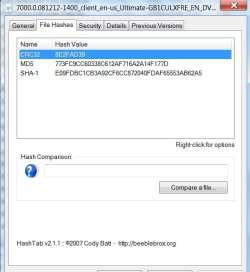
Try hashing it -if your figures match mine, it should be fine.

(d/l hastab from here, HashTab... is the coolest thing ever!

install, rt click .iso, select Properties> File Hashes - takes a minute - just noticed I need to update to the newer version)

HASH2009-02-21_013119.jpg

If it's Ok , try installing from within Vista using a virtual drive - the free version of PowerIso should do it.

PowerISO - Create, Edit, Extract, Mount, Compress, Encrypt, Split ISO file, ISO/BIN converter, Virtual Drive, DAA

Hope it helps

SIW2
 

My Computers

System One System Two

  • Computer type
    PC/Desktop
    OS
    7 X64
    CPU
    i5 8400
    Motherboard
    gigabyte b365m ds3h
    Memory
    2x8gb 3200mhz
    Hard Drives
    various
    PSU
    pure power 11 400w cm
    Case
    Coolermaster
    Cooling
    cryorig m9i
  • Computer type
    PC/Desktop
    OS
    7x64
    CPU
    g5400
    Motherboard
    ga b365m ds3h
    Memory
    8gb ddr4 2400
    PSU
    xfx pro 450w
Thanks,I install hash and my values match yours.

I have alcohol 120 and can mount it on a virtual drive my only concern will be , not to mess my actual system and be able to use the 50 gig partition I have for windows 7.

Thank you very much for the help.
 

My Computer

OS
Vista Ultimate 64 bits
Hi,

I have installed that way - ( from memory,when you get to the screen that allows Upgrade or Custom , choose Custom ) you get a screen to select the partition to install on - just a question of making sure you click on the right one.

Suggest you make an image of your existing Vista install first and save it somewhere - another partition or external hd. Also run off the recovery cd from the imaging program - needed to boot in and restore the image.

I am not expecting you to need it right now, but it's smart to have image backups always.

You can use the free version of this program - it's excellent

Macrium Reflect FREE Edition - Information and download

Hope it helps

SIW2
 

My Computers

System One System Two

  • Computer type
    PC/Desktop
    OS
    7 X64
    CPU
    i5 8400
    Motherboard
    gigabyte b365m ds3h
    Memory
    2x8gb 3200mhz
    Hard Drives
    various
    PSU
    pure power 11 400w cm
    Case
    Coolermaster
    Cooling
    cryorig m9i
  • Computer type
    PC/Desktop
    OS
    7x64
    CPU
    g5400
    Motherboard
    ga b365m ds3h
    Memory
    8gb ddr4 2400
    PSU
    xfx pro 450w
Thanks SIW2 I install it from the virtual drive and everything is running like a charm.

Thanks again
 

My Computer

OS
Vista Ultimate 64 bits
Hi Gugu,

Glad it worked for you.:D

SIW2
 

My Computers

System One System Two

  • Computer type
    PC/Desktop
    OS
    7 X64
    CPU
    i5 8400
    Motherboard
    gigabyte b365m ds3h
    Memory
    2x8gb 3200mhz
    Hard Drives
    various
    PSU
    pure power 11 400w cm
    Case
    Coolermaster
    Cooling
    cryorig m9i
  • Computer type
    PC/Desktop
    OS
    7x64
    CPU
    g5400
    Motherboard
    ga b365m ds3h
    Memory
    8gb ddr4 2400
    PSU
    xfx pro 450w
Back
Top