
Problem with installing

Boot from the Win7 DVD, select Custom Install

Now look carefully to see if anything is listed in the window marked by the red arrow below. If there is a partition already made, highlight it and use Drive Options to Format, then click Next to install. If there is unallocated space, use Options to create New partition, Format and install.
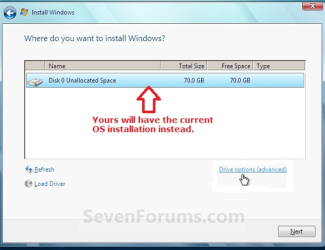
Capture.PNG

If nothing at all appears there, then select Load Driver link at bottom left, browse to the chipset drivers you have unzipped onto your USB drive and load into installer. Then refresh to see if partition appears.

The BIOS update will have to be done from Windows later unless Gateway provides a way to flash it from disk or stick.

What was the SATA controller set to?

I know it is set AHCI now, but what I am trying to ask here is what was it set to previously?

The reason I keep asking is because if it was set to AHCI before, then it may need to be set to IDE in order to be made to work with Win7 installer.
 
Last edited:
I just checked in this morning and am sorry that you are not up and running. I'm a bit lost, since this is the first time I have ever seen anything like this with a simple installation. I am going to ask around the forum to try to get some additional support for us. If things are not fixed soon, it will probably not be until after Christmas that we have all our great people here. Make sure you continually check the forum, even if it is not fixed soon.
 
Last edited:

My Computer

Computer type
PC/Desktop
Computer Manufacturer/Model Number
Dell XPS 420
OS
Windows 10, Home Clean Install
CPU
Intel Core2 processsor Q8200(2.33Ghz 1333FSB) Quad Core Tech
Motherboard
Dell
Memory
6 gb
Graphics Card(s)
ATI Radeon 256MB HD3650
Sound Card
Intergrated 7.1 Channel Audio
Monitor(s) Displays
Dell SP2009W 20"
Hard Drives
640 GB Serial ATA Hard drive
Cooling
Fan
Keyboard
Dell USB Keyboard
Mouse
Dell Premium Optical USB
Internet Speed
DSL 2.85
If the HD continues to fail to show up in "Where do you want to install Windows?" screen even after inserting SATA drivers, please check again in BIOS that your HD is correctly showing up there. If not, replug cables and check jumpers. Try another cable or HD if you have them.

Next change the SATA controller to "IDE" and re-attempt Custom install.

Next try to trigger recovery partition by tapping F-key given for Recovery on first bootup screen. You can also try booting any recovery disks you have.

We may need to reinstall Vista to do the BIOS upgrade unless Gateway provides a way to flash it from a CD or USB drive. Perhaps you can research or ask Gateway about this and whether the 12/23 BIOS upgrade is for this issue.

I will be back online around noon PST.
 
Hi,

Boot the dvd and when you get to the "Install Now" screen - don't click that - click "Repair My Computer" at the bottom of the screen.

When it has finished searching for installations, click Next.

Then click the Command Prompt.

Type: ( press enter after each line)

DISKPART

LIS DISK

SEL DISK 0

DETAIL DISK

(note exactly what it say and post details up here)

EXI
 

My Computers

System One System Two

  • Computer type
    PC/Desktop
    OS
    7 X64
    CPU
    i5 8400
    Motherboard
    gigabyte b365m ds3h
    Memory
    2x8gb 3200mhz
    Hard Drives
    various
    PSU
    pure power 11 400w cm
    Case
    Coolermaster
    Cooling
    cryorig m9i
  • Computer type
    PC/Desktop
    OS
    7x64
    CPU
    g5400
    Motherboard
    ga b365m ds3h
    Memory
    8gb ddr4 2400
    PSU
    xfx pro 450w
Ok, I switched the SATA to IDE, but still nothing, tried to load the driver, and loaded 20 drivers from the chipset link you gave me, but once it reached "ICH10 Family USB Universal Host Controller" it kept getting an error saying that it could not load the driver.

Before I tried to load the driver I did what you asked SIW2, at the input for sel disk 0 it informed me that the disk I specified is not valid.

Edit: Nevermind, I restarted the computer and the HDD was back. The Custom Installation is still showing no place to install windows though, I loaded all the drivers I could from the link yall gave me, but there were a couple that wouldnt load.
 
Last edited:

My Computer

OS
Windows 7
CPU
Intel® Core™ i7-920 Processor1
Motherboard
Systemboard with Intel® X58 Chipset
Memory
3072MB DDR3 1066MHz Three Channel Memory (3-1024MB modules)
Graphics Card(s)
ATI Radeon™ HD 4850 with 512MB Discrete Video Memory (Ports:
Sound Card
8-Channel (7.1) HD Audio
Hard Drives
750GB 7200rpm Serial ATA II/300 hard drive with 16MB Cache
Also, probably the problem with my computer, is when I firs started trying to fix it I mistook my HD with my external HD, my computer can't find my HD at all. In the load sequence, I mistook my external HD as internal, it was never loading my internal and isnt listed there.

I can't understand that.

Can you explain what you mean?
 

My Computers

System One System Two

  • Computer type
    PC/Desktop
    OS
    7 X64
    CPU
    i5 8400
    Motherboard
    gigabyte b365m ds3h
    Memory
    2x8gb 3200mhz
    Hard Drives
    various
    PSU
    pure power 11 400w cm
    Case
    Coolermaster
    Cooling
    cryorig m9i
  • Computer type
    PC/Desktop
    OS
    7x64
    CPU
    g5400
    Motherboard
    ga b365m ds3h
    Memory
    8gb ddr4 2400
    PSU
    xfx pro 450w
Nevermind, I restarted the computer and the HDD was back. The Custom Installation is still showing no place to install windows though, I loaded all the drivers I could from the link yall gave me, but there were a couple that wouldnt load.
When I goto load driver I know it doesnt give me an option to browse the C: drive if that is any problem.
 

My Computer

OS
Windows 7
CPU
Intel® Core™ i7-920 Processor1
Motherboard
Systemboard with Intel® X58 Chipset
Memory
3072MB DDR3 1066MHz Three Channel Memory (3-1024MB modules)
Graphics Card(s)
ATI Radeon™ HD 4850 with 512MB Discrete Video Memory (Ports:
Sound Card
8-Channel (7.1) HD Audio
Hard Drives
750GB 7200rpm Serial ATA II/300 hard drive with 16MB Cache
I did not forget you, but this problem is a little beyond my expertise.
I have been watching and you are being helped by two of our best. I hope it works out soon, Merry Chrismas and the best of luck with your computer.
 

My Computer

Computer type
PC/Desktop
Computer Manufacturer/Model Number
Dell XPS 420
OS
Windows 10, Home Clean Install
CPU
Intel Core2 processsor Q8200(2.33Ghz 1333FSB) Quad Core Tech
Motherboard
Dell
Memory
6 gb
Graphics Card(s)
ATI Radeon 256MB HD3650
Sound Card
Intergrated 7.1 Channel Audio
Monitor(s) Displays
Dell SP2009W 20"
Hard Drives
640 GB Serial ATA Hard drive
Cooling
Fan
Keyboard
Dell USB Keyboard
Mouse
Dell Premium Optical USB
Internet Speed
DSL 2.85
When you access the Command Prompt from booted DVD repair console, type:

DISKPART

LIST DISK

Now what does it list exactly?

If there is a disk listed, note it's number and type:

SELECT DISK # (for number of disk)

DETAIL DISK

If there is no HD listed, then look again in BIOS setup to see exactly where and how the HD is listed, report back.

SIW2 or anyone: What could keep the HD from being listed on Installer Custom drives screen, if it is listed in BIOS?

You know it's a fresh problem when the Google result points to this thread. Other results all say to get SATA drivers into installer.
 

My Computer

Computer type
PC/Desktop
Computer Manufacturer/Model Number
Bruce ... somewhere in his 40's
OS
Windows 7 Ultimate 32bit SP1
CPU
Intel(R) Core(TM)2 Quad CPU @ 2.40GHz, 2400 MHz
Motherboard
INTEL/D975XBX2
Memory
4 GB
Graphics Card(s)
ATI Radeon HD 2600 Pro
Monitor(s) Displays
Samsung SyncMaster 914v
Screen Resolution
1280 x 1024
Hard Drives
2/500GB each ... ST3500630AS ATA Device.
One is not connected
PSU
Rocketfish 700 W
Case
G.Skill Gigabyte Chassis
Keyboard
Standard PS/2 Keyboard
Mouse
Microsoft PS/2 Mouse
Internet Speed
DSL
Antivirus
Avira Internet Security
Browser
IE 11
Other Info
ATI HDMI Audio
The only disk that is there is my usb flashdrive, it is listing that as disk 5 with the rest of the disk as no media
 

My Computer

OS
Windows 7
CPU
Intel® Core™ i7-920 Processor1
Motherboard
Systemboard with Intel® X58 Chipset
Memory
3072MB DDR3 1066MHz Three Channel Memory (3-1024MB modules)
Graphics Card(s)
ATI Radeon™ HD 4850 with 512MB Discrete Video Memory (Ports:
Sound Card
8-Channel (7.1) HD Audio
Hard Drives
750GB 7200rpm Serial ATA II/300 hard drive with 16MB Cache
The only disk that is there is my usb flashdrive, it is listing that as disk 5 with the rest of the disk as no media

This is the DISKPART results above?

What about the exact listings for HD in BIOS? Where and what settings?

Were you able to determine which was your SATA controller when uploading to installer?

What was the SATA controller originally set at, before you changed to AHCI?

Please answer all questions
 
See if you can start over by downloading Vista Recovery Disk .ISO
How to Make a Windows Vista Repair Disk If You Don’t Have One :: the How-To Geek

Burn it (at a slow speed) to a DVD using ImgBurn The Official ImgBurn Website

I agree that this should be the next step after the BIOS HD listings are verified.

Please report the BIOS HD listings in full.


BTW, is there an installation showing up when you enter the Repair console of Win7 DVD to run DISKPART commands? If so, try Startup Repair on that listing first. It might be Win7.

Then reboot and attempt to trigger recovery partition by tapping F-key given on first bootup screen for Recovery.

If this fails, try to recover your Vista using the Vista repair disk linked above, burned to CD at 4x with verify on Imgburn.

Boot Vista repair disk to see if it finds an installation to repair, accept repair offer or use Startup Repair from tools list, run repeatedly to see if Vista will restart.
 
Last edited:
Just to let everyone know that was helping me out, I took the computer by the shop and they told me it was a defective hard-drive. (Don't know if that was right or not since it decided to defect during the Windows 7 installation, but I had a warranty program so repair was free). Just letting yall know in case this problem comes up for anyone else, and to thank everyone for their help with the problem.
 

My Computer

OS
Windows 7
CPU
Intel® Core™ i7-920 Processor1
Motherboard
Systemboard with Intel® X58 Chipset
Memory
3072MB DDR3 1066MHz Three Channel Memory (3-1024MB modules)
Graphics Card(s)
ATI Radeon™ HD 4850 with 512MB Discrete Video Memory (Ports:
Sound Card
8-Channel (7.1) HD Audio
Hard Drives
750GB 7200rpm Serial ATA II/300 hard drive with 16MB Cache
Back
Top