You are using an out of date browser. It may not display this or other websites correctly.
You should upgrade or use an
alternative browser.
Problem with keyboard input
Hello!

I have keyboard with US layout and I want to use it with a few languages. I've configured it like this:
But, when I switch to SR or DE (with alt + shift), input language is still Englsih. I'm using Windows 7 Professional 64bit.
Help please...

- OS
- Windows 7 Professional 64bit
- CPU
- i5
- Motherboard
- Gigabyte
- Memory
- 4 GB DDR3
- Graphics Card(s)
- SAPPHIRE Radeon HD 5870
- Sound Card
- Asus Xonar Essence STX
- Monitor(s) Displays
- Sony 24" wide
- Screen Resolution
- 1920 x 1080
- Hard Drives
- 64GB Intel SSD (system), 2x1TB WD Green (storage)
- PSU
- Corsair 620HX
- Case
- Lian Li PC-A06B
- Cooling
- Noctua fans
- Keyboard
- Logitech UltraX (US English)
- Mouse
- Logitech MX1100
- Internet Speed
- 16MBit
New member
Guru
Gold Member
VIP
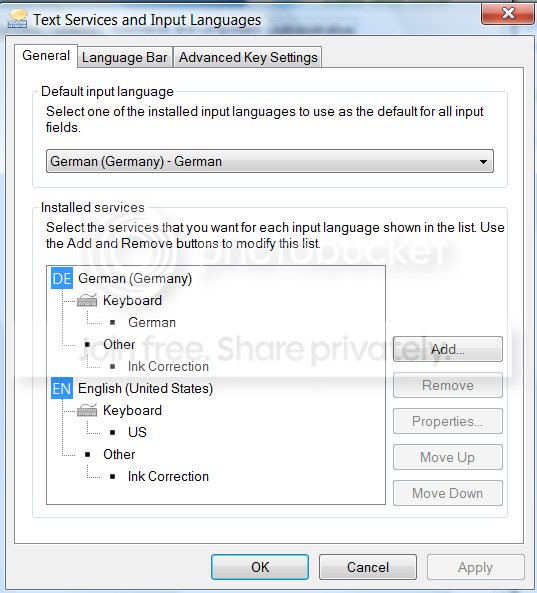
That's because your keyboards are all set to US. Here are my settings where I chose German as default:
- Computer Manufacturer/Model Number
- HP, Dell, Gateway, Toshiba - 4 laptops and 2 desktops
- OS
- Vista, Windows7, Mint Mate, Zorin, Windows 8
- CPU
- from 1.6GHz Duo to i7
- Monitor(s) Displays
- 2x HP w2207
- Hard Drives
- 5x HDD, 7x SSD, 12x Externals
- Keyboard
- with trackball - no mices
- Mouse
- Trackball mice
- Internet Speed
- DSL 6000
New member
Thread Starter
Thank you for a quick reply.
If I understood this Windows settings correctly, first I need to select a language and then keyboard layout which match with my phisical keyboard?

Following your example, if I set Serbian input like this:
Then I have Serbian input (when I switch on it), but some keys aren't properly mapped. For example braces () are shifted left for one position.

- OS
- Windows 7 Professional 64bit
- CPU
- i5
- Motherboard
- Gigabyte
- Memory
- 4 GB DDR3
- Graphics Card(s)
- SAPPHIRE Radeon HD 5870
- Sound Card
- Asus Xonar Essence STX
- Monitor(s) Displays
- Sony 24" wide
- Screen Resolution
- 1920 x 1080
- Hard Drives
- 64GB Intel SSD (system), 2x1TB WD Green (storage)
- PSU
- Corsair 620HX
- Case
- Lian Li PC-A06B
- Cooling
- Noctua fans
- Keyboard
- Logitech UltraX (US English)
- Mouse
- Logitech MX1100
- Internet Speed
- 16MBit
An Angry Old Man
Guru
VIP
SF Team
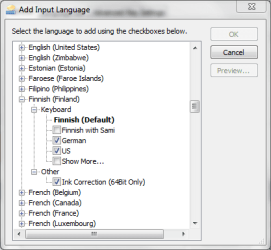
You can also make it very simple by choosing your main language, and then other languages you need from under this main language. Here's mine:

All languages chosen from under main language Finnish:
- Computer type
- Laptop
- Computer Manufacturer/Model Number
- HP ENVY 17-1150eg
- OS
- Windows 10 Pro x64 EN-GB
- CPU
- 1.6 GHz Intel Core i7-720QM Processor
- Memory
- 6 GB
- Graphics Card(s)
- ATI Mobility Radeon HD 5850 Graphics
- Sound Card
- Beats sound system with integrated subwoofer
- Monitor(s) Displays
- 17" laptop display, 22" LED and 32" Full HD TV through HDMI
- Screen Resolution
- 1600*900 (1), 1920*1080 (2&3)
- Hard Drives
- Internal: 2 x 500 GB SATA Hard Disk Drive 7200 rpm
External: 2TB for backups, 3TB USB3 network drive for media
- Cooling
- As Envy runs a bit warm, I have it on a Cooler Master pad
- Keyboard
- Logitech diNovo Media Desktop Laser (bluetooth)
- Mouse
- Logitech Performance Mouse MX
- Internet Speed
- 50/10 Mbps VDSL
- Antivirus
- Windows Defender 4.3.9431.0
- Browser
- Maxthon 3.5.2., IE11