
Solved Problem with Kingston 8GB Usb pendrive

jpchint

New member
Member
VIP
Local time
7:55 AM
Messages
166
Location
India
I Have Kingston 8Gb Usb 2.0 pendrive,for which actual capacity is 7.45 Gb.

I used my pendrive to record videocon D2H HD Recorder.STB formatted pendrive before used.Also no recordings are done.
But after inserting it in my laptop,windows is showing its capacity as 145Mb after initial formatting.Reformatting the drive dosent solved the issue.Can anyone please help?
 

Attachments
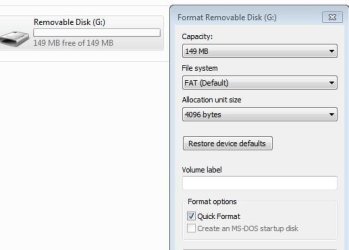
  • Capture.JPG
    Capture.JPG
    23.4 KB · Views: 55

My Computer

Computer type
Laptop
Computer Manufacturer/Model Number
LENOVO G570
OS
windows 7 ultimate 64 bit
CPU
Intel core i3-2350M cpu@!2.30 Ghz
Motherboard
Lenovo
Memory
4.00 GB
Graphics Card(s)
AMD RADEON HD 6370M(1GB)
Monitor(s) Displays
Generic pnp Monitor
Screen Resolution
1366*768
Hard Drives
ST9500325AS ATA device(500GB) NTFS
Keyboard
Standard ps/2 keyboard
Mouse
synaptics ps/2 port Touchpad
Internet Speed
921.6 kbps(Dial up Connection)
Antivirus
Quick Heal,MSE
Browser
Opera,Chrome
Are you confident that you have a genuine 8gb unit, have you ever filled it with data ?
There are lots of fake/counterfeit units running around on ebay etc that are engineered to look like they have a larger capacity than they actually do
 

My Computer

Computer type
PC/Desktop
Computer Manufacturer/Model Number
Pauly Special
OS
Win7 Ultimate X64
CPU
Intel i5 3570K
Motherboard
Gigabyte Z77X-DS3H
Memory
8GB DDR3 1600
Graphics Card(s)
Onboard
Sound Card
Onboard
Screen Resolution
1280x1024
Hard Drives
Samsung 840 Evo SSD (OS)
1TB Spinner (Data)
PSU
800W Arctic
Case
Cooler Master
Cooling
3x120mm Fans
Keyboard
MS Wireless
Mouse
MS Wireless
Internet Speed
20M
Are you confident that you have a genuine 8gb unit, have you ever filled it with data ?
There are lots of fake/counterfeit units running around on ebay etc that are engineered to look like they have a larger capacity than they actually do

Iam Using it since 3 years.The problem occured since DTH formatted my drive.
Is there any way to solve the problem?
 

My Computer

Computer type
Laptop
Computer Manufacturer/Model Number
LENOVO G570
OS
windows 7 ultimate 64 bit
CPU
Intel core i3-2350M cpu@!2.30 Ghz
Motherboard
Lenovo
Memory
4.00 GB
Graphics Card(s)
AMD RADEON HD 6370M(1GB)
Monitor(s) Displays
Generic pnp Monitor
Screen Resolution
1366*768
Hard Drives
ST9500325AS ATA device(500GB) NTFS
Keyboard
Standard ps/2 keyboard
Mouse
synaptics ps/2 port Touchpad
Internet Speed
921.6 kbps(Dial up Connection)
Antivirus
Quick Heal,MSE
Browser
Opera,Chrome
Okay clue me in. What is a DTH format?
 

My Computer

Computer type
PC/Desktop
Computer Manufacturer/Model Number
Home made Desktop
OS
Windows 10 Pro. 64/ version 1709 Windows 7 Pro/64
CPU
Intel i7-6800K @ 4.3
Motherboard
ASUS X-99 Deluxe II
Memory
Corsair Platinum 16 gig @2400
Graphics Card(s)
EVGA GTX 1070 OC
Monitor(s) Displays
Asus 27" LED LCD/VE278Q
Screen Resolution
1920-1080 or 1280-720 HDMI
Hard Drives
INTEL SSD 730-240 Gb Sata 3.0/
PSU
EVGA Platium 1200W
Case
Phanteks Luxe Tempered Glass 8 fans/ one radiator
Cooling
XSPC/ Water Cooled CPU
Keyboard
Das 4 Professional
Mouse
Logitech M705/MX Anywhere 2-S
Internet Speed
100 mbits
Antivirus
Microsoft Security Essentials/ Malwarebytes Premium 3.0/ SAS
Browser
I.E. 11 default/Firefox/ ISP Time Warner Cable/Spectrum
Other Info
LG BluRay Burner/
Sound system-KLipsch-THX/
Icy Dock ssd Hot Swap bays.
Hi jpchint,

Download Windows Executable (works without installation): HDD LLF Low Level Format Tool v 4.40

HDDGURU: HDD LLF Low Level Format Tool

Plug in your pendrive and run the tool. Continue for free > make sure to select the correct pendrive > continue > Low-Level Format > Format this device ( Do not tick "Perform quick wipe")

Watch the progress as it starts writing zeros to all sectors of the pendrive.

When complete quit. Safely remove the pendrive and then plug it in again. Do a regular format.

I would recommend that you format it with HP USB Disk Storage Format Tool v2.2.3 HP USB Disk Storage Format Tool Download - Softpedia

You have to rightclick on the HPUSBDisk.exe and run it as administrator. Do a full format and not a quick format.

( I think you can straight away try to format your pendrive with the HP Tool and if it does not work then try zeroing it with the LLF Tool followed by a regular format with the HP Tool.)

Let me know which one worked or did not work. :)
 
Last edited:

My Computer

OS
Windows 7 Home Premium 32 bit
Hi jpchint,

Download Windows Executable (works without installation): HDD LLF Low Level Format Tool v 4.40

HDDGURU: HDD LLF Low Level Format Tool

Plug in your pendrive and run the tool. Continue for free > make sure to select the correct pendrive > continue > Low-Level Format > Format this device ( Do not tick "Perform quick wipe")

Watch the progress as it starts writing zeros to all sectors of the pendrive.

When complete quit. Safely remove the pendrive and then plug it in again. Do a regular format.

I would recommend that you format it with HP USB Disk Storage Format Tool v2.2.3 HP USB Disk Storage Format Tool Download - Softpedia

You have rightclick on the HPUSBDisk.exe and run it as administrator. Do a full format and not a quick format.

( I think you can straight away try to format your pendrive with the HP Tool and if it does not work then try zeroing it with the LLF Tool followed by a regular format with the HP Tool.)

Let me know which one worked or did not work. :)
Mr jumanji,my problem is solved as the drive formatted to its original volume.Thanks to HP Usb disk format tool and thanks to you.

I want to know why windows is unable to format these kind of drives completely to its original volume??
 

My Computer

Computer type
Laptop
Computer Manufacturer/Model Number
LENOVO G570
OS
windows 7 ultimate 64 bit
CPU
Intel core i3-2350M cpu@!2.30 Ghz
Motherboard
Lenovo
Memory
4.00 GB
Graphics Card(s)
AMD RADEON HD 6370M(1GB)
Monitor(s) Displays
Generic pnp Monitor
Screen Resolution
1366*768
Hard Drives
ST9500325AS ATA device(500GB) NTFS
Keyboard
Standard ps/2 keyboard
Mouse
synaptics ps/2 port Touchpad
Internet Speed
921.6 kbps(Dial up Connection)
Antivirus
Quick Heal,MSE
Browser
Opera,Chrome
I am glad to note that HP USB Disk Storage Format Tool successfully formatted your pen drive to its natural state.:) The question is why Windows failed?

The giveaway to me was the following part of your statement in the first post.

........I used my pendrive to record videocon D2H HD Recorder.STB formatted pendrive before used.......

Most DVD Recorders use a different File Format for the drives used to record. From what I have understood so far, these are UFS ( Unix File System ) or a proprietory variant of the UFS.

Windows has its own "one track" mind.:) It can only recognise and handle a few filesystem formats to which it is tuned to. It is just not intelligent and intolerant to other file formats. Reason why it gave a wrong reading of your pendrive and refused to do anything with it.

I also wonder whether it would have run diskpart - clean all too.

Third party tools to do clean all/format, are often designed to take care of the variant file systems. Especially the HP Format Tool is known to be a "Swiss Army Knife " that can handle most tasks which Windows refuses.
 

My Computer

OS
Windows 7 Home Premium 32 bit
Okay clue me in. What is a DTH format?

Some Set Top Boxes comes with USB slot for recording the live TV to external drives (like pendrive) so that the recorded video can be watched later.If we insert empty pendrive say 4GB,it first formats the drive based on its own operating system(like UNIX).
 

My Computer

Computer type
Laptop
Computer Manufacturer/Model Number
LENOVO G570
OS
windows 7 ultimate 64 bit
CPU
Intel core i3-2350M cpu@!2.30 Ghz
Motherboard
Lenovo
Memory
4.00 GB
Graphics Card(s)
AMD RADEON HD 6370M(1GB)
Monitor(s) Displays
Generic pnp Monitor
Screen Resolution
1366*768
Hard Drives
ST9500325AS ATA device(500GB) NTFS
Keyboard
Standard ps/2 keyboard
Mouse
synaptics ps/2 port Touchpad
Internet Speed
921.6 kbps(Dial up Connection)
Antivirus
Quick Heal,MSE
Browser
Opera,Chrome
Bootice is no doubt a versatile tool. I have been recommending it to everyone to save the important sectors of both MBR and GPT drives so that in case of partition related problems, one can easily restore those sectors.

While the bootice method enunciated by the author of the article you have referred - https://www.techiemotto.com/windows/fix-windows-showing-wrong-storage-usb-device/141/ - is noteworthy, it involves quite a number of steps which one has to follow.

On the other hand, using zerowrite with HDD Lowlevel format tool or using the HP USB storage Format tool to format the drives is a very straightforward and easy method and intuitive too. There is nothing much for the user to understand and execute. I would recommend using the elaborate bootice method only if the above two fail to bring any results - which is most unlikely.

In anycase it is a welcome addition to repair such problems. Thank you for adding it here.
 
Last edited:

My Computer

OS
Windows 7 Home Premium 32 bit
Back
Top