Problem with locked EXE files

Stevvie

New member
Local time
11:53 PM
Messages
8
I have this problem where my .exe files get locked by explorer so I canot update programs. I can sometimes delete the .exe file and usually can always use unlocker. It's the same problem these people have had http://www.sevenforums.com/general-discussion/175447-exe-files-locking.html http://www.sevenforums.com/general-discussion/96078-problem-locked-exe-files.html and asked in them if they solved it but was asked by karlsnooks to start a new thread rather than ask in there if they solved their problem. I have tried all the thing that were suggested in these two threads and neither seems to solve mine or their problems. If anybody knows why explorer would lock files randomly can you please tell me, thanks.
 

My Computer

Computer Manufacturer/Model Number
HomeBuild
OS
XP X64 SP2, back up of Win7 RTM
CPU
E6600@3Ghz
Motherboard
MSI P32 Neo2
Memory
4X1GB Giell DDR2 800
Graphics Card(s)
ATI 4850
Sound Card
X-Fi Xtreme Music
Monitor(s) Displays
Samsung 2032BW
Hard Drives
512gig Samsung spinpoint F1
Western Digital WD400
PSU
Cheapo STABLE 550w
Case
unknown
Cooling
Artic Freezer 7
The problem is that an open handle to the file exists. You could use a tool like Process Explorer to show you who has the open handle, or Unlocker to close the handle and delete the file in one go. On XP systems I used a tool called forcedel.exe. I don't know if it exists for Windows 7 though.
 

My Computer

Computer type
PC/Desktop
OS
Windows 10 x64
CPU
Intel i5-3570K
Motherboard
Asus Maximus V Gene
Memory
Crucial 16GB
Graphics Card(s)
nVidia Geforce 660 GTX
Sound Card
onboard
Monitor(s) Displays
NEC 2490WUXi2
Screen Resolution
1920x1200
Hard Drives
Crucial M4 256GB
PSU
Corsair 650TX
Case
Fractal Design - Define Mini
Keyboard
Filco Majestouch Tenkeyless Black MX
Mouse
Logitech MBJ58
All programs or just some specific programs?

Does the problem occur if you update the program immediately after booting, before using any programs?
 

My Computer

Computer type
PC/Desktop
Computer Manufacturer/Model Number
Lenovo IdeaCenter 450
OS
Windows 10 Pro X64
CPU
Intel Quad Core i7-4770 @ 3.4Ghz
Memory
16.0GB PC3-12800 DDR3 SDRAM 1600 MHz
Graphics Card(s)
Intel Integrated HD Graphics
Sound Card
Realtek HD Audio
Monitor(s) Displays
HP 22" LCD
Screen Resolution
1680 x 1050
Hard Drives
250GB Samsung EVO SATA-3 SSD
2TB Seagate ST2000DM001 SATA-2
1.5TB Seagate ST3150041AS SATA
Keyboard
Dell USB
Mouse
Lenovo USB
Internet Speed
Cable via Road Runner 3MB Upload, 30MB Download
Antivirus
Windows Defender, MBAM Pro, MBAE
Browser
Seamonkey
Other Info
UEFI/GPT
PLDS DVD-RW DH16AERSH
Stevvie,
Could you give us an example of file that gets "locked"?
 

My Computer

Computer Manufacturer/Model Number
Toshiba Satellite S875D-S7239 laptop
OS
MS Windows 7 Ultimate SP1 64-bit
CPU
AMD A10-4600M
Motherboard
AMD Pumori (Socket FT1)
Memory
6.00 GB Dual-Channel DDR3 @ 798MHz (11-11-12-28)
Graphics Card(s)
AMD Radeon HD 7660G
Sound Card
High Definition Audio Device
Monitor(s) Displays
Generic PnP Monitor (1600x900@60Hz)
Screen Resolution
1600x900@60Hz
Hard Drives
SSD 119GB Corsair CSSD-V128GB2 ATA Device
Keyboard
Standard PS/2 Keyboard
Mouse
HP Wireless Optical Mobile Mouse Model FHA-3410
Internet Speed
What the local pub, local coffee shop offers.
Other Info
Optical Drive:MATSHITA BD-CMB UJ160B ATA Device


Also have an Asus ha1002xp netbook with Win 7 Ultimate installed.
As stated in my first post EXPLORER locks the file and I CAN delete the file using UNLOCKER.
An example is something like this. I use Internet Download Manager to manage my downloads and this get updated on a regular basis, so i start the installer to update my program and someway through the install it returns with an error saying 'the file is open or already in use'. So I have to use UNLOCKER to delete the file, 9 times out of 10 this works. When this does not work I have to reboot into safe mode or another OS on another drive and delete the file which so far works 100%. Some updates get applied with no problem but some don't. So far I have found no pattern to what gets locked and what doesn't. Some games get locked and some don't. Things even get locked if they are NEVER run by the OS, I know this as I tried to do a manual update of Alan wake game that hadn't been run since I rebooted about 10 minutes before and the installer said that AlanWake.exe was running or locked. It seems that sometimes as soon as the file or its containing folder is opened in explorer, it get locked.
 

My Computer

Computer Manufacturer/Model Number
HomeBuild
OS
XP X64 SP2, back up of Win7 RTM
CPU
E6600@3Ghz
Motherboard
MSI P32 Neo2
Memory
4X1GB Giell DDR2 800
Graphics Card(s)
ATI 4850
Sound Card
X-Fi Xtreme Music
Monitor(s) Displays
Samsung 2032BW
Hard Drives
512gig Samsung spinpoint F1
Western Digital WD400
PSU
Cheapo STABLE 550w
Case
unknown
Cooling
Artic Freezer 7
Sorry for the misunderstanding.

Would you please give me the name of one program that gets "locked"?
 

My Computer

Computer Manufacturer/Model Number
Toshiba Satellite S875D-S7239 laptop
OS
MS Windows 7 Ultimate SP1 64-bit
CPU
AMD A10-4600M
Motherboard
AMD Pumori (Socket FT1)
Memory
6.00 GB Dual-Channel DDR3 @ 798MHz (11-11-12-28)
Graphics Card(s)
AMD Radeon HD 7660G
Sound Card
High Definition Audio Device
Monitor(s) Displays
Generic PnP Monitor (1600x900@60Hz)
Screen Resolution
1600x900@60Hz
Hard Drives
SSD 119GB Corsair CSSD-V128GB2 ATA Device
Keyboard
Standard PS/2 Keyboard
Mouse
HP Wireless Optical Mobile Mouse Model FHA-3410
Internet Speed
What the local pub, local coffee shop offers.
Other Info
Optical Drive:MATSHITA BD-CMB UJ160B ATA Device


Also have an Asus ha1002xp netbook with Win 7 Ultimate installed.
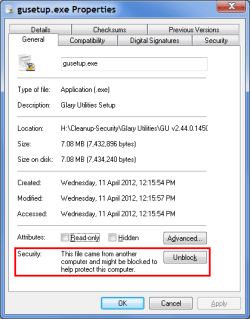
"Blocked" File?

Check the "Properties" of a troublesome exe file.
If you have downloaded it from the Internet it may be "Blocked".
Blocked Files.png
 

My Computer

Computer type
PC/Desktop
Computer Manufacturer/Model Number
n/a
OS
W7 Ultimate SP1, LM19.2 MATE, W10 Home 1703, W10 Pro 1703 VM, #All 64 bit
CPU
AMD Phenom II x6 1100T, 3.3 GHz
Motherboard
ASUS M4A88T-M/USB3 (AM3)
Memory
12GB DDR3 1333 G-Skill (4GB x 2), G-Skill (2GB x 2)
Graphics Card(s)
NVIDIA GeForce GTX 660
Sound Card
Realtek?
Monitor(s) Displays
Samsung S23B350
Screen Resolution
1920x1080
Hard Drives
WD Green 2TB (SATA), WD Green 3TB (SATA), WD Blue 4TB (SATA), WD Blue 6TB (SATA)
PSU
Cooler Master
Case
Antec GX300 Tower
Cooling
3x Antec TRICOOL 120mm Fans
Mouse
Wired Optical
Internet Speed
DSL
Antivirus
Avast
Browser
Pale Moon (64 bit)
Other Info
2018-12-27 Upgraded HDDs
2015-12-10 Upgraded case, graphics card, storage
2015-08-15 Upgraded motherboard & RAM
2015-07-15 Upgraded LM17.1 to LM17.2
lehnerus,
Excellent point. One of the reasons I was looking for specific examples of programs that that are giving the problem.
 

My Computer

Computer Manufacturer/Model Number
Toshiba Satellite S875D-S7239 laptop
OS
MS Windows 7 Ultimate SP1 64-bit
CPU
AMD A10-4600M
Motherboard
AMD Pumori (Socket FT1)
Memory
6.00 GB Dual-Channel DDR3 @ 798MHz (11-11-12-28)
Graphics Card(s)
AMD Radeon HD 7660G
Sound Card
High Definition Audio Device
Monitor(s) Displays
Generic PnP Monitor (1600x900@60Hz)
Screen Resolution
1600x900@60Hz
Hard Drives
SSD 119GB Corsair CSSD-V128GB2 ATA Device
Keyboard
Standard PS/2 Keyboard
Mouse
HP Wireless Optical Mobile Mouse Model FHA-3410
Internet Speed
What the local pub, local coffee shop offers.
Other Info
Optical Drive:MATSHITA BD-CMB UJ160B ATA Device


Also have an Asus ha1002xp netbook with Win 7 Ultimate installed.
Thanks karlsnooks

lehnerus,
Excellent point. One of the reasons I was looking for specific examples of programs that that are giving the problem.

Thanks karlsnooks. :)

I've never personally had that cause a problem with exe files, but it has caused me problems with PowerShell scripts.
 

My Computer

Computer type
PC/Desktop
Computer Manufacturer/Model Number
n/a
OS
W7 Ultimate SP1, LM19.2 MATE, W10 Home 1703, W10 Pro 1703 VM, #All 64 bit
CPU
AMD Phenom II x6 1100T, 3.3 GHz
Motherboard
ASUS M4A88T-M/USB3 (AM3)
Memory
12GB DDR3 1333 G-Skill (4GB x 2), G-Skill (2GB x 2)
Graphics Card(s)
NVIDIA GeForce GTX 660
Sound Card
Realtek?
Monitor(s) Displays
Samsung S23B350
Screen Resolution
1920x1080
Hard Drives
WD Green 2TB (SATA), WD Green 3TB (SATA), WD Blue 4TB (SATA), WD Blue 6TB (SATA)
PSU
Cooler Master
Case
Antec GX300 Tower
Cooling
3x Antec TRICOOL 120mm Fans
Mouse
Wired Optical
Internet Speed
DSL
Antivirus
Avast
Browser
Pale Moon (64 bit)
Other Info
2018-12-27 Upgraded HDDs
2015-12-10 Upgraded case, graphics card, storage
2015-08-15 Upgraded motherboard & RAM
2015-07-15 Upgraded LM17.1 to LM17.2
lehnerus
what is the executionpolicy setting?
Get-executionpolicy -list
 

My Computer

Computer Manufacturer/Model Number
Toshiba Satellite S875D-S7239 laptop
OS
MS Windows 7 Ultimate SP1 64-bit
CPU
AMD A10-4600M
Motherboard
AMD Pumori (Socket FT1)
Memory
6.00 GB Dual-Channel DDR3 @ 798MHz (11-11-12-28)
Graphics Card(s)
AMD Radeon HD 7660G
Sound Card
High Definition Audio Device
Monitor(s) Displays
Generic PnP Monitor (1600x900@60Hz)
Screen Resolution
1600x900@60Hz
Hard Drives
SSD 119GB Corsair CSSD-V128GB2 ATA Device
Keyboard
Standard PS/2 Keyboard
Mouse
HP Wireless Optical Mobile Mouse Model FHA-3410
Internet Speed
What the local pub, local coffee shop offers.
Other Info
Optical Drive:MATSHITA BD-CMB UJ160B ATA Device


Also have an Asus ha1002xp netbook with Win 7 Ultimate installed.
I'm not familiar with PowerShell at all.
I don't know the command keywords (or syntax) so I have to rely on other people's scripts.

I used an online tutorial to create W8DP and W8CP VHDs.
Part of the procedure used a PowerShell script to install the W8 image.

The tutorial I followed included a command to allow the script to run.
I believe that it was to set the execution policy (I'd have to look it up).
Even after I had set the policy, I still couldn't run the script, until I "Unblocked" it.

View attachment PowerShell Get-executionpolicy.txt
 

My Computer

Computer type
PC/Desktop
Computer Manufacturer/Model Number
n/a
OS
W7 Ultimate SP1, LM19.2 MATE, W10 Home 1703, W10 Pro 1703 VM, #All 64 bit
CPU
AMD Phenom II x6 1100T, 3.3 GHz
Motherboard
ASUS M4A88T-M/USB3 (AM3)
Memory
12GB DDR3 1333 G-Skill (4GB x 2), G-Skill (2GB x 2)
Graphics Card(s)
NVIDIA GeForce GTX 660
Sound Card
Realtek?
Monitor(s) Displays
Samsung S23B350
Screen Resolution
1920x1080
Hard Drives
WD Green 2TB (SATA), WD Green 3TB (SATA), WD Blue 4TB (SATA), WD Blue 6TB (SATA)
PSU
Cooler Master
Case
Antec GX300 Tower
Cooling
3x Antec TRICOOL 120mm Fans
Mouse
Wired Optical
Internet Speed
DSL
Antivirus
Avast
Browser
Pale Moon (64 bit)
Other Info
2018-12-27 Upgraded HDDs
2015-12-10 Upgraded case, graphics card, storage
2015-08-15 Upgraded motherboard & RAM
2015-07-15 Upgraded LM17.1 to LM17.2
Sorry for the misunderstanding.

Would you please give me the name of one program that gets "locked"?

as stated in my second post, things like games(alanwake.exe) that are installed from CD and then I try to update are already locked by explorer.
Or another example is InternetDownloadManager (idm.exe) that gets locked. I can update in safe mode OK, I have even tried rebooting then immediately updating a game and it still gets locked. Most of the update files are in either RAR or ZIP format and once unzipped are never have the unblock button on their properties page.
 

My Computer

Computer Manufacturer/Model Number
HomeBuild
OS
XP X64 SP2, back up of Win7 RTM
CPU
E6600@3Ghz
Motherboard
MSI P32 Neo2
Memory
4X1GB Giell DDR2 800
Graphics Card(s)
ATI 4850
Sound Card
X-Fi Xtreme Music
Monitor(s) Displays
Samsung 2032BW
Hard Drives
512gig Samsung spinpoint F1
Western Digital WD400
PSU
Cheapo STABLE 550w
Case
unknown
Cooling
Artic Freezer 7
What process did you use to "install" the programs from CD? (AutoRun, Copy, Setup.exe, etc.)
Where do you "install" the programs and please explain what you mean by "I try to update"?
Do these programs show up in your Programs and Features listing? If they do, why are you deleting .EXE files?
Who's shown as the Owner of the Folder where the programs are installed? Is the Folder included in a Library?
 

My Computer

Computer type
PC/Desktop
Computer Manufacturer/Model Number
Built 2/11/2011
OS
Windows 7 Pro-x64
CPU
i7-2600 3.4GHz - 3.8GHz Turbo
Motherboard
Intel DH67BL-B3
Memory
8Gb - 2x4GB, Muskin 991770 PC3-1333
Graphics Card(s)
Integrated Intel HD 2000
Sound Card
Integrated Intel 10.1 HD, RealTek ALC892
Monitor(s) Displays
Asus LCD VH222H, Haier HL24XSL2a
Screen Resolution
1920x1080, 1920x1080
Hard Drives
Crucial SSD C300-128Gb,
Western Digital WD5002AALX - 500Gb,
Western Digital WD7501AALS - 750Gb
PSU
Seasonic 650W 80+ Gold Modular
Case
Rosewill Defender
Cooling
Stock CPU, Four 120mm case fans, PCH fan added
Keyboard
Logitech EX100 Y-RBH94 Wireless
Mouse
Logitech EX100 M-RCE95 Wireless
Internet Speed
3.0/1.5 Mbs
Antivirus
Microsoft Security Essentials
Browser
Microsoft Internet Explorer 11
Other Info
Antec Veris Premier-Multimedia IR Station,
Cyber Accoustics-3602 Speakers,
AFT XM-5U Card Reader,
Hauppauge TV-HVR-2250,
Sony LX300 USB Turntable
What process did you use to "install" the programs from CD? (AutoRun, Copy, Setup.exe, etc.)
Where do you "install" the programs and please explain what you mean by "I try to update"?
Do these programs show up in your Programs and Features listing? If they do, why are you deleting .EXE files?
Who's shown as the Owner of the Folder where the programs are installed? Is the Folder included in a Library?
Installed alanwake from CD using the setup into D:/games/AlanWake. I download the updates from the games support site and click the setup which launches the standard windows installer which then says the file is in use. The file is NOT in use in ANY taskmanager or process explorer(sysinternals). If I delete alanwake.exe then start the update setup it updates just fine.

Second example I downloaded from the internet using firefox a download manager called 'internet download manager' (IDM), which goes into my documents folder. I then download the update from the site using the download manager to a folder called C:\downloads. I then close the download manager and see that it HAS quit and there is no IDM.exe process running. I then start the update setup and get the SAME error and if I delete idm.exe then run the update it updates. So I try in safe mode and still get the same error that the file is running. I even try something different where I rename the IDM folder to IDMNEW, restart the PC and then rename the folder back to IDM after a windows has settled down. I try to update and the error is that IDM.exe is in use. I can unlock and delete these programs using unlocker which shows that explorer locks the programs ONLY after trying to update them. It NEVER locks them untill the files fiolder is opened or the setup tries to update the file.
 

My Computer

Computer Manufacturer/Model Number
HomeBuild
OS
XP X64 SP2, back up of Win7 RTM
CPU
E6600@3Ghz
Motherboard
MSI P32 Neo2
Memory
4X1GB Giell DDR2 800
Graphics Card(s)
ATI 4850
Sound Card
X-Fi Xtreme Music
Monitor(s) Displays
Samsung 2032BW
Hard Drives
512gig Samsung spinpoint F1
Western Digital WD400
PSU
Cheapo STABLE 550w
Case
unknown
Cooling
Artic Freezer 7
OK, that sounds like something is grabbing the file. Perhaps your virus checker. What happens if you wait a while before applying the updates? Say 10-15 minutes.

Also, are you running any file sharing or Torrent software? :(
 

My Computer

Computer type
PC/Desktop
Computer Manufacturer/Model Number
Built 2/11/2011
OS
Windows 7 Pro-x64
CPU
i7-2600 3.4GHz - 3.8GHz Turbo
Motherboard
Intel DH67BL-B3
Memory
8Gb - 2x4GB, Muskin 991770 PC3-1333
Graphics Card(s)
Integrated Intel HD 2000
Sound Card
Integrated Intel 10.1 HD, RealTek ALC892
Monitor(s) Displays
Asus LCD VH222H, Haier HL24XSL2a
Screen Resolution
1920x1080, 1920x1080
Hard Drives
Crucial SSD C300-128Gb,
Western Digital WD5002AALX - 500Gb,
Western Digital WD7501AALS - 750Gb
PSU
Seasonic 650W 80+ Gold Modular
Case
Rosewill Defender
Cooling
Stock CPU, Four 120mm case fans, PCH fan added
Keyboard
Logitech EX100 Y-RBH94 Wireless
Mouse
Logitech EX100 M-RCE95 Wireless
Internet Speed
3.0/1.5 Mbs
Antivirus
Microsoft Security Essentials
Browser
Microsoft Internet Explorer 11
Other Info
Antec Veris Premier-Multimedia IR Station,
Cyber Accoustics-3602 Speakers,
AFT XM-5U Card Reader,
Hauppauge TV-HVR-2250,
Sony LX300 USB Turntable
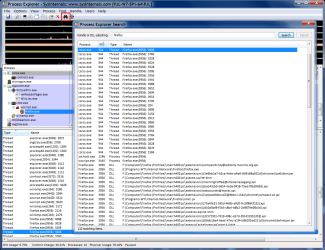
Search for handle/thread

In "Process Explorer" you can search for the file and it can show you what handles/threads are attached to it.

When I can't remove an external HDD, I search for the drive letter and invariably Windows Explorer is refusing to "detach" itself.
PrEx Search.png
 

My Computer

Computer type
PC/Desktop
Computer Manufacturer/Model Number
n/a
OS
W7 Ultimate SP1, LM19.2 MATE, W10 Home 1703, W10 Pro 1703 VM, #All 64 bit
CPU
AMD Phenom II x6 1100T, 3.3 GHz
Motherboard
ASUS M4A88T-M/USB3 (AM3)
Memory
12GB DDR3 1333 G-Skill (4GB x 2), G-Skill (2GB x 2)
Graphics Card(s)
NVIDIA GeForce GTX 660
Sound Card
Realtek?
Monitor(s) Displays
Samsung S23B350
Screen Resolution
1920x1080
Hard Drives
WD Green 2TB (SATA), WD Green 3TB (SATA), WD Blue 4TB (SATA), WD Blue 6TB (SATA)
PSU
Cooler Master
Case
Antec GX300 Tower
Cooling
3x Antec TRICOOL 120mm Fans
Mouse
Wired Optical
Internet Speed
DSL
Antivirus
Avast
Browser
Pale Moon (64 bit)
Other Info
2018-12-27 Upgraded HDDs
2015-12-10 Upgraded case, graphics card, storage
2015-08-15 Upgraded motherboard & RAM
2015-07-15 Upgraded LM17.1 to LM17.2
No torrent and virus checker is Microsoft Security Essentials. In Proccess explorer it just says EXPLORER.EXE has locked the file.
 

My Computer

Computer Manufacturer/Model Number
HomeBuild
OS
XP X64 SP2, back up of Win7 RTM
CPU
E6600@3Ghz
Motherboard
MSI P32 Neo2
Memory
4X1GB Giell DDR2 800
Graphics Card(s)
ATI 4850
Sound Card
X-Fi Xtreme Music
Monitor(s) Displays
Samsung 2032BW
Hard Drives
512gig Samsung spinpoint F1
Western Digital WD400
PSU
Cheapo STABLE 550w
Case
unknown
Cooling
Artic Freezer 7
Back
Top